

説明
robots.txt の指示を無視する無断のクローラーや悪質なボットから、ウェブサイトを守ります。Fstyle Honeypot Bot Blocker は、侵入者を自動で見つけてブロックする、軽くて強力なセキュリティの層を加えます。
インストールすると、robots.txt に隠れた罠のパスを設定します。ボットがこの立ち入り禁止の場所にアクセスしようとすると、その IP アドレスをすぐに記録し、サイト全体へのアクセスをブロックします。
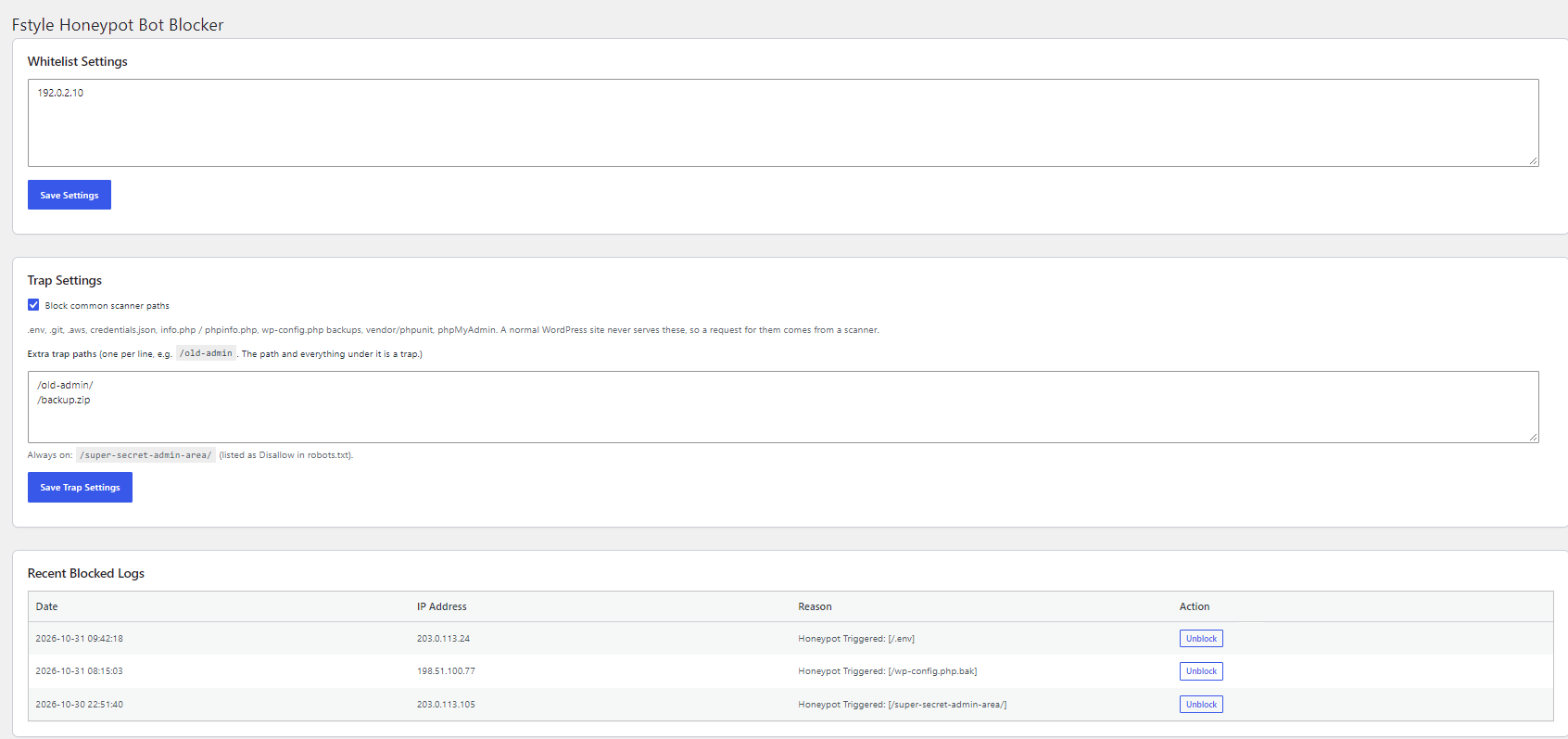
スキャナーが最初に探しに来るパス (.env、.git、credentials.json、phpinfo.php、wp-config.php のバックアップ、vendor/phpunit、phpMyAdmin) も罠として扱います。ふつうの WordPress のサイトがこれらのファイルを出すことはないので、スキャナーがほかのことを試す前に、最初のアクセスでブロックします。
It can also protect Contact Form 7 forms with a hidden field and a fill-in timer (off by default). Nothing is sent to an outside service.
主な機能
- ハニーポットですぐにブロック: robots.txt に罠のパスを自動で追加します。
- スキャナーのパスの罠: .env、.git、鍵のファイル、phpinfo、wp-config のバックアップ、phpunit、phpMyAdmin を探しに来るボットをブロックします (オフにもできます)。
- 自分で決める罠: 設定画面から、罠のパスを追加できます。
- Contact Form 7 Protection (off by default): A hidden field and a fill-in timer stop bot submissions without reCAPTCHA. Choose Off, Log only or Block.
- IP の管理画面: ブロックした IP アドレスの記録を見て、かんたんに管理できます。
- ホワイトリスト: 信頼できるサービスの IP を追加して、誤ってブロックされるのを防ぎます。
- 超軽量: パフォーマンスを重視し、データベースへの負担を最小限にしています。
スクリーンショット
インストール
fstyle-honeypot-bot-blockerフォルダを/wp-content/plugins/ディレクトリにアップロードします。- WordPress の「プラグイン」メニューから、プラグインを有効化します。
- 管理画面の「Fstyle Blocker」メニューから設定を開きます。
FAQ
-
Will it block Google or Bing?
-
No. When a request hits a trap and says it is Googlebot or Bingbot, the plugin checks it with reverse and forward DNS (IPv4 and IPv6). A verified crawler gets a 404 instead of being blocked. Logged-in administrators are never blocked either.
-
I blocked myself or someone I trust. How do I undo it?
-
Blocks expire after 7 days (change this with the
fstyle_honeypot_block_daysfilter). To unblock sooner, click “Unblock” in Recent Blocked Logs (only the latest 50 blocks are listed; older ones expire on their own), or add the address to the whitelist (one IP address or CIDR range per line). If you cannot reach the login screen, log in from another network, or rename the plugin folder in wp-content/plugins over FTP to turn the plugin off, log in, and unblock the address. -
Does it work behind Cloudflare or another reverse proxy?
-
The plugin blocks the address in REMOTE_ADDR. Proxy headers such as X-Forwarded-For are not trusted, because anyone can send them. Behind Cloudflare, a load balancer or another reverse proxy, make sure your server puts the visitor’s real address into REMOTE_ADDR (for example mod_remoteip on Apache or the real_ip module on nginx, set up for your proxy’s IP ranges), or return it from the
fstyle_honeypot_client_ipfilter. Otherwise one bot could get the proxy, and every visitor behind it, blocked. The settings screen shows a warning when the site seems to be behind a proxy. -
What is the trap path?
-
Each site gets its own random trap path (for example
/private-k3x9q2m7wa/), shown on the settings screen and added to robots.txt as Disallow. Well-behaved crawlers never visit a disallowed path, so a client that requests it is ignoring robots.txt and is blocked. Because the name differs from site to site, bots cannot learn it once and skip it everywhere. The name used before 1.5.0,/super-secret-admin-area/, is still a trap. Your own trap paths (Trap Settings) are blocked when requested, but are not listed in robots.txt. -
I have a robots.txt file on my server.
-
Then WordPress does not generate robots.txt, and the trap line is not added automatically. Add the Disallow line shown on the settings screen under
User-agent: *in your file. The settings screen reminds you when a robots.txt file exists. Requests to the trap paths are blocked either way. -
Can another site get my visitors blocked?
-
In most cases, no. If a page on another site makes a visitor’s browser load a trap path (with an image, a script or a link), the browser says so in the Sec-Fetch-Site header, and the plugin answers 404 without blocking. Bots and scanners normally do not send this header, so they are still blocked. A trap word in the query string does not count either.
-
Does it see every request?
-
It checks the requests that reach WordPress. If your server already refuses .env or .git (for example with a deny rule), or a cache in front of WordPress answers the request, the plugin does not see it.
-
Does it protect Contact Form 7 forms?
-
Yes, from version 1.4.0, but the Contact Form 7 protection is off by default. Turn it on in “Fstyle Blocker” > “Contact Form 7 Protection”. It adds a hidden field (people never see it, bots often fill it in) and records the time from opening the page to sending the form. A submission that fills in the hidden field, is sent faster than the shortest time (3 seconds by default), or is sent without JavaScript is treated as spam by Contact Form 7, and the visitor sees Contact Form 7’s spam message.
-
What is “Log only”?
-
The messages are still sent, and the plugin only counts the submissions it would have blocked. Use it for a while to compare with your current spam protection (for example reCAPTCHA) before switching to “Block”.
-
Does it send data to an outside service?
-
No. The check runs on your server. Only daily counts and the latest detections (time, form ID and reason, no personal data) are kept in your site’s options.
-
I use a page cache. Do I need to do anything?
-
Clear the page cache after turning the protection on, so that cached pages include the new fields. Forms on pages cached before that are not judged (they are counted as “Not judged”). The timer is written by JavaScript in the browser, so cached pages keep working.
評価
このプラグインにはレビューがありません。
貢献者と開発者

“Fstyle Honeypot Bot Blocker” をあなたの言語に翻訳しましょう。
開発に興味がありますか ?
変更履歴
1.5.1
- Fix: the check now runs on setup_theme instead of plugins_loaded, so a page cache that calls is_search(), is_404() or is_feed() on shutdown no longer logs PHP notices when a bot is blocked. Blocking works as before.
1.5.0
- New: each site gets its own random trap path in robots.txt, so bots cannot learn one name and skip it on every site. The old shared path is still a trap.
- New: the whitelist accepts CIDR ranges (IPv4 and IPv6) as well as single addresses. Ranges wider than /8 (IPv4) or /16 (IPv6) are ignored, so a typo cannot turn the plugin off.
- Security: a browser that another site makes load a trap (for example with an image or a link planted on another page) is no longer blocked; it gets a 404. Browsers mark such requests with the Sec-Fetch-Site header, which bots and scanners normally do not send.
- Fix: an IPv4 address shown in IPv6 form (::ffff:203.0.113.5) now matches the whitelist.
1.4.1
- Fix: Googlebot and Bingbot on IPv6 are now verified too (the forward DNS check reads AAAA records), so they are not blocked by mistake. IPv4 is checked as before.
- New: the
fstyle_honeypot_client_ipfilter, for sites behind a reverse proxy. Proxy headers are still not trusted by default. - New: the settings screen warns when the site seems to be behind a proxy, and when a robots.txt file on the server keeps the trap line from being added.
- Readme: new FAQ (Google and Bing, unblocking, proxies, robots.txt files) and a clearer short description.
1.4.0
- New: Contact Form 7 protection with a hidden field and a fill-in timer (3 seconds by default). Off by default. Modes: Off, Log only, Block.
- Blocked submissions are treated as spam by Contact Form 7 (spam log), and the guard fields are kept out of mail and stored data.
- Daily counts and the latest detections are shown on the settings screen. Nothing is sent outside your site.
1.3.0
- 新機能: スキャナーがよく探すパス (.env、.git、.aws、credentials.json、service-account.json、info.php / phpinfo.php、wp-config.php のバックアップ、vendor/phpunit、phpMyAdmin) を罠にしました。初期設定でオンになっており、「Trap Settings」でオフにできます (フィルター: fstyle_honeypot_scanner_patterns)。
- 新機能: 罠のパスを「Trap Settings」で自分で追加できます。
- サブフォルダに設置したサイトでは、サイトのパスからの相対パスで罠を判定します。
1.2.0
- セキュリティ: 罠は URL のパスだけで判定するようにしました (クエリ文字列に罠の言葉が入っていても、訪問者をブロックしません)。
- ブロックを7日で解除するようにしました (フィルター: fstyle_honeypot_block_days)。
- 逆引きと正引きの DNS で本物と確認できた Googlebot / Bingbot はブロックしません。
- ログインしている管理者は、サイトの表側でブロックされません。
1.1.1
- 見やすいように管理画面を新しくしました。
- IP アドレスを
<code>タグで囲むようにしました。 - 記録が空のときの表示を追加しました。
- プラグインディレクトリ用のスクリーンショットを改善しました。
1.1
- セキュリティを強化: SQL の prepare 文と、出力のエスケープを追加しました。
- WordPress.org の基準に合わせて、「Short Description missing」の警告を直しました。
- WordPress 6.9 への対応のため、readme の情報を更新しました。
1.0
- 最初のリリース。