

説明
LoginHush replaces the public WordPress login address with a private path without renaming core files. Its optional security layer uses transients for active rate limits and one compact indexed table for the activity log. On Apache sites using Plain permalinks, it maintains one narrowly scoped rule inside a dedicated LoginHush section of .htaccess.
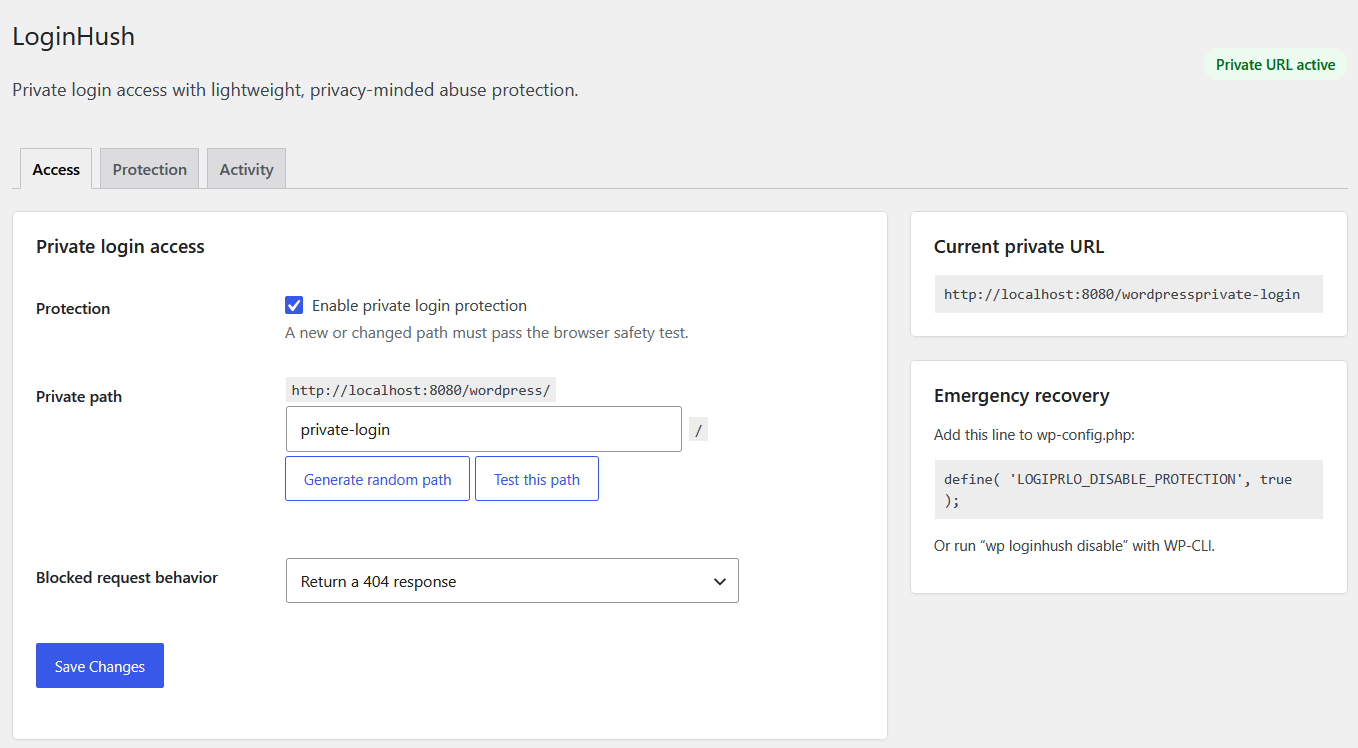
The plugin starts disabled after activation. An administrator must test the candidate path successfully in the browser before protection can be enabled. This prevents the most common accidental lockout scenario.
Features
- Custom private login path.
- Clean login paths on Apache even when WordPress Plain permalinks are selected.
- Safe query-string fallback when a clean-path rule cannot be installed.
- Blocks direct access to wp-login.php and logged-out access to wp-admin.
- Choose a real 404 response or a safe local redirect for blocked requests.
- Browser-based safety test before enabling a new path.
- Random path generator and collision checks.
- Preserves AJAX, admin-post, cron, REST, XML-RPC, WP-CLI, post-password, and WordPress recovery-mode requests.
- Rewrites WordPress-generated login, logout, registration, and password-reset URLs.
- WP-CLI status, URL, path-change, enable, and disable commands.
- wp-config.php emergency bypass.
- Page-cache detection warning.
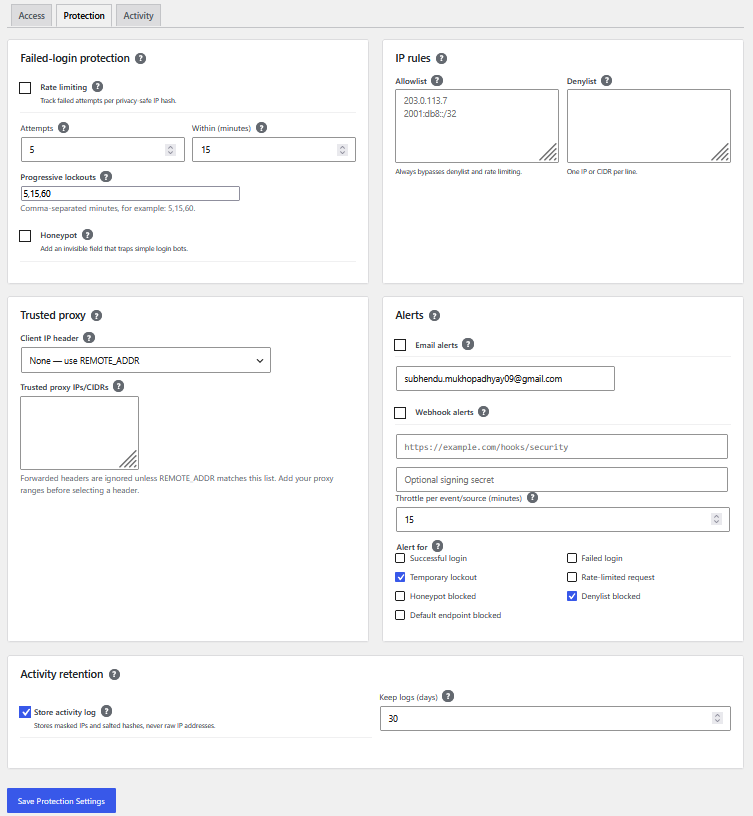
- Configurable failed-login rate limiting with progressive temporary lockouts.
- Optional login honeypot.
- Throttled email and signed generic webhook alerts.
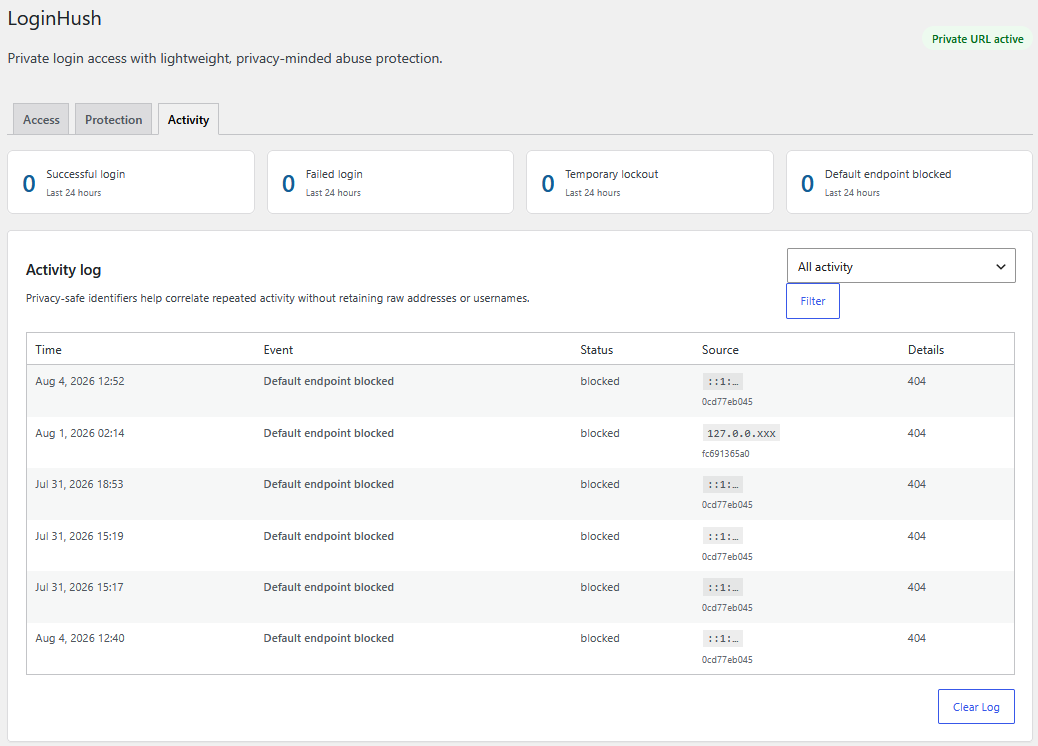
- Privacy-friendly activity log with automatic retention cleanup.
- Trusted-proxy configuration for Cloudflare and other reverse proxies.
- IPv4/IPv6 allowlist, denylist, and CIDR support.
- Clean uninstall.
Security scope
Changing the login URL and limiting failed attempts reduce common automated login traffic. They are defensive layers, not replacements for strong passwords, software updates, or two-factor authentication.
LoginHush does not block XML-RPC authentication. When activity logging is enabled, it stores masked IP addresses, site-salted hashes, event metadata, and hashed login identities for the configured retention period. Raw IP addresses and usernames are not stored in the log. Email and webhook connections occur only when explicitly enabled.
WP-CLI
wp loginhush statuswp loginhush urlwp loginhush set-slug new-private-pathwp loginhush enablewp loginhush disable
スクリーンショット
インストール
- Upload the
loginhush-private-login-url-access-guardfolder to/wp-content/plugins/or install the ZIP from Plugins > Add New. - Activate LoginHush.
- Open Settings > LoginHush.
- Choose or generate a private path.
- Select “Test this path” and wait for the success message.
- Enable protection, save, and bookmark the private URL.
- If page caching is active, exclude the private path from the page cache.
FAQ
-
I forgot the private URL. How do I recover access?
-
Use
wp loginhush urlwith WP-CLI. To disable protection, runwp loginhush disable.Without WP-CLI, add this line above the “stop editing” line in wp-config.php:
define( 'LOGIPRLO_DISABLE_PROTECTION', true );The standard wp-login.php URL will work while that constant is true. You can also deactivate the plugin by renaming its folder.
-
Does LoginHush modify WordPress files or .htaccess?
-
It never modifies WordPress core files. On Apache sites using Plain permalinks, it adds a dedicated LoginHush marker containing only the configured private-path rule. The marker is updated when the path changes and removed on deactivation or uninstall.
-
Does this stop every brute-force attack?
-
No. It reduces traffic aimed at the standard browser login URL. Use it with strong passwords, rate limiting, and two-factor authentication where appropriate.
-
Does it work with caching plugins?
-
The private login path must not be page-cached. LoginHush displays a warning when it detects common page-caching configurations, but cache exclusions remain provider-specific.
評価
このプラグインにはレビューがありません。
貢献者と開発者

変更履歴
1.5.1
- Prefixed all variables assigned in included templates and multisite uninstall scope for Plugin Check compliance.
1.5.0
- Matched the text domain and package folder to the assigned WordPress.org slug.
- Replaced all collision-prone declarations, stored-data keys, hooks, handles, and request parameters with the unique
logiprlo_prefix. - Updated the WordPress.org contributor username to
jayanta77.
1.4.0
- Prepared the plugin branding and packaging for WordPress.org submission.
1.3.4
- Added the declared translation directory for plugin-header validation.
- Removed the obsolete manual translation loader on modern WordPress.
- Safely prepared the custom-table identifier during uninstall.
1.3.3
- Moved all toggle checkboxes to the left of their labels and descriptions.
1.3.2
- Added consistent spacing between standalone setting labels and their controls.
1.3.1
- Kept every contextual-help icon inline immediately after its label text.
1.3.0
- Added lightweight contextual help tooltips throughout the Protection settings.
- Tooltips support mouse hover, keyboard focus, and touch focus without JavaScript.
1.2.2
- Moved the activity-log checkbox to the left of its label and description.
1.2.1
- Fixed the activity-retention checkbox stretching across the settings card.
1.2.0
- Added configurable failed-login rate limiting and progressive lockouts.
- Added an optional honeypot, email alerts, and signed generic webhooks with throttling.
- Added privacy-friendly activity logging with retention cleanup.
- Added trusted-proxy handling and IPv4/IPv6 allowlist and denylist rules.
- Added focused Access, Protection, and Activity settings tabs.
1.1.0
- Added clean private login paths for Apache sites using Plain permalinks.
- Added scoped .htaccess rule installation, update, deactivation, and error reporting.
- Retained the query-string route as a fallback when clean rules are unavailable.
1.0.2
- Fixed undefined login-controller variables after logout when WordPress debugging output is enabled.
- Prevented PHP warning markup from appearing inside the login username field.
1.0.1
- Fixed first-time enabling being reverted by WordPress’s second settings-sanitization pass.
- Prevented duplicate success and safety-test error notices after saving.
1.0.0
- Initial release.