
説明
Magni Image Flip adds a flip effect on your woocommerce product thumbnail images. It takes the first image from the gallery and uses it as a second image for the product.
The plugin allows you to have different types of animations for image hover effect. It will allow you to customize the plugin to as per your needs.
Just make sure add a second image to your WooCommerce Gallery and it will automatically display the image on your site.
Check plugin in action
スクリーンショット
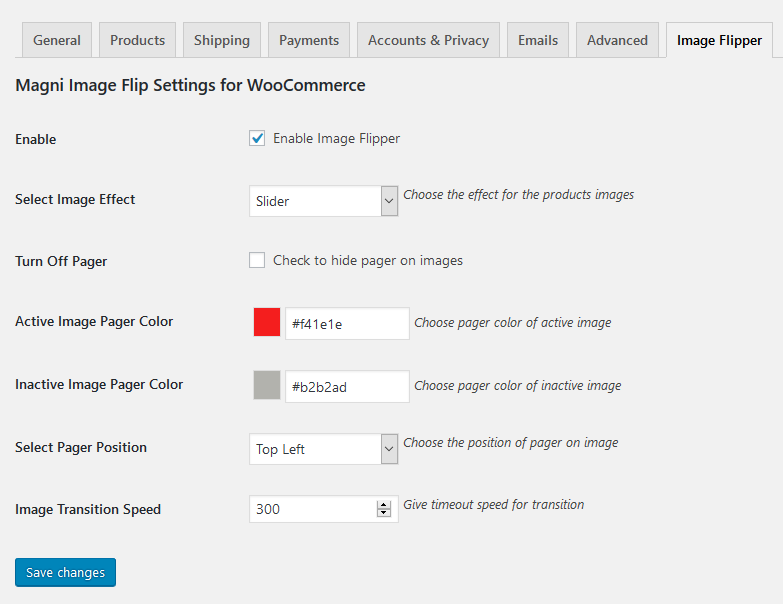
Admin settings. 
Frontend View.
インストール
- Upload “magni-image-flip.zip” file to your “/wp-content/plugins/” directory.
- Once uploaded go to your WordPress admin and navigate to plugins.
- Once you are on plugins screen then you can see Magni Image Flip For WooCommerce listed there.
- Just activate and start playing with the plugin configurations.
FAQ
-
Why should I use this plugin?
-
This plugin would help you to engage more customers by creating nice looking image flip effect.
評価

2024年1月26日
Same issue as others have reported.The image does not stop switching while the cursor is hovering over it. It goes on and on without stopping.

2022年10月11日
The image does not stop switching while the cursor is hovering over it. It goes on and on without stopping.

2022年1月13日
Great plugin. Very helpful.

2020年11月22日
Very easy and it works with Elementor archive templates too; thank you very much

2020年2月3日
I have been testing this plugin and it replaced a lot of unneeded plugins. At least for now. If it keeps doing what it's doing, I'm keeping it.
貢献者と開発者
Magni Image Flip For WooCommerce はオープンソースソフトウェアです。以下の人々がこのプラグインに貢献しています。
貢献者


“Magni Image Flip For WooCommerce” をあなたの言語に翻訳しましょう。
開発に興味がありますか ?
変更履歴
1.2
- Fixed: Deprecated issue resolved on 1.1 version.
1.1
- Added: bottom left and bottom right Pager position.
- Added: Correct .pot file added.
1.0
- Initial release.