Title: Media Library Assistant
Author: David Lingren
Published: 2012年8月13日
Last modified: 2026年3月30日
---
プラグインを検索

# Media Library Assistant
作者: [David Lingren](https://profiles.wordpress.org/dglingren/)
[ダウンロード](https://downloads.wordpress.org/plugin/media-library-assistant.3.35.zip)
* [詳細](https://ja.wordpress.org/plugins/media-library-assistant/#description)
* [レビュー](https://ja.wordpress.org/plugins/media-library-assistant/#reviews)
* [インストール](https://ja.wordpress.org/plugins/media-library-assistant/#installation)
* [開発](https://ja.wordpress.org/plugins/media-library-assistant/#developers)
[サポート](https://wordpress.org/support/plugin/media-library-assistant/)
## 説明
Media Library Assistant は、メディアライブラリの管理に関する、以下の機能強化を提供
します:
* 標準のカテゴリーやタグ、あなたのカスタムタクソノミー、そして Assistant の事前
定義された Att.、カテゴリーと Att.、タグを含む、**すべてのタクソノミーの完全な
サポート**。「メディア > Assistant」の一覧にタクソノミー列を追加したり、任意の
タクソノミーでフィルタリングしたり、タームを割り当てたり、タームごとの添付ファイル
一覧を表示したりできます。
* **「メディア > Assistant」管理画面** では、親情報、ファイル URL、画像のメタデータ
など、添付ファイルに関する詳細情報が表示されます。選択可能な一覧表示用列が、多数(
20以上) 提供されています。カスタムフィールドの値を表示するための列も、追加でき
ます。
* MIME タイプやタクソノミー用の **追加ビューフィルター** を提供し、独自のカスタムビュー
を作成する機能を備えています。
* インラインの **「一括編集」** および **「クイック編集」** エリア; 一度に複数の
添付ファイルについて、投稿者、親投稿、カスタムフィールドを更新したり、タクソノミー・
タームを追加、削除、置換できます。「メディア > 新規追加」画面でも動作します。
* 有名な [Admin Columns](https://wordpress.org/plugins/codepress-admin-columns/)
プラグインと連携し、「メディア > Assistant」画面のカスタマイズをさらに充実させ
ます。
* **IPTC**、**(GPS を含む) EXIF**、**XMP** および **PDF** メタデータは、WordPress
の標準フィールド、タクソノミーターム、およびカスタムフィールドに割り当てできます。「
設定」ページの「IPTC/EXIF」タブから既存の添付ファイルをすべて更新したり、「一括
操作」で既存の添付ファイル群を更新したり、「メディアの編集」または「個別アイテム
の編集」画面から既存の添付ファイルを更新したりできます。あなたのテーマやプラグ
インのコードからマッピングを完全にカスタマイズできるよう、**12のフック** が用意
されています。詳細については、以下の PDF ドキュメントをご覧いただくか、ダウンロード
してください: [Media Library Assistant を使用した、WordPress フィールドへのファイルメタデータのマッピング](http://davidlingren.com/assets/MLA-Metadata-Mapping.pdf)
* ファイルサイズ、画像の寸法、使用箇所情報などの **添付ファイルのメタデータ** を、
WordPress のカスタムフィールドに割り当てできます。その後、あなたの `[mla_gallery]`
ディスプレイでカスタムフィールドを使用したり、「メディア > Assistant」サブメニュー
表に、並べ替えや検索が可能な列としてカスタムフィールドを追加したりできます。また、
必要に応じて、 **WordPress `_wp_attachment_metadata` コンテンツを修正** できます。
* **投稿の MIME タイプ、ファイルアップロードの拡張子/MIME タイプ、およびファイル
タイプのアイコン画像** を完全に制御できます。54種類の追加アップロードタイプ、
112種類のファイルタイプのアイコン画像、そして1,500以上のファイル拡張子/MIME タイプ
対応関係を検索可能なリスト。
* WordPress がメディアライブラリのアイテムに対して、中間サイズの画像を生成したり
アクセスしたりする際に使用する、**中間画像サイズ** を完全に制御できます。
* 投稿、ページ、またはカスタム投稿タイプで使用される **`[mla_gallery]` ショート
コード** は、画像や(PDF ドキュメントなど) その他のメディアライブラリ・アイテム
の、ギャラリーを追加するために使用されます。MLA Gallery は、WordPress `[gallery]`
ショートコードのスーパーセットです; `[gallery]` と互換性があり、多くの機能強化
を提供します。以下が含まれます: 1) WordPress のカテゴリー、タグ、カスタムタクソ
ノミー、カスタムフィールドに対する、完全なクエリーおよび表示のサポート、2) 画像
だけでなく、すべての post_mime_type 値のサポート、3) メディアライブラリのアイテム
を投稿に「添付」する必要がないこと、および、4) スタイルおよびマークアップテンプレート
を使用した、各ギャラリーのスタイル、マークアップ、コンテンツに対する制御。あなた
のテーマやプラグインのコードから、ギャラリーを完全にカスタマイズできるよう、**
28個のフック** が提供されています。
* **`[mla_tag_cloud]` ショートコード** は、あなたのメディアライブラリ内で「最も
よく使われている」タームの「クラウド」を表示し、各タームは、その特定のタームが
メディアライブラリのアイテムに割り当てられた回数に応じて、その大きさが決まります。
あなたのテーマやプラグインのコードからクラウドを完全にカスタマイズできるよう、**
25個のフック** が提供されています。
* **`[mla_term_list]` ショートコード** は、階層型 (およびフラット型) のタクソノ
ミータームを、リスト、ドロップダウン、またはチェックリスト形式で表示します。あなた
のテーマやプラグインのコードからリストを完全にカスタマイズできるよう、**20個の
フック** が提供されています。
* **`[mla_custom_list]` ショートコード** は、カスタムフィールド値をフラットリスト/
クラウドリスト、ドロップダウンコントロール、およびチェックボックスリストとして
表示します。あなたのテーマやプラグインのコードからリストを完全にカスタマイズできる
よう、**27個のフック** が提供されています。
* **`[mla_archive_list]` ショートコード** は、フラットリスト/クラウドリストおよび
日付ベース値のドロップダウンコントロールを表示します。あなたのテーマやプラグイン
のコードからリストを完全にカスタマイズできるよう、**20個のフック** が提供され
ています。
* 強力な **コンテンツのテンプレート** を使用すると、複数のデータソースから値を組み立て
たり、リテラルテキストとデータ値を組み合わせたり、値が空かどうかを判定したり、
2つ以上の選択肢から選択したり、出力を完全に抑制したりできます。
* **[WPML](https://wpml.org/)** および **Polylang** といった多言語 CMS プラグイン
のサポート。MLA は、[WPML の推奨プラグインリスト](https://wpml.org/plugin/media-library-assistant/)
に掲載されています。
* **Photonic Gallery、Justified Image Grid、Jetpack 及びその他のプラグイン** と
連携するため、あなたの `[mla_gallery]` ギャラリーにスライドショー、サムネイル
ストリップ、特殊効果を追加できます。
* **[WordPress Real Media Library: Media Library Folder & File Manager](https://wordpress.org/plugins/real-media-library-lite/)**(
Lite 版および Pro 版) と連携し、あなたのファイルをフォルダー、コレクション、ギャラリー
に整理します。この組み合わせにより、管理画面「メディア > Assistant」サブメニュー
と `[mla_gallery]` ショートコードの両方が強化されます。
* **[CatFolders – WP Media Folders](https://wordpress.org/plugins/catfolders/)**(
Lite 版および Pro 版) と連携し、より効率的かつ迅速にメディアファイルのカテゴリー
分けを行えます。この組み合わせにより、管理画面「メディア > Assistant」サブメニュー
と `[mla_gallery]` ショートコードの両方が強化されます。
* **強化された検索メディアボックス**。検索対象を名前/スラグ、Alt テキスト、キャプション
フィールドに拡張できます。検索語の接続詞は、「and」または「or」に設定できます。
添付ファイル ID や親 ID による検索に対応しており、メディアライブラリのアイテム
に割り当てられた、タクソノミーターム内のキーワードで検索することも可能です。「
メディアマネージャー」モーダルウィンドウでも動作します。
* 「メディアマネージャー」モーダルウィンドウおよび「メディア > ライブラリ」のグリッド
画面の、「添付ファイルの詳細」パネルでのタクソノミーおよびカスタムフィールドの
サポート。
Assistant は、標準のメディアライブラリページと同じように動作するように設計されて
いるため、学習曲線は短く、スムーズです。新しい画面が表示されるたびに、新機能を紹介
するコンテキストヘルプが提供されます。
**注記:** 完全なドキュメントは、「設定 > Media Library Assistant」管理画面、および
管理画面内のドロップダウン「ヘルプ」コンテンツに収録されています。ドキュメントの
スタンドアロン版は、私の Web サイトから入手できます: [Media Library Assistant ドキュメント](http://davidlingren.com/assets/mla-doc.html)
**このプラグインへの支援として、個人からの寄付を募ったり受け入れたりしません。**
WordPress とその世界中のコミュニティは、私にとって非常に大切な存在であり、何かお返し
ができることを嬉しく思っています。
Media Library Assistant プラグインが役に立ったと感じ、素晴らしい活動への支援をご
希望の方は、ALS ネットワークの [Chateau Seaview Fund](http://secure.alsnetwork.org/goto/Chateau_Seaview_Fund)
への [税控除対象の寄付](http://secure.alsnetwork.org/goto/Chateau_Seaview_Fund)
をご検討ください。この基金の寄付金は、その全額が ALS 患者の方々、そのご家族、そして
介護者の生活をより楽にするために使われます。ありがとうございます !
### 謝辞
Media Library Assistant には、[Yellowicon](http://www.yellowicon.com) の創設者、
[Everaldo Coelho](http://www.everaldo.com) 様が作成した [Crystal Project Icons](http://www.softicons.com/free-icons/system-icons/crystal-project-icons-by-everaldo-coelho)
から、(許可を得て) 引用した多くの画像が含まれています。
多言語サポート機能のテストとアドバイスをしてくださった Aurovrata Venet、Il’ya Karastel、
Kristian Adolfsson の皆さん、**本当にありがとうございます** !
#### 見本プラグイン
MLA 見本プラグインは、MLA が提供するフックを活用して、MLA ショートコードによって
生成される管理画面やフロントエンドのコンテンツを拡張する、実践的な応用例を示すため
に開発されました。見本のほとんどは、MLA サポートフォーラムのトピックから引用した
ものです。
「ドキュメント > 見本プラグイン」サブメニューでは、MLA 見本プラグインの一覧を表示
したり、「プラグイン > インストール済みプラグイン」エリアでそれらをインストールまたは
更新したり、インストール済みの見本を確認したりできます。プラグインを有効化、無効
化、または削除するには、「プラグイン > インストール済みプラグイン」管理サブメニュー
に移動する必要があります。
「見本」プラグインサブメニューには、すべての MLA 見本プラグインがリスト表示され、
すでに「インストール済みプラグイン」エリアにあるものが識別されます。サブメニュー
には :
* 「画面オプション」のドロップダウンメニューでは、表示する列や1ページあたりの表示
件数を選択できます。
* 「ヘルプ」ドロップダウンエリアでは、サブメニューのコンテンツや機能について、簡単
に説明しています。
* 「プラグインを検索」テキストボックスでは、1つ以上のキーワードやフレーズを含む
アイテムのみを表示するように、フィルタリングできます。
* 見本プラグインをインストールしたり更新するために、一括処理およびロールオーバー
処理が提供されています。
* 表は、表示されている任意の列で、ソートできます。
見本プラグインをインストールしたら、WordPress プラグイン > エディター サブメニュー
を使用すると、ソースコードを表示したり、(細心の注意を払った上で) コードに軽微な変更
を施したりできます。**コードを修正する場合は、十分に注意してください !** 有効化中
のプラグインに変更を加えることは、おすすめできません。あなたの変更によって致命的
なエラーが発生した場合、プラグインは自動的に無効化されます。ファイルをダウンロード
するか、FTP 経由であなたのサイトにアクセスし、より堅牢な HTML/PHP エディター上で
コードをオフラインで編集する方が、はるかに安全です。
「ダウンロード」のロールオーバーアクションを使用すると、プラグインをあなたのローカル
システムにダウンロードできます。変更が完了したら、プラグインを圧縮ファイル (ZIP
アーカイブ) にコピーし、その後、管理画面のプラグイン > 新規追加 (プラグインのアップ
ロード) サブメニューから、あなたのサーバーにアップロードできます。
見本プラグインのコードに変更を加える場合は、将来のアップデートで変更内容が失われ
ないよう、変更したファイルを別名で保存することをおすすめします。ファイル名を維持
したい場合は、MLA 値に100を加えるなど、バージョン番号を変更することを検討してくだ
さい。そうすれば、自分が修正したプラグインをより簡単に識別できるようになります。
## スクリーンショット
* [[
* 「メディア > Assistant」サブメニュー表に、強化された検索ボックス、タクソノミー
フィルター、カスタムビューが表示されています; クイック編集エリアも表示されてい
ます。
* [[
* 「メディア > Assistant」サブメニューの表には、タクソノミー追加、削除、置換のオプション
を含む、一括編集エリアが表示されています; メタデータのマッピングボタンも表示さ
れています。
* [[
* 「メディア > Assistant」サブメニューの表に、プルダウン「ヘルプ」メニューとタブ
が表示されています。
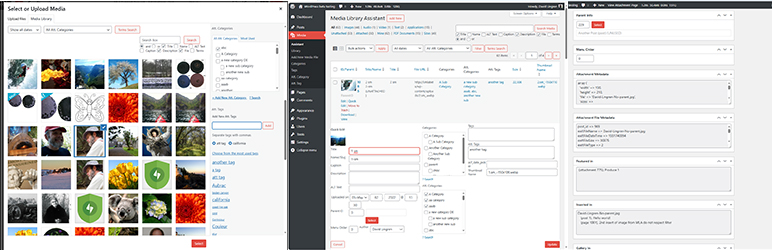
* [[
* 日付やタクソノミーターム用の追加フィルターを表示する「メディアマネージャー」の
ポップアップモーダルウィンドウです。また、強化された「メディア検索」ボックスと、「
添付ファイルの詳細」エリア内に、フル機能のタクソノミーサポートが表示されています。
* [[
* 「検索ターム」ポップアップモーダルウィンドウでは、タクソノミーターム名内のキーワード
やフレーズを検索することで、表示されるアイテムをフィルタリングできます。
* [[
* 「メディア > 新規メディアのアップロード」サブメニューページでは、アイテムのアップ
ロード時にテンプレートやマッピングルールを適用するための一括編集エリアが表示さ
れます。
* [[
* 追加のフィールド、マッピングルールボタン、およびタクソノミーボックスが表示され
た、強化された編集ページ。
* [[
* 親の選択、メタデータ表示ボックス、および使用箇所レポートボックスが表示された、
強化された編集ページ。
* [[
* 親投稿/ページを簡単に編集できる「親を選択」ポップアップウィンドウが表示された、
強化された編集ページ。
* [[
* 「設定」ページの「一般」タブでは、使用箇所レポートやその他のさまざまなオプション
をカスタマイズできます。
* [[
* 「設定」ページの「一般」タブでは、タクソノミーサポートのオプションと、「メディア
> Assistant」の表示オプションの一部が表示されています。
* [[
* 「設定」ページの「一般」タブでは、「メディアマネージャー」と「メディア > ライブラリ」
の「グリッドモード」の機能強化オプションが表示されています。
* [[
* 「設定」ページの「画像」タブでは、「メディアライブラリ」の画像アイテムの中間サイズ
を追加したり管理できます。
* [[
* 「設定」ページの「ビュー」タブでは、MIME タイプを追加したり管理したり、「メディア
> Assistant」のテーブルビューを定義できます。
* [[
* 「設定」ページの「アップロード」タブでは、許可するファイル形式やそれに対応する
アイコンを追加したり管理できます。
* [[
* 「設定」ページの「ショートコード」タブでは、MLA ショートコード用のカスタムスタイル
やマークアップテンプレートを追加したり管理できます。
* [[
* 「設定」ページの「カスタムフィールド」タブでは、添付ファイルのメタデータをカスタム
フィールドにマッピングでき、[mla_gallery] ショートコードでの表示や、「メディア
> Assistant」サブメニューでの並べ替え・検索可能な列として活用できます。
* [[
* 「設定」ページの「IPTC/EXIF/WP 処理オプション」画面では、画像のメタデータを標準
フィールド (たとえば、キャプション)、タクソノミーターム、およびカスタムフィールド
に割り当てできます。
* [[
* 「設定」ページの「ドキュメント」タブには、MLA ショートコードや機能に関する、完全
なリファレンスが収録されています。
* [[
* 「設定」ページの「ドキュメント > 見本プラグイン」タブには、MLA の機能を拡張する
ために使用したり、カスタマイズできる多数の任意プラグインが表示されています。
* [[
* 「設定」ページの「デバッグ」タブでは、デバッグログのカテゴリーを有効にしたり、
エラーログを管理したり表示できます。
## インストール
1. `media-library-assistant` とそのサブフォルダーをあなたの `/wp-content/plugins/`
ディレクトリにアップロードする、**または** プラグイン > 新規追加ページにアクセス
して、「Media Library Assistant」を検索してください; 「今すぐインストール」をクリック
して、アップロードしてください
2. WordPress の「プラグイン」メニューから、プラグインを有効化します。
3. 設定 > Media Library Assistant ページにアクセスして、(たとえば、カテゴリーやタグ
など) タクソノミーサポートをカスタマイズします。
4. 設定 > Media Library Assistant の「カスタムフィールド」および「IPTC/EXIF」タブ
に移動し、メタデータを添付ファイルのフィールドにマッピングします。
5. 管理画面「メディア」セクションの「Assistant」サブメニューにアクセスします。
6. 「画面オプション」リンクをクリックして、表示設定をカスタマイズします。
7. 強化された「編集」、「クイック編集」、「一括編集」ページを使用して、カテゴリー
とタグを割り当てます。
8. `[mla_gallery]` ショートコードを使用すると、あなたの投稿やページに、画像やドキュメント
などのギャラリーを追加できます。
9. `[mla_tag_cloud]`、`[mla_term_list]`、`[mla_custom_list]`、`[mla_archive_list]`
ショートコードを使用すると、あなたの投稿やページに、タクソノミーターム、カスタム
フィールド値、日付ベースの値の、クリック可能なリストを追加できます。
## FAQ
### 「メディア > Assistant」サブメニューにある表を、ファイルサイズなどの値で並べ替えるには、どうすればよいですか ?
「設定」ページの「カスタムフィールド」タブにアクセスすると、ファイルサイズなど、
多くの添付ファイルメタデータ値のサポートを追加できます。そこで、データを WordPress
のカスタムフィールドにマッピングするルールを定義し、「MLA カラム」のチェックボックス
をオンにすると、「メディア > Assistant」サブメニューのテーブル内で、そのフィールド
を並べ替え可能な列にできます。また、あなたの `[mla_gallery]` ショートコード内でこの
フィールドを使用できます。たとえば、このショートコードは、「general」カテゴリー内
のサイズが最も大きい10枚の画像を、カスタムキャプション付きで、ギャラリーとして表示
します:
```
[mla_gallery category="general" mla_caption="{+caption+}
{+custom:File Size+}" meta_key="File Size" orderby="meta_value" order="DESC" numberposts=10]
```
### 投稿やページに表示する画像を、カテゴリー、タグ、およびカスタムタクソノミーを使って選択するには、どうすればよいですか ?
強力な `[mla_gallery]` ショートコードは、WP_Query クラスが提供するクエリー機能の
ほぼすべてをサポートしています。詳細なドキュメントは、「設定 > Media Library Assistant」
の「ドキュメント」タブでご覧ください。簡単な例は、前の質問に記載されています。以下
は、Att カテゴリー「fauna」、または Att タグ「animal」である PDF 文書を表示する例
です:
```
[mla_gallery post_mime_type="application/pdf" size=icon mla_caption="{+title+}" tax_query="array(array('taxonomy'=>'attachment_category','field'=>'slug','terms'=>'fauna'),array('taxonomy'=>'attachment_tag','field'=>'slug','terms'=>'animal'),'relation'=>'OR')"]
```
### Can I use [mla_gallery] for attachments other than images?
はい ! あなたのクエリーに post_mime_type パラメーターを追加すれば、`[mla_gallery]`
ショートコードはすべての MIME タイプをサポートします。あなたの PDF 文書、プレーン
テキストファイル、その他の添付ファイルから、ギャラリーを作成できます。同じギャラリー
内で、画像とその他の MIME タイプを混在させることもできます。以下は、Imagick と Ghostscript
を使用して、各 PDF 文書の最初のページをサムネイルとして表示する、PDF 文書のギャラリー
を表示する例です:
```
[mla_gallery post_mime_type=application/pdf post_parent=all link=file mla_viewer=true columns=1 orderby=date order=desc]
```
`[mla_gallery]` を使用すると、投稿やページなど、他の投稿タイプ向けの「ギャラリー」
表示も作成できます。
### Can the Assistant use the standard WordPress post Categories and Tags?
はい ! Media Library Assistant 設定ページにアクセスすれば、いつでも「カテゴリー」
と「タグ」の機能を有効化または無効化できます。
### Do I have to use the WordPress post Categories and Tags?
いいえ ! Assistant は、あらかじめ定義された Att、カテゴリーと Att、タグを提供します;
これらは WordPress のカスタムタクソノミーであり、それに伴うすべての API サポート
が備わっています。Media Library Assistant 設定ページにアクセスすれば、いつでも事前
定義されたタクソノミーを、有効化または無効化できます。
### Assistant に、独自のタクソノミーを追加できますか ?
はい。「添付ファイル」投稿タイプに登録したカスタムタクソノミーは、すべて Assistant
UI に表示されます。Media Library Assistant 設定ページを使用して、Assistant UI に
各タクソノミーのサポートを追加してください。
### Can I use Jetpack Tiled Gallery or a lightbox plugin to display my gallery?
他のギャラリー生成用ショートコードを使用すると、[mla_gallery] のようなデータ選択
機能に加え、WordPress.com の Jetpack モジュールにある「カルーセル」や「タイル型ギャラリー」
など、人気の代替機能の書式設定や表示機能も活用できます。ギャラリー用の添付ファイル
ID を列挙する「ids=」や類似のパラメーターを受け付ける、任意のショートコードを使用
できます。以下は、野菜以外のすべてのアイテムを表示する、Jetpack Tiled ギャラリー
の例です:
```
[mla_gallery attachment_category=vegetable tax_operator="NOT IN" mla_alt_shortcode=gallery type="rectangular"]
```
ほとんどのライトボックスプラグインは、HTMLの `class=` や `rel=` タグを使用して機能
を有効にします。`[mla_gallery]` を使用すると、あなたのギャラリーの出力にこれらの
タグ情報を追加できます。以下は、Easy Fancybox を使用して、PDF ドキュメントをシャドウボックス
で開く例です:
```
[mla_gallery post_mime_type=application/pdf post_parent=all link=file size=icon mla_caption='{+title+}' mla_link_attributes='class="fancybox-pdf fancybox-iframe"']
```
この例では、`mla_caption=` パラメーターによって、ドキュメントのタイトルがシャドウボックス
表示へのリンクに変化するため、サムネイル画像またはキャプションをクリックして、表示
を起動できます。
### タクソノミー編集画面の「投稿」数が、クリックした際の検索結果と一致しないのは、なぜですか ?
これは WordPress の既知の問題であり、Trac にはすでに複数のサポートチケットが登録
されています。例えば、
チケット #20708 (クローズ済み不具合 (バグ)): 重複) タクソ
ノミーテーブルの投稿数が間違っている、 チケット #14084 (割り当て済み不具合 (バグ)):
カスタムタクソノミーの件数には、下書きおよびゴミ箱に移動された投稿が含まれています、
そして チケット #14076(クローズ済み不具合 (バグ): 重複) タクソノミー画面での投稿
件数が、誤解を招く表示になっています。
たとえば、Assistant にタグサポートを追加した後、添付ファイルにタグ値を割り当てる
と、「投稿」管理セクションの「タグ」編集画面にある「投稿」列のカウントに、添付ファイル
が含まれます。当該列の数字をクリックすると、投稿とページのみが表示されます。カスタム
投稿タイプやタクソノミーについても、(Assistant を使用しているかどうかに関わらず)
同様の課題が確認されています。Assistant によって追加された、編集画面の「添付ファイル」
列は、動作方式が異なるため、正しい件数が表示されます。
### 1つの投稿やページに、複数の画像を添付できますか ?
いいえ; これは WordPress データベースの構造上の制限です。ただし、カテゴリー、タグ、
およびカスタムタクソノミーを使用すれば、好みの方法であなたの画像を整理し、投稿や
ページに関連付けできます。`[mla_gallery]` ショートコードを使えば、簡単に実現でき
ます。また、`ids=` パラメーターを使用すれば、特定の画像のリストから、ギャラリーを
作成できます。
### アイテムを「リンク解除」するには、どうすればよいですか ?
変更したいアイテムにカーソルを合わせ、「編集」または「クイック編集」をクリックし
ます。「親情報」フィールドの ID 欄をゼロ (0) に設定し、「更新」をクリックして変更
を保存します。変更をキャンセルする場合は、「キャンセル」をクリックすると、変更を
保存せずにメインページに戻ります。また、「選択」ボタンをクリックして投稿/ページの
リストを表示し、その中からアイテムの新しい親として選択できます。「メディア > Assistant」
サブメニューのテーブルにある「親を設定」リンクからも、親の変更やアイテムのリンク
解除ができます。
### 「メディア > Assistant」サブメニューの反応が遅いようです; これを速くする方法はありますか ?
MLA の機能の中には、使用箇所レポートや Alt テキストのソート/検索など、データベース
処理を多く必要とするものがあります。これが課題と認識される場合は、設定ページに移動
し、**「使用箇所データベースへのアクセス調整」** 設定を調整してください。どの「使用
箇所」カテゴリーについても、処理を有効または無効にできます。「Gallery in」および「
MLA Gallery in」については、ページがロードされるたびに結果を更新するか、更新の間隔
を15分間空けて結果をキャッシュするかを選択できます。投稿、ページ、または添付ファイル
が追加または更新された場合、キャッシュは自動的にクリアされます。
### カスタムテンプレートやオプション設定は、バージョンアップ後も引き継がれますか ?
心配無用です。新しい MLA バージョンにアップデートしても、カスタムテンプレートやあなた
のオプション設定は、すべてそのまま維持されます。
また、「設定 > Media Library Assistant」の「一般」タブから、テンプレートや設定の
バックアップも作成できます。ページの一番下までスクロールし、「すべての設定をエクスポート」
をクリックして、バックアップファイルを作成してください。ファイルはいくつでも作成
できます; 各ファイルには日付と時刻が記録されているため、後で必要なファイルを復元
できます。
さらに、設定を保持したままプラグインを無効化したり、削除したりできます。将来、再
インストールして有効化した際にも、設定はそのまま残っています。
MLA を完全に削除する場合は、設定と (必要に応じて) バックアップファイルを完全に削除
できます。「一般」タブの「プラグイン設定のアンインストール (削除)」セクションで、
これらのオプションを有効にできます。
### 他の言語版はありますか ?
数は多くありませんが、プラグインのソースコード内における国際化作業はすべて完了し
ており、「/languages」ディレクトリに Portable Object Template (.POT) が用意されてい
ます。私自身は英語以外の言語については実務的な知識がありませんが、翻訳作業に協力
いただける方がいましたら、ぜひご一緒に取り組ませていただければ幸いです。「languages」
ディレクトリ内の「MLA Internationalization Guide.pdf」ファイルをぜひご覧いただき、
お問い合わせください。
### 「phpDocs」ディレクトリには何が入っているのですか ? また、これは必要ですか ?
MLA のソースコードにはすべて、「DocBlocks」という、phpDocumentor が API ドキュメント
を生成するために使用する、特殊なコメントが記述されています。コードについてより深
く理解したい場合は、[MLA phpDocs web ページ](http://davidlingren.com/assets/phpDocs/index.html)
にアクセスしてご覧ください。なお、これらのページの機能の多くは、JavaScript を必要
とすることにご注意ください。
### 本プラグインで見つかったセキュリティバグは、どこに報告すればよいですか ?
Media Library Assistant プラグインのソースコードで、セキュリティ上のバグを発見した
場合は、[Patchstack 脆弱性開示プログラム](https://patchstack.com/database/vdp/1b29f6ff-db26-4d2c-a439-1f8afc17eb2e)
を通じて報告してください。Patchstack チームが、検証や CVE の割り当てを支援し、本
プラグインの開発者に通知します。
## 評価

### [Lifesaver for big sites](https://wordpress.org/support/topic/lifesaver-for-big-sites-2/)
[pawblank](https://profiles.wordpress.org/pawblank/) 2026年2月8日
Media manager is a lifesaver for big sites. Sorting and folder-like organization
makes content work much faster

### [Security Risk: Server Blacklisting](https://wordpress.org/support/topic/security-risk-server-blacklisting/)
[alltdl](https://profiles.wordpress.org/alltdl/) 2025年12月25日 2 replies
Following a WordPress core update to 6.9, WordFence flagged this plugin for a known
security vulnerability. Within just a few hours, and before I could disable or update
it, my VPS IP was blacklisted by Spamhaus (CSS) due to outbound spam activity. This
led to my provider automatically suspending my account. This is an actively exploitable
vulnerability with immediate, real-world consequences, rather than just a theoretical
concern. Since the site showed no obvious signs of being compromised, the plugin
is especially dangerous. I recommend avoiding this plugin unless you are prepared
to monitor it constantly and can disable it the moment a security warning appears.
Right now, the risk clearly outweighs the benefit.

### [Good one!](https://wordpress.org/support/topic/good-one-624/)
[Techtivus](https://profiles.wordpress.org/bristoltours/) 2025年9月9日
Just what we needed for our sites!

### [The most useful tool](https://wordpress.org/support/topic/the-most-useful-tool-2/)
[pkolka](https://profiles.wordpress.org/pkolka/) 2025年8月10日
The media manager is easily one of the most useful tools for my daily workflow.
Folders, sorting, and previews all work flawlessly it’s like having a real file
system inside WordPress.

### [Very nice media manager!](https://wordpress.org/support/topic/very-nice-media-manager/)
[theclov](https://profiles.wordpress.org/theclov/) 2025年5月22日
The media manager plugin is a huge help when organizing files in large projects.
Being able to assign folders and quickly sort through uploads saves me hours each
week. A must-have for anyone managing a content-heavy site!

### [Great media manager](https://wordpress.org/support/topic/great-media-manager-2/)
[Diego](https://profiles.wordpress.org/buenodimi/) 2025年5月15日
I’ve used a few plugins before but this media manager stands out – seamless bulk
uploads, folder structure, and metadata editing. Totally streamlined my workflow.
[ 198件のレビューをすべて表示 ](https://wordpress.org/support/plugin/media-library-assistant/reviews/)
## 貢献者と開発者
Media Library Assistant はオープンソースソフトウェアです。以下の人々がこのプラグ
インに貢献しています。
貢献者
* [ David Lingren ](https://profiles.wordpress.org/dglingren/)
“Media Library Assistant” は3ロケールに翻訳されています。 [翻訳者](https://translate.wordpress.org/projects/wp-plugins/media-library-assistant/contributors)
のみなさん、翻訳へのご協力ありがとうございます。
[“Media Library Assistant” をあなたの言語に翻訳しましょう。](https://translate.wordpress.org/projects/wp-plugins/media-library-assistant)
### 開発に興味がありますか ?
[コードを閲覧](https://plugins.trac.wordpress.org/browser/media-library-assistant/)
するか、[SVN リポジトリ](https://plugins.svn.wordpress.org/media-library-assistant/)
をチェックするか、[開発ログ](https://plugins.trac.wordpress.org/log/media-library-assistant/)
を [RSS](https://plugins.trac.wordpress.org/log/media-library-assistant/?limit=100&mode=stop_on_copy&format=rss)
で購読してみてください。
## 変更履歴
#### 3.35
* New: Several enhancements to the Media/Assistant “Thumbnail” (generation) Bulk
action. More information in the “Thumbnail Generation” tab of the pulldown Help
menu and the new Settings/Media Library Assistant “Thumbnail Generation Support”
Documentation section.
* Fix: IMPORTANT: For all five MLA shortcodes, a Stored Cross-Site Scripting (XSS)
security risk has been mitigated.
* Fix: IMPORTANT: For the `[mla_custom_list]` shortcode, an SQL Injection security
risk has been mitigated.
* Fix: IMPORTANT: For WP 7.0, several updates to the MLA enhancements for the Media
Manager Modal (popup) Window and Media/Library Grid view have been made.
* Fix: A defect handling REGEX named subpatterns in mapping rule templates has
been corrected.
* Fix: For MP3 files, XMP metadata is now extracted from XML and PRIV frames, bypassing
embedded image files.
* Fix: For shortcodes that generate pagination links, a defect in handling URL
fragments has been corrected.
#### 3.34
* New: For the Media/Assistant submenu page, **custom table views** can be composed
with all of the data selection parameters of the `[mla_gallery]` shortcode. More
information in the “Library Views/Post MIME Type Processing” section of the Settings/
Media Library Assistant Documentation tab.
* Fix: IMPORTANT: For the Media Manager Modal (popup) Window, a Missing Authorization
security risk has been mitigated.
* Fix: A defect in parsing metadata arrays for mapping rules has been corrected.
* Fix: A defect in handling PDF metadata parsing of documents with corrupted cross-
reference streams has been corrected.
* Fix: A PHP Warning message in the “execute” rollover action on the Settings/Media
Library Assistant IPTC/EXIF/WP tab has been eliminated.
#### 3.33
* Fix: IMPORTANT: For the `[mla_tag_cloud]` and `[mla_term_list]` shortcodes, an
SQL injection security risk has been mitigated.
* Fix: A WPML support defect causing a critical site error when duplicating an
attachment in a new language has been corrected.
* Fix: For all of the shortcodes, a defect in handling relative paths in pagination
output formats has been corrected.
* Fix: The priority of the hooks MLA adds to the “init” action has been adjusted
to avoid a taxonomy registration conflict with the “Breadcrumb NavXT” plugin.
#### 3.32
* Fix: A defect with taxonomy labels in the MMMW ATTACHMENT DETAILS pane causing
a PHP “Undefined variable $label” message has been corrected.
#### 3.31
* New: The **`[mla_archive_list]` shortcode** lets you create lists and dropdown
controls with date-based elements and use them to filter the gallery displayed
by the `[mla_gallery]` shortcode.
* New: The `mla_get_custom_values()` function used by the `[mla_custom_list]` shortcode
is now available for public use in the `MLAShortcodes` class (includes/class-
mla-shortcodes.php).
* New: On the Settings/Media Library Assistant Image tab you can control the “BIG
image” threshold option. You can use the WordPress default value, set a custom
value or disable scaling entirely.
* New: For the Media/Assistant submenu table, new “Download Original” bulk and
rollover actions let you download the original, unaltered files for scaled and
rotated items.
* Fix: For all shortcodes, pagination links now include all values from the $_REQUEST
array, making pagination more reliable.
* Fix: A PHP deprecation message on the Media/Assistant admin page has been eliminated.
* Fix: The `utf8_encode()` function call, deprecated in PHP 8.2, has been replaced.
* Fix: An occasional issue with taxonomy labels in the MMMW ATTACHMENT DETAILS
pane has been resolved.
* Fix: For the “MLA UI Elements Example” plugin (v2.07), the `[muie_archive_list]`
shortcode has been deprecated.
* Fix: An internationalization problem with taxonomy labels has been resolved.
#### 3.30
* New: For PDF documents, metadata embedded in compressed object streams is now
extracted, processed and made available as “pdf:” data sources.
* Fix: IMPORTANT: For the `[mla_gallery]` shortcode, the “mla_viewer” feature has
been redesigned to mitigate an Unauthenticated Local File Read security issue.
The feature now uses WordPress AJAX processing when PDF thumbnail images are
not available, which is less efficient but secure.
* Fix: IMPORTANT: For the `[mla_gallery]` shortcode, the “Transfer by Item Name”
feature has been redesigned to mitigate an Insecure Direct Object Reference security
issue. This fix also requires you to manually update the “MLA Item Transfer Pretty
Links” example plugin if your site uses it.
* Fix: IMPORTANT: The “MLA Item Transfer Pretty Links” example plugin has been
updated to use the new “Transfer by Item Name” method. **You must manually update
the example plugin** if your site uses it.
#### 3.00 – 3.29
* 3.29 – IMPORTANT: Security mitigation in all four shortcodes. Media Manager Modal(
popup) and Media/Assistant submenu table fixes. Four fixes in all.
* 3.28 – IMPORTANT: Security mitigation and [mla_term_list] critical error fix.
WPML Media/Assistant fix. Five fixes in all.
* 3.27 – IMPORTANT: Security fixes. Shortcode enhancements for term list checklists
and custom field date queries, AVIF metadata support. Three enhancements and
five fixes in all.
* 3.26 – IMPORTANT: For the Polylang plugin, a defect that caused the famous “There
Has Been a Critical Error on This Website” error has been corrected.
* 3.25 – New tool for managing image Intermediate Sizes, taxonomy archive solution,
new and enhanced example plugins and field-level data sources, WP 6.8 compatible.
Eight enhancements, ten fixes in all.
* 3.24 – IMPORTANT: Reflected Cross-Site Scripting security risks in three example
plugins mitigated. Field-level data sources for very large images. REST support
for Att. Categories and Att. Tags. Improved processing of the `mla_image_class`
and `mla_image_alt` parameters. Two enhancements, two fixes in all.
* 3.23 – For the [mla_gallery] shortcode, a defect regarding default post parent
processing, e.g. when the shortcode has no explicit parameters, has been corrected.
* 3.22 – IMPORTANT: Resolve “Fatal error: Uncaught TypeError: array_key_exists():”
in `class-mla-options.php`. Delay localization of built-in style and markup templates
until `init` action.
* 3.21 – IMPORTANT: WP 6.7 i18n fix and a Cross-Site Scripting (XSS) security risk
mitigation. Media/Assistant admin page fixes and enhancement. Three enhancements,
ten fixes in all.
* 3.20 – IMPORTANT: A security risk that allowed remote code execution from a logged
in administrator account has been mitigated. Mapping rule and shortcode fixes.
Four fixes in all.
* 3.19 – IMPORTANT: A security risk in the Settings/Media Library Assistant Uploads
tab has been mitigated. Mapping rule fixes and enhancement. Media/Assistant bulk
action fix. One enhancement, six fixes in all.
* 3.18 – IMPORTANT: A security risk in the Media/Edit Media screen has been mitigated.
A defect in formatting the order=DESC shortcode parameter has been corrected.
Two fixes in all.
* 3.17 – IMPORTANT: Security risks in the Media/Edit Media screen and shortcodes
have been mitigated. Elementor fix for the Media Manager Modal (popup) Window.
Eight fixes in all.
* 3.16 – IMPORTANT: Security risks in the Media/Edit Media screen and [mla_custom_list]
shortcode have been mitigated. Shortcode bug fixes and a new feature in the MLA
Multi-search Example plugin. One enhancement, four fixes in all.
* 3.15 – IMPORTANT: Eliminate PHP Fatal Error when accessing Example Plugins from
the Settings/Media Library Assistant Documentation tab.
* 3.14 – IMPORTANT: WordPress 6.5 updates and two security fixes. New and enhanced
example plugins. Shortcode enhancements. Seven enhancements in all, eleven fixes.
* 3.13 – IMPORTANT: `[mla_gallery]` parameters containing HTML are once again processed
correctly. New “MLA Custom Field List” shortcode. Code refactor reduces load
time and memory required for the `[mla_gallery]` shortcode. Four enhancements
in all, six fixes.
* 3.12 – IMPORTANT: Cross-site scripting security risk for authenticated users
with the “Author” role has been eliminated.
* 3.11 – IMPORTANT: security risk fixes for shortcode parameters and example plugin.
Custom file icon support for Uploads file types. One enhancement, four fixes.
* 3.10 – IMPORTANT: WP 6.3 Gutenberg/Media Manager fix and a security risk fix.
File Extension and MIME Type Processing fixes. “MLA Multisite Extensions” example
plugin enhancements. Four enhancements in all, nine fixes.
* 3.09 – IMPORTANT: security risk fixes for shortcode parameters and example plugin.
Custom file icon support for Uploads file types. One enhancement, four fixes.
* 3.08 – PNG metadata fixes, terms search enhancements, example plugin enhancements,
MLA Insert Fixit security fix, Documentation updates and additions. Eight enhancements
in all, eleven fixes.
* 3.07 – Metadata extraction for PNG files, “Set Featured Image” enhancements,
extensive “Where-used Reporting” documentation, Modern Event Calendar fix and
Example Plugin enhancements. Eight enhancements in all, seven fixes.
* 3.06 – IMPORTANT: SECURITY FIX for the MLA Insert Fixit example plugin removes
an SQL injection risk. New mapping rules tutorial available, some PDF parsing
improvements and documentation improvements. One enhancement, eight fixes in
all.
* 3.05- IMPORTANT: Admin Columns Pro v6.0+ support. Support for the “CatFolders–
WP Media Folders” plugin. The “MLA Yoast SEO Example” plugin has been completely
rewritten. New “MLA Content Items Example” plugin. Three enhancements in all,
two fixes.
* 3.04 – Fix: When Photo Engine (WP/LR Sync) is active, a PHP Fatal Error with
mapping rules during “sync” operations has been corrected.
* 3.03 – IMPORTANT: For the [mla_gallery] shortcode, a defect (introduced in v3.02)
in expanding template values has been corrected.
* 3.02 – MLA Text Widget, WPML, Polylang and Photo Engine (WP/LR Sync) fixes. Some
PHP errors eliminated. Bulk Edit Area enhancements. New “MLA WFU Data Source”
example plugin. Two enhancements in all, ten fixes.
* 3.01 – IMPORTANT: For the Media/Assistant Bulk Edit feature, AJAX errors have
been corrected.
* 3.00 – WordPress 6.0 support, security improvements, shortcode and example plugin
enhancements. Seven enhancements in all, seventeen fixes.
#### 2.90 – 2.99
* 2.99 – WordPress 5.9 support. Bulk Edit values save/restore, current date/time
data sources, custom field Library views filtered by MIME type. Four enhancements
in all, fifteen fixes.
* 2.98 – New “Attachment File Metadata” meta box on the Media/Edit Media screen.
Enhanced “MLA Advanced Custom Fields Example” and new “MLA Filename Issues Example”
plugins. Five enhancements in all, eleven fixes.
* 2.97 – IMPORTANT: [mla_gallery] PHP “Warning: array_key_exists()…” messages have
been eliminated. WP 5.8, cropping of MMMW top row image thubmnails fixed. Description
element added to mapping rules. Four enhancements in all, four fixes.
* 2.96 – WordPress 5.8 support! New [muie_archive_list] shortcode. CSV export item
values. Support for Enhanced Media Library plugin. Donation links are back. Thirteen
enhancements in all, fourteen fixes.
* 2.95 – Support for Real Media Library plugin in Media/Assistant and `[mla_gallery]`,
MLA Insert Fixit improvements, `[mla_gallery]` simple date parameters, “Mine”
filter/view. Four enhancements in all, twelve fixes.
* 2.94 – For [mla_gallery], icon handling, mla_viewer, and performance fixes. New
and enhanced example plugins. Three enhancements in all, nine fixes.
* 2.93 – Correct defects in handling array values, e.g., tax_input, in request:
parameters and pagination controls. Example plugin enhancements. Two enhancements
in all, three fixes.
* 2.92 – Correct Media/Assistant Quick Edit error that deleted term assignments
in the WordPress Categories taxonomy.
* 2.91 – Correct PHP Fatal Error in Media Manager Search Media operations. Correct
defect that caused Media Manager “Edit Gallery” operations to lose existing items.
Two fixes in all.
* 2.90 – WP 5.6 support, thorough review and update of all files for validating,
sanitizing and escaping user data to reduce the risk of security exploits, two
new example plugins. Seven enhancements in all, seven fixes.
#### 2.80 – 2.84
* 2.84 – WP 5.5 support, new Always Use MLA MIME Type option, CSV Data Source example
plugin, Support for PaidMembershipsPro, Simple Taxonomy Ordering, Simple Custom
Post Order, Featured Image from URL plugins. Thirteen enhancements in all, twelve
fixes.
* 2.83 – Avoid “Fatal error:” with Admin Columns Pro version 5.1+. Fix Attachments
area positioning in the Media Manager Modal (popup) Window. Two fixes in all.
* 2.82 – Compatibility updates for WordPress 5.4. Security fixes to prevent three
categories of attacks. New tools for “MLA Insert Fixit” and “WooCommerce Fixit
Tools” example plugins. Fixes for `[mla_gallery]` and Media Manager Modal Window.
Seven enhancements in all, eleven fixes.
* 2.81 – Compatibility updates for WordPress 5.3. New “mso:” prefix gives access
to the Document Properties embedded in Office Open XML file formats (e.g., docx,
xlsx, pptx). Three enhancements, eight fixes.
* 2.80 – A new “MLA Phoenix Media Rename Example” plugin supports the Phoenix Media
Rename plugin. MLA Insert Fixit example plugin improvements, improved support
for other plugins and themes. One enhancement, twelve fixes.
#### 2.70 – 2.79
* 2.79 – [mla_gallery] keyword/term search “exclude” logic, [mla_tag_cloud] performance
improvements, Media/Assistant Download bulk action. Nine enhancements in all,
six fixes.
* 2.78 – Support Admin Columns Pro v4.5.x, add “Search Media” and “Terms Search”
exclude logic, Eliminate PHP messages for Polylang and some AJAX actions. One
enhancement, five fixes.
* 2.77 – Preserve current term assignments for checklist-style taxonomies when
opening the Media/Assistant Quick Edit area. This defect was introduced in v2.76.
* 2.76 – “Checklist-style” term search and additions in the Bulk and Quick Edit
areas. New and improved example plugins. Seven enhancements, four fixes.
* 2.75 – Admin Columns (and Pro) fixes to eliminate PHP messages. Five fixes in
all.
* 2.74 – Cross-Site Scripting vulnerabilities have been removed from the Media/
Assistant and Settings/Media Library assistant admin submenu screens. One enhancement,
seven fixes.
* 2.73 – Checklist-style flat taxonomy improvements, Admin Columns Pro fix, new
and improved example plugins, e.g., “parent search”. Five enhancements, four
fixes.
* 2.72 – Remove “Circular Reference” PHP Warnings in class-mla-mime-types.php.
* 2.71 – Admin Columns Pro CSV Export support, Uploaded on date editing, regular
expression match/replace functions in shortcodes, new and improved example plugins.
Thirteen enhancements, seven fixes.
* 2.70 – Improved file download security, Polylang fixes. Two enhancements, seven
fixes.
#### 2.60 – 2.65
* 2.65 – Corrects an “ajax.fail error” in the Media/Assistant “Set Parent” function
and the Media/Edit Media screen. One other enhancement, two other fixes.
* 2.64 – For `[mla_gallery]`, corrects v2.63 problem that applied `mla_named_transfer`
to all `link=file` and `link=download` galleries.
* 2.63 – Download by name and pretty links, str_replace format option, disable
mapping rules, debug tab. Eight enhancements in all, nine fixes.
* 2.62 – Corrects a PHP Fatal Error when loading MLA Media Manager enhancements
for “front-end” use.
* 2.61 – Several new example plugins and hooks, new shortcode parameters. Thirteen
enhancements in all, thirteen fixes.
* 2.60 – Completely new Settings/IPTC/EXIF tab and example plugin enhancements.
Five enhancements in all, five
#### 2.50 – 2.54
* 2.54 – Admin Columns/PHP 7.1.x Fix, thumbnail generation enhancements, [mla_term_list]
fix and Settings/Shortcodes tab updates. Six fixes in all.
* 2.53 – Correct PHP Fatal Error defect for users of Admin Columns (free version).
* 2.52 – Improved Admin Columns Pro integration, better PHP 7 support. Example
plugin improvements. Six enhancements in all, eight fixes.
* 2.51 – Change “primary column” handling for WP 4.3+ to be more like Media/Library
submenu table. Some MLA UI Elements Example plugin fixes.
* 2.50 – Completely new Settings/Custom Fields tab, [mla_term_list] and example
plugin enhancements. Fourteen enhancements in all, sixteen fixes.
#### 2.40 – 2.41
* 2.41 – Updated example plugins, EXIF improvements, PHP 5.3 compatibility, Polylang
fix. Five enhancements in all, ten fixes.
* 2.40 – Generate WP 4.7 PDF thumbnails, new Shortcodes tab, requires less admin-
mode memory, Examples tab “View” action and “Installed” view. Seventeen other
enhancements, fourteen fixes.
#### 2.30 – 2.33
* 2.33 – Fix WordPress “The plugin does not have a valid header” errors on initial
MLA installs. Two enhancements, one other fix.
* 2.32 – New Documentation/Example Plugins submenu and installer, WordPress 4.6
fixes and several new example plugins. Sixteen enhancements in all, nine fixes.
* 2.31 – Remove call to `xdebug_get_function_stack()` causing fatal PHP error.
* 2.30 – New [mla_term-list] shortcode for hierarchical taxonomy display, Uncaught
RangeError fix, custom data sources. Thirteen enhancements in all, six fixes.
#### 2.00 – 2.25
* 2.25 – Default shortcode parameters in templates, list/grid view switcher, delete
option settings, better XML parsing. Eight enhancements in all, eleven fixes.
* 2.24 – Corrects the MLA error that suppressed Admin Columns functions for Posts,
Pages, Custom Post Types, Users and Comments.
* 2.23 – Admin Columns 2.4.9 fixes, EXIF/XMP/PDF improvements, Posts, Pages and
custom Post Types in `[mla_gallery]` display. Seven enhancements in all, six
fixes.
* 2.22 – Support for the “Admin Columns” plugin, PHP7 and “enclosing shortcode”
syntax. Better performance, new filters and examples. Eight enhancements in all,
eight fixes.
* 2.21 – Fix for “empty grid”, “No media attachments found”, “No items found” and“
Unknown column” symptoms. Thanks to all who quickly alerted me to the problem.
One other fix for “Featured Image” handling of size=none.
* 2.20 – Reduced memory/time footprint, default setting changes, WPML/Polylang
IPTC/EXIF mapping fixes, partial German translation. Nine other enhancements,
thirteen fixes.
* 2.15 – Bulk Edit Reset button, Debug tab enhancements, Quick Edit thumbnails,
new examples and hooks. Sixteen enhancements in all, sixteen fixes.
* 2.14 – Final WordPress 4.3 updates. New Debug tab features. Updated Dutch translation.
Four other fixes.
* 2.13 – WordPress 4.3 updates. PDF Thumbnail image generator. Wildcard keyword/
term searching. Several WPML and Polylang fixes. Dutch and Swedish translations!
Twelve other enhancements, twelve other fixes.
* 2.12 – Fixes a defect in [mla_gallery] handling of the mla_caption parameter.
Adds mla_debug=log option.
* 2.11 – Enhanced WPML and new Polylang support. “Attached” Media/Assistant table
view. Eight other enhancements, fifteen fixes.
*2.10 – mla_viewer is back, with
a Featured Image option! XMP support for image meta data. Eight other enhancements,
twelve fixes.
* 2.02 – Bulk Edit on Media/Add New, pause/restart IPTC/EXIF mapping, EXIF CAMERA
fields, “timestamp”, “date” and “fraction” format options. Six other enhancements,
twelve fixes.
* 2.01 – Google File Viewer (mla_viewer) disabled. IPTC/EXIF mapping performance
gains. Four other enhancements, five fixes.
* 2.00 – Requires WP v3.5+. Ajax-powered bulk edit and mapping, front-end “terms
search” for [mla_gallery]. Five other enhancements, two fixes.
#### 1.00 – 1.95
* 1.95: New [mla_gallery] parameters, Download rollover action, Media/Assistant
submenu filters. Eleven enhancements, seven fixes.
* 1.94: Media Manager fixes and new “current-item” parameters for [mla_tag_cloud].
Two other enhancements, seven fixes.
* 1.93: WordPress 4.0 Media Grid enhancements (optional) and compatibility fixes.
New auto-fill option for Media Manager taxonomy meta boxes. One other enhancement,
three other fixes.
* 1.92: Three bug fixes, one serious.
* 1.91: WordPress 4.0 support! New “Edit Media meta box” and “Media Modal Initial
Values” filters and example plugins. Four other enhancements, six fixes.
* 1.90: New “Terms Search” popup window and Search Media “Terms” checkbox. Post
Type filter and pagination for “Select Parent” popup. Ten other enhancements,
five fixes.
* 1.83: Corrects serious defect, restoring Quick Edit, Bulk Edit and Screen Options
to Media/Assistant submenu. Three other fixes.
* 1.82: “Select Parent” popup window (Media/Edit Media, Attached to column, Quick
Edit area), SVG support and several new filter examples. Five other enhancements,
three other fixes.
* 1.81: Corrects serious defect in Media Manager Modal Window file uploading. Adds
item-specific tag clouds. One other enhancement, five other fixes.
* 1.80: Full taxonomy meta box support in the Media Manager Modal Window. Checkbox-
style meta box for flat taxonomies. Fourteen other enhancements, nine fixes.
* 1.71: Searchable Category meta boxes for the Media/Edit Media screen. Support
for the WordPress “Attachment Display Settings”. Six fixes.
* 1.70: Internationalization and localization support! Custom Field and IPTC/EXIF
Mapping hooks. One other enhancement, six fixes.
* 1.61: Three fixes, including one significant fix for item-specific markup substitution
parameters. Tested for compatibility with WP 3.8.
* 1.60: New [mla_tag_cloud] shortcode and shortcode-enabled MLA Text Widget. Five
other enhancements, four fixes.
* 1.52: Corrected serious defect in [mla_gallery] that incorrectly limited the
number of items returned for non-paginated galleries. One other fix.
* 1.51: Attachment Metadata mapping/updating, [mla_gallery] “apply_filters” hooks,
multiple paginated galleries per page, “ALL_CUSTOM” pseudo value. Three other
enhancements, six fixes.
* 1.50: PDF and GPS Metadata support. Content Templates; mix literal text with
data values, test for empty values and choose among two or more alternatives
for [mla_gallery] and data mapping. Four other enhancements, seven fixes.
* 1.43: Generalized pagination support with “mla_output=paginate_links”. One other
enhancement, four fixes.
* 1.42: Pagination support for [mla_gallery]! Improved CSS width (itemwidth) and
margin handling. Eight other enhancements, six fixes.
* 1.41: New [mla_gallery] “previous link” and “next link” output for gallery navigation.
New “request” substitution parameter to access $_REQUEST variables. Three other
enhancements, seven fixes.
* 1.40: Better performance! New custom table views, Post MIME Type and Upload file/
MIMEs control; 112 file type icons to choose from. Four new Gallery Display Content
parameters. four other enhancements, twelve fixes.
* 1.30: New “mla_alt_shortcode” parameter combines [mla_gallery] with other gallery
display shortcodes, e.g., Jetpack Carousel and Tiled Mosaic. Support for new
3.6 audio/video metadata. One other enhancement, eight fixes.
* 1.20: Media Manager (Add Media, etc.) enhancements: filter by more MIME types,
date, taxonomy terms; enhanced search box for name/slug, ALT text, caption and
attachment ID. New [mla_gallery] sort options. Four other enhancements, four
fixes.
* 1.14: New [mla_gallery] mla_target and tax_operator parameters, tax_query cleanup
and ids/include fix. Attachments column fix. IPTC/EXIF and Custom Field mapping
fixes. Three other fixes.
* 1.13: Add custom fields to the quick and bulk edit areas; sort and search on
them in the Media/Assistant submenu. Expanded EXIF data access, including COMPUTED
values. Google File Viewer support, two other enhancements and two fixes.
* 1.11: Search by attachment ID, avoid fatal errors and other odd results when
adding taxonomy terms. One other fix.
* 1.10: Map attachment metadata to custom fields; add them to [mla_gallery] display
and as sortable columns on the Media/Assistant submenu table. Get Photonic Gallery(
plugin) integration and six other fixes.
* 1.00: Map IPTC and EXIF metadata to standard fields, taxonomy terms and custom
fields. Improved performance for where-used reporting. Specify default `[mla_gallery]`
style and markup templates. Five other fixes.
#### 0.11 – 0.90
* カスタムフィールド、タクソノミーターム、および IPTC/EXIF メタデータ向け `[mla_gallery]`
サポート。WordPress v3.5 に対応しました !
* ギャラリー項目の間隔を調整するための、デフォルトのスタイルテンプレート、`[mla_gallery]`
パラメーター「mla_itemwidth」および「mla_margin」が改善されました。WordPress
の標準カテゴリータクソノミーに対する、クイック編集サポートが修正されました。
* `[mla_gallery]` ショートコード出力の CSS スタイル、HTML マークアップ、およびデータ
コンテンツを制御するための、MLA ギャラリー用スタイルおよびマークアップテンプレート。
その他、8つの強化と4つの修正。
* 削除済み (!) 「Gallery in」および「MLA Gallery in」の列エントリーが空の場合に、
警告が表示されます。
* `[gallery]` および `[mla_gallery]` ショートコードを使用して、アイテムがどこに
返却されたかを確認できる、新しい「Gallery in」および「MLA Gallery in」の使用状況
レポートです。その他、2つの強化と2つの修正。
* 検索メディアボックスの機能強化。検索対象を名前/スラグ、Alt テキスト、キャプション
の各フィールドに拡大しました。検索語句を「and」または「or」で連結可能です。その他
5つの機能強化と2つの修正。
* 新しい `[mla_gallery]` ショートコードは、`[gallery]` ショートコードのスーパー
セットであり、多くの機能強化が施されています。これには、タクソノミーのサポート
や、すべての (画像だけではない) post_mime_type 値のサポートが含まれます。メディア
ライブラリのアイテムは、投稿に「添付」する必要は、ありません。
* プラグインの自動アップグレード用に、SQL ビュー (Alt テキストによるソート対応)
が作成されました。
* 一括編集エリア; 一度に複数の添付ファイルに対して、タクソノミータームを追加、削除、
または置換できます。Alt テキストでメディア一覧をソートしたり、使用箇所レポート
からリビジョンを除外できます。
* 標準の「カテゴリー」や「タグ」をはじめ、あなたのカスタムタクソノミー、およびアシスタント
の事前定義済み「Att カテゴリー」と「Att タグ」を含む、すべてのタクソノミーに対応
しています。Assistant 管理画面にタクソノミー列を追加し、任意のタクソノミーでフィルタ
リングしたり、タームを割り当てたり、タームごとの添付ファイル一覧を表示できます。
* 添付ファイルのメタデータをインラインで編集するための、クイック編集アクション。
* 個別のアイテムを更新する際に発生していた「404 Not Found」エラーを修正しました。
#### 0.1
* 最初のリリース。
## メタ
* バージョン **3.35**
* 最終更新日 **1か月前**
* 有効インストール数 **70,000+**
* WordPress バージョン ** 4.7またはそれ以降 **
* 検証済み最新バージョン: **7.0**
* PHP バージョン ** 7.4またはそれ以降 **
* 言語
* [Czech](https://cs.wordpress.org/plugins/media-library-assistant/)、[Dutch](https://nl.wordpress.org/plugins/media-library-assistant/)、
[English (US)](https://wordpress.org/plugins/media-library-assistant/)、[Finnish](https://fi.wordpress.org/plugins/media-library-assistant/).
* [プラグインを翻訳](https://translate.wordpress.org/projects/wp-plugins/media-library-assistant)
* タグ
* [categories](https://ja.wordpress.org/plugins/tags/categories/)[images](https://ja.wordpress.org/plugins/tags/images/)
[media](https://ja.wordpress.org/plugins/tags/media/)[media library](https://ja.wordpress.org/plugins/tags/media-library/)
[tags](https://ja.wordpress.org/plugins/tags/tags/)
* [詳細を表示](https://ja.wordpress.org/plugins/media-library-assistant/advanced/)
## 評価
5つ星中4.8つ星
* [ 182 5-星レビュー ](https://wordpress.org/support/plugin/media-library-assistant/reviews/?filter=5)
* [ 8 4-星レビュー ](https://wordpress.org/support/plugin/media-library-assistant/reviews/?filter=4)
* [ 2 3-星レビュー ](https://wordpress.org/support/plugin/media-library-assistant/reviews/?filter=3)
* [ 1 2-星レビュー ](https://wordpress.org/support/plugin/media-library-assistant/reviews/?filter=2)
* [ 5 1-星レビュー ](https://wordpress.org/support/plugin/media-library-assistant/reviews/?filter=1)
[Your review](https://wordpress.org/support/plugin/media-library-assistant/reviews/#new-post)
[すべてのレビューを見る](https://wordpress.org/support/plugin/media-library-assistant/reviews/)
## 貢献者
* [ David Lingren ](https://profiles.wordpress.org/dglingren/)
## サポート
過去2ヶ月以内に解決した問題:
6 / 7
[サポートフォーラムを表示](https://wordpress.org/support/plugin/media-library-assistant/)
## 寄付
このプラグインが今後も改善できるよう応援しませんか ?
[ このプラグインに寄付 ](http://davidlingren.com/#donate)