
説明
MixPay Payment is a service that allows users to accept online crypto payments with numerous supported cryptocurrencies. The service is non-custodial with low transaction fees and extremely simple integration. The crypto payment gateway can be added easily to websites, social media accounts, and the largest e-commerce platforms by using cryptocurrency payment plugins.
MixPay Payment has created a plugin for all major e-commerce including WooCommerce The plugin enables users to pay for items in your online store using any cryptocurrencies. Installing the plugin created a new payment method in your store. We provide a simple step-by-step guide on installing the plugin and setting up your MixPay Payment to start accepting crypto payments. Don’t worry if you want to accept Bitcoin as payment, but your customer wants to use Ether: we will use the auto-conversion provided by MixPay and everyone will use their favorite coin!
Customers will be thrilled to have a place to spend their hard-mined coins, especially since they’re constantly growing in value. Also, the process is much simpler without having to enter credit card info or go through PayPal. The future is crypto!
MixPay Payment does the heavy lifting, and all you need to do is register an Mixin account and install the plugin. Let us do the rest and power your store with crypto payments!
The easiest way to accept online payments in a wide variety of cryptocurrencies.
Documents
- For users: https://mixpay.me
- For developers: https://mixpay.me/developers
Social
- Official: https://mixpay.me
- Blog: https://mixpay.me/blog
- Linktree: https://linktr.ee/mixpay
- Twitter: https://twitter.com/MixPayProtocol
- Facebook: https://www.facebook.com/mixpayprotocol
- VK: https://vk.com/mixpayprotocol
- Discord: https://discord.gg/AtJr6ycfEy
- Instagram: https://www.instagram.com/mixpayprotocol
- TikTok: https://www.tiktok.com/@mixpayprotocol
- LinkedIn: https://www.linkedin.com/company/mixpay
- YouTube: https://www.youtube.com/@mixpayprotocol
- Medium: https://medium.com/mixpayblog
- Mirror: https://mirror.xyz/mixpayme.eth
- GitHub: https://github.com/MixPayProtocol
- Email: bd@mixpay.me
スクリーンショット
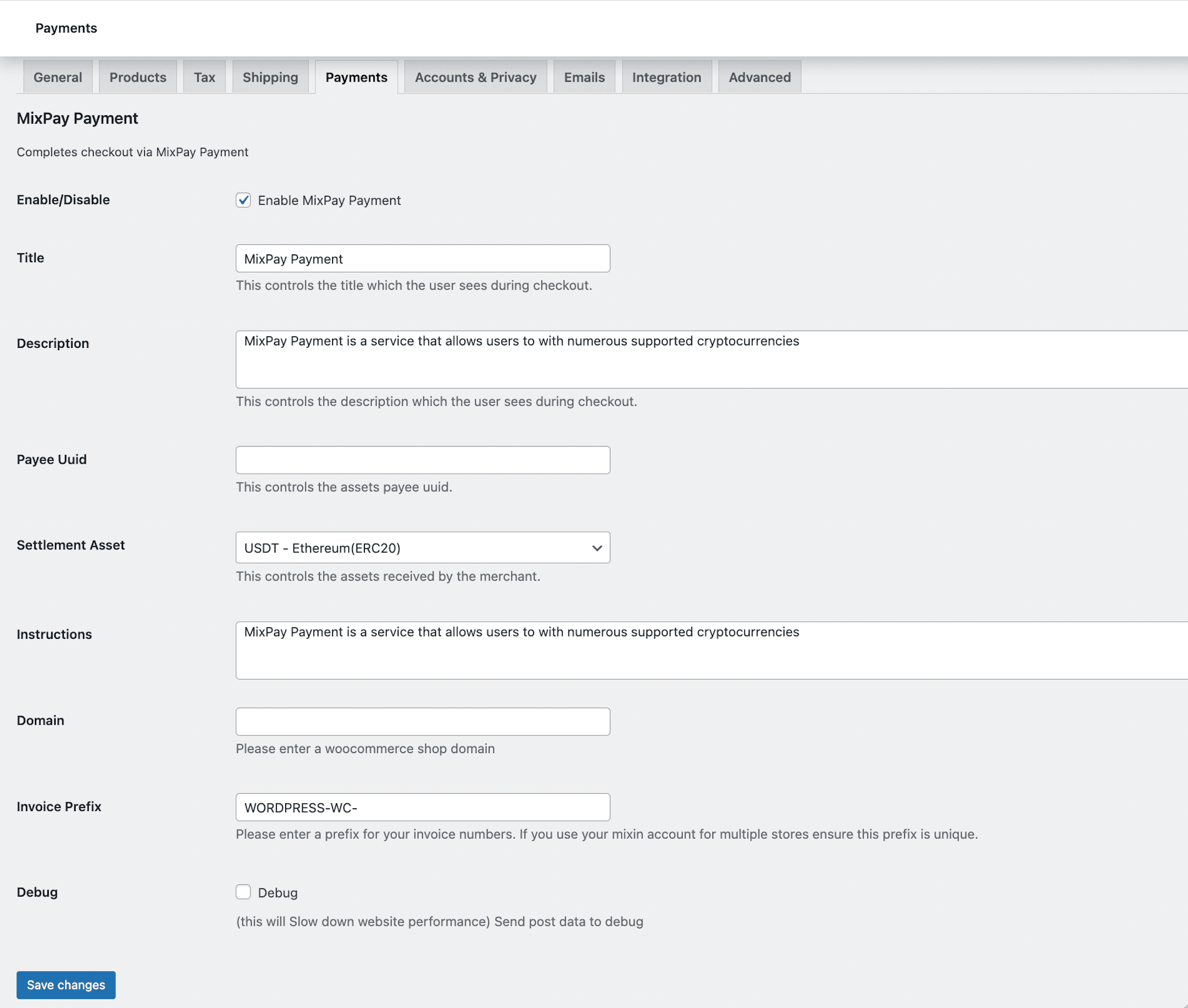
MixPay Payment configuration 
MixPay Payment Order page 
The MixPay Payment page
インストール
Plugin installation
- Please make sure PHP BCMath installed in your server.
- Upload the mixpay-woocommerce-plugin directory to the /wp-content/plugins/directory.
- Activate the plugin through the “Plugins” menu in WordPress.
After the plugin is activated, MixPay Payment will appear in the WooCommerce>Payments section.
Plugin configuration
After you have installed the MixPay Payment plugin, the configuration steps are:
1. On the WooCommerce “Settings” page, go to the “Payment Gateways” tab, then click “MixPay Payment”
2. Check “Enable MixPay Payment”.
3. Specify your Payee Uuid And Settlement Asset
4. Click “Save changes” and the gateway will be active.
FAQ
-
It is safe?
-
The details you provide during the account creation are confidential and securely encrypted. The details sent to the Placeholder Platform only include your ID, order ID, the amount involved, and the cryptocurrency used for the transaction. We take privacy seriously, and we never share your account or transaction details with anyone.
-
How can we contact support person?
-
If you run into any problems, or if you simply wish to discuss something with our experts, make sure you contact us with your query, and someone will help you shortly.
評価

貢献者と開発者

変更履歴
1.0.0
- Initial commit
1.0.2
- Security upgrade
1.0.3
- Use short Link to Payment
1.0.4
- Remove expiredTimestamp
1.0.5
- Change Icon & Remove currency check
1.0.6
- Change images catalogue
1.0.9
- Use MixPay Email Account
1.1.0
- Support for woocommerce block.