説明
これは、マルチサイトネットワーク上に完全に構成されたサイトを作成する中で、これまでで最も簡単、高速、そして最もユーザーフレンドリーな方法です。 NS Cloner は、WordPress マルチサイトネットワーク上の既存のサイトを取得し、テーマとテーマが完全に同一の新しいサイトにクローンを作成します。 テーマ設定、プラグイン、 プラグイン構成、コンテンツ、写真、ビデオ、サイト設定。
すべてを保持し、インテリジェントな置換を行うため、新しいサイトの設定には名前とタイトルの選択を反映し、URL の自動置換やその他のバックグラウンド更新を行い、新しいサイトが時間をかけて作成した場合とまったく同じように機能するようになります。 すべて手動で設定します。
重要: このプラグインは WordPress マルチサイトでのみ動作します (ただし Pro バージョンはシングルサイトでも動作します)。 そのメニューはネットワーク管理ダッシュボード (wp-admin / network) にあります。
NS Cloner を使用するための一般的なワークフロー
- クローンを開始したいとおりに1つ以上のサイトを正確にセットアップします。
- 「ネットワークダッシュボード > NS Cloner」に移動します。
- クローンを作成するサイトを選択し、新しいサイトの目的の URL とタイトルを入力します。
- ワンクリックでクローンを作成できます。
はい、本当に簡単です。
主な使用例
- 独自のマルチサイト環境で、複数のクライアントサイトをホストおよび管理する開発者 – これにより、お気に入りの標準プラグインと構成をすべて備えた、新しいベースラインサイトを迅速に展開できます。 面倒な手動入力を繰り返す必要はもうありません。
- 不必要な重複で時間を無駄にすることなく、複数のバージョンのサイトを作成して、異なるテーマのデザインを並行してテストおよび試用できるようにしたいデザイナー。
- コラボレーション用のステージングサイトをすばやくセットアップしたり、サイトの地域バージョンなどのコンテンツを簡単に複製したりする方法を必要としているチーム。
- 「メンバー」サイトを提供し、サイトの起動時間をほぼゼロに短縮したいと考えている組織。
- マルチサイトを通じて多数のサイトをホストし、リーチを拡大し、導入時間を短縮する方法を探しているアフィリエイト。
機能
コア機能
- サイト全体を数秒でコピーします
- サブドメインまたはサブディレクトリモードで動作します
- すべてのウィジェット、メニュー、テーマとプラグインの設定をコピーします
- すべての固定ページ、投稿、カスタム投稿タイプ、タクソノミーをコピーします
- アップロードしたすべてのメディアファイルと関連データをコピーします
- バックグラウンドで動作し、大規模なサイトでのタイムアウトやメモリ不足を回避します。
- クローン作成を中断せずにタブを閉じることも、そのままで進行状況をライブで監視することもできます
- 高度な検証と先制的な問題検出
- トラブルシューティングに役立つ堅牢なプロセスログ
- 開発者が拡張できるフックが豊富なクローン作成パイプライン
- 翻訳準備完了
Pro の機能
さらに強力な機能については、NS Cloner Pro をチェックしてください。すべての無料のコア機能に加えて、Pro には次のものが含まれます。
- テレポート (新規) – リモートクローン作成機能: リモートネットワークにサブサイトのクローンを作成したり、マルチサイトネットワーク全体をリモートの場所にテレポートしたりできます。
- シングルサイト (新規) – マルチサイトだけでなく、標準のシングルサイトのクローンを作成したり、シングルサイトとマルチサイト間、あるいはその逆の間でクローンを作成したりする機能を獲得します。
- WP CLI アドオン (新規) – コマンドラインからサイトを直接簡単にコピーします。
- 検索と置換 – クローンコンテンツに対して無制限かつ簡単なカスタム検索と置換を実行します。
- テーブルマネージャー – どのデータベーステーブルを複製するかを正確に簡単に管理します。
- ユーザーのクローン作成 – すべての WordPress ユーザーとその権限のクローンを作成したり、クローンサイトの新しいユーザーを即座に作成したりする機能。
- プリセット – よく使用するクローン作成設定をショートカットとして保存し、時間をさらに節約します。
スクリーンショット

主なクローン作成オプション。 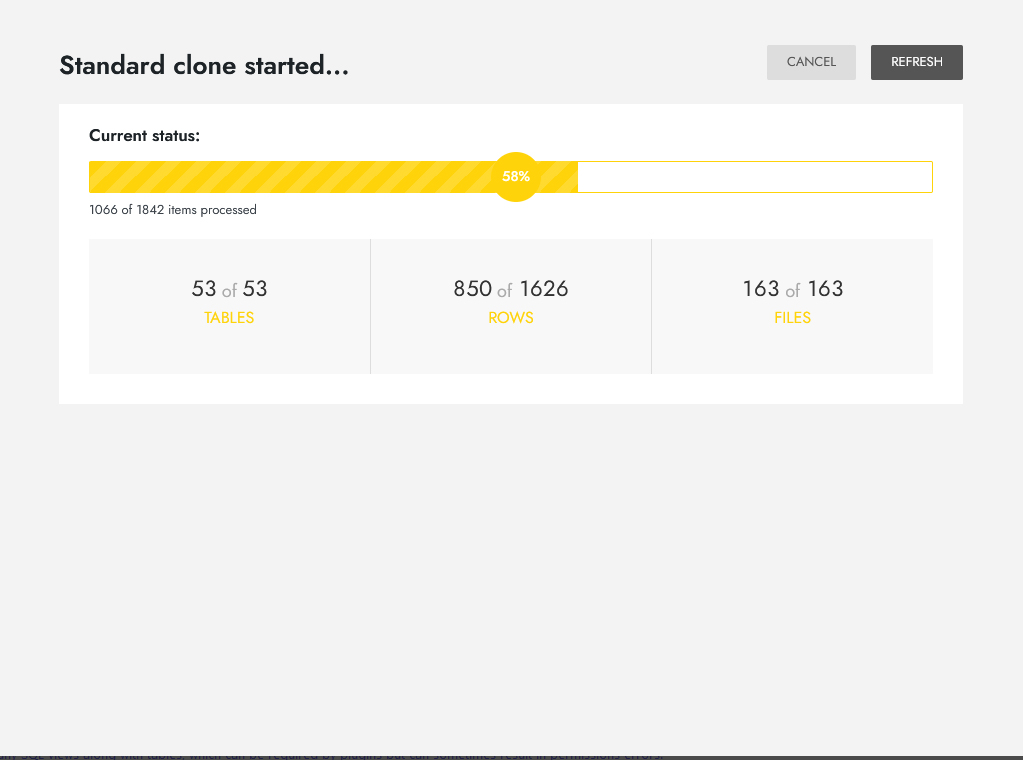
クローン作成中です。
インストール
- マルチサイトスーパー管理者として WordPress ネットワークにログインし、/wp-admin/network に移動します。
- 「ダッシュボード > プラグイン > NS Cloner」を使用して WordPress.org リポジトリからインストールするか、zip ファイルをアップロードしてインストールするための新しいツールを追加します
- ネットワーク WordPress の「プラグイン」メニューから NS Cloner を有効化します
- ネットワークダッシュボード (/wp-admin/network) のメインメニューから NS Cloner にアクセスします。
標準的な予防措置と注意事項
- 他のツールとは異なり、NS Cloner はルートサイト (ID =1) のクローン作成をサポートしています。 ルートサイトのクローンを作成する場合、クローナーはすべてのグローバルネットワーク WordPress テーブル (wp_blogs など) と BuddyPress などの一般的なネットワークプラグインのグローバルテーブルを自動的に除外します。 ただし Cloner がそこに存在するすべてのプラグインのすべてのネットワークレベルのテーブルを認識することは不可能であるため、一部のネットワークレベルのプラグインテーブルを Cloner が誤ってコピーする可能性があり、プラグインによっては問題が発生する可能性があります。 Pro に含まれるテーブルマネージャーアドオンは、テーブルレベルのクローン作成を完全に制御する必要がある独自のシナリオに最適です。
- 私たちは常に支援しようと努めています (そして、その証拠はここのプラグインサポートフォーラムで見ることができます) が、特に非標準環境に起因する問題については、この無料バージョンについてユーザーにサポートを約束することはできません。
- 私たちは NS Cloner を実稼働システムで何年も問題なく使用してきました。 それは、あなたのシナリオで頭痛の種を引き起こす可能性のある新しい状態が見つからないという意味ではありません。 可能性は低いですが、常に可能性があります。 重要なネットワークに展開する前に、テストシステムでよく理解しておくことをお勧めします。
- 念のため、データをバックアップしてください。 このプラグインはデータベースレベルで動作し、その魔法を発揮します。 私たちはこれを自社サイトやクライアントサイトで何百回も実行し、徹底的にテストしました。 安全です。 しかし、私たちの言葉を鵜呑みにしないでください。
FAQ
-
サポートに連絡したり、フィードバックを提供したり、機能リクエストを行ったりするにはどうすればよいですか ?
-
wpsitecloner.com/support で、ナレッジベースを参照したり、機能リクエストに追加または投票したり、問題について問い合わせたりすることができます。
-
さらに詳しいドキュメントはどこで入手できますか ?
-
NS Cloner の使用に関する詳細については、これらの記事を参照してください。
-
NS Cloner は正確に何をコピーしますか ?
-
Cloner は、完全に同一のツインサイトを作成するために必要なものすべてをコピーします。すべてのメディアアップロード、投稿、固定ページ、カスタム投稿タイプ、タクソノミー、コメント、メニュー、WordPress オプション、テーマおよびプラグイン設定 (アクティブなものを含む) です。
ユーザーと権限はコピーしません (これはプロの機能です)。また、同じファイルをマルチサイトネットワーク全体で共有するため、テーマ / プラグインファイルをコピーしません。そのため、ネットワーク内でクローンを作成するときにそれらをコピーする必要はありません。
-
ネットワークの一部ではない (非マルチサイト) 個々のサイトのクローンを作成できますか ?
-
それはプロの機能です – ですから、そうです! Pro を使用すると、WordPress シングルサイトを別のシングルサイトに簡単にクローンできます。 ネットワークからサイトを独自の個別インストールに複製したり、その逆も可能です。
-
サイトが非常に大きい場合はどうなりますか ?
-
あなたは幸運です ! NS Cloner V4 には新しいバックグラウンドクローン作成機能があるため、タイムアウトやメモリ制限によって「死の白い画面」に陥ることなく、ほぼあらゆるサイズのサイトのクローンを作成できるはずです。 クローンを中断することなく、ブラウザを閉じて後で戻って確認することもできます。
評価


貢献者と開発者

変更履歴
4.4.2 – 2024.01.30
- Enhancement: Improved locale loading.
- Fix: PHP notices.
4.4.1 – 2024.01.25
- New: Introduce new function
ns_cloner_perform_cloneto make it easier to perform cloning from other plugins. - Enhancement: Improved checks for file loading.
- Fix: PHP notices.
4.4 – 2023.11.20
- New: Updated the admin area for a more modern experience.
- Enhancement: Code improvements.
4.3.3 – 2023.08.23
- 機能強化: フロントエンドのクローンコアファイルのロードを改善しました。
- 修正: テンプレートのクローンを作成する
4.3.2 – 2023.08.15
- 修正: クローンの初期化におけるバックグラウンドプロセスクラスの問題を修正
4.3.1 – 2023.08.11
- ベンダーパスを修正する
4.3 – 2023.08.11
- 機能強化: 依存関係管理の改善
- 機能強化: 独自のカスタムログの場所をオーバーライドして定義する機能。
NS_CLONER_LOG_DIRを使用してカスタムログディレクトリを定義します。NS_CLONER_LOG_URLを使用してカスタムログ URL を定義します。 - 修正: PHP とバックグラウンドプロセスマネージャーの互換性
- 修正: PHP に関する通知
4.2.2.2 – 2023.05.09
- 重大な PHP エラーを修正
4.2.2.1 – 2022.12.19
- 不要なベンダーファイルを削除する
4.2.2 – 2022.12.16
- クローン作成時のテーブル制約の問題を修正
- プラグインの URL を更新する
4.2.1 – 2022.09.19
- 不正確なメモリ制限警告を修正
- デフォルトのクローン作成モード選択を修正
- 不要なベンダーファイルを削除する
4.2.0 – 2022.08.25
- キャッシュフラッシュロジックを改善する
- 内部コーディング標準の改善
- シリアル値の未定義クラスの処理を修正
4.1.9.3 – 2022.01.06
- クローン作成時以外の不要なすべてのフックを削減して最適化します。
4.1.9.2 – 2022.01.03
- WP Simple Pay との互換性の問題を修正
4.1.9.1 – 2021.12.23
- 管理者以外のリクエストの初期化を防止してパフォーマンスを最適化する
- 不要なオブジェクトキャッシュのフラッシュを修正し、完全に無効にするフィルターを追加しました
4.1.8 – 2021.09.30
- 多数のサイトが存在するネットワーク向けに WordPress サイトリストを最適化する
- クローン作成中に重複したオプションキーに対するプロアクティブな解決試行を追加します
- その他の修正。 その他のプラグインの互換性の問題
4.1.7 – 2021.09.02
- 管理インターフェースにスタイル調整を適用する
- ルート / メインブログ ID が1に等しくないネットワークのバグを修正
- 「すべてのプラグインデータを削除」リセットボタンが完全に機能しないバグを修正
- Collisimo Shipping Methods プラグインとの互換性の問題を修正
4.1.6 – 2021.05.31
- PHP 8との互換性のためにコンポーザーの依存関係を更新する
4.1.5.3 – 2021.02.10
- Rank Math Pro SEO との互換性エラーを修正
4.1.5.2 – 2021.02.03
- クローン作成後に新しいサイトタイトルが適用されないバグを修正
4.1.5.1 – 2021.02.02
- Pro バージョンとの互換性を壊すスラッグの変更を修正
4.1.5 – 2021.01.31
- オブジェクトのキャッシュの問題を解決するために wp_cache_flush() 呼び出しを追加
- スタックしたプロセスのプラグインデータをクリアするオプションを追加
- WordPress の推奨事項に従って国際化を更新します
- その他の修正。 警告、タイプミス
4.1.4 – 2020.12.30
- マジックウェイクアップメソッドの可視性エラーを修正
- WP Engine サイトのキャッシュクリアメカニズムを修正
- Woo 割引ルールとの競合を修正
4.1.3 – 2020.11.17
- データベースビュー / 制約エラーを回避するための新しいオプションを追加します
- Pro の SFTP 転送機能と互換性を持たせる
- 非効率なデータベース呼び出し、応答しない分析設定 UI を修正
4.1.0 – 2020.09.25
- 生産性統計の取得と分析を追加する
- JQuery 1.8の互換性、デバッグ通知、その他のその他を修正しました。 バグの修正
4.0.9 – 2020.06.15
- 新しいパフォーマンス制御オプションを追加する
- 新しいサイトの URL 検証を簡素化および改善する
- メモリ制限 -1の処理を修正
- Yoast WP SEO との互換性の問題を修正
- クローンの回復の停止、オプションテーブルからの通知などのその他のバグを修正します。
4.0.8 – 2020.06.11
- クローン作成後の自動キャッシュフラッシュを追加
- パフォーマンス調整および検索 / 置換制御用の新しいフィルターを追加します。
- ハードコードした upload_path を使用したルートサイトの upload_path の置換を修正
- サイトタイトルに非ラテン文字が含まれるサイトをクローン作成できない問題を修正
- 終了の失敗、データベース接頭辞の不規則性など、その他のバグを修正します。
4.0.7 – 2020.01.30
- ルートサイトクローンに含むプレフィックスのないカスタムテーブルを修正
- プライベート / パブリックブログプロパティをクローンサイトに反映しない問題を修正
4.0.6 – 2020.01.13
- WordPress 5.3 UI の変更に合わせて管理スタイルを更新
- 停止したクローン作成プロセスに対する新しい回復機能を追加
- シリアル化された検索 / 置換更新、不要なサイトメタのクローン作成に関するバグを修正
4.0.5 – 2019.10.17
- 数字のみのサイト名を有効にする
- WPEngine サイトのクローン作成の最後に自動キャッシュフラッシュを追加する
- 非常に大きなテーブルをキューに入れるときのメモリ / 時間の過負荷を修正
- その他を修正します。 プラグインの互換性の問題
4.0.4 – 2019.09.02
- NULL 値に対するデータベース処理を修正
- 5.1より前の WordPress での致命的なサイト作成エラーを修正
- 1つのクエリで複数の SQL ステートメントを許可しないサーバーでのエラーを修正
- その他のバグやプラグインの互換性の問題を修正
4.0.3 – 2019.08.19
- 挿入の損失または不正な行クエリによる欠落行を修正する
- Max_allowed_packet データベースエラーを修正
4.0.2 – 2019.08.15
- クリーンアップタスクのタイミングの競合を修正します。
- 手動でキャンセルした後もプロセスが実行され続ける問題を修正します。
- 行処理クラスを書き換えて、パフォーマンスを大幅に向上させ、クエリを減らします。
- バックグラウンドリクエストが停止する環境向けに、フォールバック AJAX プロセスディスパッチを追加します。
- 大きなテーブルに対してキューのバッチ処理を追加します。
- デバッグログを改善します。
4.0.1 – 2019.07.26
- バックグラウンドプロセスのロックタイミングを修正して、プロセスのフリーズや競合を防ぎます。
- SQL ビューの処理を修正 – テーブルのクローン作成から除外し、代わりに最後に作成します。
- 一部のサーバーでのオブジェクトキャッシュが原因で発生する空のターゲットサイト URL を修正しました。
4.0.0 – 2019.07.22
- すべて新しく再構築した V4 をリリースします。