
説明
Hacking: John Grefe – Twitter Google +
Design: James Steward – Twitter Google +
Group: The Waypoint – http://consultants.thewaypoint.com
This plugin uses HD 331dpi images, in beautiful responsive cirlces, to display weather for your location. Images included in this package now.
The plugin parses data from the openweather api to display information. The HD background image changes, based on the ‘condition’ outside, better named here, the “Feels”. We have provided one Feel in the initial v.1. Use the documentation to xref the api condition statements, against file names. The images get loaded via css, so they don’t interfere with layered objects on the site.
Use the built in widget or add it somewhere else with this shortcode: (Best settings shown)
[waypoint-weather location="Long Beach" units="F" size="tall" override_title="MTL" forecast_days=hide hide_stats=false]
“Hej Dude! I am like totally metric n’ stuff, but its not working on the back end.”
jajaja, Shortcodes are breaking the build. You’ll want to do this.
[waypoint-weather location="Oslow" units="C" size="tall" override_title="The Waypoint" forecast_days=hide hide_stats=false]
Settings:
- Location: Enter like Long Beach, CA or just Los Angeles. You may need to try different variations to get the right city. Don’t use zip/postal codes, the API hates them.
- Units: F (default) or C
- Size: wide (default) or tall, You should use Tall, girls love tall guys, so does this style.
- Override Title: Change the title in the header bar to whatever, sometimes it pulls weather from a close city.
- Forecast Days: Don’t use this unless you want the plugin to be ugly.
- Hide stats: Hide the text stats like humidity, wind, high and lows, etc.
- Background: You probably don’t want this as you want the css to load the dynamic images.
All weather data is provided by http://openweathermap.org and is cached for one hour.
Release History
1.0
Updated with all images in Repo, this should just chain install from your wp-admin section now, otherwise, always safer to upload as a zip. It is a beast ~26mg.
.1
First release for proof.
Lookup the condition code that the plugin is displaying while running such as “Clear Skys” here, then change file name to that code, ex “800.png”. http://bugs.openweathermap.org/projects/api/wiki/Weather_Condition_Codes
Author Ship Slug
https://plus.google.com/113242995329771585932?rel=author
Fork this! ‘git@github.com:johngrefe/waypoint-hd-weather-widget.git’ (Real code is hosted on github anyways, who knows, you’ll probably find a better build sooner there!)
スクリーンショット
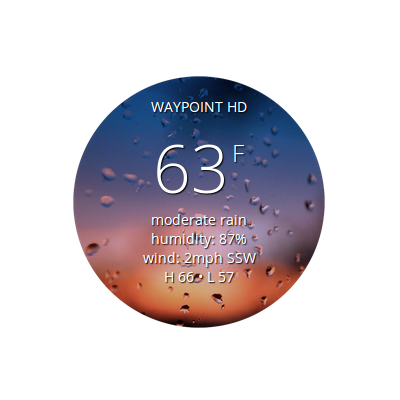
Basic tall layout
インストール
- Add plugin to the
/wp-content/plugins/directory (Don’t use Upload in WP admin, it sucks dude.) - Activate the plugin through the ‘Plugins’ menu in WordPress.
- Use shortcode or widget.
評価
このプラグインにはレビューがありません。
貢献者と開発者


“HD Weather Widget by The Waypoint” をあなたの言語に翻訳しましょう。