
説明
Discount Rules for WooCommerce helps you to create any type of bulk discounts, dynamic pricing, advanced discounts, percentage discounts, product based discounts, tiered discounts for your products. Offer Product quantity based discounts, cart based discounts at a percentage or fixed amount or discount based on total order. Create Buy One and Get one free (BOGO) deals and increase your sales multifold by offering dynamic pricing and discounts based on categories, products, user roles, cart items, purchase history and much more in the pro version.
You can set discounts for products and product variations. You can also set discounts based on categories, attributes, customers, user roles in the pro version.
Discounts will be visible in product page, product details page, cart, checkout and in email notifications.
Display the pricing discount table beautifully on the product page. Start selling more and retain customers by running promotions with the best dynamic pricing and discount plugin for WooCommerce.
View Demo | Documentation with real examples | Ask Questions | PRO version | Examples
DISCOUNT TYPES AND FEATURES
Free version features
- Percentage based discounts in WooCommerce
- Store-wide global discount
- Quantity range based tiered pricing percentage discount (Example: Buy 3 to 7 quantities, get 10%, Buy 8 to 12 quantities, get 20%)
- Cart based percentage discount (Example: Spend more than $1000, get 10% discount)
- Order total based discount
- Number of line items (count) based discount (Example: Purchase 4 different products or variants and get 10% discount)
- Exclude selected products from discount rules (product price based rules)
- Date based discount (validity)
- Show discount table on product pages
PRO features
- All features of the free version, plus)
- Fixed price discounts ( Get $9 discount for purchasing over 6 items)
- Category specific discount conditions ( Get 25 % off on all items under Summer Collection )
- Buy One Get One Free discounts in WooCommerce (BOGO Deals) Example: Buy 2 get 1 cheapest product free
- Dynamic pricing and discounts for WooCommerce
- Specific product based discounts (Buy Product A and get 10% discount)
- User role based dynamic pricing and discounts for your WooCommerce store (Example: Wholesale customers get a discounted price)
- Dependant product based discounts (Buy Product A and get discount on Product B)
- Bundle / package deal (Buy 3 items for $10. 4th item will be charge full price)
- Offer one or more free products (Multiple products could be offered free using a rule)
- Coupon code activated discount rules – The discount will apply after a coupon is entered.
- Option to set discount for each product variant.
- Attribute specific discount (Buy Small size T-shirts and get 10% discount)
- Option to set Discount for All Products or Global Discount
- Discount for customers with specific domains (10% discount for all emails ending with @acme.com)
- Customer specific discount (10% discount for selected customers)
- Shipping / Delivery location based discount (Example: If shipping destination is California, get 15% discount)
- Purchase history based discount (Customers who spent $100 in previously get 10% discount)
- Discount based on the number of orders placed earlier (Example: 10% discount for customers with 5 or more orders)
- If customer purchased selected products previously, he can get a discount (Example: Customers who purchased Shoes get 10% discount)
- Applying multiple discount rules in a purchase (Get 5% for order above $500 and 10 % for buying more than 6 items)
- Cart discounts by sum of item quantities in cart (Order more than 10 items from any category and get 15 % discount)
- Cart discounts by selected customers (John gets 25% life time discount. Ellen gets 10 % limited period offer)
- Cart discounts by fixed price discounts (Flat $50 discount for all orders today)
- Buy 3 units of Product A and get flat $25 discount
- Add 3 products to the cart and get the Cheapest Item free
- Buy any 10 products from Specific category and get a Product Free from Category B
- Buy Product A and Product B from Category Electronics and get a free product from category Accessories
- Buy any Product from Category Mobile and choose a free product from Category Hard Cases
- Option to offer free products only from certain category
- Exclude products on SALE from discount rules
- SALE Badge for discounted products (When the rules match)
- Option to show or hide the discounted price
- Priority support for PRO version
Examples
Category Discount Rules:
- Buy T-shirts from Category Apparel and save 10%
- Get 30% off on Category A & Category B
- Purchase any 6 items from Category A and get 25% discount on total cart value.
- Purchase 3 products from Category A or B or C or from all of them and get 20% discount valid from dd/mm/yyyy to dd/mm/yyyy
Quantity range based tiered pricing discounts
- Buy 1 to 5 quantities, get $2 discount, Buy 6 or more, get $3 discount
- Buy 2 to 3 quantities, get 10% discount, 4-5 quantities, get 20%, 6-8, get 30%
Product Variant Discounts:
- Get 50% off on Nike T-shirts Small and Large Sizes
- Buy a Small Size Tee and get a small Size shorts free
- You can customise the Variants discounts in several combinations
Product Dependant rule:
- Buy Product A at full price and get 20% discount in Product B
- Buy 2 quantities of Product A, 2 quantities of Product and get 30% discount in Product C
- Buy 3 quantities of Product A and get flat $10 off in product B
- Buy a Mobile and get 20% off on headphone
BOGO deals:
- Buy one and get one free of the same product
- Buy 2 get one cheapest free offer (repeat)
- Buy X get Y product free Eg: Buy 3 product and get a pendrive free (or with 50% discount)
- Buy Any 2 items from Category X, and get a Product free from Category B
- Buy X products and get X number of products free
- Buy 3 products from any category, get 1 free. Buy 6 products, get 2 products free….
- Buy 12 products (any or category specific), get X number of cheapest among them free
- Free products can be a few selected products, cheapest products in the entire store or from selected categories.
- Products can be offered either free (100% discount) or a limited percentage discount (50%)
Cart Discount Rules:
- All Orders above $500 will get 15% discount
- Add two to six products in cart and get flat $30 discount.
- 10% discount for all retailers (User Role specific discount)
- All orders above $500 will get 15% discount
- Buy 2 products and get 20% discount
- Discount for products from specific categories only
- Free shipping for orders above $100
- Coupon code activated cart discount rules
- Discount based on total order
Product Specific Discount
- Shoes get 20% discount, T-Shirts get 5% discount
- Adidas Special Edition Shoe (A specific product) gets 15% discount for 10 days
- Buy 10 mugs are more and get 5% off
- Buy 3 for $10, Buy 6 for $20
Fixed Price Per Unit
- Set a fixed price per unit (Product A cost is $20. Buy 5 to 10 quantity for $15 per unit, 11 and above for $10 each)
- Price can be set for a specific product or variant.
- If your entire category of products have the same price, you can use this to set a reduced price
User Role based Discount
- Bulk discount based on user role for specific product or product categories.
- Members of Wholesale customers group gets 40% discount, while Retail customers get 5% discount
Bundle / Package deal
- Create offers like Buy 3 items for $10. 4th item will be charged full price.
- Repeat the discount easily. Example: Buy 3 for $10, 6 for $20
Discount rules activated by coupon
- Activate / Trigger a discount rule upon entering a coupon code (useful when you want to provide discount to a target group of users)
Global Discount Storewide
- 20% discount on all items in the store till December 25
- All Products get 10% discount
Attributes specific discount
- Discount based on the product attributes (NOTE: The attributes should be defined at Product -> Attributes)
- Example: 10% discount for purchase of T-Shirt with Small sizes.
Shipping Address Based Discount
- Flat 25% discount at Cart for Customers from New York
- Customers from California get 10% discount while those from Texas get 5%
Purchase history based discount
- Discount based on the total amount spent by the customer in previous orders
- Discount based on the total number of orders placed by the customer
- Based on purchase history (Example: Provide 10% discount to all customers who purchased Shoes earlier)
- Purchase history for a specific period (10% discount for those who spent $500 in the last 3 months)
Adjustment rules
- Category specific discount on product price
- Date and Time based discount on product price
- Item Quantity based discount on product price
- Cart subtotal range based discount on cart total
- Number of Items in cart
- Total Sum of Item quantities
- Shipping address based discount rule
- Discount based on First Product
Conditions based on
Conditions can be based products, categories, customers, customer roles, shipping location, coupons, purchase history, order total amount, items in cart and more.
- All products
- Customer purchase history
- Specific products / Selected products
- All categories
- Selected categories
- All customers
- Selected customers
- All customer roles
- Selected customer roles
- All Shipping locations
- Selected shipping locations
Rules apply based on
- Products
- Line items in cart
- Cart subtotal
- Line item quantity
- Total cart quantity
- Purchase history
- Category
- User roles
- Attributes
Need assistance with the discount set up? Reach out to us
Though we have made the rule creation so simple with just 3 steps, you might still be having a few doubts. Or simply you might want to re-check if your setup is correct or you might be having a unique discount promo to run in your website. Don’t worry.
Feel free to reach out to us via the Live Chat in our website or via the support request form.
We are happy to help you and guide you with the set up.
Website
https://www.flycart.org/products/wordpress/woocommerce-discount-rules
Documentation
https://docs.flycart.org/en/collections/806883-woocommerce-discount-rules
Got questions?
Just reach out to us and we will get back to you. You can either contact us via the Live Chat or via the support request form
Credits
- Dutch Translation – @mvdburg1971 – Michael van der Burg
スクリーンショット

Price rules and Cart rules 
Creating a price rule 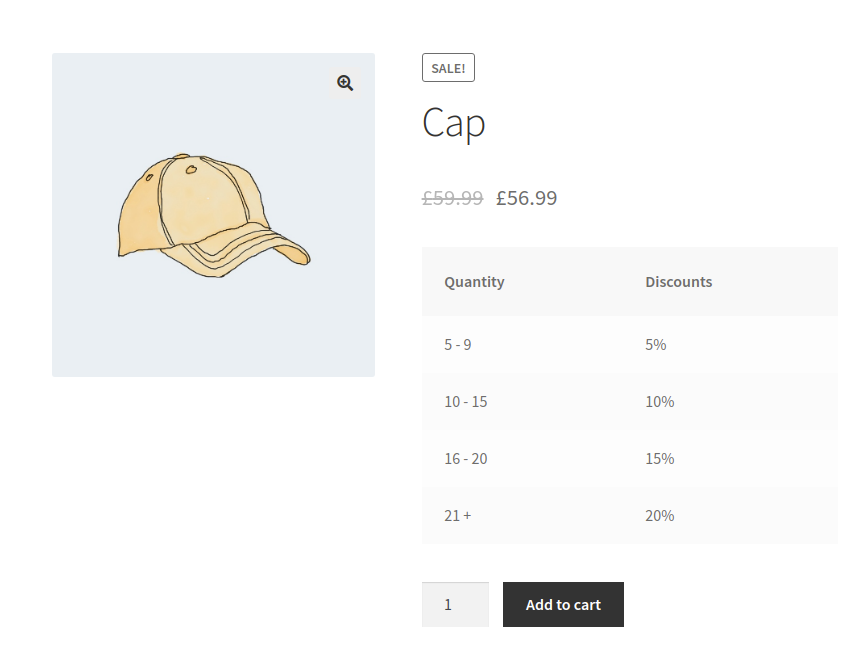
Example Promotion Offers created using Discount rules 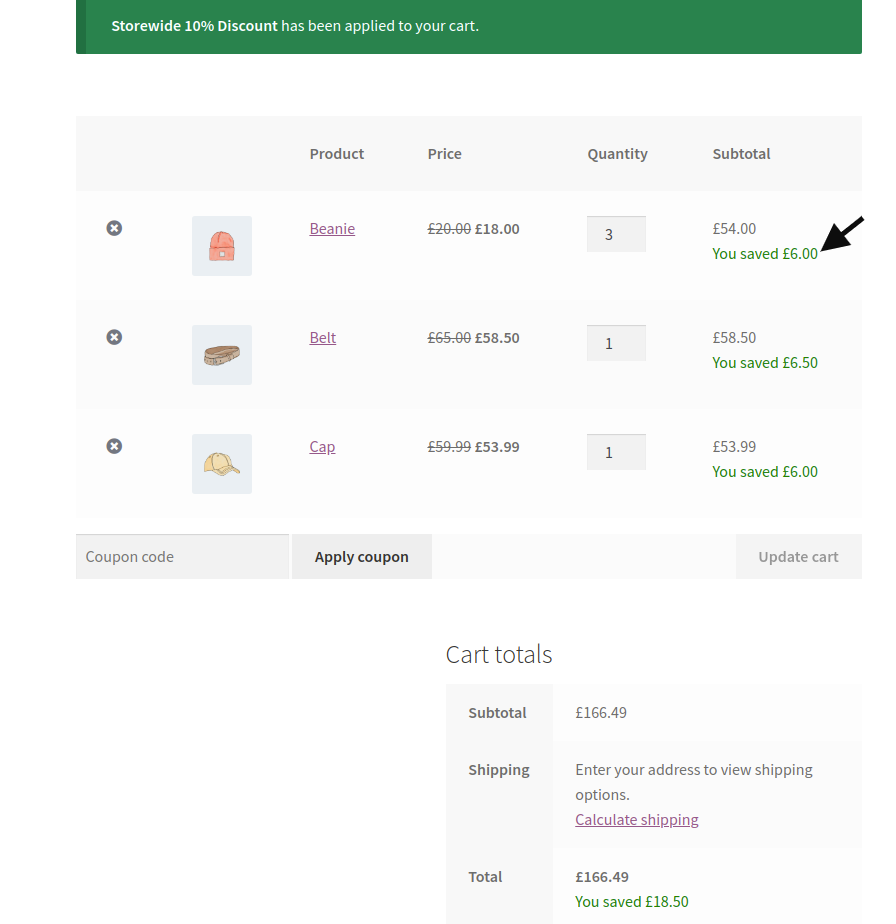
Discounted price is applied in the Cart 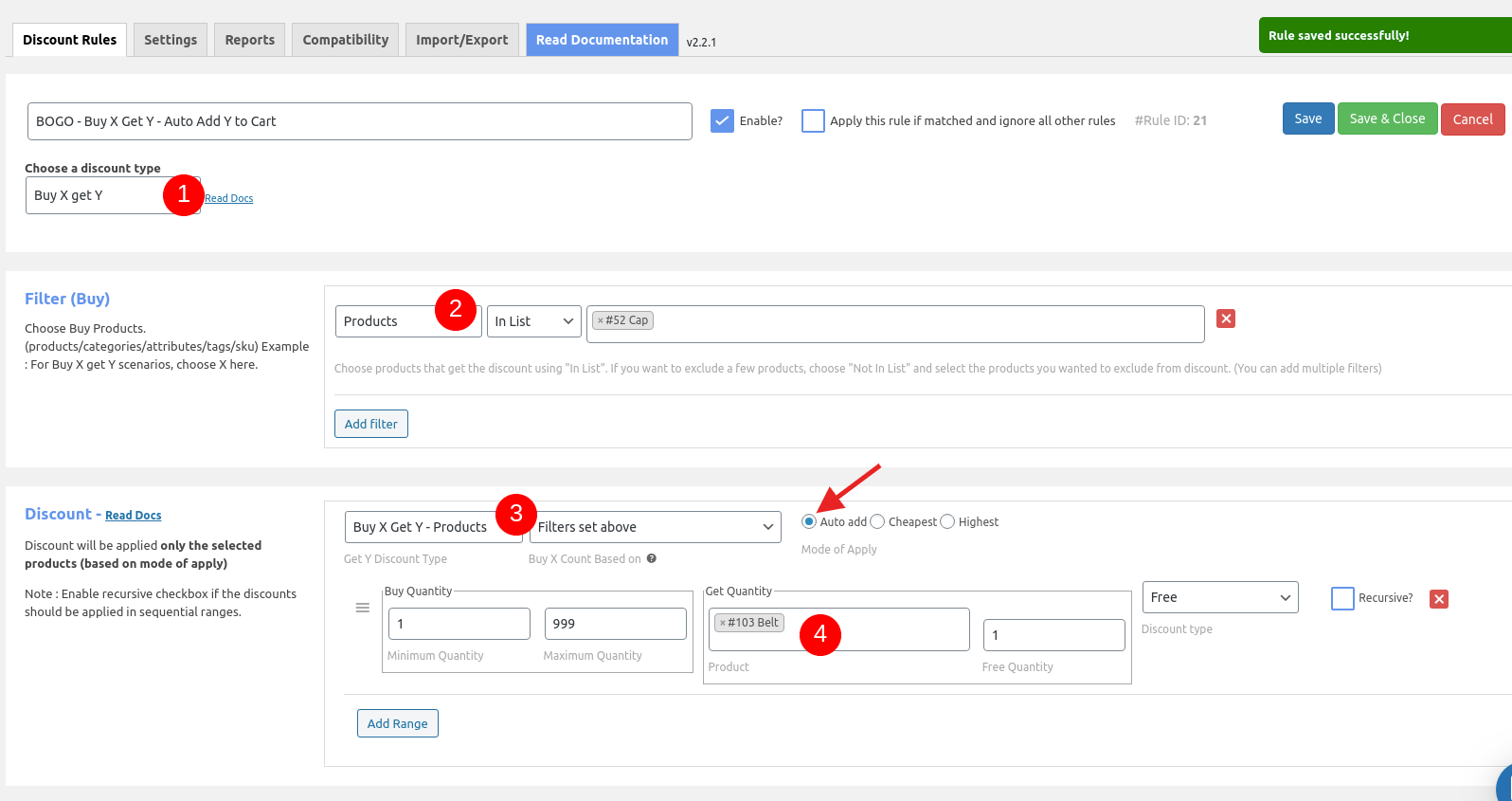
Creating a Buy X get Y rule 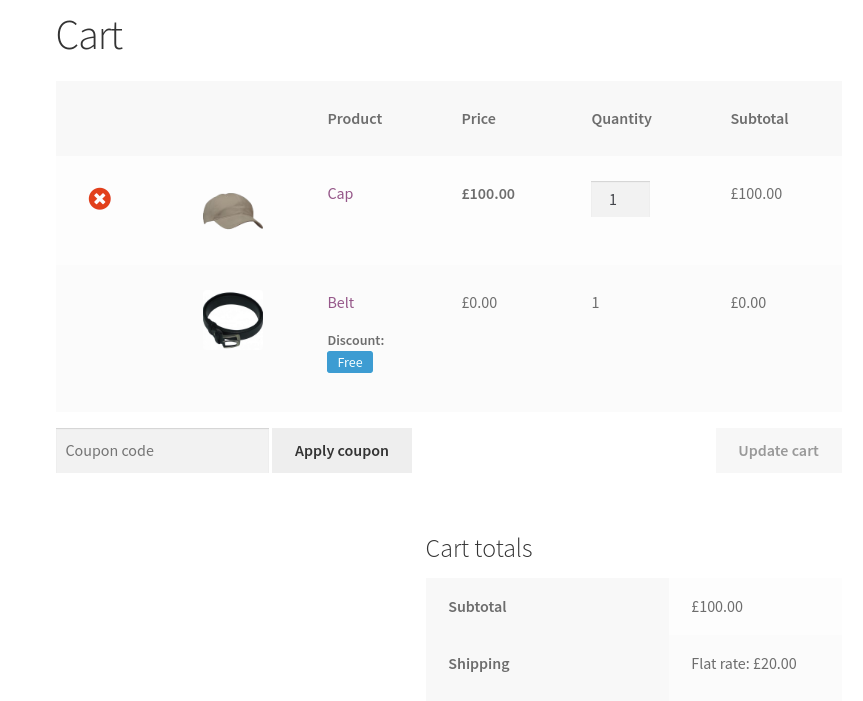
Free product auto added in cart
インストール
Just use the WordPress installer or upload to the /wp-content/plugins folder. Then Activate the Woo Discount Rules plugin.
More information could be found in the documentation
Minimum Requirements
- WordPress 4.6.1 or greater
- WooCommerce 3.0.0 or greater
- PHP version 5.6.0 or greater
- MySQL version 5.0 or greater
FAQ
-
Are multiple discounts possible ?
-
Yes. It is possible to create multiple discounts.
-
Are the discounts visible in Product page ?
-
Yes. The discount will be displayed in Product page, product details page, cart striking out the Original price.
-
Is it possible to exclude products on SALE?
-
Yes. You can exclude the products on sale from the discount rules.
-
Can I offer a discount based on the purchase history of the customer?
-
Yes. You can offer a discount based on the purchase history, total amount spent by the customer in his previous orders or based on the total number of orders placed by a customer.
-
Is it possible to provide discount for wholesale customers?
-
Yes. The plugin has a user role specific discount rule. You can create a discount for specific user roles like Wholesale customers.
-
How to provide a bulk discount in WooCommerce?
-
Simple. Just install the plugin and create a product price based discount rule. You can configure bulk purchase quantity ranges with discount percentages. Example: 3 to 5 quantities – 10%, 6 to 10 quantities – 20%
-
Will the discount be showed in the invoice ?
-
Yes. The discount will be displayed separately in the invoice.
-
Will the discount be applied to Product Variants ?
-
Yes. The discount will be applied to Product Variants as well. If you have two variants for an Iphone such as 64GB and 128GB, the discount will be applicable for both the variants.
-
Is it possible to apply discount based on User roles ?
-
Yes. You can apply discount for different user levels. Eg: Premium customers get 20% discount while first time customers gets 10% discount.
-
How to set Bulk Discount ?
-
You can specify the Maximum and minimum quantity for the discount to be applied.
Eg:
* Quantity 1 – 5 = $10 Discount or 10% discount
* Quantity 5 – 10 = $15 Discount or 15% discount -
Can I set a global discount for all products ?
-
Yes. You can set discount for all products at global level.
-
Is it possible to provide Bogo deals ?
-
Yes. You can provide buy 1 get 1 offers in your store.
-
If I have one or more rules for the same product, which will be applied ?
-
In that case, the rule with the higher priority will be applied.
-
Are there any limit for the number of rules ?
-
With free version and the PRO version, there is absolutely no limits. You can create unlimited discount rules for your store.
-
What happens after my PRO license expires ?
-
You can continue using Discount Rules for WooCommerce plugin in your site. However you won’t be able to receive the Updates and priority support.
-
What is your refund policy?
-
We do have a 14-day money back guarantee. If our plugin doesn’t meet your requirements, we can issue a full refund. No compromise in that.
-
Can I set discount based on Billing Country and City ?
-
Yes. It is possible to set discount rule based on the Customer city. Eg:Customers from Texas gets 15% discount. The discount will be applied at the cart level.
-
How to setup BOGO (Buy ONE get ONE) deals ?
-
Navigate to WooCommerce -> Woo Discount Rules -> Add New Rule.
Choose the discount type as Buy X get X. Then choose the filter and quantity ranges.
Note : Enable recursive checkbox if the discounts should be applied in sequential ranges.
評価


貢献者と開発者
Discount Rules for WooCommerce – Create Smart WooCommerce Coupons & Discounts はオープンソースソフトウェアです。以下の人々がこのプラグインに貢献しています。
貢献者
変更履歴
2.6.3 – 20/02/24
- Add: Compatibility for WordPress 6.4
- Add: Compatibility for WooCommerce 8.6
- Improved: Plugin name changed
- Fix: Warnings when enabled “Suppress third party discount plugins” option in settings
2.6.2 – 27/09/23
- Add: Compatibility for WooCommerce 8.1
2.6.1 – 12/07/23
- Improvement: Pagination improvements [Core].
- Improvement: Text changes [Core].
- Improvement: Event: advanced_woo_discount_rules_matched_set_discount_range [Pro].
- Add: Support collection addon(v1.2.0) on BXGY [Pro].
- Fix: Duplicate coupon message while using URL coupon [Core].
- Fix: Tax not included on dynamic strikeout [Core].
- Fix: Tax not included on discount table for variable products [Core and Pro].
- Fix: BXGY variants not working on few cases [Pro].
2.6.0 – 08/05/23
- Add: Pagination on backend rule listing [Core].
- Add: Support WooCommerce High-Performance order storage feature [Core and Pro].
- Add: Tab for display Addons [Core].
- Add: Option to exclude out of stock product on on-sale page [Core].
- Improvement: Query optimization while load coupon in backend [Pro].
- Improvement: Show message in plugin page when a major release is available [Core].
- Improvement: Allow span, div and p tag on HTML accepted fields [Core].
- Improvement: Changed TEXT to LONGTEXT for the columns filters, conditions [Core].
- Improvement: Display single value on discount table when start and end range is same [Core].
- Improvement: Licence URL update [Pro].
- Improvement: Load individual product count through the event advanced_woo_discount_rules_include_cart_item_to_count_quantity [Core].
- Improvement: Support {{cart_subtotal}} shortcode on promotion message. [Core].
- Improvement: Event: advanced_woo_discount_rules_get_product_discount_price [Core].
- Improvement: Event: advanced_woo_discount_rules_get_product_discount_details [Core].
- Improvement: Event: advanced_woo_discount_rules_get_product_discount_percentage [Core].
- Improvement: Event: advanced_woo_discount_rules_get_product_save_amount [Core].
- Improvement: Event: advanced_woo_discount_rules_get_cart_item_discount_price [Core].
- Improvement: Event: advanced_woo_discount_rules_get_cart_item_discount_details [Core].
- Improvement: Event: advanced_woo_discount_rules_get_cart_item_saved_amount [Core].
- Improvement: Event: advanced_woo_discount_rules_get_order_item_discount_price [Core].
- Improvement: Event: advanced_woo_discount_rules_get_order_item_discount_details [Core].
- Improvement: Event: advanced_woo_discount_rules_get_order_item_saved_amount [Core].
- Improvement: Event: advanced_woo_discount_rules_get_order_discount_details [Core].
- Improvement: Event: advanced_woo_discount_rules_get_order_saved_amount [Core].
- Improvement: Event: advanced_woo_discount_rules_cart_subtotal_promotion_message [Core].
- Fix: Warning when regular price in not entered on product [Core].
- Fix: Loading range on backend – disappear when remove the first one [Core and Pro].
- Fix: Wrong calculation in cart discount while enable apply all matched rule with Apply discount sequentially option [Core].
- Fix: Showing wrong strikeout on product page [Core].
- Fix: Adding discount info meta field even if no discount applied [Core].
2.5.4 – 30/01/23
- Fix: Discount data is not stored for analytics when change language using WPML [Core].
- Fix: Discount value is incorrect on coupon report for fixed discount type [Core].
- Fix: Dynamic strikeout not working for variable product [Core].
2.5.3 – 16/01/23
- Improvement: Show used coupon report [Core]
- Improvement: Dynamic strikeout script update to check the target first with in form [Core].
- Improvement: Updated JQuery UI version [Core].
- Fix: Validation fix on creating rules [Pro].
- Fix: Warning when on rule conditions due to translation [Core].
- Fix: The cheapest product does not receive a discount when variant together option is enabled [Pro].
- Fix: Error on variation is not an array [Pro].
- Fix: Condition doesn’t matches when have Match any option with user role condition [Pro].
- Fix: On-sale page shows incorrect data while have attribute in filters [Pro].
2.5.2 – 09/11/22
- Improvement: Event: advanced_woo_discount_rules_exclude_coupon_while_remove_third_party_coupon [Core].
- Improvement: Updated code on check free shipping [Core].
- Add: Support for WordPress 6.1 [Core and Pro].
- Fix: SKU filter displays wrong value, when having space in SKU [Pro].
2.5.0 – 01/11/22
- Improvement: Added applied discount info in order and order item meta _wdr_discounts [Core and Pro].
- Improvement: Loading issue on shop page while having variable price strikeout improvement [Core].
- Improvement: Set 3 for 10 fixed .1 difference on subtotal [Pro].
- Improvement: Doing strikeout on cart while using third-party shortcode [Core].
- Improvement: Show free shipping rule reports since v2.5.0 [Pro].
- Improvement: Added order_item_id and other_discount columns in wdr_order_item_discounts table [Core].
- Add: Show total order count and sales on report section [Core and Pro].
- Fix: Disable coupon option doesn’t working with free shipping [Pro].
- Fix: Applied message is not displaying in cart for free shipping [Pro].
- Fix: Limit option is not working with Free shipping [Pro].
- Fix: Warning on PHP 8 [Core and Pro].
- Fix: Fatal error on load order item meta [Core].
2.4.5 – 27/09/22
- Improvement: Additional param on the event advanced_woo_discount_rules_strikeout_price_html [Core].
- Improvement: Backend field validation [Core and Pro].
- Improvement: Condition and filter matches on any operation [Core and Pro].
- Fix: Applying discount more than discount quantity on set and BXGY [Pro]
- Fix: Quantity issue on set discount while manual request [Pro].
2.4.4 – 09/08/22
- Improvement: Event: advanced_woo_discount_rules_is_valid_filter_type
- Improvement: Event: advanced_woo_discount_rules_after_delete_rule
- Improvement: Event: advanced_woo_discount_rules_after_delete_rules
- Improvement: Event: advanced_woo_discount_rules_page_tabs
- Improvement: Event: advanced_woo_discount_rules_process_custom_filter
- Improvement: Event: advanced_woo_discount_rules_load_custom_filter_data
- Improvement: Event: advanced_woo_discount_rules_update_additional_data_before_save_rule
- Improvement: Event: advanced_woo_discount_rules_after_save_rule
- Improvement: Event: advanced_woo_discount_rules_do_strikeout_for_out_of_stock_variants
- Fix: Onsale page query improvement for on-sale filter.
- Fix: Redirecting to list page on create rule instead of edit page.
- Fix: BXGY cheapest variants together strikeout issue fix
- Fix: Wrong price on subtotal promotion message while set including tax.
2.4.3 – 28/06/22
- Improvement: Event: advanced_woo_discount_rules_is_valid_filter_type
- Improvement: Event: advanced_woo_discount_rules_after_delete_rule
- Improvement: Event: advanced_woo_discount_rules_after_delete_rules
- Improvement: Event: advanced_woo_discount_rules_page_tabs
- Improvement: Event: advanced_woo_discount_rules_process_custom_filter
- Improvement: Event: advanced_woo_discount_rules_load_custom_filter_data
- Improvement: Event: advanced_woo_discount_rules_update_additional_data_before_save_rule
- Improvement: Event: advanced_woo_discount_rules_after_save_rule
- Fix: Onsale page query improvement for on-sale filter.
- Fix: Redirecting to list page on create rule instead of edit page.
- Fix: Sale page doesn’t filters based on selected rules.
- Improvement: Event: advanced_woo_discount_rules_get_price_of_cart_item_on_find_cheapest_item
2.4.2 – 21/06/22
- Feature: Option to schedule sale page product rebuild on daily once.
- Improvement: Event: advanced_woo_discount_rules_variation_title_modify_count
- Improvement: Event: advanced_woo_discount_rules_refresh_shipping_options_on_order_review
- Fix: Cart coupon Condition not working when cart is empty.
- Fix: Fatal error due to Invalid Product ID on save rule.
- Fix: Warning on ajax strikeout.
- Fix: Strikeout not displayed for BXGY cheapest individual product on product page and cross sell block.
- Fix: BXGY discount applies before matches.
- Fix: esc_attr() applied to prevent XSS issues.
2.4.1 – 17/05/22
- Improvement: Added template override path for Bulk table.
- Improvement: Removed backslash while using single quote on promotion message.
- Improvement: Event: advanced_woo_discount_rules_allowed_html_elements_and_attributes.
- Improvement: Load rule id on discount table info for BXGY and Set discount.
- Improvement: V1 to v2 migration limit.
- Fix: Table compare issue.
- Fix: Division by zero.
- Fix: Warning on get cart.
2.4.0 – 06/04/22
- Deprecated: V1 layout.
- Fix: Calculating discount for out of stock product variant.
- Fix: Custom taxonomy query while process on-sale page.
- Fix: Multiple messages on having BXGY cheapest rules.
- Improvement – Event advanced_woo_discount_rules_cart_strikeout_quantity_html.
2.3.13 – 09/02/22
- Feature – Apply coupon through URL option.
- Improvement – Compatible option for Multi-Currency by WPML.
- Improvement – Compatible for WooCommerce Multi-Currency by TIV.NET.
- Improvement – Compatible for WooCommerce Price Based on Country by Oscar Gare.
- Improvement – Quantity calculation for Cart Item Product Combination Condition on having multiple product with same Id.
- Improvement – PHP 8 compatible.
- Improvement – Event advanced_woo_discount_rules_calculate_discount_for_cart_item.
- Fix – BXGY categories are not displaying in report.
- Fix – Warning on applying Cart adjustment.
- Fix – Discount table doesn’t loads for variable product based on exclusive option.
- Fix – Not in list filter for variant sku also consider for discount.
2.3.12 – 13/01/22
- Improvement – WooCommerce 6.1 compatible
- Fix – Error on API calls.
2.3.11 – 16/12/21
- Improvement – Load cart item quantity through event advanced_woo_discount_rules_cart_item_quantity.
- Improvement – Load cart item count through event advanced_woo_discount_rules_include_cart_item_to_count_quantity.
- Improvement – Disable free shipping rule in statistics.
- Improvement – Event: advanced_woo_discount_rules_admin_rule_notices.
- Improvement – Warning on product doesn’t exists / out of stock for BXGY.
- Fix – Purchase history quantities for Specific Product condition doesn’t considered variants.
- Fix – Not displaying variant name when having more than 3 combination of attributes.
- Fix – Auto add next available variant when a variant in not purchasable.
2.3.10 – 15/11/21
- Improvement – Event advanced_woo_discount_rules_calculate_cheapest_discount.
- Improvement – Event advanced_woo_discount_rules_use_sale_badge_percentage_customization.
- Improvement – Revert First order condition doesn’t worked for mix guest and login
- Fix – Not displaying variation title in BXGY auto add select on cart.
- Fix – BXGY doesn’t auto remove on checkout on rule failed.
- Fix – Handle BXGY sale badge on user group condition.
- Fix – Same price strikeout issue.
- Fix – Fatal error on product object as null.
2.3.9 – 21/10/21
- Feature – Option to hide other shipping methods when free shipping is available.
- Improvement – Skip invisible variant price for doing strikeout.
- Improvement – Alternative for recalculate discount before apply coupon event.
- Improvement – Taxonomy cache improvement.
- Improvement – Compatible for facebook for woocommerce.
- Improvement – Display discount info based on tax in discount bar.
- Improvement – Removed customize-table.css and added though inline.
- Improvement – Load the awdr_pro.js in footer.
- Improvement – Strikeout price for product addon.
- Improvement – Onsale shortcode index doesn’t update on empty value.
- Improvement – Event: advanced_woo_discount_rules_do_process_discounts_of_each_rule.
- Improvement – Event: advanced_woo_discount_rules_coupon_value.
- Improvement – Event: Additional param in advanced_woo_discount_rules_line_item_subtotal_saved_text.
- Fix – First order condition doesn’t worked for mix guest and login
- Fix – Handle auto add products based on language while having wpml.
- Fix – Product not auto added when previously added is not in stock.
- Fix – Fatal error while getting product id.
- Fix – Buy X get X not applies while having less quantity.
- Fix – Displaying strikeout in reverse.
- Fix – Wrong discount quantity on some cases in cart.
- Fix – Error while auto add (on product doesn’t exists).
- Fix – Free shipping with other exclusive rule.
2.3.8 – 22/07/21
- Feature – Option to display percentage in sale badge.
- Improvement – Optimize the term query to improve performance.
- Improvement – Option to load minified CSS and JS.
- Improvement – Taxonomy slug support for different language.
- Improvement – Event advanced_woo_discount_rules_dequeue_jquery_ui_datepicker_script.
- Improvement – Event advanced_woo_discount_rules_calculate_current_discount_amount.
- Improvement – Event advanced_woo_discount_rules_is_rule_passed_with_out_discount_for_exclusive_rule.
- Improvement – WPML compatibility for searching filters.
- Improvement – Validation fails for few cases.
- Improvement – Default value for option Apply cart discount as is changed to Coupon.
- Fix – Discount table for bundle product is not showing.
- Fix – Coupon discount values doesn’t splits based on filters in backend.
- Fix – Exclude exclusive rule for free products.
- Fix – Same strikeout issue.
- Fix – You save price is displayed wrong while having tax in few cases.
- Fix – Unable to edit rule in mobile.
- Fix – The discount bar is not showing if variant is selected in filter.
- Fix – No coupon label for cart fixed discount.
2.3.7 – 30/04/21
- Improvement – Moved advance option tab to settings.
2.3.6 – 29/04/21
- Feature – Recursive option for set discounts.
- Improvement – Reset migration improvement.
- Improvement – Changed rule limit option select box to number field.
- Improvement – Additional param on Event: advanced_woo_discount_rules_get_product_categories
- Improvement – Compatible with PHP 8.
- Improvement – Event: advanced_woo_discount_rules_dynamic_price_html_update
- Improvement – Event: advanced_woo_discount_rules_csv_import_export_separator
- Improvement – Event: advanced_woo_discount_rules_csv_length_for_import.
- Improvement – Event: advanced_woo_discount_rules_discounts_check_bogo_return_values.
- Improvement – Advance option to handle conflict with other plugins.
- Fix – Build onsale list not working while having huge volume of products.
- Fix – Blocking paypal return requests.
- Fix – Subsequent discount with cart rule.
- Fix – Dynamic strikeout shows incorrect value while having multiple rules.
2.3.5 – 23/03/21
- Feature – Cross sell feature for BXGY cheapest product option.
- Feature – Recipe: sample rules to add.
- Improvement – SKU with product title in product select box.
- Improvement – Subtotal based promotion UI improvement at backend.
- Improvement – Multi site query optimize.
- Improvement – Smart Coupons plugin compatible.
- Improvement – Sale badge translation improvement.
- Improvement – Event: advanced_woo_discount_rules_get_attribute_id_from_taxonomy_name
- Improvement – Event: advanced_woo_discount_rules_exclude_non_stock_product_on_sale_page
- Improvement – Event: advanced_woo_discount_rules_strikeout_price_html additional params.
- Improvement – Translation improvement.
- Fix – Variable product with tag condition not working.
- Fix – The discount bar is not displayed for variable product SKU filter.
- Fix – Show product on sale page even if only the variant has chosen.
- Fix – Report for BXGY cheapest product discount (fixed discount) is not shown.
- Fix – Category select box is not showing all language categories while having WPML.
2.3.4 – 01/02/21
- Feature – Quantity based promotion message.
- Improvement – Accept additional tags in sale badge.
- Improvement – Translation improvements.
- Improvement – Variable product suffix on strikeout.
- Improvement – Event: advanced_woo_discount_rules_coupon_discount_type_percentage
- Improvement – Event: advanced_woo_discount_rules_apply_coupon_for_products_based_on_filters
- Improvement – Event: advanced_woo_discount_rules_cart_item_key_for_buy_x_get_y_limited_discounts
- Improvement – Event: advanced_woo_discount_rules_select_coupon_from_woocommerce
- Improvement – Email tld condition improvement.
- Fix – Coupon not applied when use settings (disable coupons discount rules will work).
- Fix – Fatal error for child products when category based rule is set.
- Fix – Buy X get Y auto add not added while variant is added in cart.
- Fix – BOGO Cheapest strikeout issue.
- Fix – Last order purchase condition issue
- Fix – Fatal error on view plugin details in plugin page
2.3.3 – 16/12/20
- Fix – Attribute doesn’t loads for few language.
- Fix – Show Discount bar for 0 price product.
- Fix – Duplicate rule is not generated when title has ‘.
- Fix – Exclusive option for free shipping is not working.
- Fix – Set discount not applies for few cases.
- Fix – Warning message for empty variants.
- Fix – Customer chosen product is not updating for variant together option.
- Improvement – Product addon compatible improvement.
- Improvement – Product addon by themehigh compatible improvement.
- Improvement – Display parent name of category while select child.
- Improvement – Translation for discount label, rule title, Free shipping.
- Improvement – Event: advanced_woo_discount_rules_recalculate_discount_before_apply_coupon.
- Improvement – Calculating tax with fee.
- Improvement – Removing jquery-ui-datepicker script on our pages as it making conflict in few sites.
- Improvement – Improved query for purchase history rules.
- Improvement – Shipping state and country condition.
- Improvement – Event: advanced_woo_discount_rules_set_cheapest_item_key_as_product_id_for_product_page.
2.3.2 – 05/11/20
- Fix – Displaying discount table if user role based condition is false.
- Fix – Discount fee doesn’t works when Combine all discounts option enabled.
- Fix – BOGO Cheapest doesn’t works with WPML translation management.
- Fix – BOGO Cheapest individual option not works when apply all matched rule is enabled.
- Improvement – Added nonce for dynamic strikeout ajax method.
- Improvement – Custom Coupon not added in some cases.
- Improvement – Added country field in state condition.
- Improvement – JQuery DragTable updated.
- Improvement – BOGO Cheapest individual option improved.
- Improvement – Optimized the purchase history based first order query.
2.3.1 – 16/10/20
- Fix – JS error
- Improvement – Discount table improvement.
- Improvement – Product page strikeout doesn’t displays while dynamic strikeout option enabled in few cases.
- Improvement – Added new event advanced_woo_discount_rules_user_on_condition_check in pro.
2.3.0 – 14/10/20
- Feature – Discount table for variants while changing variant options
- Fix – Fatal error because of get_posts method.
- Fix – Tax calculation in discount fee.
- Fix – Wrong discount in BOGO while having apply all matched rules option.
- Fix – Coupon name not displaying in cart.
- Fix – Metorik API not working with Discount Rules.
- Fix – SKU based rule not displays in onsale page.
- Fix – Strikeout doesn’t displays when Suppress third party discount plugins option is enabled.
- Improvement – Cart strikeout improvements.
- Improvement – Improved discount info in order meta.
- Improvement – UI for RTL.
2.2.2 – 24/09/20
- Feature – Apply as coupon option.
- Fix – You saved message not showing on backend order page.
- Fix – Variable product strike through not working with suppress third party option.
- Fix – Disable strikeout when save product through backend inline method.
- Fix – Case sensitive issue on email based rules.
- Fix – Loading multiple fields for custom taxonomy.
- Improvement – Rule not saving when zero prices are entered in bulk discount.
- Improvement – Wholesale price by RymeraWebCo compatible improvement.
- Improvement – Event advanced_woo_discount_rules_hide_specific_rules_in_bulk_table added additional parameter.
- Improvement – Translation for you saved text and applied rule messages.
- Improvement – Disable strikeout when no option is chosen.
- Improvement – BOGO auto add improved.
2.2.1 – 08/09/20
- Fix – Table column doesn’t accepts space.
- Fix – Zipcode condition doesn’t works on changing in checkout.
- Improvement – Added nonce while switch version.
- Improvement – Event advanced_woo_discount_rules_change_bulk_rule_quantity while get quantity of products in bulk rule.
2.2.0 – 02/09/20
- Fix – Security checks improved.
- Fix – Taxonomy not listed in sale page.
- Improvement – Front end script improved.
- Improvement – Disable BXGY auto add when product not in stock.
2.1.2 – 22/08/20
- Fix – Security fix: though a major release was made in 2.1.0 in August 13th, a few sites might had older versions. In case, they were affected due to cross-site scripting, this fix will clean up the html before displaying in the front end.
2.1.1 – 17/08/20
- Fix – Country and state field doesn’t loads when have multiple
- Fix – Warning while having BOGO rule.
- Improvement – Versioning the script files.
2.1.0 – 13/08/20
- Fix – Fatal error when WooCommerce is deactivated.
- Fix – Displays only 10 item in sale page for attribute based rules.
- Fix – Disable strikeout if option is disabled for variable products.
- Fix – PHP 7.x warnings.
- Fix – Timeout warnings while checking for update.
- Fix – Warning while having grouped product.
- Improvement – Report based on cart quantities.
- Improvement – Added Aelia Currency Switcher Compatible.
- Improvement – Removed create collate while create table.
- Improvement – Privilege and CSRF check for all requests.
- Improvement – Choose free shipping as default only when applicable.
2.0.2 – 29/07/20
- Fix – Making conflict with YITH WooCommerce Wishlist
- Fix – Script error because of selectWoo
- Fix – BXGY cheapest individual option calculate wrong discounts
- Improvement – Text improvement
2.0.1 – 14/07/20
- Fix – Warning on install pack.
2.0.0 – 14/07/20
- Fix – Cart discount price for single product.
- Fix – Displaying strikeout when chosen apply as coupon.
- Fix – Coupon code not migrated while migration.
- Fix – Not in list condition not working.
- Improvement – Displayed max rule limit reach msg and limits.
- Improvement – select2 to selectWoo.
- Improvement – Individual rule report.
- Improvement – Download exported csv without storing in server.
- Improvement – Report for BOGO rules.
- Feature – Import option.
1.9.12 – 29/06/20
- Fix – Dynamic strikeout improvement(strikeout doesn’t replace for non matched qty).
- Fix – Custom taxonomy condition for variable products.
- Fix – Report for cart discount not showing.
- Fix – Product doesn’t loads based on keyword when WooCommerce Product Search plugin is active.
- Fix – Coupon doesn’t removes for BOGO rule (when disable coupon while rule applied option is enabled).
- Fix – Error on currency switcher by villatheme.
- Fix – Set discount value is wrong when rule is marked as exclusive.
- Fix – Warning on apply BOGO rule.
- Improvement – Additional events to get discount table manually.
- Improvement – Composite product compatible improvement.
- Improvement – CSS override for display switch option in v1.
1.9.11 – 17/06/20
- Fix – Custom taxonomy doesn’t works with conditions.
- Fix – Email based rule doesn’t works with User role on OR condition.
- Fix – Subtotal based promotion Price is not correct when we give subtotal as decimal value.
- Fix – Loading strikeout even the rule reached the usage limit.
- Feature – On sale include/exclude condition for Free shipping discount type.
- Improvement – Subtotal based promotion enable/disable option
1.9.10 – 10/06/20
- Fix – Showing duplicate strikeout.
- Fix – Showing discount table even the rule disabled.
- Fix – Showing discount table even the rule disabled.
- Fix – Migration: all rules are not migrated.
- Fix – Disable discount rule coupon will work option is not working.
- Fix – Displaying price as 1 when the price has zero value.
- Improvement – Apply this rule if matched and ignore all other rules option work flow changed.
1.9.9 – 02/06/20
- Improvement – Product addon compatible.
- Improvement – V2 UI improvements.
- Improvement – V2 field validations.
- Improvement – Events: woo_discount_rules_before_apply_cart_discount
- Improvement – Events: advanced_woo_discount_rules_custom_target_for_simple_product_on_qty_update, advanced_woo_discount_rules_custom_target_for_variable_product_on_qty_update
- Improvement – Added compatible with WPC Product Timer for WooCommerce – in v2
- Improvement – Additional shortcode for discount bars – in v2
- Improvement – Strikeout based on tax settings – in v2
- Feature – Beta Subtotal promotion message.
- Fix – Third party coupon doesn’t removed in checkout.
- Fix – Rule doesn’t works for few attributes.
- Fix – Discount bar for BXGY.
- Fix – Calculating tax for discount fee.
- Fix – Calculating fee multiple time when calculate total is called multiple times.
1.9.8 – 13/05/20
- Feature – Included v2 beta with new UI
- Fix – PHP warning fix
- Improvement – Event: apply_filters(‘woo_discount_rules_discounted_suffix_price’, $discountPrice, $product);
- Improvement – Event: woo_discount_rule_generate_discount_table_information, woo_discount_rule_discount_table_information
- Improvement – Don’t add free product when haveToApplyTheRules method return false
1.9.7 – 20/04/20
- Fix – PHP warning count()
- Improvement – Changed the script handle name
1.9.6 – 23/03/20
- Fix – Error displays (removed coupon) when disable third party coupon option is enabled.
- Fix – Not saving the cart rule based on WPML language.
- Fix – Display price suffix when there is no discount while having dynamic update option.
- Improvement – Additional param in the event woo_discount_rules_load_original_price_on_get_cheapest_product.
- Improvement – Discounted price in advance layout based on settings.
- Improvement – Event apply_filters(‘woo_discount_rules_product_price_container_class’, ”).
1.9.5 – 19/02/20
- Fix – Strikeout for On after apply discount option doesn’t works with non cumulative options.
- Improvement – Text improvements
- Improvement – Email TLD improvement
- Improvement – Event apply_filters(‘woo_discount_rules_calculate_subtotal_before_discounts_for_price_rules’, false, $rule);
1.9.4 – 05/02/20
- Fix – Each category option in cart rules doesn’t consider product exclude option.
- Fix – 7.3 compatible fix warning issue.
- Improvement – Trigger event when billing email updated.
- Improvement – Backward compatible for Adjustment type.
- Improvement – Updated bootstrap to 3.4.1.
- Improvement – Event apply_filters(‘woo_discount_rules_has_bogo_from_adjustment_set’, $has_bogo, $adjustment_sets).
- Improvement – Improved dependency check on activate plugin.
- Improvement – Compatible for Alg_WC_Currency_Switcher.
1.9.3 – 29/01/20
- Fix – Disabled default free shipping even when the rule is disabled.
- Fix – Wrong strikeout on quantity update in product page.
- Fix – Dynamic coupon name with different language (Arabic) is not saved correctly in cart rule.
- Fix – Calculating wrong discount for category based rule in cart while having tax settings(displays incl tax in cart).
- Improvement – Refresh the cart on coupon applied when force refresh option is enabled.
- Improvement – Apply biggest discount when an item has BOGO rule.
- Improvement – Increased the free limit to 6.
- Improvement – Sample rules while activate the plugin.
- Improvement – Hints for user friendly.
1.9.2 – 07/01/20
- Fix – Disable discount rules coupon will work option doesn’t works for cart rules.
- Fix – Division by zero in cart rule BOGO.
- Fix – Notice: Undefined index: line_subtotal_tax.
- Fix – Wrong strikeout on product page for fixed price and set discount rules while having the tax settings as enter price excluding and display as including tax.
- Improvement – Slow query while checking for force update.
1.9.1 – 24/12/19
- Fix – Wrong discount calculation for the Cart free product discount.
1.9.0 – 17/12/19
- Improvement – Moved BOGO options to adjustment type for user friendly.
- Improvement – Display time Hours in 24 hours.
- Improvement – Remove special character for BOGO coupon.
- Improvement – Load shipping info from session if post value doesn’t exists.
- Improvement – Don’t allow to repeat same condition again in cart rule while adding rules.
- Improvement – To display message on failed to apply coupon when discount applied through Woo Discount plugin(based on settings).
- Improvement – Event: apply_filters(‘woo_discount_rules_table_content_condition_html’, $condition, $value);
- Improvement – Event: apply_filters(‘woo_discount_rules_table_content_discount_html’, $discount, $value->discount_type, $value->to_discount, $value);
- Improvement – Event: apply_filters(‘woo_discount_rules_exclude_cart_item_which_has_discount_already’, false, $cart_item_key, $values, $cart);
- Improvement – Event: apply_filters(‘woo_discount_rules_load_coupon_value_by_search’, false);
- Improvement – Event: apply_filters(‘woo_discount_rules_cart_bogo_coupon_code’, ‘{{product_name}} X {{quantity}}’);
- Improvement – Event: apply_filters(‘woo_discount_rules_notice_on_remove_coupon_while_having_a_discount’, $msg, $code);
- Improvement – Event: apply_filters(‘woo_discount_rules_remove_coupon_message_on_apply_discount’, true, $coupon_code);
- Fix – Wrong coupon name while having multiple create coupon option rules is set.
- Fix – Each category option in cart rule is not working.
- Fix – Warning due to the method doesn’t exists wc_strtoupper.
- Fix – Changed discount type for free product in cart option.
- Fix – Free shipping based on shipping state doesn’t works when update the cart item.
- Fix – Warning issue when exclude sale option is enabled in cart rules.
- Fix – Remove cart rule BOGO when third-party coupon applied(based on settings).
- Fix – Warning on having first order discount in cart rules.
1.8.2 – 14/11/19
- Feature – Option to display promotion message in cart about the upcoming discount (Subtotal based).
- Improvement – Upgrading to pro option in deactivation survey.
- Improvement – WordPress 5.3 UI improvement.
- Fix – PHP Fatal error Call to a member function get() on null while apply coupon through third-party plugin(On renewal subscription).
- Fix – Wrong subtotal calculation while having tax settings as excluding tax and display by including tax.
- Fix – Auto add free product on subtotal matches in price rule.
- Fix – Dynamic coupon removed, while remove third party coupon option is enabled.
- Fix – Loading trashed coupon in the selected coupon fields while having large number of coupons.
1.8.1 – 21/10/19
- Feature – First order option in Purchase history.
- Feature – Category exclude option in cart rules.
- Feature – Create coupon option instead of selecting from woocommerce coupon for coupon based rules.
- Improvement – Increased the priority for the hook woocommerce_get_price_html to 1000
- Improvement – Event apply_filters(‘woo_discount_rules_exclude_product_from_discount’, false, $item[‘data’], $id, $rule, $item);
- Improvement – Event update apply_filters(‘woo_discount_rules_rule_matches_to_display_in_table’, $status, $product, $rule, $index);
- Improvement – Option to hide the discount table from front end while login as admin.
- Improvement – Removed options Any one cheapest from selected and Any one cheapest from all products.
- Improvement – Give priority to user for purchase history rule.
- Fix – Changed discount type for free product in cart option so the discount applies only for selected products.
- Fix – Currency switcher compatible for villa theme.
- Fix – Wrong subtotal calculation when exclude products is chosen.
- Fix – Timeout issue when returning customer in checkout for purchase history rule.
- Fix – Displaying discount table for on-sale product when exclude on-sale product option is enabled.
1.8.0 – 03/10/19
- Feature – Fixed price per unit option in price discount rules.
- Feature – Bundle (Set) Discount option in price discount rules.
- Improvement – Survey while deactivate the plugin.
- Improvement – Moved shipping country option under Customer shipping details in cart rules.
- Fix – Reduced the priority of the hook woocommerce_get_price_html to 9 as it making conflict with wholesale plugin(sale price adjustment).
- Fix – Woocommerce Currency Switcher – realmag777 Compatible for you saved text.
1.7.20 – 23/09/19
- Feature – Option for Product in list, Exclude product, Exclude on sale product in cart rules.
- Feature – Duration option(Last 7 days, 14 days, 30 days, 60 days, 90 days, 180 days, 1 year, Custom) in purchase history based rules.
- Improvement – Include variant while parent product is selected in Purchase history based rule.
- Improvement – Send params in JS event woo_discount_rules_after_display_strikeout_price_on_quantity_update.
- Improvement – Not to trigger ajax for loading discount table if table is disabled.
- Improvement – Dynamic strikeout improvement to change the price for variable product header price while having single price for all variants.
- Improvement – Event apply_filters(‘woo_discount_rules_class_to_refresh_the_checkout_review_on_blur’, ‘input#billing_email, select#billing_state’);
- Improvement – Display update notice through update check when there is no update available.
- Fix – Not displaying sale price with strike out because of sale adjustment handled by Woo discount plugin.
1.7.19 – 26/08/19
- Feature – Option to do strikeout on change quantity in product page.
- Feature – Option to display strikeout on after a rule condition is matched in product page.
- Fix – Validation issue in woocommerce v2.x on saving BOGO Rule.
- Fix – Not applying discount for decimal values less than 1 in cart rules.
- Fix – Wrong strikeout price for variable product on set option apply discount from regular price.
- Fix – Not displaying price display suffix when disable strikeout option and enable sale option.
- Improvement – Event apply_filters(‘woo_discount_rules_remove_event_woocommerce_cart_loaded_from_session’, false).
- …