

説明
410Gone Consent Manager for Google Consent Mode and GTM is a lightweight CMP with a cookie banner, customization modal, and Google Consent Mode v2 + Google Tag Manager compatibility. It includes desktop/mobile previews in the admin, design and label settings, and multilingual support (Polylang, WPML, or via filter).
You can find the documentation in french for the plugin here : Official website for the consent managemet wordpress plugin(FR)
Key features
- Configurable banner and “Customize” modal (titles, texts, buttons, links).
- Editable palette (background, default text, accept/customize buttons) with color pickers.
- Live desktop/mobile preview in the admin.
- Automatic dataLayer/consent default injection in the
<head>and conditional GTM loading. - Tracking modes for analytics loading: all inclusive, hybrid, or GTM-only.
- Shortcode
[cmp410gone_manage_cookies]to display a “Manage my cookies” link in content. - Translation-ready for Polylang/WPML, with the
cmp410gone_translate_settingfilter for other multilingual plugins. - Advanced options: consent retention, debug console, force display for testing.
Configuration
Design
- Enable/disable the CMP.
- Choose colors (background/default text, Accept/Customize buttons) via color pickers with live preview.
Labels
- Set banner and modal titles/text, plus button labels.
- Add privacy policy and cookie policy URLs.
Tracking & configuration
- Choose the tracking mode (all inclusive, hybrid, GTM-only).
- Enter the GTM container ID (e.g.
GTM-XXXXXXX). - Add the GA4 measurement ID if needed (e.g.
G-XXXXXXXXXX). - Adjust
wait_for_update(ms) for the consent default if needed.
Advanced
- Consent retention duration (days).
- Debug mode (console) and force display for testing.
Translations
- Save your texts in the main language.
- Polylang: go to Languages String translations, group CMP 410gone, and translate each key (
cmp410gone_banner_title,cmp410gone_btn_accept, etc.). - WPML: go to WPML String Translation, domain CMP 410gone, then translate the same keys.
- Other plugins: hook into the
cmp410gone_translate_settingfilter to provide custom translations.
Frontend usage
- The banner and modal are injected automatically (
wp_head,wp_footer). - The shortcode
[cmp410gone_manage_cookies label="Manage my cookies"]displays a management link. - Third-party scripts should be controlled via GTM to respect consent choices.
External services
This plugin can load Google Tag Manager when you provide a GTM Container ID in the settings.
- Service: Google Tag Manager (gtm.js and noscript iframe).
- Data sent: the GTM container ID and the consent state stored in the dataLayer.
- When: on page load, only if GTM is enabled in the plugin settings.
- Terms: https://marketingplatform.google.com/about/tag-manager/
- Privacy: https://policies.google.com/privacy
Troubleshooting
- If using JS optimization (e.g. WP Rocket), exclude
cmp.js/410gone-consent-managerfrom “Delay JavaScript execution”, then clear cache. - Enable debug mode to follow the consent flow in the console.
More information: https://www.410-gone.fr/blog/plugin-cmp-wordpress-gratuit-consent-mode-v2-gtm.html
スクリーンショット
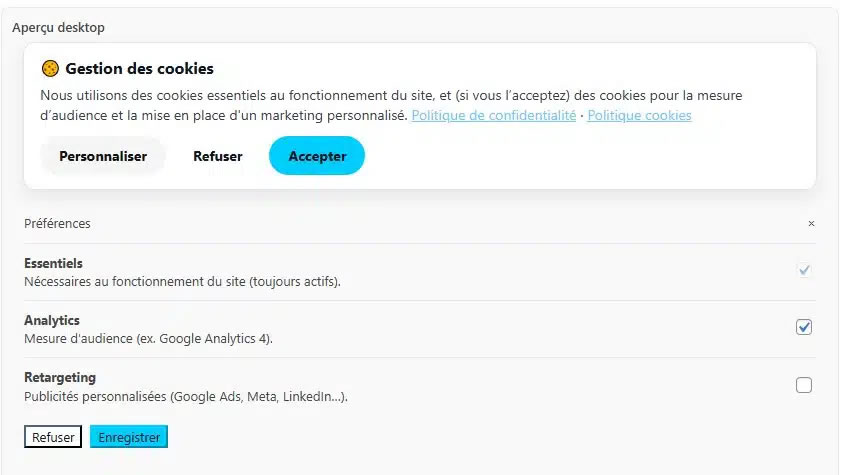
Plugin backend display a preview for the banner and the customize popin. 
You can customize the color for the button and the text used in the plugin, you can find more documentation here: https://www.410-gone.fr/blog/plugin-cmp-wordpress-gratuit-consent-mode-v2-gtm.html . 
Everything can be translated. 
Complete translation setup using polylang (for example, wpml is also available)
インストール
- Copy the plugin folder into
wp-content/plugins/(or zip it and install via Plugins Add New Upload Plugin). - Activate “410Gone Consent Manager for Google Consent Mode and GTM” in the WordPress dashboard.
- Open Settings 🍪 410Gone Consent Manager to configure the CMP.
評価

貢献者と開発者
410Gone Consent Manager for Google Consent Mode and GTM はオープンソースソフトウェアです。以下の人々がこのプラグインに貢献しています。
貢献者
変更履歴
1.6.0
- Added tracking modes for analytics loading (all inclusive, hybrid, GTM-only).
- Added GA4 measurement ID configuration in settings.
- Improved consent flow to trigger page_view after consent without reload.
1.5.0
Add configuration and switch to default overlayoff if no javascript (SEO enhancement for bot crawling)
1.4.2
- Initial release.