

説明
SurfLink is designed to Search & Replace, Easy Redirection, 404/410 Manager, Link Shortener, Auto Linking, Backup & Restore, Hide Login Url Security.
Search and Replace
Safely perform bulk find-and-replace operations directly on the database.
* Database Management: Supports all tables and handles serialized data (critical for preventing data corruption).
* Safety First: Includes a “Dry Run” mode to test before applying, case-sensitivity toggles, and specific GUID handling.
* Title Updater: Update post titles in pages, posts and custom post types.
* History Logs: View detailed logs of changes with a “View Changes” diff modal (Before vs. After).
* Easy URL Updater (Pro): A dedicated visual interface to update old domain names or migrate HTTP to HTTPS across contents, attachments, and links.
* Rerun Operation (Upcoming): Re-run a Search & Replace operation from the History Logs.
Redirects, 410 & 404s
A complete suite for managing traffic and broken links.
* Redirect Manager: Create 301, 302, or 307 redirects.
* Advanced Rules (Pro): Redirect based on Regex, “Starts With”, “Contains”, “Is 404”, User Agent, or even redirect to Random Posts.
* Redirect List: View redirects in a nice table. Create, edit, and delete redirects.
* Dead Link Handling: Monitor 404 logs and easily convert them to Redirects or 410 Gone status (to tell Google a page is permanently deleted).
* Import/Export: Support for CSV import/export for bulk management.
Backup and Restore
Secure your site data with a few clicks.
* Flexible Backups: Backup the entire database, specific directories (Uploads, Themes, Plugins), or both.
* Selective Restore: Restore an entire site or just specific components (e.g., restore only the database, keep the themes).
* Scheduled Auto Backups (Pro): Set it and forget it. Schedule daily or weekly backups to ensure you never lose data.
* Upload & Restore (Mix): Restore backups from external files easily. Unlimited file size support in premium version.
* Cross domain Restore: Restore backups from a different domain (e.g., staging, localhost, or a new production domain).
* Remote Backups (Upcoming): Backup to a remote location (e.g., Google Drive) for long-term storage.
LoginHider Security
Protect your site from brute-force attacks.
* Hide Login URL: Change your default wp-login.php to a custom slug (e.g., /my-secret-entry) and show a nice login form.
* Options: Configure the custom login slug, max login attempts, and IP ban duration.
* Limit Attempts: Log failed login attempts and automatically ban IPs after a set threshold.
* Failed Login Logs: View detailed logs of failed login attempts.
* IP Unbanning: Easily remove IP addresses from the ban list.
Module Manager
- Module Manager: Enable/disable modules to keep your admin interface clean.
- Background Processes: Also enable/disable background processes to optimize performance as needed.
* Advanced Options (Upcoming): You can enable/disable a specific sub-module in the Module Manager.
🟢 Free Features vs 🔴 Pro Features
Free Version Includes:
- Search & Replace: Standard DB search/replace, Dry Run, History Logs, “View Changes” diff.
- Easy Title Updater: Update post titles with a single click in post, page and custom post types. Dry Run, History Logs, “View Changes” diff.
- Redirects: Add specific (single/bulk) redirects, 404 Logs, Specific 410 (Gone) status, Import/Export.
- Backup: Manual Backup creation, Saved Backup logs, Manual Restore, Selective Restore.
- Security: Login Hider settings, Failed login logs, IP Unbanning.
- General: Module Manager (enable/disable features).
Pro Version Includes:
- Easy URL Updater: Visual interface for URL migration.
- Advanced Redirect Rules: Regex, Wildcards, Parameter handling, Random post redirects.
- Link Shortener: Create and track branded shortlinks. Make QR codes for them.
- Link Report: Dashboard, Link Reports, Domain Reports and Error Reports.
- Broken Link Scanner: Scan all posts and terms for broken links.
- Auto Linker Beta (Pro): Automatically link selected keywords in your future and present posts, pages, categories, tags, and custom post types.
- Soft Linker (Pro): Link selected keywords just before the page is loaded. No hardcoding.
- Hard Unlinker Beta (Pro): Automatically unlink posts, pages, categories, tags, and custom post types.
- Group Tagging: Create, edit, and delete groups of shortlinks.
- Advanced 410: Add 410s automatically from deleted items (trash/delete hooks).
- Add Multisite 410: Add multiple 410s at once.
- Scheduled Backups: Automated daily/weekly backups to keep your data safe.
- Upload large files & Restore: Restore backups from external files with no size limitation.
SurfLink is compatible with these plugins
You can use these similar type plugins while keeping Surflink installed: PrettyLinks, BetterLinks, Redirection, Better Search Replace, UpdraftPlus, All-in-One WP Migration, Duplicator, BackWPup.
Surflink will continue working alongside these. If you don’t want a specific module, you can always disable that Surflink module from module manager.
スクリーンショット
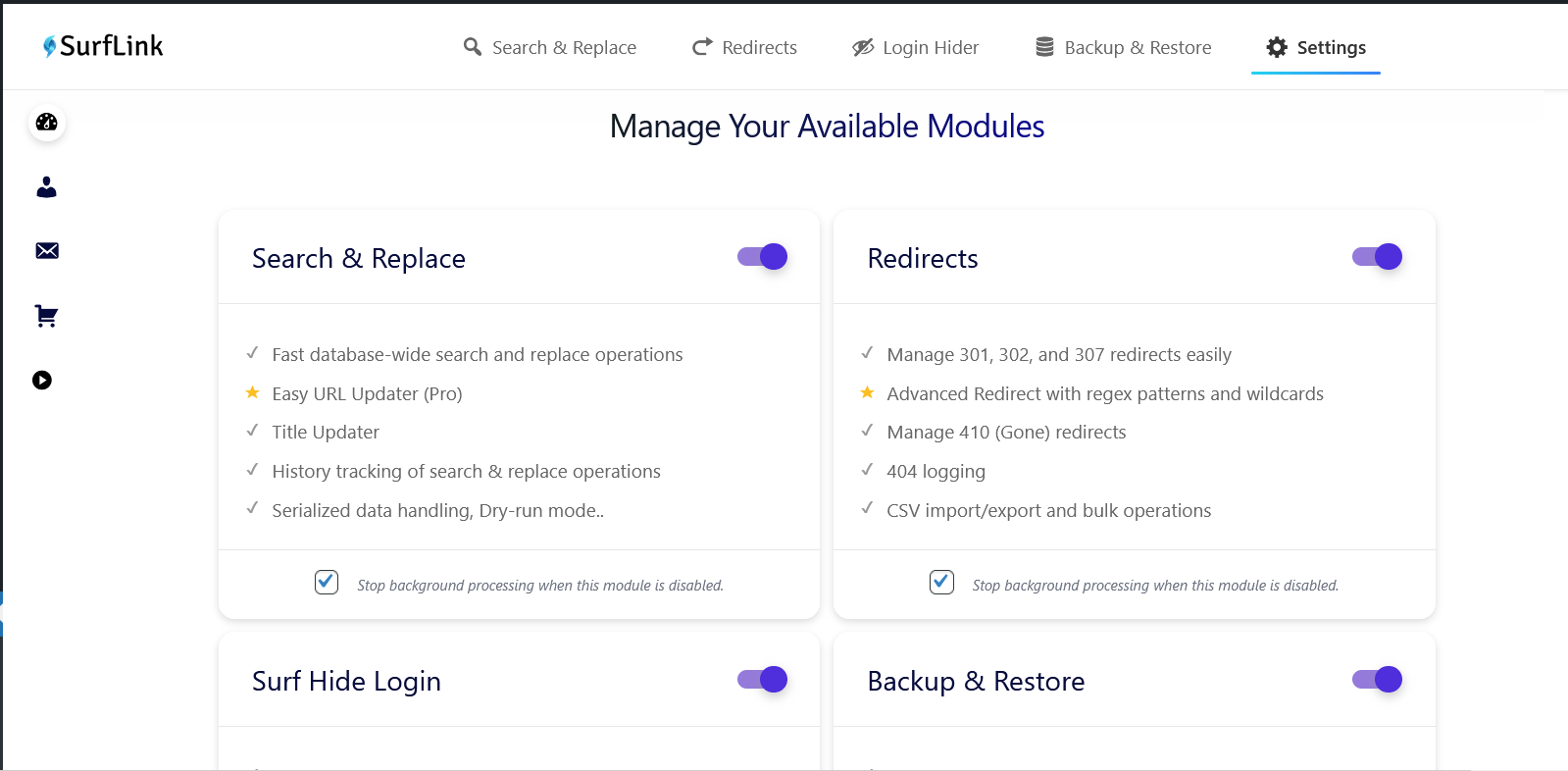
Module Manager: Easily toggle Search & Replace, Redirects, Backup, and Security modules. 
Search & Replace: Interface showing search and replace process. 
Advanced Redirects: Setting up regex rules in Advanced Redirects. 
Backup & Restore: Managing saved backups. 
Login Security: Configuring custom login slug. 
Ban notice in the log in form 
Failed Login Attempts:
インストール
Install SurfLink like you would install any other WordPress plugin.
Dashboard Method:
- Login to your WordPress admin and go to Plugins -> Add New
- Type “SurfLink” in the search bar and select this plugin
- Click “Install”, and then “Activate Plugin”
Upload Method:
- Download: Download the plugin zip file.
- Upload: Go to your WordPress Dashboard > Plugins > Add New > Upload Plugin. Select the
surflink.zipfile. - Activate: Click “Activate Plugin”.
FAQ
Can I damage my site with the Search and Replace module?
Yes! Database operations are powerful. Entering a wrong search or replace string could break your site. Always perform a Backup (using Module 3) before running a Search & Replace operation. Use the “Dry Run” feature first to verify what will be changed.
Can I restore database on a different domain?
Yes, SurfLink supports restoring database on a different domain (WordPress Multisite Installation).
Can I restore the database backup on a different table prefix?
Yes, SurfLink automatically handles differences in database table prefixes.
Why do I see a 404 error or get redirected when trying to access default wp-login.php after a restore?
This issue can occur if the login session expires after restoration and the active login security plugins interfere with your access to wp-login.php. There are two possible causes:
-
1. Login Security Plugins (WPS Hide Login, Loginizer, etc.)
-
The Issue: Third-party login security plugins may block access to
wp-login.phpor change the login URL. After a restore if login session expires, these settings may cause 404 errors or unwanted redirects if you try to access wp-login.php default login page.Solutions to try:
Option 1: Use your custom login URL (if known)
– If you remember the custom login slug configured in the other plugin, access it directly
– Example:yourdomain.com/your-custom-login-slugOption 2: Deactivate via FTP/File Manager
-
Connect to your site using an FTP client (like FileZilla) or your hosting control panel’s File Manager
-
Navigate to the plugins folder:
- Go to:
wp-content/plugins/
- Go to:
-
Deactivate the conflicting plugin by renaming its folder:
- Find the plugin’s folder (e.g.,
wps-hide-login,loginizer, etc.) - Rename it by adding
-disabledto the folder name - Example: Rename
wps-hide-logintowps-hide-login-disabled - This automatically deactivates the plugin
- Find the plugin’s folder (e.g.,
-
Log in normally:
- Go to
yourdomain.com/wp-login.php - Log in with your credentials
- Go to
-
Decide which plugin to use:
- Go to Plugins delete the disabled plugin (optional)
- Configure SurfLink’s Login Security if you want to use SurfLink instead
- Important: Don’t enable multiple login security plugins simultaneously
-
-
2. SurfLink’s LoginHider Feature is ON
-
The Solution:
Option 1: Use your custom login URL (if known)
– If you remember the custom login slug configured in the plugin, access it directly with your current domain
– Example:yourdomain.com/your-custom-login-slugOption 2: Deactivate via FTP/File Manager
– If grace period is over and you don’t remember your custom login slug, then connect to your site using an FTP client or your hosting control panel’s File Manager.
– Navigate to the plugins folder, deactivate SurfLink plugin by renaming its folder.
– Afterwards Log in via wp-login.php.
– Finally, Don’t forget to rename Surflink folder and activate it again in your dashboard.How does the Login Hider work?
It provides a custom login url with a nice login form. It also logs failed login attempts and automatically bans IP addresses after a set threshold.Does this work on WordPress Multisite Installation?
No. It is not fully compatible with WordPress Multisite. Use with caution on Multisite installations.
評価


貢献者と開発者

変更履歴
2.5.8
- UI design improvements.
- New Pro Feature: Autolinking keywords.
- New Pro Feature: ShortLink QR code.
- New Pro Module: Link Report (Link Reports and Broken Links Scanner).
2.5.4
- New Pro Module: Link Report
- Update: LoginHider Module is moved to the Settings page.
- Fix: Subtle bug fixed in LoginHider.
2.5.3
- Fix: Subtle bug fixed in LoginHider.
2.5.2
- Fix: Empty source field bug in Redirect.
2.4.8
- Fix: text-domain bugs fixed.
- Update: SurfLink backup directories are restructured.
2.4.7
- Improved: Backup/Restore UI Improved.
- Fix: Minor bugs fixed.
2.4.5
- Improved: Progress bar UI Improved.
2.4.4
- Fix: Bugs fixed in Module Manager and Select Backup Modal.
- Improved: Custom Login Form UI Improved.
- Security: Overall security is improved.
2.4.3
- Improved: UI Improved, more professional and user-friendly.
- Security: Overall security is improved.
2.4.1
- Improved: Restore UX Improved (Retry Logic Added).
- Improved: Upload & Restore UX Improved (Pending Restore Logic for uploaded files added).
- Improved: Cross Domain Restore is now more stable.
- Updated: Backup & Restore FAQ is updated.
2.4.0
- Fixed: UI bug fixed in 410.
2.3.9
- Fixed: Critical bug fixed in loginhider.
- New Feature: SurfLink now support Cross Domain Restoration (Database Migration).
2.3.8
- Fixed: Critical bug fixed in backup and restore modules.
- Improved: Loginhider strategy is improved.
2.3.6
- Improved: Import operations are more optimized for better and safe performance. UX is also improved.
2.3.5
- New Feature: Title Updater ! Now you can easily update post titles in pages, posts and custom post types. Dry run is also supported for safe testing.Also includes History Logs.
2.3.4
- Improved: search and replace now support handling nested serialized data.
2.3.3
- Fixed: Subtle bug in restore backup fixed.
2.3.1
- Improved: UX is improved in Redirects module. And some minor fixes.
2.3.0
- Performance: More optimized query in case of redirection is optimized for better and faster performance.
2.2.9
- Fixed: Important bug fixed.
2.2.8
- Fixed: Critical bug fixed.
2.2.7
- Fixed: Critical bug fixed.
2.2.7
- Improved: Backup & Restore Module UX is improved.
- Fixed: Important bug fixed.
2.2.6
- Improved: Search & Replace Module UX is improved.
- Improved: User accessibility is improved.
- Updated: Dark mode theme is updated.
2.2.5
- Improved: Search & Replace now fully supports UTF-8, Emojis, and all international languages.
- Fixed: Case-insensitive matching for accented characters.
2.2.4
- Fix: Side nav bar bug fixed.
- Update: Minor CSS fixed.
2.2.3
- Update: Light mode theme is updated.
- Fix: Important bugs fixed.
2.2.2
- Update: minor update.
2.2.1
- Fix: Upload and restore limit exceed bug fixed.
- Fix: Loginhider’s custom login page is restricted from editing and indexing.
- Fix: A subtle bug in create custom login page fixed.
2.2.0
- Fix: Minor CSS fixed.
- Update: Premium version of SurfLink is released.
2.1.1
- Fix: Possible naming conflicts with other plugins and the SurfLink Premium is fixed.
- Update: SurfLab User Dashboard link is updated.
2.1.0
- Fix: Accidentally deleting other version’s data of SurfLink while uninstalling is fixed.
- Update: New Settings: User can decide whether to delete redirects and 410 data during uninstall or not. As they are user created data.
2.0.2
- Update: Target url is now validated less strictly to be more user-friendly.
2.0.1
- Update: used date() instead of gmdate() to avoid timezone issues.
2.0.0
- New Feature: Added Module Manager to enable/disable specific sections.
- Module 1 (Enhanced): Added Easy URL Updater (Pro) and improved Search/Replace History Logs with visual diffs.
- Module 2 (New): Added comprehensive Redirect Manager (301/302/307).
- Module 2 (New): Added Shortlinks manager (Pro).
- Module 2 (New): Added 410 Gone status manager and 404 Error logging.
- Module 3 (New): Added full Backup and Restore system (Database + Files).
- Module 3 (New): Added Scheduled Auto Backups (Pro).
- Module 4 (New): Added LoginHider (Brute-force protection and custom login URL).
- Update: Tested compatibility up to WordPress 6.9.
1.0.0
- Initial release.
- Basic Search and Replace functionality.
- Serialized data support.