

説明
SnapAura Menu Manager gives you granular control over when and where your menu items appear. Perfect for creating dynamic navigation that adapts to your visitors’ context.
Features:
- Login State Control – Show menu items only to logged-in or logged-out users
- User Role Visibility – Show menu items only to specific user roles (Administrator, Editor, Author, Contributor, Subscriber)
- Device-Based Hiding – Hide items on mobile, tablet, or desktop devices
- Current Page Hiding – Automatically hide menu items when viewing that page
- Works with Any Theme – Compatible with all WordPress themes
- No Configuration Required – Simple checkboxes in the menu editor
Use Cases:
- Show “Login” only to logged-out users and “Dashboard” only to logged-in users
- Show “Edit Posts” only to Editors and Administrators
- Show “Submit Article” only to Authors and Contributors
- Hide contact links on mobile to save space
- Create different navigation experiences for different devices
- Remove redundant navigation when already on a page
How It Works:
- Go to Appearance > Menus
- Expand any menu item
- Check the visibility options you want
- Save your menu
No complicated settings or configuration files. Just simple checkboxes that do exactly what they say.
スクリーンショット
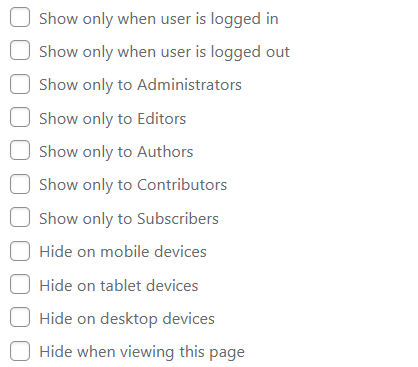
Menu editor showing visibility checkboxes for each menu item
インストール
- Upload the plugin files to
/wp-content/plugins/menu-visibility-control/, or install through the WordPress plugins screen - Activate the plugin through the ‘Plugins’ screen in WordPress
- Go to Appearance > Menus to configure visibility for your menu items
FAQ
-
Does this work with my theme?
-
Yes! SnapAura Menu Manager works with any WordPress theme that uses standard WordPress menus.
-
Will this slow down my site?
-
No. The plugin adds minimal CSS and uses efficient WordPress filters. There’s no JavaScript and no external resources.
-
Can I hide items based on user roles?
-
Currently, the plugin supports logged-in vs logged-out visibility. Role-based visibility may be added in a future version.
-
What are the device breakpoints?
-
- Mobile: 767px and below
- Tablet: 768px to 980px
- Desktop: 981px and above
-
It works with any system that uses WordPress’s
wp_nav_menufunction. Custom menu builders that bypass WordPress’s menu system may not be compatible.
評価
このプラグインにはレビューがありません。
貢献者と開発者

“SnapAura Menu Manager” をあなたの言語に翻訳しましょう。
開発に興味がありますか ?
変更履歴
1.1.0
- Added user role visibility (show menu items only to specific roles)
- Support for Administrator, Editor, Author, Contributor, and Subscriber roles
- Role restrictions work with OR logic (show to any checked role)
- Improved menu organization with role-based access control
1.0.0
- Initial release
- Login state visibility (logged in / logged out)
- Device-based hiding (mobile / tablet / desktop)
- Current page hiding
- Full internationalization support