

説明
SDAweb Social Galleri Feed connects to the Instagram Graph API and displays your posts in a customizable grid gallery with lightbox. Supports multiple Instagram accounts — connect up to 20 accounts and display different feeds on different pages. Built for speed — feeds load instantly on cached pages with zero network requests.
Features
Multi-Account Support
* Connect up to 20 Instagram accounts, each with its own token and cache
* Per-account test connection, cache management, and failure tracking
* Display different accounts on different pages with the account shortcode attribute
* Visual Shortcode Builder shows which account you’re building for
Layout & Design
* Multiple layouts — Grid, masonry, and highlight modes
* Responsive columns — Separate settings for desktop, laptop, tablet, and mobile
* Profile header — Avatar, username, follower count, bio, and follow button
* Hover effects — Overlay on image hover with gradient
* Color pickers — Customize likes icon, comments icon, and date text colors
Instagram Stories
* Story ring — Gradient ring on avatar when Stories are active (like Instagram)
* Fullscreen Story viewer — Auto-advance, tap navigation, progress bars, keyboard support
* Video Stories play automatically (muted by default)
* Per-account Stories refresh every 15 minutes via WP-Cron
* Toggle on/off globally or per shortcode
Lightbox
* Fullscreen lightbox — Carousel navigation with keyboard and swipe support
* Swipe-up-to-close — Mobile-native gesture
* Engagement stats — Likes, comments, media type badge, and relative date
Content & Filtering
* Multiple feeds — Use feed_id attribute for independent feeds on different pages
* Hashtag filtering — Include or exclude posts by hashtag
* Media type filter — Filter by image, video, or carousel
* Load more — Paginated loading with customizable button
Performance
* Instant loading — Server-side inline JSON per account, zero network requests on cache hit
* REST API endpoint with legacy AJAX fallback
* Stale-while-revalidate — Expired cache served instantly while refreshing
* Per-account WP-Cron background refresh — All caches stay warm automatically
* Smart fetch limit — Only requests what’s needed from the API
* Lazy loading and incremental grid rendering
* Per-IP rate limiting
Localization
* All 30+ frontend strings configurable in admin (Norwegian defaults)
* Relative timestamps and month names customizable
Security
* Bearer token authentication — API token sent via Authorization header
* AES-256-CBC token encryption at rest with random IV per encryption
* CSRF protection — check_admin_referer() on all admin actions
* XSS prevention — textContent used instead of innerHTML, all output escaped
* Clean uninstall — Removes all options, transients, and cron jobs per account
Accessibility
* Full keyboard navigation in lightbox and gallery
* ARIA labels and screen reader support
* Respects prefers-reduced-motion
Shortcode
[sdawsoga_gallery]
Shortcode Attributes
account— Account slug from Accounts tab (default: default account)feed_id— Gallery name for CSS targetinglimit— Number of posts to display (default: 9)columns— Number of columns (default: 3)layout— grid, masonry, or highlightaspect_ratio— square, portrait, instagram, or originalpadding— Gap between images in pixelsshow_header— Show/hide profile header (true/false)show_loadmore— Show/hide load more button (true/false)hover_effect— Enable/disable hover overlay (true/false)filter_type— all, image, video, or carouselhashtag— Only show posts containing this hashtagexclude_hashtags— Comma-separated hashtags to excludeshow_stories— Show/hide Instagram Stories ring (true/false)
Requirements
- A Facebook Page connected to an Instagram Business or Creator account
- A valid Facebook Page Access Token with the
instagram_basic,pages_show_list,pages_read_engagement, andinstagram_manage_insightspermissions (all four are required for the feed) - PHP 7.4+ and WordPress 5.8+
Third-Party Services
This plugin connects to the Instagram Graph API (via Facebook) to retrieve your Instagram posts, profile information, and engagement metrics.
- Service: Instagram Graph API / Facebook Graph API
- Website: https://developers.facebook.com/
- Terms of Use: https://developers.facebook.com/terms/
- Privacy Policy: https://www.facebook.com/privacy/policy/
When data is sent: When the plugin refreshes the feed cache (via WP-Cron background refresh or manual cache clear in the admin panel). With default settings, this happens approximately once per hour.
What data is sent: Your Facebook Page Access Token and Instagram Business Account ID are sent to Facebook’s servers to authenticate and retrieve your posts.
No visitor data is collected or transmitted. The plugin does not track site visitors or send any visitor information to external services.
スクリーンショット


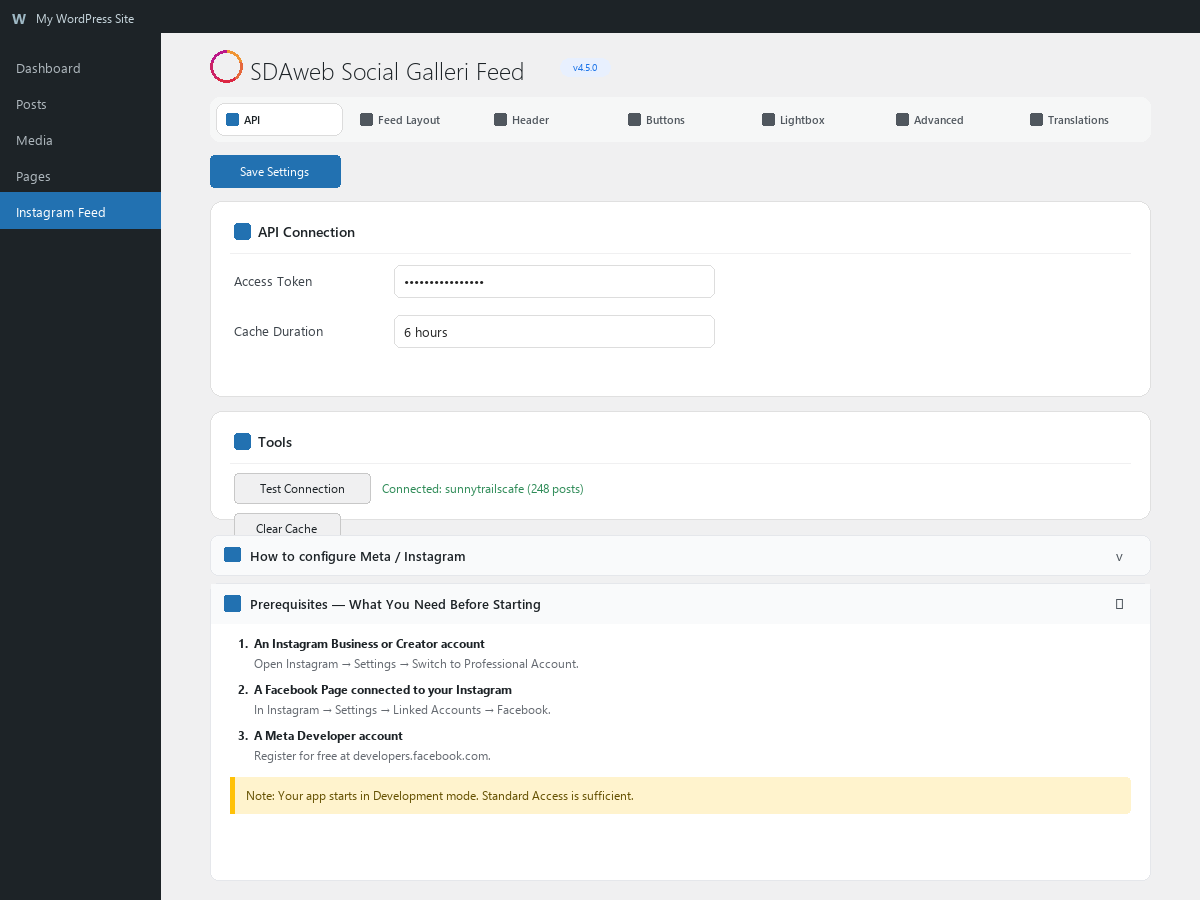


ブロック
このプラグインは1個のブロックを提供します。
- Social Galleri Feed Display your Instagram feed as a responsive gallery.
インストール
- Upload the
sdaweb-social-galleri-feedfolder to/wp-content/plugins/ - Activate the plugin through the Plugins menu
- Go to Social Galleri > Accounts tab
- Click Add Account, enter a label and paste your Facebook Page Access Token
- The plugin tests the connection and caches your feed automatically
- Add
[sdawsoga_gallery]to any page or post - For multiple accounts, use
[sdawsoga_gallery account="slug"]
For token setup instructions, see the built-in setup guide in the Global tab.
FAQ
-
Can I connect multiple Instagram accounts?
-
Yes. Go to the Accounts tab and add up to 20 accounts, each with its own token. Use
[sdawsoga_gallery account="slug"]to display a specific account. The Shortcode Builder lets you select accounts visually. -
Why do likes and comments show 0?
-
The Instagram Graph API only returns engagement metrics for accounts owned by the token holder.
-
Can I use multiple feeds on the same page?
-
Yes. Use the
feed_idattribute:[sdawsoga_gallery feed_id="homepage"]. Each feed operates independently. Combine withaccountfor different accounts:[sdawsoga_gallery account="oslo" feed_id="sidebar"]. -
How do I change the language?
-
Go to Social Galleri > Translations and update any string.
-
Does it work with page builders?
-
Yes. The shortcode works in Elementor, WPBakery, Divi, and any builder that supports WordPress shortcodes. A Gutenberg block is also available.
-
How fast does the feed load?
-
Feed data is embedded in the page HTML when the cache is warm (nearly always, thanks to per-account WP-Cron background refresh), so it loads instantly with zero network requests.
-
What Facebook Graph API permissions do I need?
-
Four permissions:
instagram_basic,pages_show_list,pages_read_engagement, andinstagram_manage_insights. All four are required for the feed — the plugin reads your posts through the Graph API Business Discovery endpoint, which needs the insights scope (it is also used by Stories). Omittinginstagram_manage_insightscauses a “(#10) Application does not have permission for this action” error when the feed loads. The setup guide in the plugin admin lists all of these with step-by-step instructions for Graph API Explorer. -
Can I extend the plugin from my theme or another plugin?
-
Yes. The plugin exposes 21 documented WordPress filter and action hooks covering rendering, post filtering, API data, SEO schema, and lifecycle events. Full documentation with copy-paste examples lives in
docs/hooks.mdinside the plugin folder. Examples include: rewriting Instagram CDN thumbnails through your own image proxy, overriding the gallery template from your theme, post-processing captions to embed YouTube links, and busting your page cache when the feed refreshes. All hooks are stable within the 5.x major version.
評価
このプラグインにはレビューがありません。
貢献者と開発者


“SDAweb Social Galleri Feed” をあなたの言語に翻訳しましょう。
開発に興味がありますか ?
変更履歴
The most recent releases are listed here. The complete history is in changelog.txt in the plugin folder.
5.3.14
- Fixed: on sites with a page cache (LiteSpeed Cache, WP Super Cache, Cloudflare …) the gallery could stop loading for all logged-out visitors until the cache was purged. It happened when a page was cached while the Instagram posts were not yet built into it — right after adding an account, or while Instagram was unreachable: the security codes in the cached page expire after 12–24 hours, and WordPress then refused the gallery’s own request. Logged-out visitors no longer send such a code — the feed is public, read-only data — so an old cached page keeps working. Nothing changes for logged-in users.
- Fixed: after an image failed to load, “Load more” showed one post twice.
- Fixed: a post that Instagram delivers without a picture address (it does that for some flagged or copyrighted content) made the browser request a non-existent page on your site on every page view, and showed as a broken image in the lightbox. Such posts, and such slides inside an album, are now left out.
- Fixed: when the gallery could not be loaded, the error message was written and then hidden again at once, so visitors and administrators saw an empty area. The message — the “error” text under Translations — is now shown, and announced to screen readers.
- The complete version history has moved to changelog.txt in the plugin folder; this section lists the most recent releases.
5.3.13
- Security hardening: two old copies of the Instagram access token are now removed. (1) Sites that upgraded from 4.x to 5.0 kept the original single-account token after it was copied to the new account; if an administrator later deleted every account, the plugin quietly started using that old token again. It is now deleted once the accounts have their own token, and when all accounts have been removed. (2) Sites that once ran a release older than 4.6 still had that release’s token stored unencrypted under its old option name. It is now deleted.
- Fixed: deleting the plugin never removed the options of releases older than 4.6 (including that unencrypted token), because the clean-up checked a flag it had just deleted. They are now removed — but only when they are recognisably this plugin’s own, so another plugin’s settings that happen to share the short old prefix are never touched.
- Deleting the plugin now also removes the short-lived markers introduced in 5.3.12.
- No visible changes and no settings to review.
5.3.12
- Fix: limit=”X” on the shortcode (and “Posts to show” in the block) had no effect — the per-device post counts from the settings always won. An explicit limit now sets a fixed count on every screen size, as the settings page always described. If your shortcode contains a limit, the gallery will show that number of posts after this update.
- Fix: columns=”X” on the shortcode (and “Columns” in the block) had no effect. An explicit value now sets the column count on desktop and laptop screens and caps the smaller breakpoints, so a gallery never shows more columns on a tablet than on a desktop. If your shortcode contains columns, the layout will follow it after this update.
- Changed: in the block, “Posts to show” and “Columns” now default to 0 = “use the per-device values from the plugin settings”. Existing blocks that were left at the old defaults (9 / 3) keep looking exactly as they do today.
- Fix: every apostrophe in a lightbox caption was corrupted — “It’s” appeared as “It&”, a link “#39” and “;s”.
- Fix: hashtags and mentions with non-English letters were cut at the first such letter — “#søndag” became a link “#s” followed by plain “øndag”. Hashtags and mentions are now fully Unicode-aware, email addresses are no longer turned into mentions, and links are URL-encoded.
- Fix: when an account’s fetch kept failing (for example a token without the instagram_manage_insights permission), every page view by every visitor ran the full Instagram request sequence again — twice. A failed fetch is now remembered for five minutes; scheduled refreshes, “Refresh now” and “Clear cache” are unaffected.
- Fix: an unexpected response from Instagram without feed data was stored as an empty gallery and written over the backup copy. It is now treated as a failure, and an empty result never replaces a backup that contains posts.