説明
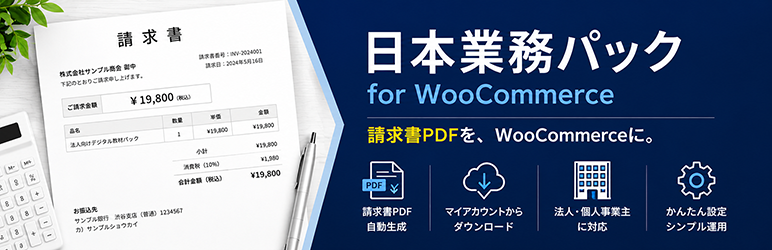
「Neutrope Japanese Invoice PDFs for WooCommerce」は、WooCommerce の注文から日本向けの請求書 PDF を生成する無料プラグインです。WooCommerce ストアで、請求書や同様の受領書類など、日本の商習慣に対応したビジネス文書を発行する必要があるショップ向けに設計されています。
機能 (無料版)
- 請求書 PDF の生成 (表題、請求先情報、明細、合計、消費税の概要)
- 管理画面の注文編集画面からワンクリックで PDF を出力
- 顧客がマイアカウントから請求書をダウンロード可能 (有効と無効を切り替え可能)
- 設定画面で会社名、住所、ロゴを設定可能
- 請求書 PDF の合計金額に送料と返金を反映
- 売上サマリー画面 (「WooCommerce 売上サマリー」): WooCommerce アナリティクスのキャッシュに依存せず、注文データから直接集計します。期間、注文ステータス、支払い方法での絞り込み、注文日、支払日、完了日による集計、返金を反映した純額、注文一覧、UTF-8 (BOM) 形式の CSV エクスポートに対応します。
- 高パフォーマンス注文ストレージ (HPOS) に対応
- mPDF による日本語 PDF 出力
- テーマからテンプレート (
templates/invoice.php) を上書き可能
予定しているロードマップ (提供時期の確約なし)
以下の項目は、将来の有料版での提供を検討しているものです。無料版には実装されておらず、提供を保証するものでもありません。
- 適格請求書発行事業者登録番号 (日本のインボイス制度)
- 税率別表示 (10% / 軽減税率8%)
- 領収書
- 銀行振込情報
- 支払期限
- 社印、ヘッダー注記、宛名の敬称
無料版プラグインにはフィルターとフックが用意されているため、コアを変更せずにアドオンプラグインから上記の機能を追加できます。
クレジット / サードパーティライセンス
このプラグインには、以下のサードパーティ製ソフトウェアとフォントが同梱されています。
- mPDF: GPL-2.0-or-later。PDF レンダリングエンジンです。https://mpdf.github.io/
- Noto Sans JP: SIL Open Font License 1.1。請求書 PDF の日本語テキストに使用しています。
ライセンス全文はassets/fonts/OFL.txtに同梱されています。https://fonts.google.com/noto
IPA フォントは GPL 互換ではないため採用していません。同梱物を GPL 互換に保つため、OFL の Noto Sans JP を使用しています。 - DejaVu Sans Condensed: Bitstream Vera Fonts License / パブリックドメイン。
mPDF が内部のサンセリフフォールバックとして必要とするため、4ファイル (DejaVuSansCondensed.ttf / -Bold / -Oblique / -BoldOblique) を同梱しています。
ライセンス全文はassets/fonts/DejaVu-LICENSE.txtに同梱されています。https://dejavu-fonts.github.io/
スクリーンショット


インストール
Server requirements
- PHP 7.4 or later
- PHP extensions mbstring and gd (required by the bundled mPDF library)
- WooCommerce 7.0 or later, active
Steps
- Upload the plugin ZIP and activate it. The distribution ZIP already bundles the PDF library and the Japanese font, so
composer installis not required. - Confirm that WooCommerce is active.
- Open WooCommerce > Japanese Invoice PDFs and fill in your company name, address, and logo.
- Open any order from the admin and click the invoice button in the “Japanese Invoice PDFs” meta box.
For developers: the distribution ZIP excludes vendor/mpdf/mpdf/ttfonts via .distignore. If you run the plugin from source, run composer install first. The distribution ZIP can be rebuilt locally with powershell -File bin/build-zip.ps1. CI builds the same ZIP via GitHub Actions.
FAQ
-
Is WooCommerce required?
-
Yes. The plugin shows an admin notice and disables itself when WooCommerce is not active.
-
Can other people download my invoices?
-
No. Downloads from My Account require login, ownership of the order is enforced, and a nonce is verified.
-
Are PDFs stored on the server?
-
No. Every PDF is generated on demand and streamed to the browser, so there are no leftover files that could be linked directly.
-
Japanese characters look like garbled text
-
The plugin bundles Noto Sans JP (OFL 1.1), so no extra setup is needed. If you still see broken characters, verify that the PHP
mbstringandgdextensions are enabled on your server. -
Amounts display with decimals like “¥2,400.00”
-
The plugin follows the WooCommerce currency settings. To hide decimals for JPY, set WooCommerce > Settings > General > Number of decimals to 0.
-
Recipient name order and the “Japan” suffix in the address
-
Name order, honorifics (sama, onchu, etc.) and country labelling are roadmap items. The free version uses WooCommerce default formatting.
-
Can I customize the template?
-
Yes. Copy
templates/invoice.phptowp-content/themes/<your-theme>/neutrope-japanese-invoice-pdfs-for-woocommerce/invoice.phpto override it.
評価
このプラグインにはレビューがありません。
貢献者と開発者
Neutrope Japanese Invoice PDFs for WooCommerce はオープンソースソフトウェアです。以下の人々がこのプラグインに貢献しています。
貢献者
変更履歴
1.1.1
- Add: completed date as a Sales Summary aggregation basis. Shops that mark orders completed when shipped can use completed date as a shipping-date report, while the existing default order-date behavior remains unchanged.
- Add: completed date to the Sales Summary order list and CSV export.
- Dev: expose the
wcjbp_sales_summary_date_basesfilter for safe date-basis label customization. Query keys remain limited to order date, paid date and completed date.
1.1.0
- Add: Sales Summary screen under WooCommerce > 売上サマリー. Aggregates orders directly from WooCommerce order data (HPOS compatible) without relying on WooCommerce Analytics caches. Filter by date range, order status (default: processing / completed), payment method, and aggregation basis date (order date or paid date). Summary cards (order count, gross/refunded/net totals, goods, shipping, tax, average) use the same refund-aware net logic as the invoice PDF. Includes an order list and a UTF-8 BOM CSV export (capability- and nonce-checked). A safety cap limits aggregation to 2000 orders and shows a warning when exceeded.
1.0.2
- Fix: account for refunds in invoice PDF totals. Refunded orders now show refund line(s) (負の金額) in the item table and compute the subtotal, tax, and total from the net (post-refund) amounts, so the PDF matches WooCommerce’s refunded totals. Handles product, shipping, and manual refunds, tax and tax-free, and multiple refunds. Orders without refunds are unchanged.
1.0.1
- Fix: include shipping lines in the invoice PDF. Orders with a shipping cost now show a “送料(配送方法名)” row in the item table so the itemized rows reconcile with the subtotal and total. Zero-cost shipping is not shown; multiple shipping lines are supported.
1.0.0
- Initial release (free MVP).
- Invoice PDF generation, admin output, My Account download, settings screen, HPOS compatible.