

説明
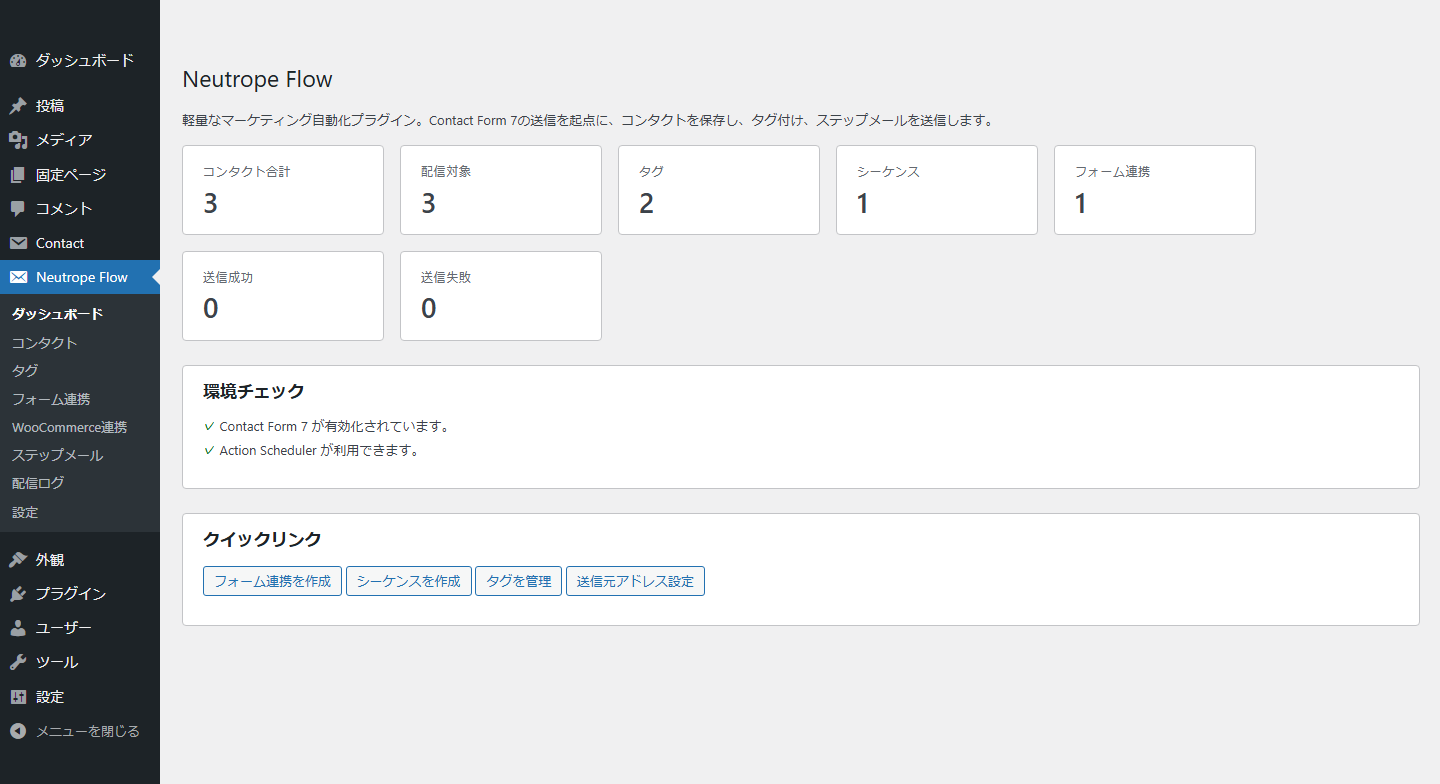
Neutrope Flow は、サイト所有者が自分の WordPress 環境で連絡先を管理し、予約したフォローアップメールを送信できるようにします。
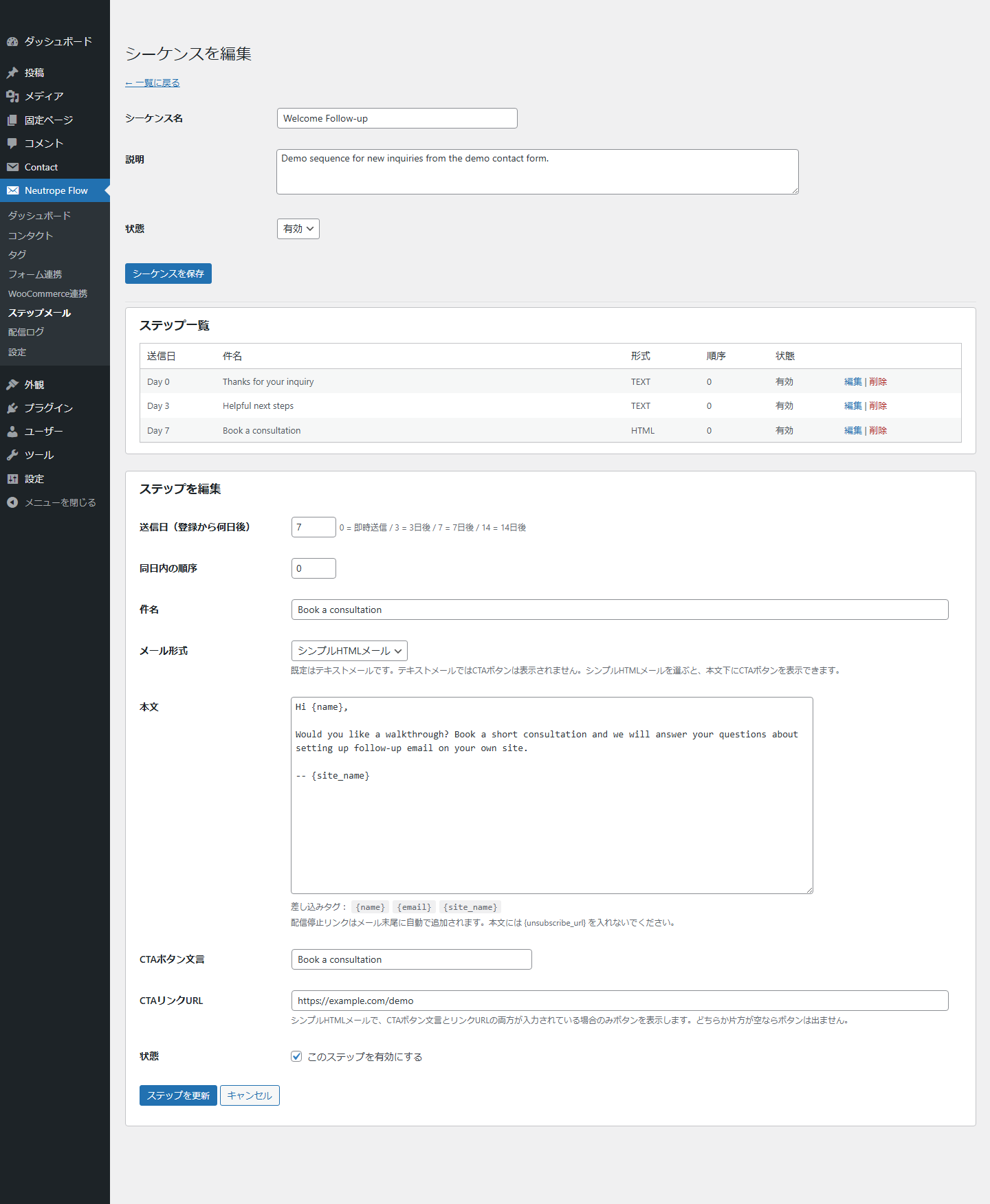
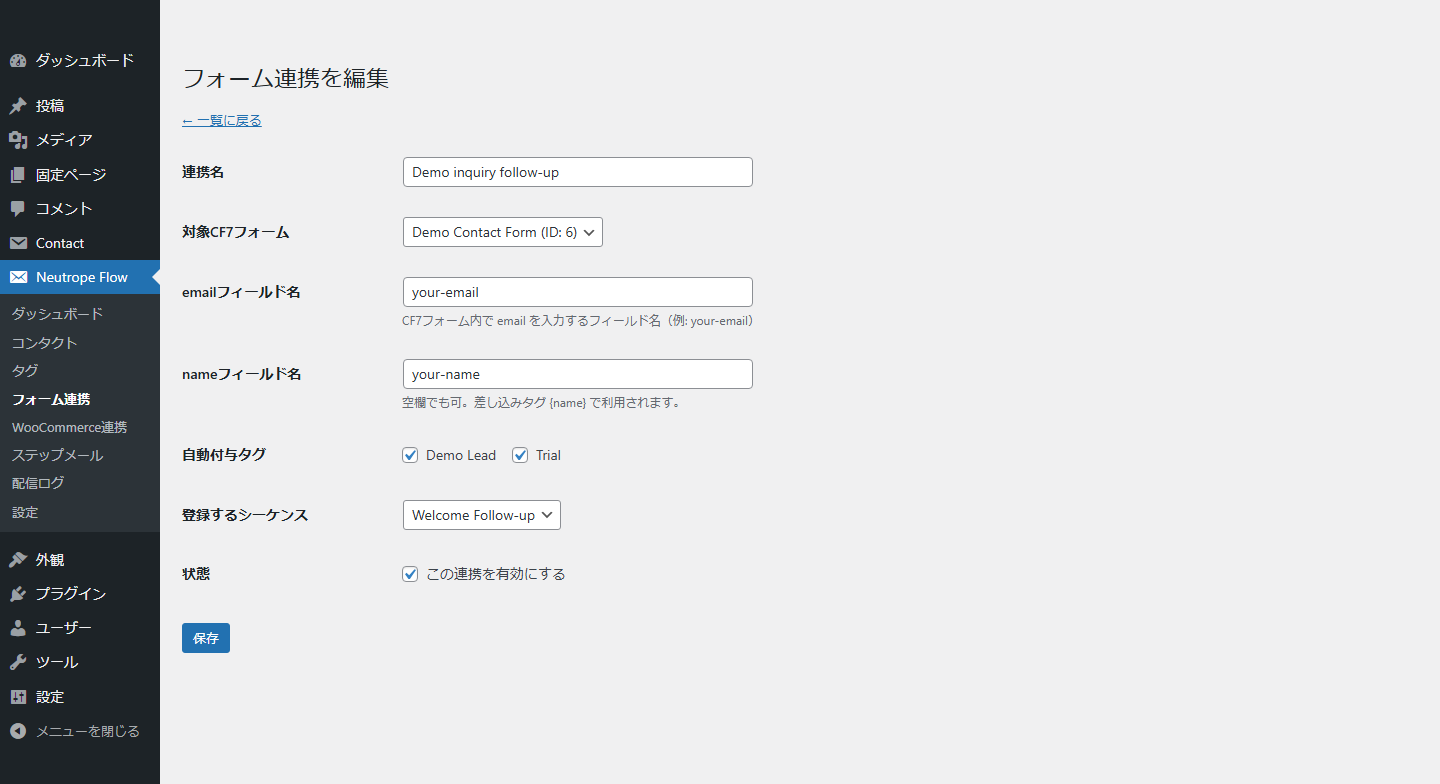
設定した Contact Form 7のフォーム送信または WooCommerce の注文イベント後に、連絡先を作成または更新できます。マッピングによってタグを追加し、その連絡先をメールシーケンスへ登録できます。各シーケンスには、即時送信のメールと数日後に送信するメールなど、1つ以上のステップを設定できます。
メールは WordPress の wp_mail() を通じて送信されます。Neutrope Flow は SMTP サービスやメール配信事業者ではありません。配信は WordPress サイトのメール設定に依存します。予約送信の時刻も Action Scheduler または WP-Cron に依存するため、アクセスの少ないサイトでは指定時刻どおりに実行されない場合があります。
主な機能
- 連絡先の名前とメールアドレスを、WordPress データベース内の専用テーブルに保存します。
- タグを使用して連絡先を整理します。
- テキストまたはシンプルな HTML 形式のフォローアップメールシーケンスを作成します。
- 設定した Contact Form 7のフォーム送信からシーケンスを開始します。
- 設定した WooCommerce の注文イベントからシーケンスを開始します。
- 利用可能な場合は Action Scheduler で後続ステップを予約し、利用できない場合は WP-Cron を使用します。
- シーケンスメールに配信停止リンクと List-Unsubscribe ヘッダーを追加します。
- 配信停止済みの連絡先を除外し、同じステップの重複配信を防止します。
- ログ記録を有効にすると、配信結果をサイト内のログへ記録します。
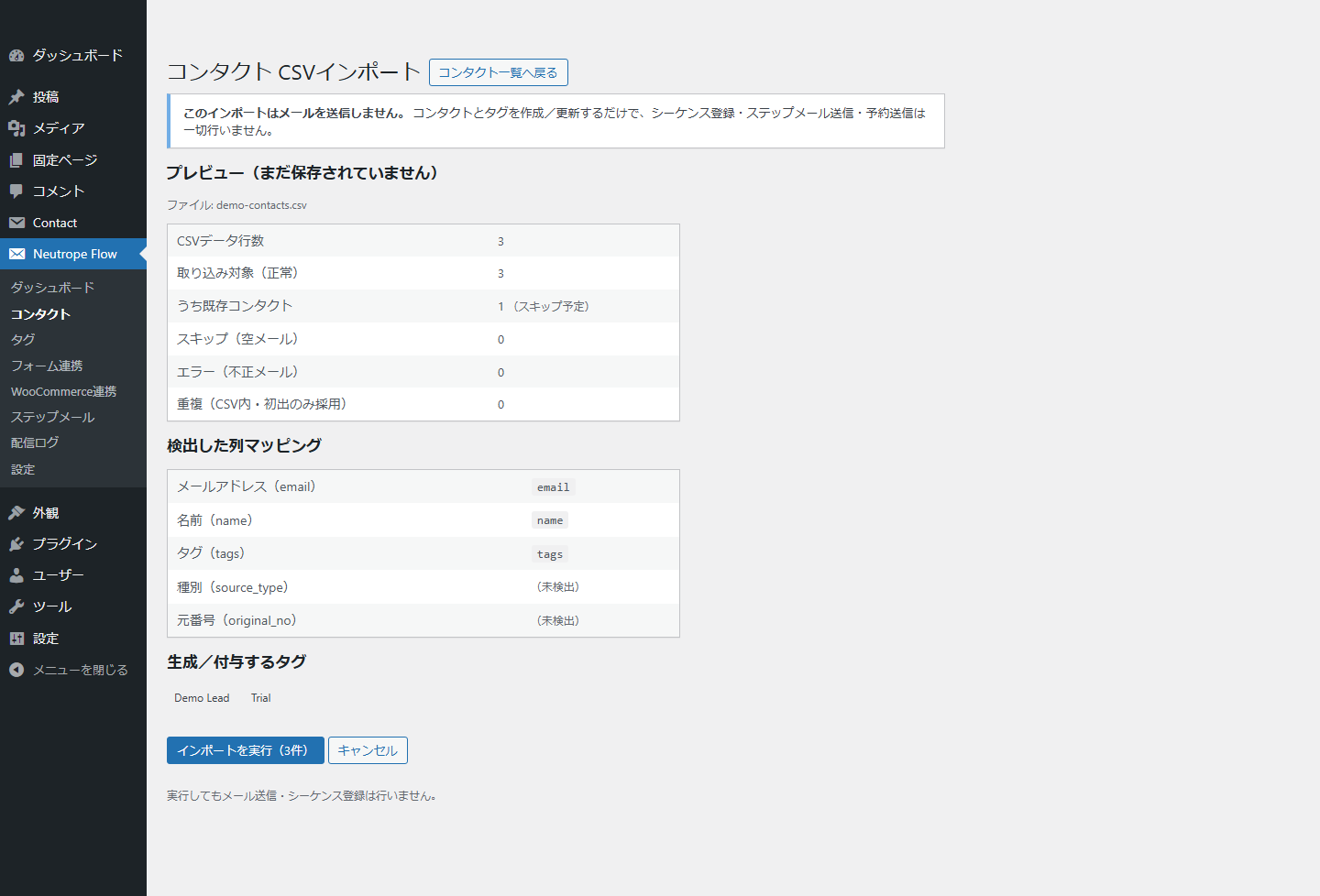
- メール送信やシーケンス登録を行わずに、UTF-8形式の CSV ファイルから連絡先とタグをインポートします。
- 対象となる CTA リンクへ、任意で UTM パラメーターを追加できます。このオプションは初期状態では無効です。
- 送信成功後、対応するローカルレポート拡張機能向けに、受信者情報を含まないキャンペーンテンプレートのコンテンツスナップショットを出力します。
外部サービスとトラッキング
Neutrope Flow は、外部への API リクエストを行わず、API キーも必要としません。連絡先データを Neutrope やその他の外部サービスへ送信することもありません。
オプションの UTM 機能は、送信メール内の対象リンクにパラメーターを追加するだけです。Google アナリティクスへ接続したり、解析データを送信したりすることはありません。
メール配信は、サイトの WordPress メール設定によって処理されます。サイトが SMTP またはトランザクションメール用プラグインを使用している場合、そのプラグインは、独自の利用規約とプライバシーポリシーに基づいて、設定されたサービス提供者へデータを送信することがあります。
プライバシー
Neutrope Flow は、連絡先のメールアドレス、名前、流入元情報、タグ、シーケンス設定、配信ログの詳細、ランダムに生成された配信停止トークンを、サイトの WordPress データベースに保存します。IP アドレスは保存せず、これらのデータを Neutrope に送信することもありません。
送信に成功すると、プラグインは、正規化されたシーケンスステップの件名、本文、形式、CTA、送信時刻、UTM メタデータを、対応するローカル拡張機能へ通知できます。このキャンペーンテンプレートのスナップショットには、連絡先 ID、受信者のメールアドレス、受信者名、受信者向けに生成された本文、配信停止 URL、配信ログの受信者フィールドは含まれません。
サイト所有者には、フォローアップメールに必要な同意を取得し、適切なデータ保持期間を設定し、この処理をプライバシーポリシーに記載する責任があります。プラグインを削除すると、設定と独自のデータベーステーブルも削除されます。
スクリーンショット
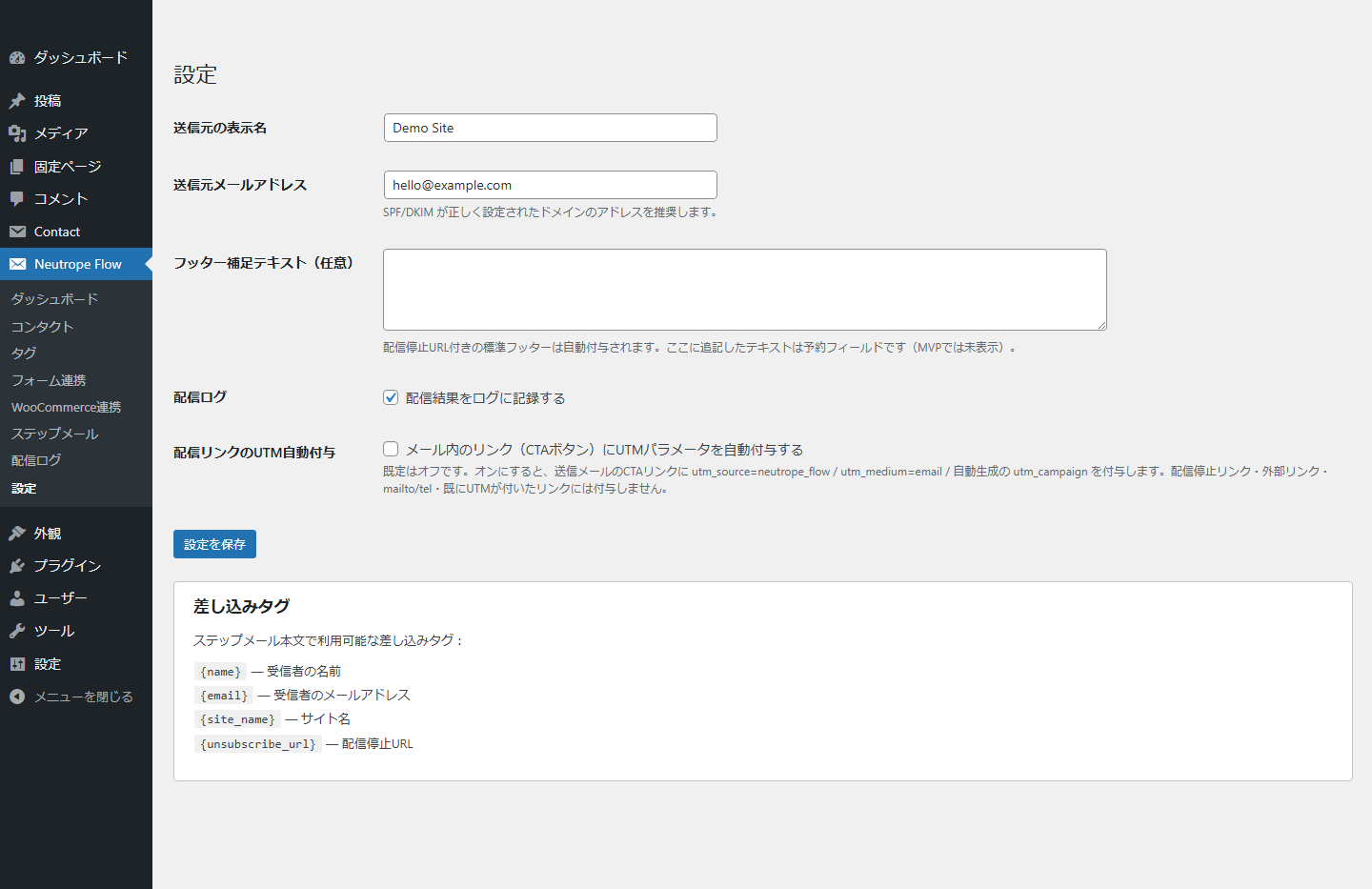
インストール
- Upload the
neutrope-flowfolder to/wp-content/plugins/, or install the plugin ZIP through the WordPress Plugins screen. - Activate Neutrope Flow.
- Open Neutrope Flow > Settings and review the sender address and logging options.
- Create tags and an email sequence, then configure a Contact Form 7 or WooCommerce mapping.
- Send a test message using a non-production recipient before enabling a mapping for live submissions.
Contact Form 7 is required only for Contact Form 7 mappings. WooCommerce is required only for WooCommerce mappings. Action Scheduler is optional; Neutrope Flow falls back to WP-Cron when it is unavailable.
FAQ
-
Does Neutrope Flow provide an email delivery service?
-
No. It sends through WordPress
wp_mail(). Configure WordPress mail or a compatible SMTP plugin separately and test delivery before using a sequence. -
Does CSV import send email or enroll contacts in a sequence?
-
No. CSV import only creates or updates contacts and tags. The preview and result screens explicitly confirm that no email or sequence enrollment is performed.
-
Does the plugin connect to Brevo, Google Analytics, or another API?
-
No. Neutrope Flow makes no outbound API requests and stores no API keys. Optional UTM parameters may later be processed by an analytics system already used by the site, but the plugin does not connect to that system.
-
How are follow-up emails scheduled?
-
Action Scheduler is used when available. Otherwise, Neutrope Flow uses WP-Cron. WP-Cron runs when WordPress receives traffic, so delivery may occur later than the configured time on low-traffic sites.
-
How does unsubscribe work?
-
Each contact receives a random unsubscribe token. Sequence emails include a visible unsubscribe link and List-Unsubscribe headers. Unsubscribed contacts are excluded from later sequence deliveries.
-
What personal data is stored?
-
The plugin can store a contact’s email address, name, source metadata, tags, delivery-log details, and unsubscribe token. Data stays in the site’s WordPress database. The plugin does not store IP addresses or transmit contact data to Neutrope.
評価
このプラグインにはレビューがありません。
貢献者と開発者

変更履歴
0.4.9
- Added a recipient-free campaign-template content snapshot event after successful email dispatch.
- Added stable monthly source references, canonical subject/body/format/CTA/UTM metadata, and a deterministic SHA-256 content hash for compatible local reporting extensions.
- Added request-local duplicate suppression and listener-exception isolation so snapshot consumers cannot interrupt email delivery.
- Added no database migration and no dependency on a reporting plugin.
0.4.8
- Standardized admin request, nonce, upload, and transient identifiers with the full plugin-specific prefix.
- Added nonce validation to the central admin action router before dispatching any handler.
- Re-audited enqueued assets, admin permissions, unsubscribe confirmation, and prepared SQL identifiers.
0.4.7
- Removed invalid plugin and author URL headers for WordPress.org review.
- Replaced inline unsubscribe-page CSS with WordPress enqueue APIs.
- Added nonce validation for admin edit links that read GET parameters.
- Renamed the admin notice transient key to a longer plugin-specific prefix.
- Updated database queries to use prepared identifier placeholders where supported.
- Raised the minimum WordPress version to 6.2 for prepared identifier placeholder support.
0.4.6
- Prepared the plugin for WordPress.org review.
- Rewrote the readme in English and added screenshot captions.
- Renamed internal PHP classes to longer Neutrope_Flow_* names.
- Audited database-query warnings and clarified fixed internal table usage.
- Added uninstall cleanup for WooCommerce mapping data and fallback cron cleanup.
- Added WordPress 7.0 smoke-test verification.
0.4.5
- Added a two-step CSV contact import with preview and explicit confirmation.
- Added UTF-8 validation, row and file-size limits, column detection, duplicate handling, and tag import.
- CSV import does not send email, enroll sequences, or schedule delivery.
0.4.4
- Added extension hooks for reporting integrations.
- Added optional UTM parameters for eligible CTA links. The setting is disabled by default.
0.4.3
- Improved List-Unsubscribe header compatibility across WordPress mail transports.
0.4.2
- Added RFC 8058 one-click unsubscribe support.
0.4.1
- Added a confirmation step for visible unsubscribe links.
0.4.0
- Added simple HTML email and CTA button support.
0.3.0
- Added built-in sequence templates.
0.2.0
- Added WooCommerce order mappings.
0.1.0
- Initial release.