

説明
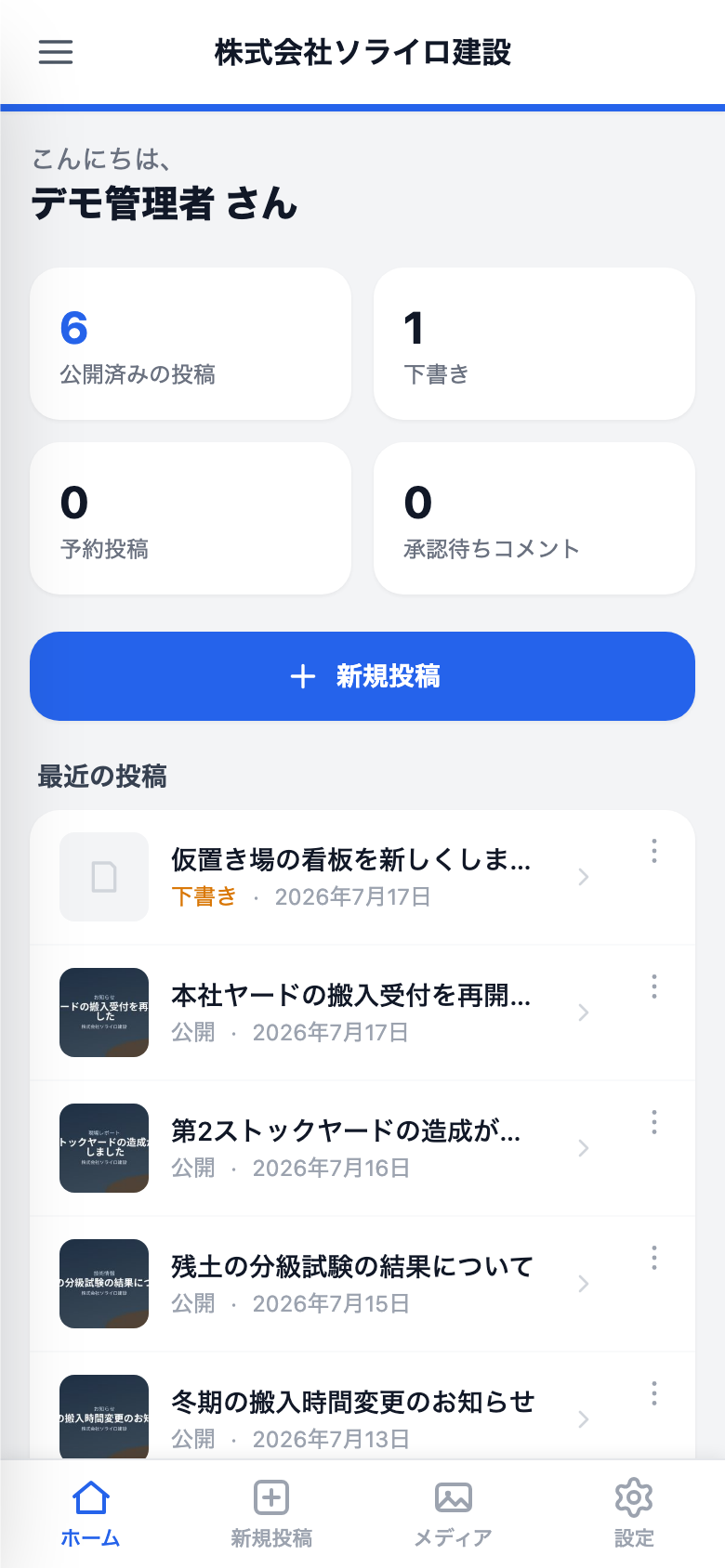
ASB Smart Flow は、WordPress の管理画面を片手で扱える速いモバイル体験に変え、AI で書く流れを足します。スマホで /mobile-admin/ を開くと、窮屈な wp-admin ではなくアプリのような画面が出ます。機能はすべて 1 つの無料版に入っています。有料プランもライセンス認証もありません。
できること
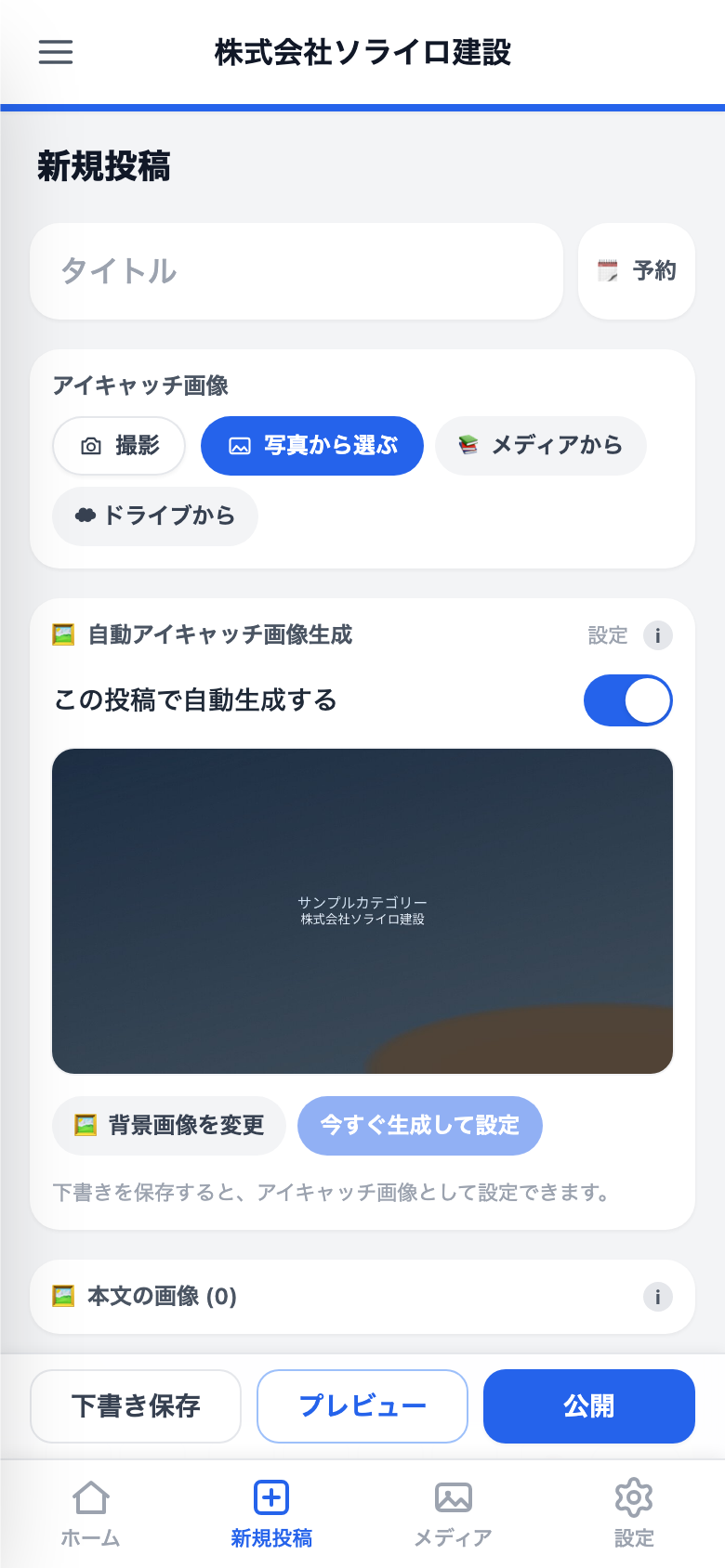
- 下部のタブバー — [ホーム] [新規投稿] [メディア] [設定] に、親指で届きます。
- スマホ向けアップローダー — カメラと複数選択に対応。アップロード前に端末側で縮小・圧縮して、通信量を抑えます。
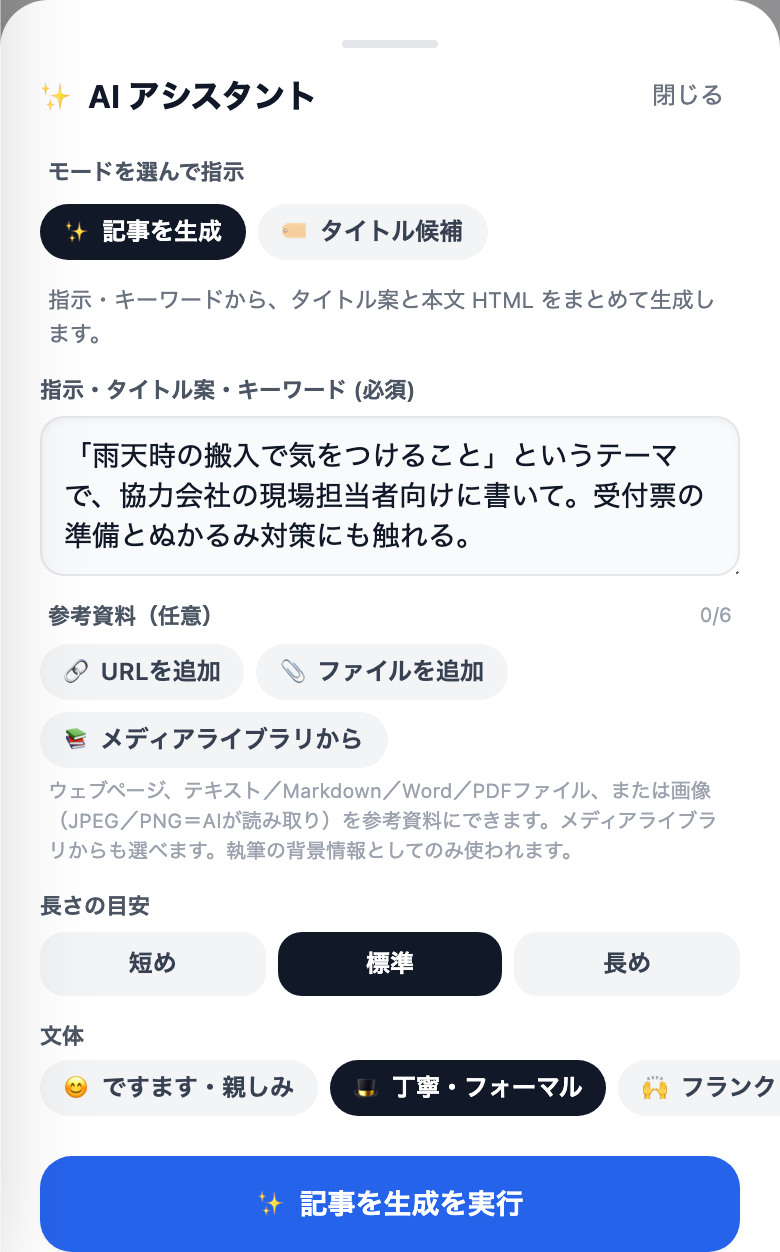
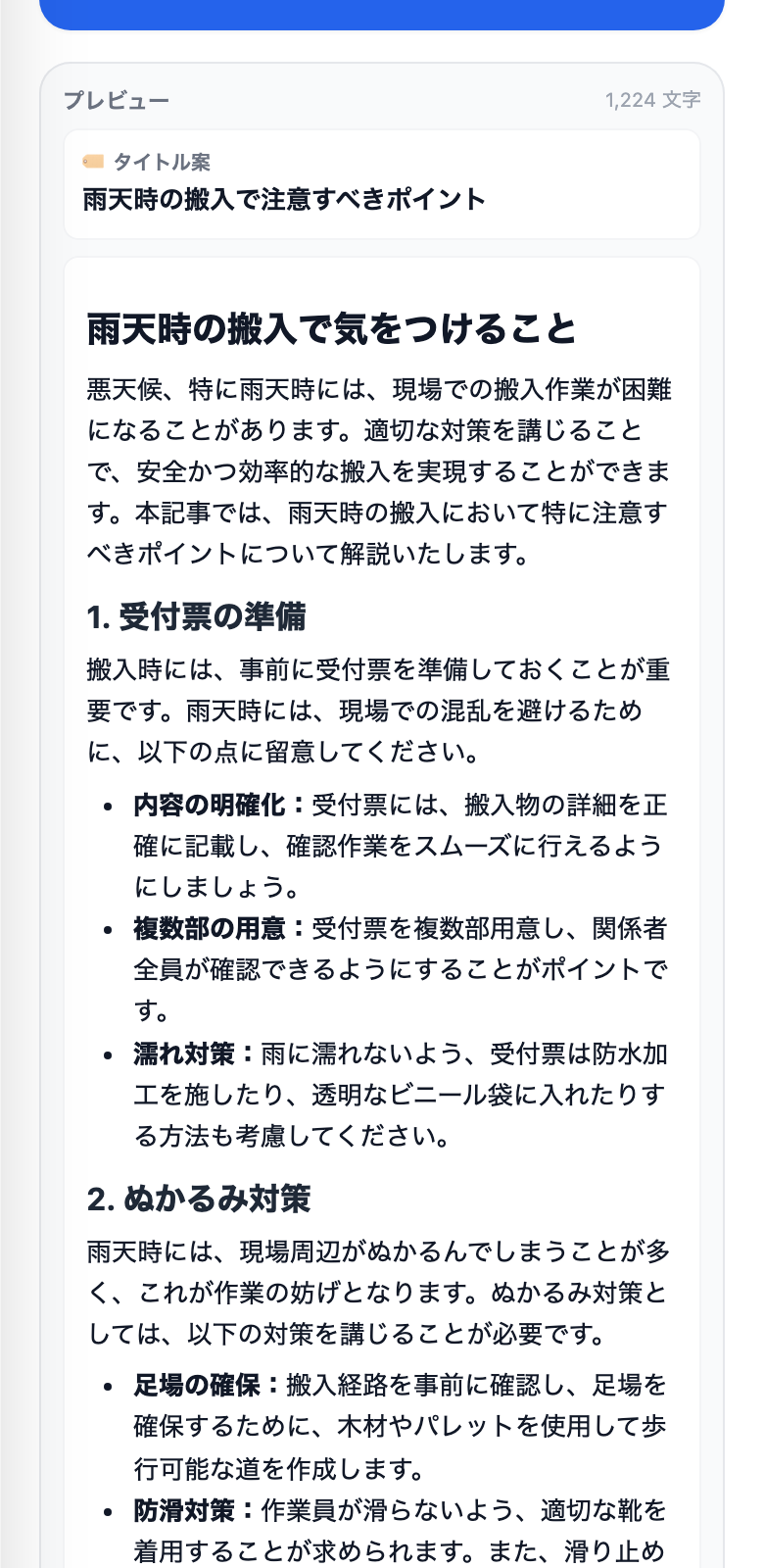
- AI 執筆 (BYOK) — OpenAI、Google Gemini、Anthropic Claude のうち、ご自身の API キーで、生成・リライト・要約・校正・タイトル案の作成ができます。当社のサーバーを経由することはなく、リクエストはあなたの WordPress から選んだ提供元へ直接送られます。
- 部分修正 — 書き直しではなく「ここを直して」と頼めます。AI は段落ごとに変更案を出し、採用するかどうかは一つずつ選べます。採用しなかった所は、書いたとおりに残ります。
- かんたん投稿とテンプレート — 穴埋め式の投稿テンプレート、文体プリセット、クイック指示。どれも AI タブから編集できます。
- 絵文字トレイと定型文 — よく使う絵文字と、署名・営業時間・ハッシュタグなどの定型文を、ワンタップで挿入できます。
- パスキーログイン (WebAuthn / FIDO2) —
/mobile-admin/loginから、スマホの顔認証や指紋でログインできます。パソコンでは、内蔵の認証機能 (Touch ID / Windows Hello) がある場合にwp-login.phpへパスキーのボタンが出ます。無い場合は、いつもどおり WordPress のパスワードでログインします。 - 音声入力 — 投稿画面のマイクをタップして話すと、聞き取った文字がカーソル位置に入ります。ワンタップで AI が読みやすい文章に整えます (BYOK)。
- コメントの管理 — 承認・未承認・返信・ゴミ箱への移動を、スマホからそのまま行えます (権限のあるアカウントの場合)。
- オフラインの下書き保護 — 未送信の変更を端末内に控えておき、通信が切れたときや誤って閉じたときに、復元を提案します。
- 本文画像と
[asbsmfl-img]/[asbsmfl-gallery]ショートコード — ツールバーからカーソル位置に画像や段組みギャラリーを挿入し、「本文画像」パネルで画像ごとの幅 (100 / 50 / 33 / 25%) とキャプションを調整できます。 - パソコンでも AI — 同じ AI エディターが、投稿編集画面の「✨ AI で記事を書く」メタボックスと、wp-admin の AI タブにもあります。
- サイトのアクセントカラー — サイトごとの識別色を決めると、ヘッダーや主要なボタンに反映されます (プリセットと、自由な 16 進数指定)。
- ハンバーガーメニュー — ふだんあまり使わない wp-admin の各所へ、すぐ移動できます。
- 自動リダイレクト (任意) — スマホから wp-admin を開いた人を、モバイル画面へ送ります。
- モバイル URL の QR コード — 「設定 一般」に QR コードと PNG のダウンロードがあり、パソコンからスマホへリンクを渡せます。
- 日本語・英語の画面 — React アプリと管理画面は完全に翻訳済みです。ほかの言語では英語になります。
- HTTPS 必須 — 安全でない接続では動作しません。
ASB プラグインファミリーとの連携
ASB Smart Flow は姉妹プラグインを自動で見つけ、新規投稿画面の「📢 配信と連携」アコーディオンに、投稿ごとの切り替えをまとめて表示します:
- ASB PWA Engine — 投稿ごとのプッシュ通知の切り替え。
- ASB Calendar Advance — カレンダーへの表示と、Google カレンダーのボタン。
- ASB LINE Notification — LINE への配信。画像・サムネイル・画像優先の切り替え付き。
- ASB Post Thumbnail Pro — 投稿ごとに有効・無効を上書きできます。
- Jetpack Publicize — 有効なときに自動で認識します。
これらの連携は、各姉妹プラグインの無料版でも Pro 版でも動作します。姉妹プラグインの Pro 版では、予約投稿や画像の自動化などが追加されます。さらに広げたい場合は https://shop.asobit.jp/ をご覧ください。
AI とデータの流れ
ASB Smart Flow が AI 提供元を呼ぶのは、あなた自身が API キーを設定し、生成を実行したときだけです。キーはプラグイン内でも、WordPress 7.0 の「設定 コネクター」からサイト全体でも設定できます。キーを設定しない無料のままなら、外部への通信は発生しません。
AI は既定で管理者のみが使えます。リクエストにはサイト運営者の API キーが使われるため、ほかの権限グループが AI を使うには、管理者が「権限と AI」タブで明示的に許可する必要があります。
- API キーはご自身のサイト内で暗号化して保存されます (AES、鍵はサイトの
AUTH_KEYから生成)。選んだ提供元以外へ送られることはありません。 - 「生成」を押すと、投稿の内容・指示・選んだ文体が、あなたの WordPress から直接提供元のエンドポイント (
api.openai.com、generativelanguage.googleapis.com、api.anthropic.com) へ送られます。そのデータには、各提供元のプライバシーポリシーが適用されます。 - アソビット合同会社が AI のリクエストを受け取ったり、中継したりすることはありません。
外部サービス
外部サービスへの通信は、その機能を有効にして使ったときだけ発生します。どれも使っていなければ、外部への通信は一切ありません。
- OpenAI (任意・BYOK) —
api.openai.com。送信する内容: 指示文、投稿の本文、添付した参考テキストや画像、そしてご自身の API キー。規約: https://openai.com/policies/ プライバシー: https://openai.com/policies/privacy-policy/ - Google Gemini (任意・BYOK) —
generativelanguage.googleapis.com。送信する内容は上と同じです。規約: https://ai.google.dev/gemini-api/terms プライバシー: https://policies.google.com/privacy - Anthropic Claude (任意・BYOK) —
api.anthropic.com。送信する内容は上と同じです。規約: https://www.anthropic.com/legal/consumer-terms プライバシー: https://www.anthropic.com/legal/privacy - Google ドライブからの画像取り込み (任意) — ドライブから画像を取り込むと、サーバーが
drive.google.com/www.googleapis.comからダウンロードします。さらに Google API キーと OAuth クライアント ID を設定した場合は、ドライブの選択画面を開いたときにブラウザーがapis.google.comとaccounts.google.comから Google Picker SDK を読み込みます。規約とプライバシー: https://policies.google.com/ - 音声入力 — ブラウザー内蔵の Web Speech API を使います。ブラウザーや OS によっては、話した音声がブラウザー提供元の音声認識サービスで処理されることがあります (Chrome なら Google、iOS なら Apple など)。アソビット合同会社には何も送られません。
ソースと翻訳
- コンパイル済み React アプリ (
build/index.js) の元のソースは、プラグイン内のapp-src/に同梱しています。プラグインのフォルダーでnpm install && npm run buildを実行すると作り直せます (@wordpress/scriptsを使用。Tailwind・PostCSS の設定も同梱)。 - 翻訳: WordPress.org の翻訳プラットフォームからのご協力を歓迎します。
スクリーンショット
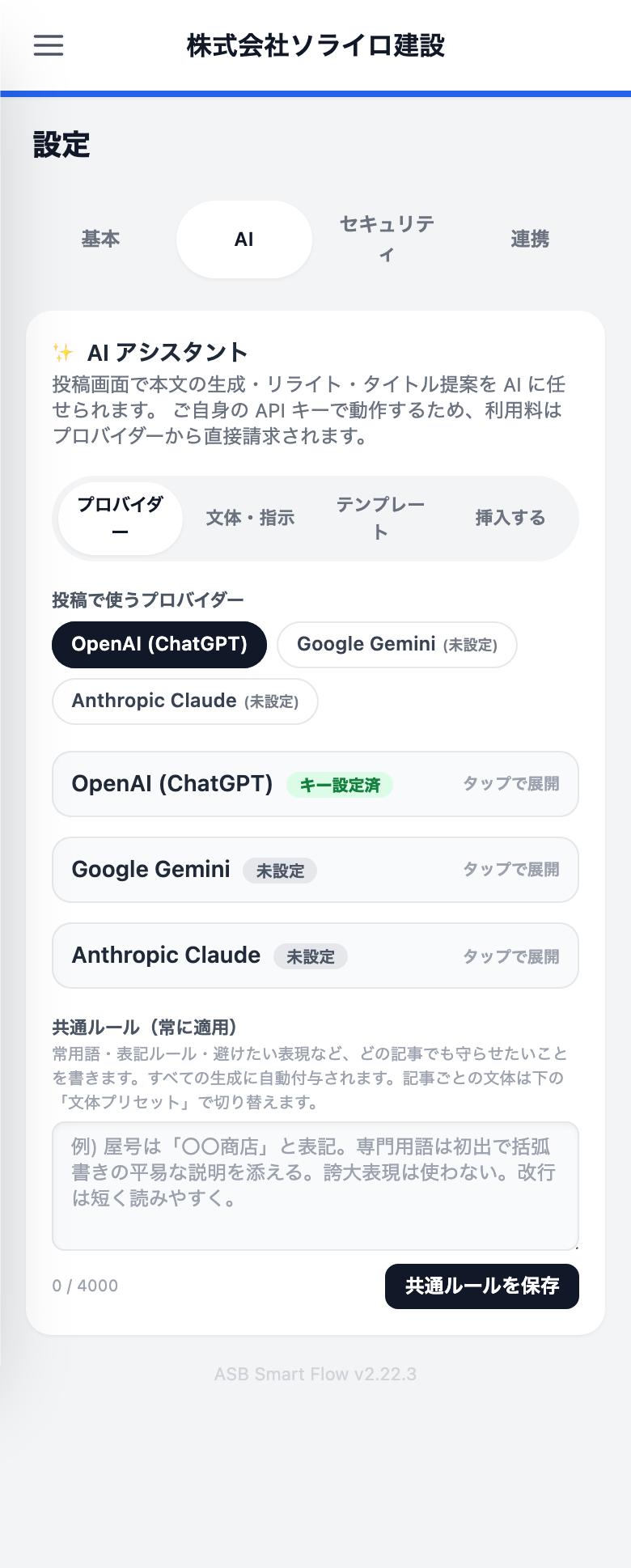
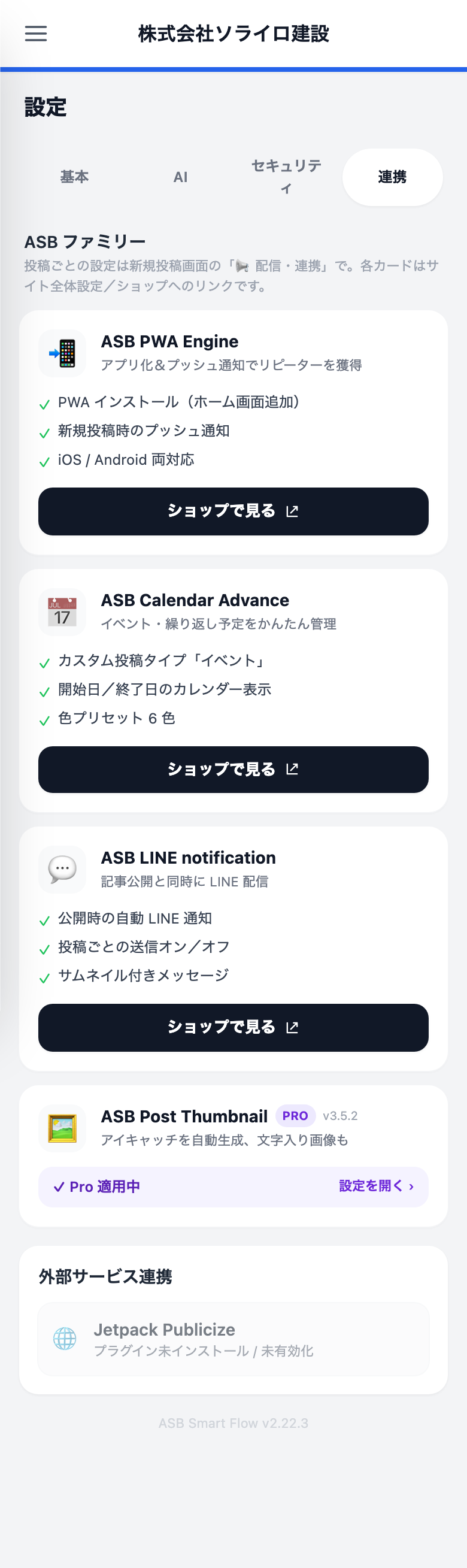
インストール
asb-smart-flowフォルダーを/wp-content/plugins/にアップロードするか、「プラグイン 新規追加」からインストールします。- プラグインを有効化します。
- Open ASB Smart Flow in the wp-admin sidebar and choose your accent color and auto-redirect preference.
- スマホで
https://<your-site>/mobile-admin/を開きます。(「設定 一般」タブに、この URL を直接開く QR コードがあります。)
FAQ
-
モバイル管理は誰が使えますか ?
-
edit_posts権限を持つ、ログイン中のユーザーです。asbsmfl_required_capabilityフィルターで変更できます。 -
`/mobile-admin/` の URL は変更できますか ?
-
まだできません。衝突を避けるため、
mobile-adminというスラッグの固定ページは作らないでください。 -
プラグインは外部へ通信しますか ?
-
設定したときだけです。AI キーを設定していなければ、プラグインのサーバー側から外部への通信は発生しません。例外は、Google ドライブから画像を取り込む操作を明示的に行ったときで、そのファイルを Google からダウンロードします。AI キーを設定している場合、生成の呼び出しは選んだ提供元へ直接送られます。詳しくは「外部サービス」の項をご覧ください。
-
HTTPS は必須ですか ?
-
はい。安全でない接続では画面が表示されません。パスキー (WebAuthn) でのログインにも安全な接続が必要です。(Smart Flow 自体は Service Worker もプッシュ通知も持ちません。それらは姉妹プラグインの ASB PWA Engine の役目です。)
-
どの AI 提供元に対応していますか ?
-
OpenAI、Google Gemini、Anthropic Claude です。どれか 1 つを選び、ご自身の API キーを設定します (BYOK)。WordPress 7.0 以降では「設定 コネクター」に一度保存したキーが自動で使われるので、プラグイン側で入力する必要はありません。プラグインに入力したキーは、Smart Flow の中だけコネクターより優先されます。モデルは提供元ごとの一覧から選べるほか、モデル ID を直接入力することもできます。
-
AI の API キーはどこに保存されますか ?
-
ご自身のサイトの
wp_optionsテーブルに暗号化して保存されます。鍵はサイトのAUTH_KEYから作られ、復号はリクエスト中のメモリ上でのみ行われます。AI タブからいつでも入れ替え・削除ができ、プラグインを削除すると一緒に消えます。 -
翻訳プラグインと一緒に使えますか ?
-
はい。ASB Smart Flow は
languages/にある専用のasb-smart-flow.pot/.po/.jsonを読み込み、get_user_locale()に従います。React 側もwp.i18n.setLocaleData()を呼ぶので、ユーザーごとの言語設定はモバイル画面でも有効です。
評価
このプラグインにはレビューがありません。
貢献者と開発者

変更履歴
2.26.0
- 新機能: 直したい所を指せます。2.25.0 の部分修正も、投稿の一部だけを直してほかはそのままにする機能でした。ただし、どの部分かを「2 番目の見出し」のように言葉で伝える必要があり、AI がそれを探していました。これからは、指すだけで済みます。パソコンのブロックエディターでは、文章のブロック (段落・見出し・箇条書き・引用) それぞれのツールバーに AI のボタンが出ます。押して、どう直すかを伝えると、そのブロックだけが書き直されます。スマホの投稿画面では、部分修正を選ぶと本文が番号付きの一覧で出ます。直したい所をタップしてください。1 つでも、いくつでも選べます。
- 選んだブロックの前後は、流れを見るために AI へ渡しますが、AI が変更することはできません。「ここに例を足して」が前後に自然につながる一方で、選ばなかった所は書いたとおりに戻ります。
- ブロック単位の修正を反映しても、変わるのはそのブロックだけです。窓を開けている間にほかの場所を直していても、そのまま残ります。1 つの段落への指示が 2 つの段落になって返ってくることもありますが、それも問題なく反映されます。
- 場所を選んだ後で本文が変わった場合は、その旨をお知らせして、選び直しをお願いします。今その位置にある文章に、そのまま当ててしまうことはありません。
- 直したい所を言葉で伝えるやりかたは、これまでどおりそのまま使えます。クラシックエディターでは、こちらだけになります。
2.25.0
- 新機能: 部分修正。これまでの AI の操作は、どれも記事をまるごと作り直して返していました。つまり、受け入れるということは、それまでの下書きを捨てるということでした。「部分修正」は、書いた文章を土台にします。直したい所を言葉で伝えると (「2 番目の見出しをもっと具体的に」「最後にまとめを足して」など)、AI は記事を書き直すのではなく、段落ごとに変更案を出します。変更案はカードで並び、上に元の文章、下に提案が出ます。採用するか見送るかは、一つずつ選べます。採用しなかった所は、書いたとおりに戻ります。スマホの投稿画面と、パソコンの投稿編集画面にある「AI で記事を書く」パネルの両方で使えます。
- ブロックエディターでは、触っていないブロックは元のブロックの種類と設定のまま残ります。変更を頼んでいない画像・埋め込み・表・箇条書きが、新しいブロックとして作り直されることはありません。
- 新機能: 途中でやめて、また続けられます。AI に書いてもらうための下ごしらえ、つまり読ませるページ、読ませるファイル、書きかけの指示は、それ自体がひとつの作業です。ところが今までは、それがどこにも残りませんでした。AI パネルの中だけに存在していて、WordPress はタイトルも本文も空の投稿を保存しないため、タブを閉じると下ごしらえは何も言わずに消えていました。参考資料と指示は、投稿そのものに保存されるようになりました。ふつうに「下書き保存」すれば一緒に残り、投稿を開き直せば元に戻ります。投稿の中身が下ごしらえだけのときは、AI パネルに「ここまでを下書き保存」ボタンが出ます。押すと、投稿一覧で見分けられるように、書いた指示から仮のタイトルを付けて保存します。自分で入力したタイトルには触れません。スマホの投稿画面でも、同じ理由で、AI の下ごしらえだけの投稿を「下書き保存」できるようになりました。
- 変更: パソコンの編集画面で、校正と部分修正には文体プリセットを表示しないようにしました。どちらも文体プリセットを使わない作りなので、選んでも何も起きませんでした。
- 修正: 改行のつもりの所に「\n」という 2 文字がそのまま出ていました。3 か所です。本文を AI の下書きで置き換えるか尋ねる確認と、同梱の定型文 2 つ (署名と、予約の案内) です。定型文の場合は、その 2 文字が投稿にそのまま入っていました。AI 設定をすでに保存していたサイトでは、同梱の定型文 2 つが更新時に自動で直ります。自分で編集した定型文は、書いたとおりに残します。
2.24.4
- 修正: 購入とアップグレードのリンクが、すべて存在しないページに向いていました。ショップにはまだ何も公開していないため、「Pro にアップグレード」「ライセンスを購入」のボタンはどれも 404 を返していました。これは未完成のショップというより、壊れたプラグインに見えます。これらのリンクは、実際に販売を始めるまで画面に出さないようにしました。ライセンスで何ができるようになるかの説明は、そのまま残しています。同じ決まりをサイドバーの ASB ファミリーのカードにも広げました。案内できるページができてから表示します。
2.24.3
- Fixed: the mobile app address /mobile-admin/ (and its login page) stopped opening on sites that updated to 2.24.x in place — the address quietly redirected to the home page instead. WordPress caches the whole set of address rules and only rebuilds that cache when a plugin is activated or the Permalinks screen is saved; updating a plugin is neither, so the cached rule still pointed at the internal name the app had before 2.24.0. WordPress discarded the unknown name, the address resolved to nothing, and the visitor was sent to the front page with no error shown anywhere. The plugin now rebuilds that cache as soon as it notices the mismatch.
2.24.2
- Fixed: the “ASB family” cards read the state of sibling plugins wrongly. A plugin that was installed but deactivated was shown as if it were not installed at all, and a Pro edition whose licence was not active was labelled FREE and offered for sale. Both now have their own card, with the right next step (activate the plugin / activate the licence).
- Fixed: siblings running a licensed Pro edition were dropped from the Dashboard family strip entirely, so an installed plugin looked missing. Every family plugin on the site is now listed.
- Added: ASB Smart Guide appears in the family cards on sites where it is installed.
- Fixed: the LINE Notification card listed “messages with thumbnails” as a free feature — sending the featured image is part of its Pro edition.
- Changed: family cards no longer link to WordPress.org pages or shop pages for plugins that are not published or on sale yet. Until each one goes live its card appears only on sites that already have it, as a plain status card.
2.24.1
- Fix: Keep the sibling-plugin panels working after ASB PWA Engine 2.16.0, ASB Calendar Advance 2.14.0 and ASB LINE Notification 2.9.0 moved to their new prefixes. Their post meta, options and helper functions are now resolved at runtime, so Smart Flow works with either the old or the new version of each.
2.24.0
Internal rename requested by the WordPress.org plugin review team: every class, constant, option, hook, script handle and shortcode moved from the asb_sf_ prefix to asbsmfl_, which is long enough to be collision-proof against the other 100,000 plugins in the directory. Behaviour is unchanged.
- Changed: the body-image shortcodes are now
[asbsmfl-img]and[asbsmfl-gallery]. Posts that already contain the old tags are rewritten automatically on the first load after upgrading — nothing to do by hand. - Changed: stored data moves to the new names on that same first load — settings, AI provider settings (your API key stays encrypted and readable), the passkey credentials table and the image-tray post meta.
- Changed: filters and actions were renamed to match, e.g.
asb_sf_required_capabilityis nowasbsmfl_required_capability. Custom code hooking into this plugin needs the new names; nothing else is affected. - Fixed: the mobile admin skin printed its accent-colour CSS variables as a raw
<style>tag instead of attaching them to its stylesheet withwp_add_inline_style(). - Fixed: the shared helper trait declared class constants, which is a fatal error on PHP 7.4 through 8.1 — the versions this plugin says it supports.
- Fixed: the two globals the uninstall routine defines while walking a multisite network were missing the plugin prefix.
- Fixed: the multisite migration checked its “already done” flag before switching to each site, so on a network only the main site was ever migrated.
- Dev: table names in the migration and uninstall routines now go through the
%iidentifier placeholder instead of being interpolated.
2.23.1
- Dev: all remaining inline
<script>/<style>output now goes throughwp_register_*+wp_add_inline_*, including the standalone mobile app shell, and script translations usewp_set_script_translations(). - Dev: translations are delivered by WordPress language packs instead of a bundled catalogue, so the
languages/folder andDomain Pathheader were dropped from the package. - Dev: the packaged
Stable tagnow follows the plugin version automatically, and two$_GETreads plus one interpolated table name were tightened.
2.23.0
Security-hardening release ahead of the WordPress.org submission.
- Security: the mobile dashboard now limits posts and counts to the signed-in user’s own posts for accounts that cannot edit others’ posts (Contributor / Author), and site-wide comment totals are only returned to accounts that can moderate.
- Security: the unauthenticated passkey sign-in endpoint (
/webauthn/login/begin) is now rate-limited per client and site-wide, answering HTTP 429 with a Retry-After header when flooded. - Security: resource ceilings for imported content — Google Drive downloads are capped at 20 MB and 50 megapixels, Word (.docx) extraction rejects oversized archives before unpacking, PDF text extraction has a total decompression budget, and AI vision images are dimension-checked before decoding (with ImageMagick memory limits).
- Security: the AI settings endpoint is no longer readable by accounts that can neither use AI nor manage the settings, and its
canEditflag now honours the delegated settings role. - Security: the passkey login cookie’s Secure flag now follows the same HTTPS judgment used to allow the login, fixing sites behind TLS-terminating reverse proxies.
- Changed: AI is now administrator-only by default. Your API key is only spendable by other roles after you explicitly delegate on the “Permissions & AI” tab. Sites that already saved a choice there are unaffected.
- Changed: the “hide ASB family promotions” switch is now available to every site (it previously required owning a Pro sibling plugin).
- Fixed: the ASB Post Thumbnail link in the family sidebar pointed at a page that no longer exists; all family links now use their permanent URLs.
- Dev: JSON bootstrap payloads are HEX-escaped, unit-test files are excluded from the distribution, and the readme was aligned with the actual implementation.
2.22.3
- Fix: several interface strings stayed in English on Japanese sites — the Google Drive picker status and its setup hints, the family integration heading, and the auto featured-image preview card. The strings were already translatable; their Japanese translations were simply missing from the bundled catalogue and have now been added (13 strings).
2.22.2
- Fix: saving from the mobile composer could fail with “you are not allowed to edit the … custom field” when a sibling plugin exposes read-only post meta over REST (e.g. LINE notification’s send history). The composer now only submits custom fields shown in its own “additional fields” form instead of echoing back every field it loaded.
2.22.1
- Tweak: admin radio buttons show the native WordPress selected dot again – the branded yellow dot clashed inside the blue control.
2.22.0
- Refreshed admin design. The settings screen now wears the Asobit corporate palette: a clean white canvas with neutral greys, a near-black header bar, and the brand yellow for primary buttons and active states (buttons invert to black on hover). Layout and behaviour are unchanged — colours only. The site accent preset still applies to the visitor-facing app and is not affected.
2.21.0
- New: WordPress 7.0 Connectors support. If your site already stores an AI provider key under Settings Connectors (or in an environment variable / PHP constant), Smart Flow now uses it automatically — no need to paste the same key into the plugin. Both the desktop AI Provider tab and the mobile settings card show a “Via WordPress Connectors” state for such providers, and the tip text steers new setups toward managing keys in core. A key entered in the plugin still overrides the connector for Smart Flow only, and everything keeps working unchanged on WordPress below 7.0.
- Switching between OpenAI / Gemini / Claude keeps working exactly as before, whichever place each key comes from; the provider picker now also counts connector-backed providers as ready to use.
Older entries: see changelog.txt inside the plugin folder.