

説明
WordPress マルチサイト標準のネットワーク管理では、どのプラグインがネットワーク全体で有効化されているかは確認できますが、各サイトの管理者がサイトごとにローカルに有効化したプラグインを、ネットワーク全体にわたって確認する標準機能はありません。Multisite Matrix はこのギャップを埋めます。
できること
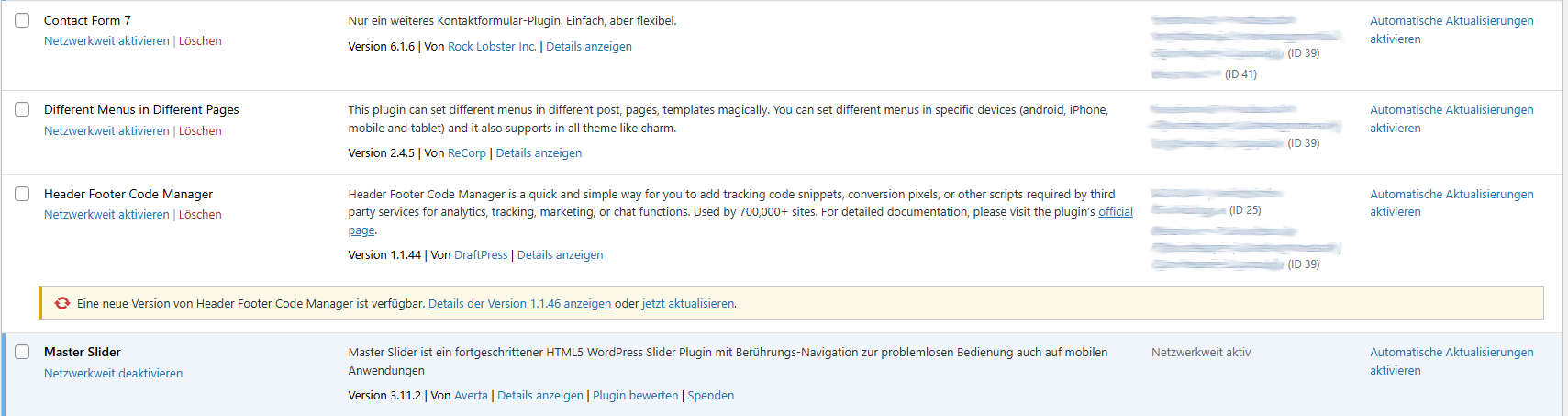
- 既存のネットワーク管理 > プラグイン一覧に「サイトでの有効状態」列を直接追加し、各プラグインがどのサイトでローカルに有効になっているかを一目で確認できるようにします。
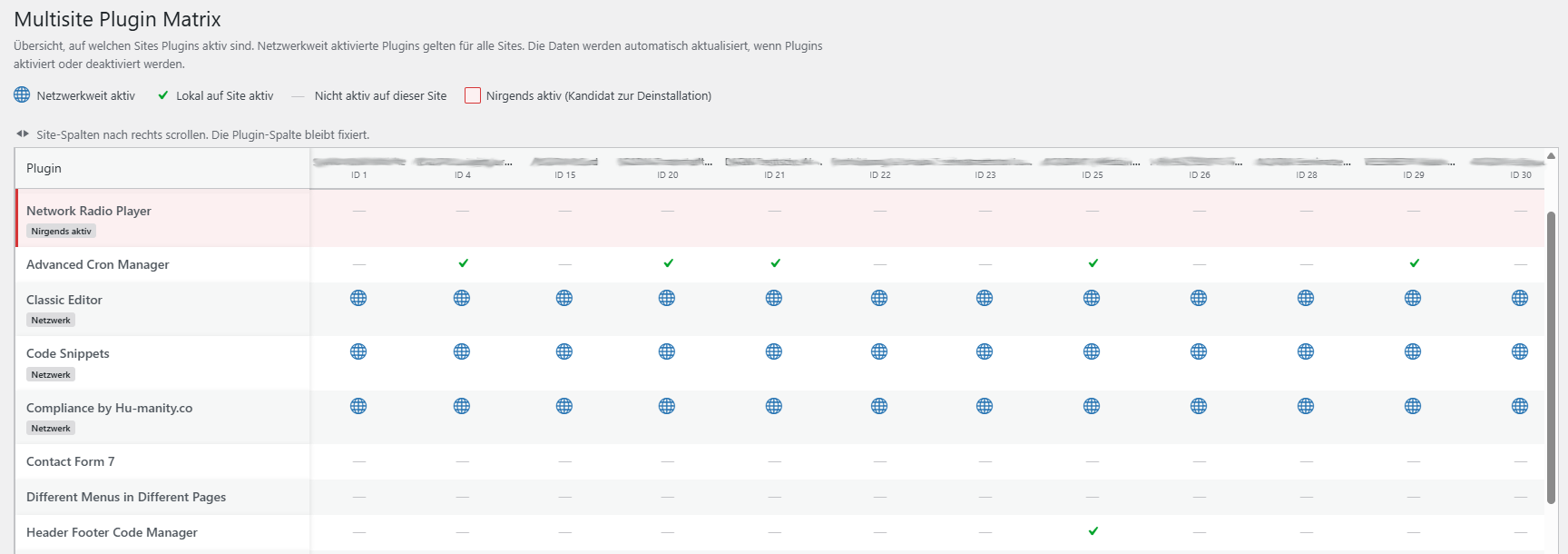
- Adds a dedicated Plugin Matrix page (Network Admin > Plugins > Multisite Matrix) with a full plugins-by-sites table: every installed plugin as a row, every site as a column, so you can scan the whole network’s plugin usage in one screen.
- インストール済みだがネットワーク内のどこでも有効になっていないプラグインにフラグを付けます — セキュリティやパフォーマンスの監査前に、整理すべき候補をすばやく見つけられます。
- Distinguishes network-activated plugins (active for every site by definition) from plugins activated locally on individual sites.
- マトリクスから各サイトのプラグイン画面へ直接リンクされているため、目的のサイトを探し回ることなく、見つけた内容にすぐ対応できます。
なぜ必要か
サイト数がある程度多いネットワークでは、「40あるサイトのうち、あの古い SEO プラグインがまだ有効なのはどれか」という疑問が実際に何度も生じますが、WordPress のコア機能だけでは、すべてのサイトのプラグイン画面を一つひとつ手動で開かない限り答えが得られません。Multisite Matrix なら、1回のページ読み込みでその答えが分かります。
仕組み
Data is read directly from WordPress’s own site and network options — nothing is sent anywhere, no external requests are made, and the plugin makes no changes to which plugins are active. The plugin-to-site mapping is cached for an hour (via a site transient) and automatically refreshed whenever a plugin is activated, deactivated, or a site is added or removed, so the matrix never depends on a manual rebuild.
動作要件
Multisite Matrix only does anything on a WordPress Multisite install — on a single-site install it stays completely inactive. It can only be network-activated (not activated on an individual site), and its screens are only visible to users with the manage_network_plugins capability (network administrators).
スクリーンショット
インストール
multisite-matrixフォルダを/wp-content/plugins/にアップロードするか、WordPress のプラグイン画面から直接インストールしてください。- ネットワーク管理 > プラグイン に移動し、Multisite Matrix をネットワーク全体で有効化してください。個別のサイトで有効化することはできません — これはマルチサイト専用のプラグインです。
- ネットワーク管理 > プラグイン > Multisite Matrix を開くと完全なマトリクスを確認できます。または通常のネットワーク管理 > プラグイン画面に追加された新しい「サイトでの有効状態」列を見るだけでも構いません。
FAQ
-
Does this work on a normal (non-Multisite) WordPress install?
-
いいえ。Multisite Matrix は読み込み時にマルチサイトインストールかどうかを確認し、そうでない場合は一切何も行いません。
-
Can it activate or deactivate plugins for me?
-
No. It’s read-only by design — it shows you the current state across the network, but any activation, deactivation, or cleanup still happens the normal way, on the relevant site’s own Plugins screen (which the matrix links to directly).
-
Who can see the Plugin Matrix page?
-
Only network administrators (specifically, users with the
manage_network_pluginscapability). Regular site admins don’t see it. -
How current is the data?
-
プラグインとサイトの対応マップは最大1時間キャッシュされますが、ネットワーク内のどこかでプラグインが有効化・無効化されたり、サイトが追加・削除されたりすると即座に無効化されます。そのため実際には、1時間ごとではなく、関連する変更が行われるたびに常に最新の状態が反映されます。
-
Does it send any data anywhere?
-
いいえ。すべてご自身の WordPress データベースから読み込まれます。プラグインが外部へリクエストを送信することはありません。
評価
このプラグインにはレビューがありません。
貢献者と開発者

変更履歴
1.2.5
- プラグインヘッダーの Description フィールドを修正しました。ドイツ語のままになっていましたが、プラグインの他の部分で使われている英語のソース文字列と一致するようになりました。
1.2.4
- Source strings switched from German to English (WordPress.org convention) so the plugin can be properly localized.
- Added translations for German, French, Spanish, Italian, Dutch, Portuguese (Brazil), Polish, Russian, Japanese, and Chinese (Simplified).
1.2.3
- Renamed internal function, class, and option/transient names to use a unique “MULTMA”/”multma” prefix, per WordPress.org plugin review feedback.
1.2.2
- WordPress.org での初の一般公開リリース。