

説明
You pay for every click from Facebook, Instagram, Google, TikTok or Microsoft ads. Those clicks arrive with tracking tags in the link — ?fbclid=…, ?gclid=…, ?utm_source=… — and most speed setups treat every one of those links as a brand-new page: the visitor waits for WordPress to build it from scratch, exactly when a slow page costs you money.
OG Speed is built around that moment. It recognizes the tags that ad and email platforms add and serves those visitors the same ready-made copy as everyone else. The tags stay in the address bar, so your analytics and your ad pixels still see them.
What makes it different
- Ad clicks get the fast page. A ready-made list of the click IDs and tracking tags used by Meta, Google Ads, Microsoft Ads, TikTok, X, LinkedIn, Pinterest, Snapchat, Reddit, Mailchimp, Klaviyo, HubSpot and more. Add or remove any of them.
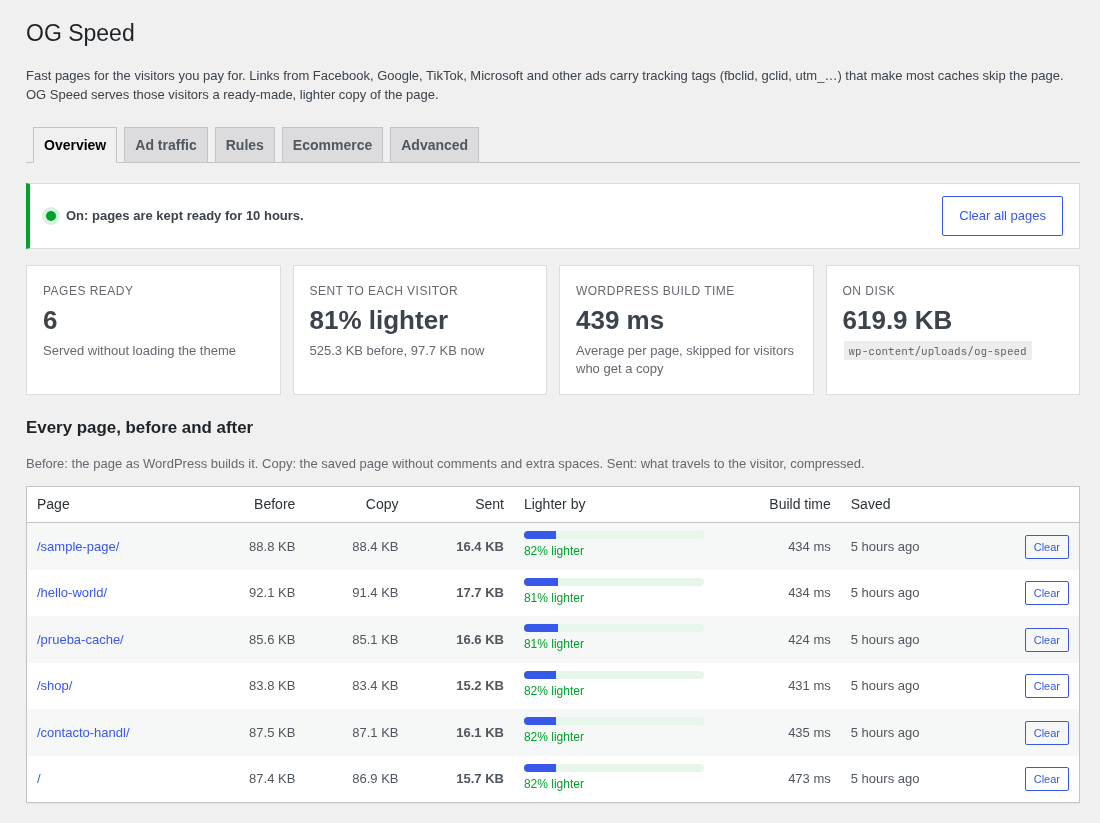
- Every page, before and after. The Overview lists each saved page with what it weighed when WordPress built it, what the saved copy weighs, what actually travels to the visitor (compressed) and how long WordPress took to build it.
- Lighter copies. The saved copy drops HTML comments and extra spaces, and is stored compressed (gzip) for browsers that accept it. Scripts, styles, preformatted text and form fields are left exactly as they are.
- Check an ad link. Paste the link from your ad campaign and see right away whether its visitors get the fast page — and what to change if they do not.
- Preload after every change. When pages are cleared, your site rebuilds the front page and your latest pages in the background, so the next ad visitor never waits.
- Store-safe. Product pages — the landing page of most product ads — are saved, while carts, checkout and accounts are never touched.
Settings, tab by tab
- Overview — on/off status, pages ready, how much lighter they are, the average WordPress build time, and the list of every saved page with its weight before and after and a button to clear it.
- Ad traffic — the ad link checker and the list of ad and email tracking parameters, with one click to restore the defaults.
- Rules — choose what is saved (front page, single items, archives), exclude content types, keep extra parameters as separate pages (for example
?lang=), and never save certain URLs, cookies or browsers. - Ecommerce — save WooCommerce product and shop pages or not, and refresh a product when its stock changes after a sale. Cart, checkout and account pages, and visitors with items in their cart (WooCommerce and Easy Digital Downloads), always get the live site.
- Advanced — lifetime of the copies, a separate copy for mobile devices, clear everything or only the affected pages when content changes, preload settings, lighter copies and the HTML signature comment.
How it works
- The first visit to a page is saved as a static HTML file (plus a compressed version); later visitors get that file before the theme and most of WordPress load.
- Logged-in users, commenters, password-protected posts, searches, feeds, previews, 404 pages and pages that set cookies always get the live page.
- Saved pages are cleared automatically when you publish or update content, approve comments, or change menus, widgets, the theme or plugins. There is also a “Clear cache” button in the admin bar. Expired copies are removed from disk once a day.
- Works on any host where WordPress can write to the uploads folder. It does not edit
wp-config.phpor.htaccessin your site root.
For developers
- Response header
X-OG-Speed: HITorMISSshows what happened on each request. - Define
DONOTCACHEPAGEto keep a page out of the cache, like with other caching plugins. - The action
onlygrow_speed_clearedruns after all pages are cleared, andonlygrow_speed_post_cleared(post ID, URLs) after the pages of one item are cleared, so you can purge a CDN or proxy too.
Privacy
No tracking, no external requests, no accounts. Preloading only requests pages of your own site. Saved pages are stored on your own server in wp-content/uploads/og-speed/, and only pages that are the same for every visitor are saved.
スクリーンショット

インストール
- Install and activate the plugin. It starts working right away with safe defaults.
- Go to Settings OG Speed and open your site in a private window: the pages you visit appear in the list with their weight before and after.
- Paste an ad link in the checker (Ad traffic tab), then review the Rules, Ecommerce and Advanced tabs if you need to.
FAQ
-
Will my ad tracking still work?
-
Yes. The tags stay in the link and in the address bar; your pixels and analytics read them in the browser as usual. OG Speed only ignores them when deciding which saved copy to serve.
-
What do “Before”, “Copy” and “Sent” mean in the list?
-
Before is the page as WordPress builds it. Copy is the saved page, without comments and extra spaces. Sent is what travels to the visitor: the compressed copy, for browsers that accept compression (nearly all of them).
-
Can the lighter copy break my page?
-
It only removes HTML comments and collapses spaces between tags, which the browser ignores anyway. Scripts, styles,
<pre>and<textarea>are kept byte for byte. If you ever need the copy to be identical to the original, turn off “Lighter copies” in the Advanced tab. -
Why do I not see a saved page?
-
Logged-in users always get the live page. Check in a private window, and use the link checker in the Ad traffic tab to see whether a parameter in your link is not in the list.
-
Can I use it with another caching plugin?
-
Use one page cache at a time. Turn off page caching in the other plugin, or deactivate OG Speed.
-
Does it work with WooCommerce?
-
Yes. Product and shop pages are saved (you can turn that off), a product is refreshed when its stock changes, and carts, checkout, accounts and shoppers with items in their cart always get the live site.
-
Where are the saved files?
-
In
wp-content/uploads/og-speed/: for each page, an HTML file, its compressed version and a small file with its weights. Deleting the plugin removes the folder and its settings.
評価
このプラグインにはレビューがありません。
貢献者と開発者

変更履歴
0.1.0
- [[feature]] First release: ad and email visitors (fbclid, gclid, UTM and more) get the ready-made copy of the page instead of waiting for WordPress.
- [[feature]] Every page, before and after: each saved page with its weight in WordPress, the copy, what is sent compressed and the build time (Settings OG Speed).
- [[new]] Lighter copies: without HTML comments and extra spaces, also stored compressed (gzip).
- [[new]] Ad link checker, rules for inclusions and exceptions, separate mobile copies, smart clearing, background preloading and admin bar button.
- [[new]] WooCommerce and Easy Digital Downloads protections, and product refresh when stock changes.