
説明
This plugin allows WooCommerce store owners to add automatic PDF form filling features for email notification attachments and order downloads to their WooCommerce store.
An existing PDF can be set up to be filled with customer and order information when an order is placed or processed. Images can also be downloaded from a dynamic URL and embedded into the PDF. You can then have your customers receive order email notifications with PDF attachments containing customer order data. You can also allow your customers to download the filled PDF on their order page via the downloadable files feature of WooCommerce. The filled PDF files can be saved in a custom uploads subdirectory on your web server.
What makes this plugin special is its approach to preparing PDF files. It is not generating PDF documents from scratch. It modifies the original PDF document that was prepared using third party software and supplied to the plugin. This allows users the freedom to design exactly what they need and use their pre-existing documents.
Possible uses:
* Automated creation of tickets for events
* Automated creation of certificates for certifications requiring payment
* Automated creation of official documents that require payment
* Automated warranty document creation based on date of purchase
* Automated creation of PDFs that assist with order fulfillment
An external web API is used for working with PDF files (free usage has limitations). The plugin comminicates with the external service to create an API key, upload your blank PDF files, retrieve information about your PDF files and eventually add your user information to your PDF files. Please see privacy policy at https://pdf.ninja.
こちらのPdf.Ninja 利用規約およびPdf.Ninja プライバシーポリシーをご覧ください。
Requirements:
* PHP 5.5 or newer
* WordPress 5.4 or newer
* WooCommerce 5.6.0 or newer
* Chrome 60, Firefox 56 (or equivalent) or newer
Known incompatible plugins:
* Imagify (strips forms from PDF files)
* ShortPixel Image Optimizer (strips forms from PDF files)
Special thanks to the following sponsors of this plugin:
* BrowserStack
スクリーンショット

PDF Forms section on product edit page 
フィールドマッピングと画像埋め込みを含むイベントチケット製品の例 
An example filled event ticket PDF with embedded QR code image and a barcode font field 
An example order details page with a downloadable warranty certificate PDF 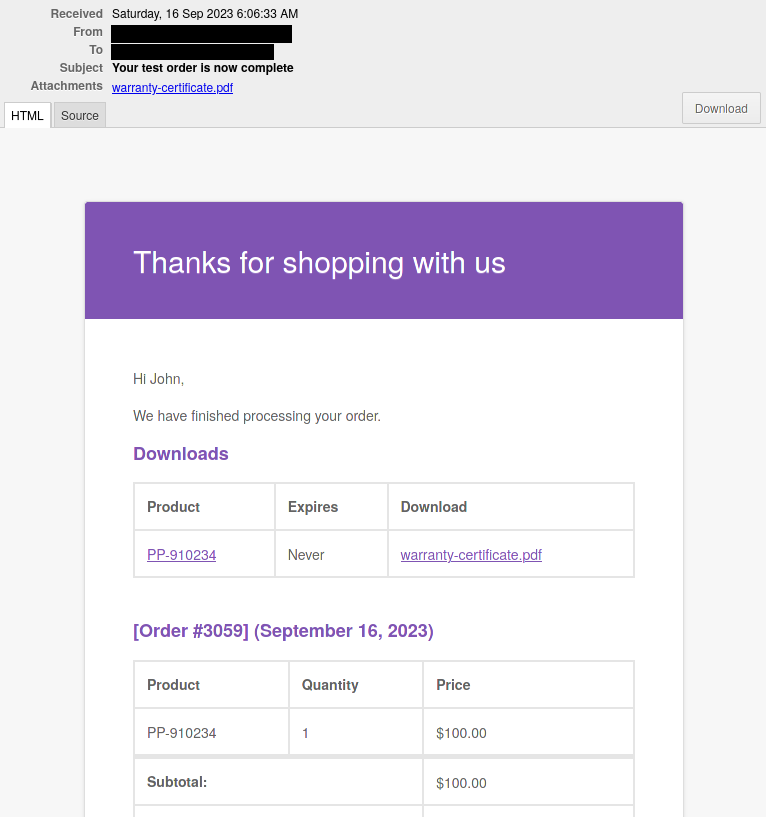
An example order notification message with a warranty certificate PDF attachment and a downloadable file link
インストール
- Install the WooCommerce plugin.
- Upload this plugin’s folder to the
/wp-content/plugins/directory, or install the plugin through the WordPress plugins screen directly. - Activate the plugin through the ‘Plugins’ screen in WordPress.
- Start using the ‘PDF Forms’ section on the WooCommerce product editor page.
FAQ
-
Does this plugin allow my website users to edit PDF files?
-
No. This plugin adds UI features to the WooCommerce interface in the WordPress Admin Panel only.
-
Does this plugin require special software installation on the web server?
-
No. The plugin uses core WordPress and WooCommerce features only. No special software or PHP extensions are needed. Working with PDF files is done through Pdf.Ninja API. It is recommended to have a working SSL/TLS certificate validation with cURL.
-
How are WooCommerce placeholders mapped to PDF form fields?
-
The field mapper tool allows you to map fields individually. Combinations of placeholders with custom text can be mapped to a PDF field. Mappings can be associated with a specific PDF attachment or all PDF attachments. Field value mappings can also be created, allowing filled PDF fields to be filled with content that differs from the source values.
-
My fields are not getting filled, what is wrong?
-
マッピングがマッピングリストに存在し、フィールド名が一致していることを確認してください。
If you attached an updated PDF file and your mappings were for the old attachment ID then those mappings will be deleted and you will need to recreate them.
Sometimes PDF form fields have validation scripts which prevent value with an incorrect format to be filled in. Date PDF fields must be filled with correctly formatted date strings.
-
Try using the Enable Media Replace plugin to replace the PDF file in-place in the Media Library.
-
Make sure your PDF checkbox/radio field’s exported value matches the value that is mapped to it. Usually, it is “On” or “Yes”. If you have a different value in the WooCommerce placeholder, you will need to create a value mapping so that your placeholder value gets changed to your PDF checkbox export value.
Some PDF viewers don’t render checkboxes correctly in some PDF files. You may be able to solve this issue by recreating the PDF in a different PDF editor. If you are using Pdf.Ninja API v1, switching to v2 may resolve your issue.
-
How do I remove the watermark in the filled PDF files?
-
Please see the Pdf.Ninja API website.
評価
このプラグインにはレビューがありません。
貢献者と開発者

変更履歴
1.1.6
-
Release date: April 2, 2026
-
Verified support for WP 7.0 and WC 10.6
1.1.5
-
Release date: December 29, 2025
-
Verified support for WC 10.4
- Other minor bug fixes and improvements
1.1.4
-
Release date: November 19, 2025
-
Added the
Downloadstable in the edit order page meta box - Bug fix: plugin randomly failing to work due to a race condition causing product settings not to be stored in new orders (when HPOS is enabled with compatibility mode)
- Other minor bug fixes and improvements
1.1.3
-
Release date: November 13, 2025
-
Bug fix: Only the first email receives PDF attachment when multiple emails are sent on order submission
1.1.2
-
Release date: November 7, 2025
-
Verified support for WC 10.3
- Added PDF as a supported image format for embedding
- Bug fixes and minor improvements
1.1.1
-
Release date: February 12, 2025
-
Bug fix: All PDFs are attached to email messages instead of just the configured ones
- Bug fix: Adding multiple attachments at the same time causes options for all but one to be overwritten
- その他の軽微な修正と改善
1.1.0
-
リリース日: 2024年12月30日
-
Added HPOS support
- 「すべての値マッピングを削除」ボタンを追加
- WC 9.5のサポートを確認済み
- その他のバグ修正と改善
1.0.6
-
リリース日: 2024年11月11日
-
軽微な修正
1.0.5
-
リリース日: 2024年10月26日
-
Verified support for WC 9.4 and WP 6.7
- 安全でない接続通知に関するバグを修正しました
- その他の小さな更新
1.0.4
-
リリース日: 2024年7月17日
-
無効なプレースホルダーを空の文字列に置き換えるように変更しました
- プレースホルダーの一致を修正しました
1.0.3
-
リリース日: 2024年6月2日
-
プレースホルダープロセッサーの複数の問題を修正し、より多くのプレースホルダーのサポートを追加しました
- Bug fix (product setting change requires focus out event to be saved)
1.0.2
-
リリース日: 2024年1月16日
-
Fixed possible issues with API communication caused by non-alphanumeric characters in request boundary
- その他の細かい改善点
1.0.1
-
リリース日: 2024年1月2日
-
プラグインレビューに関する変更
- Fixed an issue with UTF-8 not being base64-decoded properly
- その他の軽微な修正と改善
1.0.0
-
リリース日: 2023年10月1日
-
初回リリース