

説明
RoidNet AI Content Generator is the most powerful free AI content automation plugin for WordPress. Whether you’re a blogger, SEO professional, niche site builder, or agency owner, this plugin will revolutionize the way you create and publish content.
🚀 Generate Unlimited Articles for FREE — Unlike other plugins that limit your content generation, RoidNet AI Content Generator allows you to create as many AI-powered articles as you want. There are NO hard limits on article generation in the free version.
🖼️ Automatic HD Images from Pexels — Every article you generate automatically includes beautiful, royalty-free, high-definition images from Pexels. No more searching for stock photos manually!
🤖 Access 200+ AI Models via OpenRouter — Connect to OpenRouter and choose from the world’s best AI models including OpenAI GPT-4o, GPT-4 Turbo, Claude 3.5 Sonnet, Llama 3.1, Mistral, and many more. You’re not locked into a single AI provider.
Why This Plugin is a Game-Changer for Content Creators
Content is the backbone of SEO. But creating high-quality, optimized content consistently is time-consuming and expensive. With RoidNet AI Content Generator, you can:
- Build authority sites faster by automating your content pipeline
- Scale your affiliate marketing with bulk AI-generated reviews and guides
- Power your dropshipping blog with SEO-rich product descriptions and articles
- Grow your personal brand with consistent publishing schedules
- Support multi-language audiences with content in 20+ languages
🆓 Powerful Free Features
The free version of this plugin is incredibly powerful and includes:
- ✅ Unlimited AI Article Generation — Generate as many articles as you need
- ✅ Automatic Pexels HD Images — Every article gets relevant, high-quality images
- ✅ OpenRouter AI Integration — Access GPT-4, Claude, Llama, and 200+ models
- ✅ Yoast SEO & Rank Math Integration — Auto-generate meta titles and descriptions
- ✅ Smart Internal Linking — Automatically link to related posts on your site
- ✅ Multi-Language Support — Generate content in English, Arabic, Spanish, French, German, Turkish, and more
- ✅ Scheduled Publishing — Set up automated publishing schedules
- ✅ Keyword Queue System — Manage hundreds of keywords for bulk generation
- ✅ Custom AI Instructions — Fine-tune the AI’s writing style and tone
- ✅ Category Assignment — Auto-assign posts to WordPress categories
- ✅ Clean HTML Output — Proper heading tags (H2, H3), lists, and formatting
- ✅ AI Keyword Suggestions — Get keyword ideas generated by AI (10/month limit)
💎 Pro Features for Power Users
For users who need even more control and scalability, the Pro version unlocks:
- 🔓 Unlimited Scheduling Slots — Free users can schedule up to 4 posts/week; Pro users have unlimited scheduling
- 🔓 Unlimited AI Keyword Generation — Generate unlimited keyword suggestions with AI
- 🔓 Priority Support — Get faster responses from our support team
👉 Upgrade to Pro for unlimited features and priority support!
Free vs Pro Comparison
Feature
Free
Pro
AI Article Generation
✅ Unlimited
✅ Unlimited
Pexels HD Images
✅ Yes
✅ Yes
OpenRouter AI Models
✅ All Models
✅ All Models
SEO Plugin Integration
✅ Yes
✅ Yes
Internal Linking
✅ Yes
✅ Yes
Multi-Language
✅ 20+ Languages
✅ 20+ Languages
Scheduling Slots
⚠️ Up to 4/week
✅ Unlimited
AI Keywords/Month
⚠️ 10/month
✅ Unlimited
Priority Support
❌ No
✅ Yes
How It Works
- Install & Activate — Install the plugin and activate it from your WordPress dashboard
- Configure API Keys — Get your free API keys from OpenRouter and Pexels
- Add Keywords — Enter the topics you want to write about
- Set Your Schedule — Choose when you want articles to be published
- Let AI Do the Work — The plugin generates and publishes articles automatically
Complete SEO Automation
This plugin doesn’t just generate content — it optimizes it for search engines:
- Meta Titles & Descriptions — Automatically generated and pushed to Yoast SEO or Rank Math
- Focus Keywords — Each article is optimized around your target keyword
- Internal Links — Smart linking to related content on your site
- Proper HTML Structure — Clean code with proper heading hierarchy
- Image Alt Tags — All images include SEO-friendly alt text
Multilingual Content Creation
Reach global audiences by generating content in multiple languages:
- English, Arabic, Spanish, French, German, Italian, Portuguese, Dutch, Russian, Turkish, Japanese, Korean, Chinese, and more!
Who Is This Plugin For?
- Bloggers who want to publish more frequently without spending hours writing
- SEO Agencies managing multiple client websites
- Affiliate Marketers building niche review sites
- eCommerce Store Owners who need product descriptions and blog content
- Content Marketers looking to scale their content production
- Digital Publishers running news or magazine-style websites
API Requirements
To use this plugin, you’ll need:
- OpenRouter API Key (Required) — Get it free at openrouter.ai/keys
- Pexels API Key (Optional) — Get it free at pexels.com/api
Both services offer generous free tiers, making this plugin truly free to use for most users.
Privacy & Data Handling
We take your privacy seriously. This plugin:
- Does NOT store your content on our servers
- Does NOT share your data with third parties (except the APIs you configure)
- Processes everything through your WordPress installation
- Fully complies with WordPress.org plugin guidelines
Support & Company
For professional support and business inquiries:
- Company: RoidNet
- Website: https://roidnet.com/
- Email: info@roidnet.com
External Services
This plugin connects to external third-party services. By using this plugin, you acknowledge and agree to their terms.
OpenRouter API
This plugin uses OpenRouter to generate AI content. Your prompts and keywords are sent to OpenRouter’s API.
- Service URL: https://openrouter.ai/
- Data Sent: Keywords, content prompts, language preferences
- When: Each time content is generated
- Terms of Use
- Privacy Policy
Pexels API
This plugin optionally uses Pexels to fetch royalty-free images for your articles.
- Service URL: https://www.pexels.com/
- Data Sent: Image search queries based on keywords
- When: Each time an article with images is generated
- Terms of Service
- Privacy Policy
Freemius SDK
This plugin includes Freemius for licensing management and optional usage analytics.
- Service URL: https://freemius.com/
- Terms of Use
- Privacy Policy
スクリーンショット
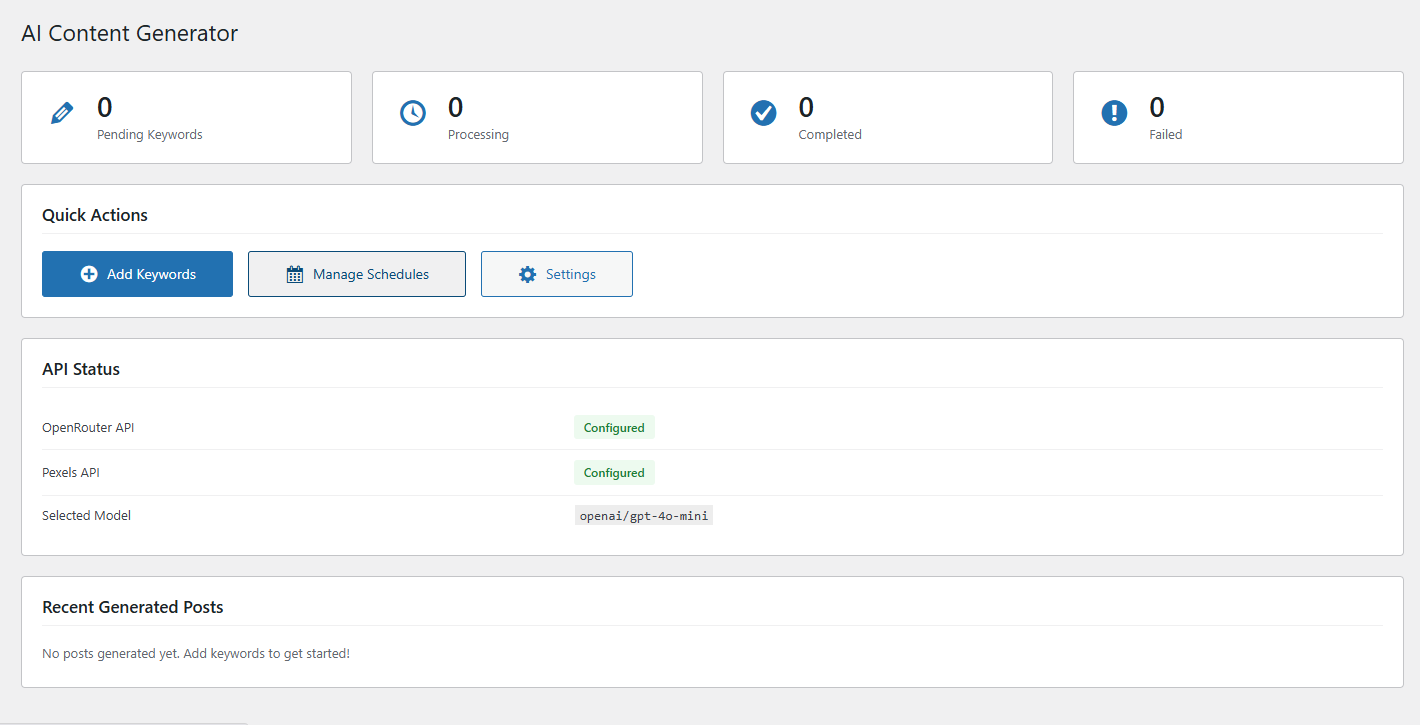
Dashboard — Overview of your content generation status with quick actions 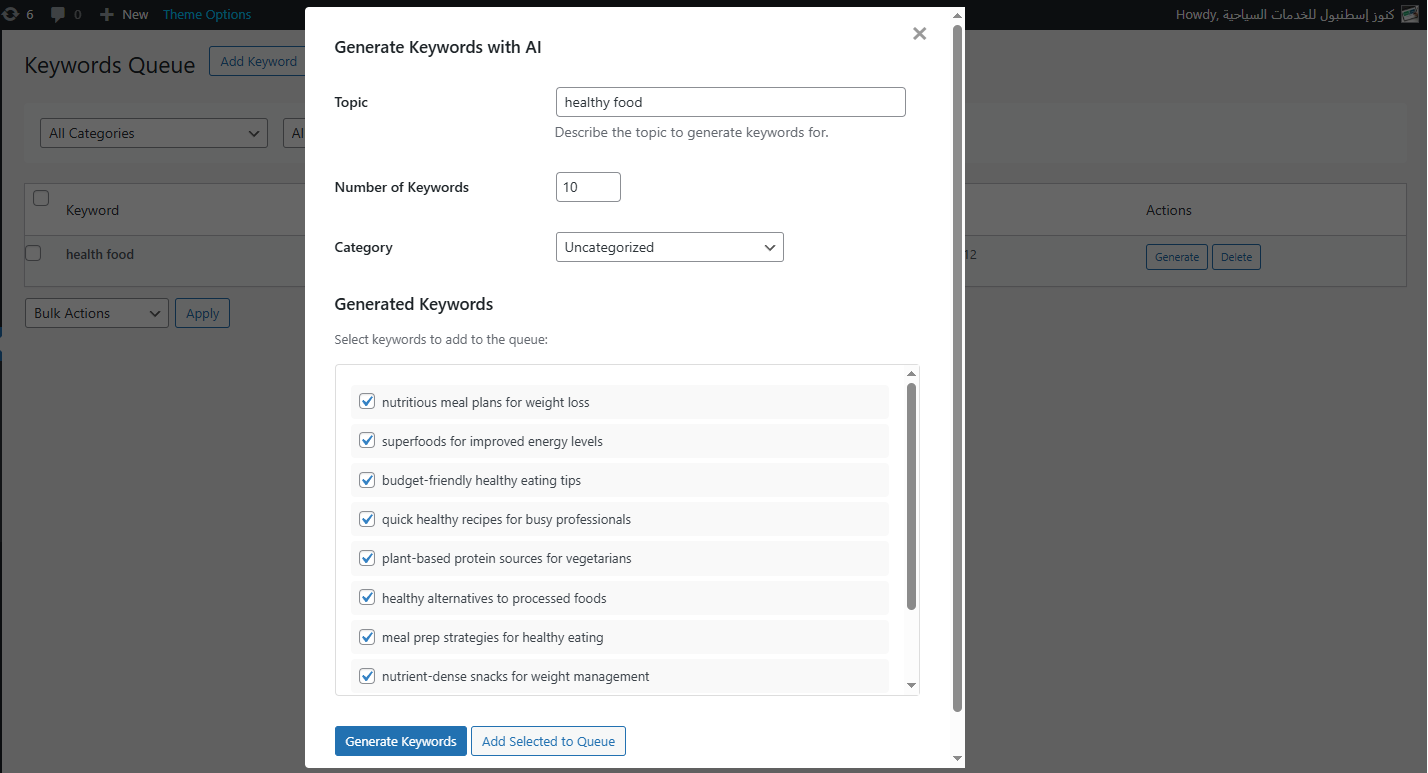
Keywords Management — Add, manage, and track your keyword queue 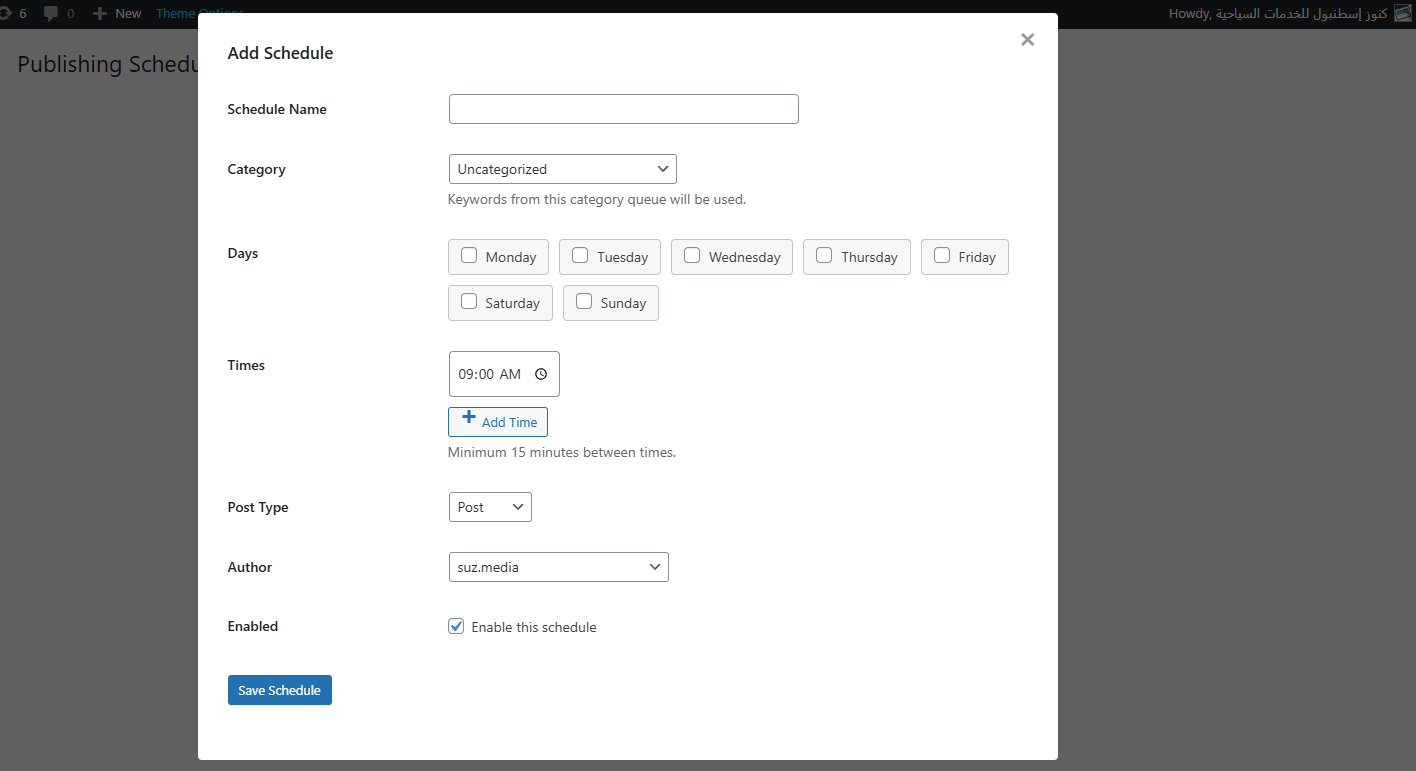
Article Generation Settings — Configure AI models, languages, and content options 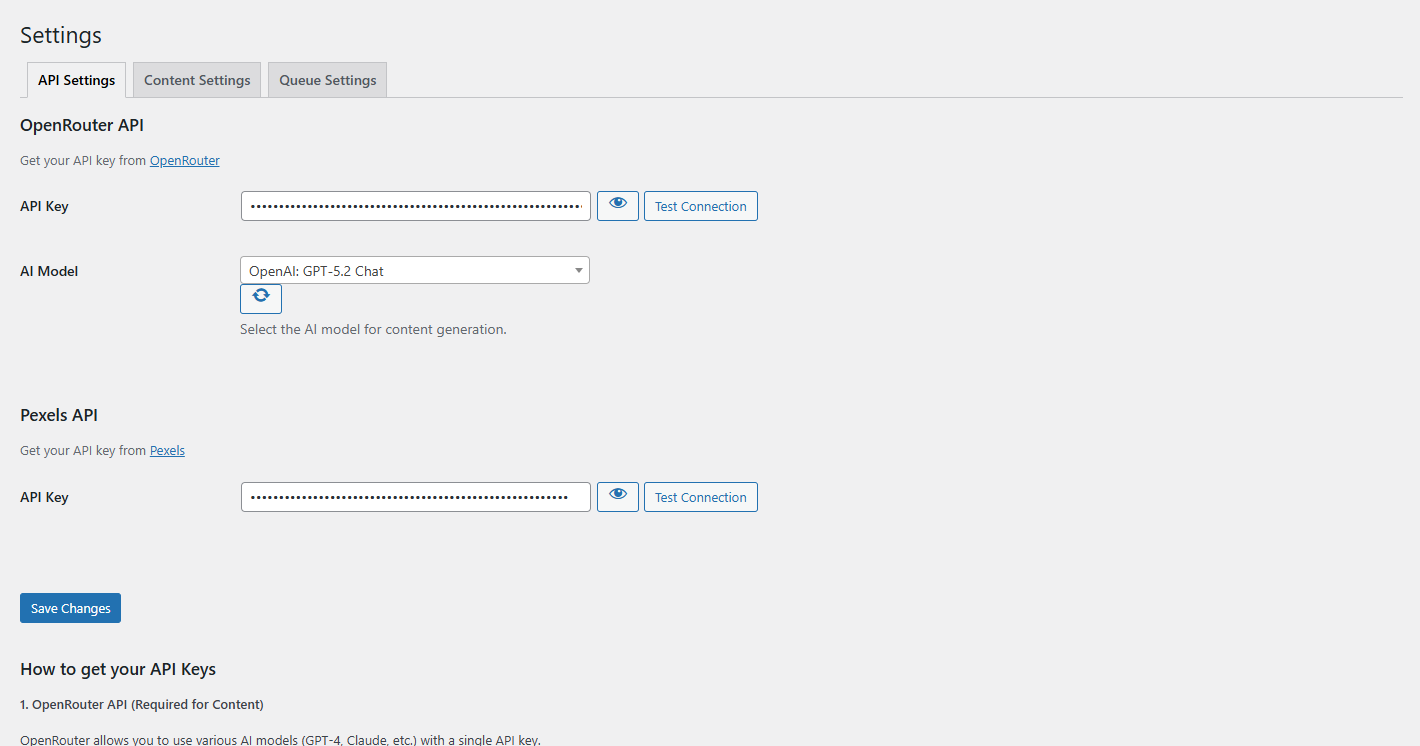
Scheduling System — Set up automated publishing schedules 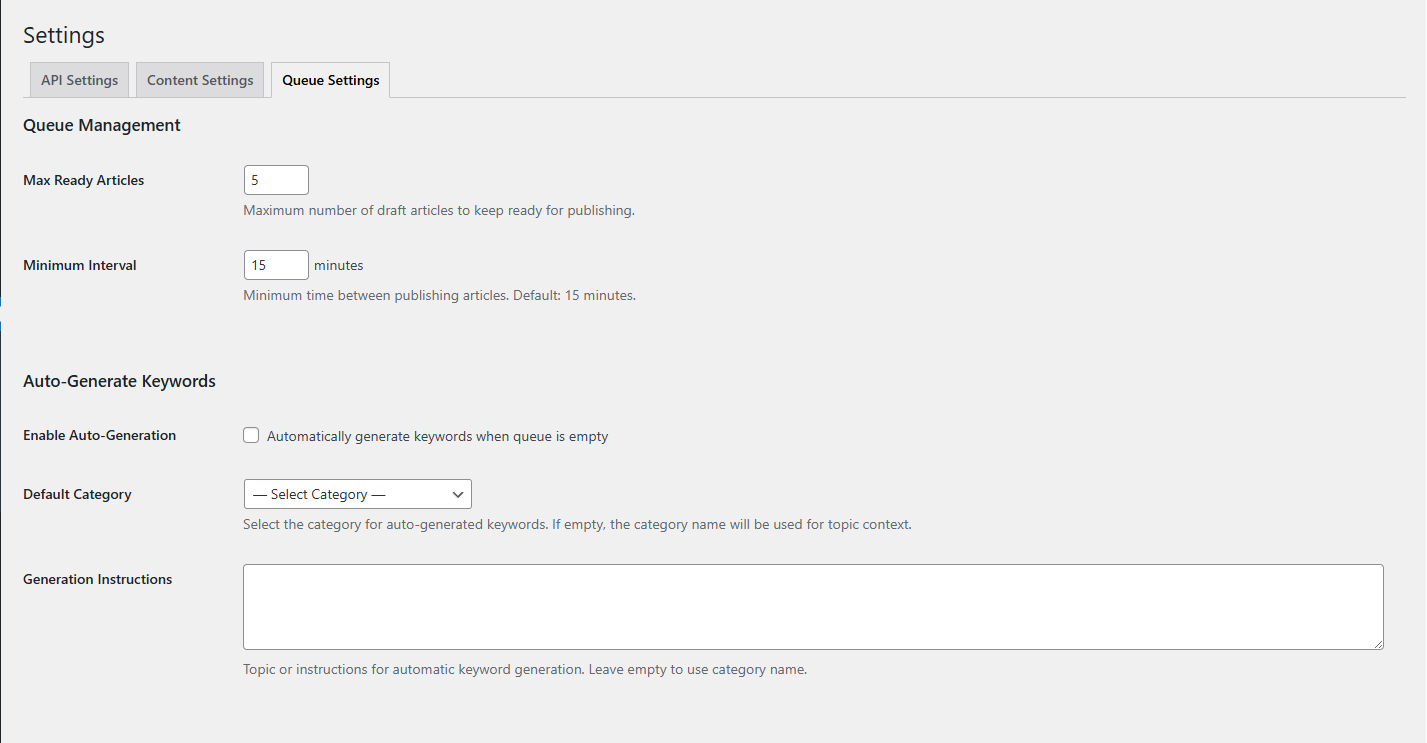
Settings Page — Configure API keys and plugin options 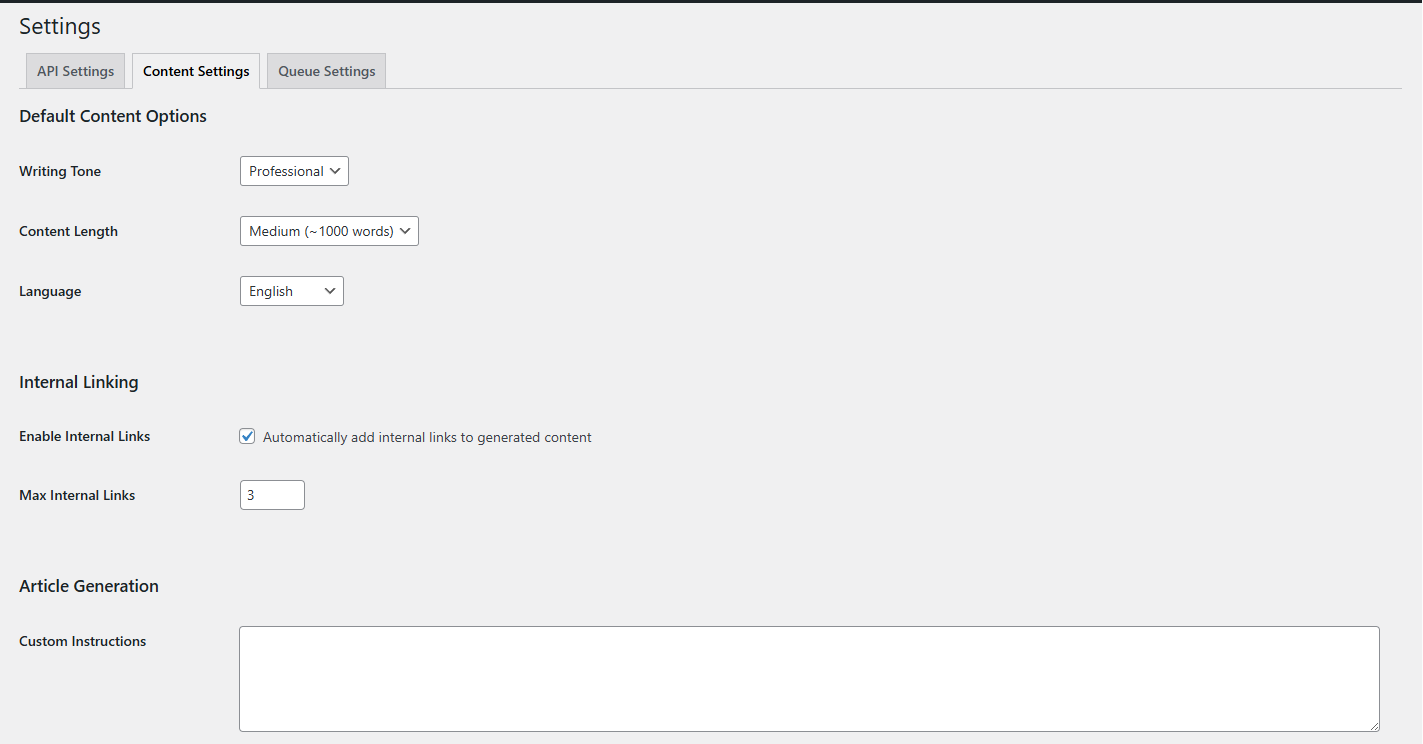
Generated Article Preview — See how your AI-generated content looks 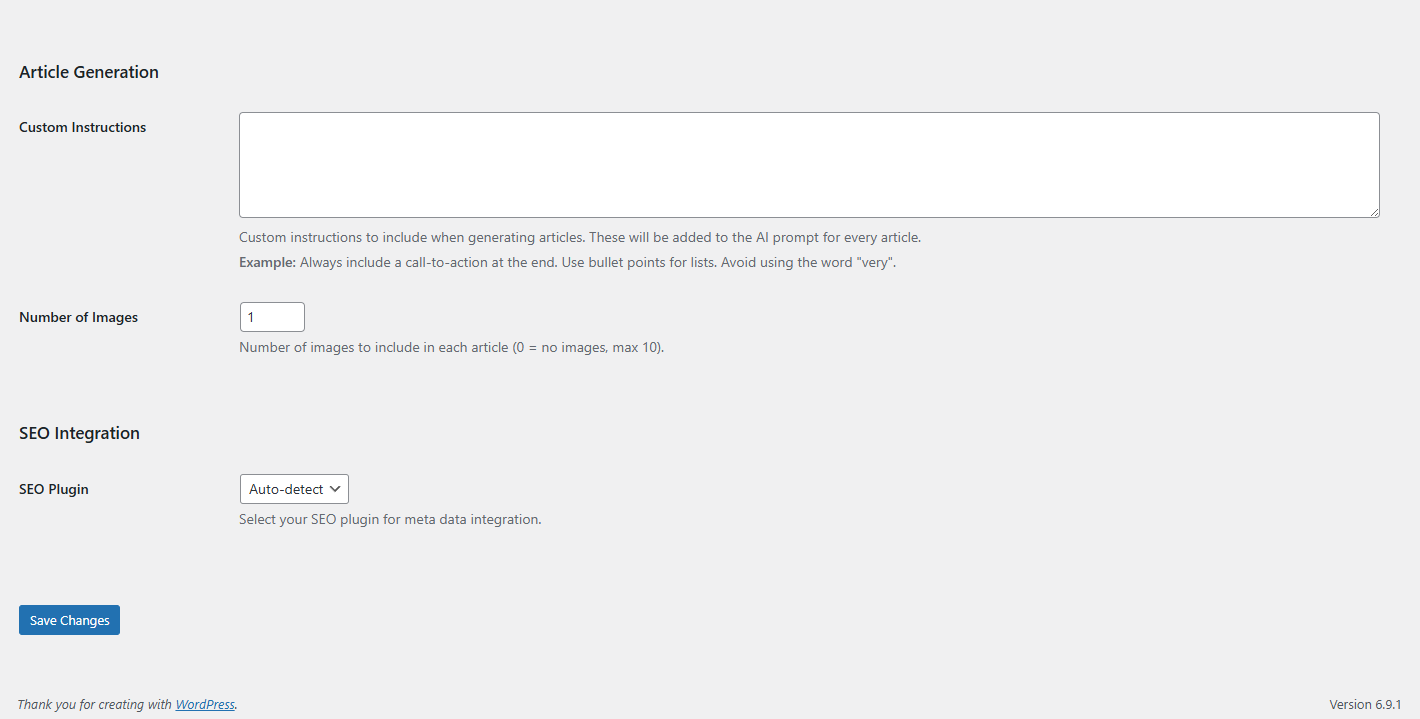
SEO Integration — Automatic meta data for Yoast SEO and Rank Math
インストール
- Upload the
roidnet-ai-content-generatorfolder to/wp-content/plugins/ - Activate the plugin through the ‘Plugins’ menu in WordPress
- Navigate to ‘AI Content’ in your WordPress admin sidebar
- Go to Settings and enter your API keys
- Start adding keywords and creating your publishing schedule!
Quick Start Guide
After activation, follow these steps:
- Get Your OpenRouter API Key: Visit openrouter.ai, create an account, and generate your API key
- Get Your Pexels API Key (Optional): Visit pexels.com/api for free HD images
- Configure Settings: Enter your API keys in the plugin settings page
- Add Keywords: Go to the Keywords tab and add topics you want to write about
- Create a Schedule: Set up your publishing schedule in the Schedules tab
- Relax: The plugin will automatically generate and publish content!
FAQ
-
Is this plugin really free?
-
Yes! The core functionality is completely free. You can generate unlimited AI articles with Pexels images at no cost. The Pro version adds extra scheduling flexibility and unlimited AI keyword suggestions.
-
What AI models can I use?
-
All models available through OpenRouter, including OpenAI GPT-4, GPT-4o, GPT-4 Turbo, Claude 3.5 Sonnet, Claude 3 Opus, Llama 3.1, Mistral, and 200+ more models.
-
Do I need to pay for AI API usage?
-
OpenRouter offers pay-as-you-go pricing for AI models. Many models have very low costs, and some are free. The average cost per article is typically just a few cents.
-
Are the Pexels images free to use?
-
Yes! All images from Pexels are royalty-free and can be used for commercial purposes. The plugin automatically credits Pexels as required by their terms of service.
-
Will the content be unique?
-
Yes, every article is generated fresh by the AI based on your keywords. The plugin also includes duplicate-checking functionality.
-
Does it work with my theme?
-
Yes! The plugin generates standard WordPress posts with clean HTML that works with any theme or page builder.
-
Can I edit articles before publishing?
-
Absolutely! You can set articles to save as drafts instead of publishing automatically. This lets you review and edit before going live.
-
What languages are supported?
-
The plugin supports 20+ languages including English, Arabic, Spanish, French, German, Italian, Portuguese, Dutch, Russian, Turkish, Japanese, Korean, Chinese, Hindi, Vietnamese, Thai, Polish, Swedish, Norwegian, and Danish.
-
Is there a limit on article generation?
-
No! The free version allows unlimited article generation. The only limits are on scheduling slots (4/week) and AI keyword suggestions (10/month).
評価
このプラグインにはレビューがありません。
貢献者と開発者
RoidNet AI Content Generator – Automated Article Writer with GPT and Pexels はオープンソースソフトウェアです。以下の人々がこのプラグインに貢献しています。
貢献者

変更履歴
1.1.0
- Improvement: Refined Pro feature UI for better visibility
- Fix: Fixed scheduling slot limit logic for free users
- Fix: Resolved browser caching issues with strict versioning
1.0.7
- Feature: Official WordPress.org Plugin Directory release
- Improvement: Enhanced compatibility with latest WordPress 6.7
- Improvement: Optimized codebase for WordPress.org compliance
- Fix: Various bug fixes and performance improvements
1.0.6
- Feature: Added monthly AI keyword limits (10/month) for free users
- Feature: Integrated step-by-step API Setup Guide
- Security: Added Privacy Policy and Service disclosures
1.0.5
- Feature: Implemented Free vs Pro plans
- Feature: Added smart weekly publishing limits
- Feature: Integrated AI keyword generation quotas
- Improvement: Enhanced scheduling and queue management UI
- Security: Integrated Freemius SDK for secure licensing
1.0.0
- Initial release
- OpenRouter AI integration
- Pexels image integration
- Keyword queue management
- Scheduling system
- Yoast SEO and Rank Math integration
- Multi-language support
- Internal linking feature