
説明
Object Cache for APCu enables persistent object caching in WordPress using the APCu (Alternative PHP Cache) extension. It helps reduce database queries by caching objects in memory, speeding up page loads and backend performance.
Features:
- Uses APCu for WordPress object caching.
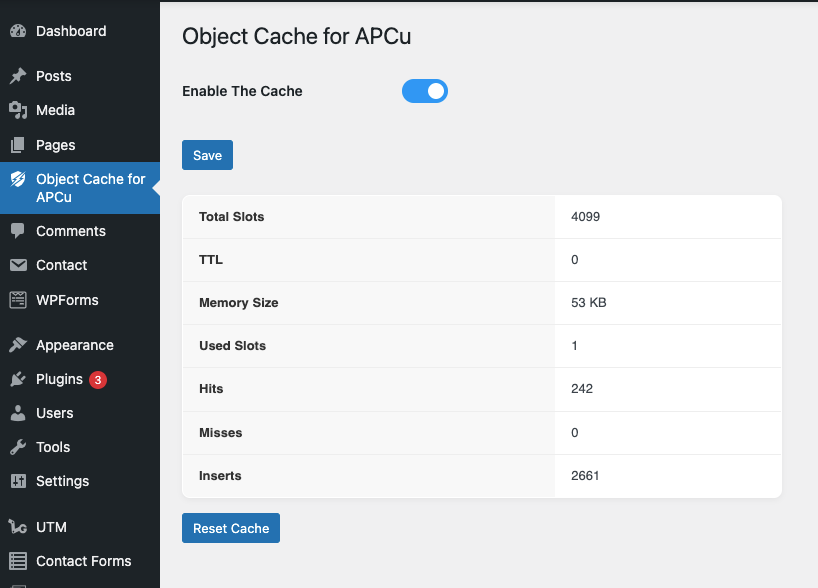
- Dashboard with real-time APCu stats (hits, misses, memory, inserts, etc.).
- Clear/reset cache with one click (protected by nonce).
- Automatically installs
object-cache.phpin wp-content. - Clean, professional admin interface.
🤝 Real Human Support
Need help? Contact us anytime.
- Email: support@ciphercoin.com
- Live Chat: ciphercoin.com
We can help customizations, plugin and theme compatibility, bug fixes, WooCommerce, and any WordPress development or support.
スクリーンショット
インストール
- Make sure the APCu PHP extension is installed and enabled.
- Upload the plugin to the
/wp-content/plugins/directory. - Activate the plugin from the ‘Plugins’ menu in WordPress.
- Visit Settings > APCU Cache to view stats or clear the cache.
FAQ
-
What if APCu is not installed?
-
You’ll see a warning asking to enable the APCu extension via terminal or cPanel. You can install it using PECL:
pecl install apcu. -
Only if your host supports APCu.
-
Is this suitable for production?
-
APCu is ideal for single-server setups like small VPS or staging/dev sites. It’s not recommended for multi-server/clustered environments.
評価
このプラグインにはレビューがありません。
貢献者と開発者

“Object Cache for APCu – ZapCu” をあなたの言語に翻訳しましょう。
開発に興味がありますか ?
変更履歴
1.0.0
- Initial release
- Object cache via APCu
- Admin dashboard with stats and reset