
説明
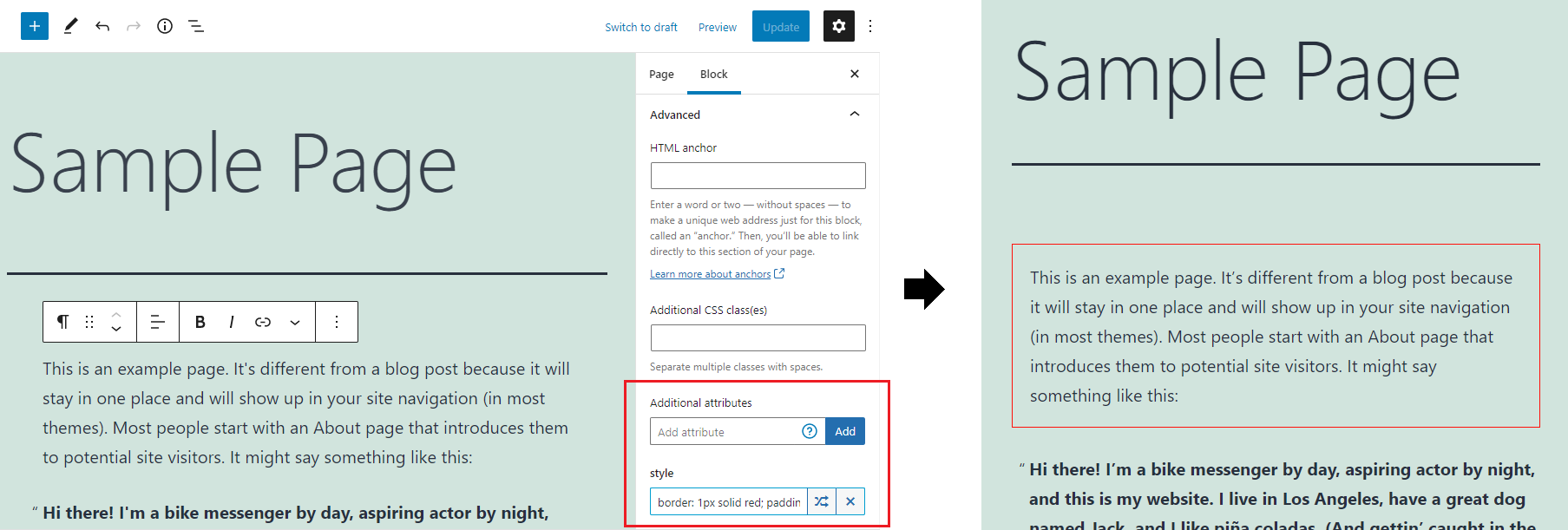
このプラグインは、Gutenberg ブロックに高度なインスペクターコントロールを追加し、フロントエンド出力にカスタム HTML 属性を追加可能にします。インライン CSS を追加しブロックの外観を調整したり、aria 属性を設定してサイトのアクセシビリティを向上させたり、data 属性の追加で任意の JavaScript モジュールと統合したり、onclick、onchange、onload などの JavaScriptDOM イベント属性を追加することができます。
スクリーンショット
インストール
管理者ダッシュボードからインストール
- WordPress の管理画面 プラグインに移動。
- 「新規追加」をクリック。
- 「プラグインのアップロード」をクリック。
attributes-for-blocks.zipファイルを選択。- 「今すぐインストール」をクリック。
- WordPress 管理画面 プラグイン からプラグインを有効化。
FTP アップロードで手動インストール
attributes-for-blocks.zipファイルから解凍した「attributes-for-blocks」フォルダーを、WordPress の../wp-content/pluginsフォルダーにアップロードしてください。- WordPress 管理画面 プラグイン からプラグインを有効化。
FAQ
-
属性を追加するにはどうすればよいですか ?
-
選択したブロックのインスペクターコントロール (ブロックの設定) で、一番下までスクロールし、「詳細設定」をクリックします。すると、「追加属性」という項目があるはずです。
「属性の追加」フィールドに属性名を入力し「追加」を押すと、ブロックに属性が追加され、その下にその属性名がラベルされた新しい入力欄が追加表示されます。そこにオプションとしての属性値を挿入できます。
属性の例:style,title,target,class,id,onclick,data-*,aria-*。 -
Why is the input disabled?
-
When the current user doesn’t have
unfiltered_htmlcapabilities attributes cannot be added and all existing attributes are stripped when the post is updated. -
どのように機能しますか ?
-
通常ブロックの場合、属性はブロック保存コンテンツのルート要素に追加されます。つまり、属性はフロントエンドでのみレンダリングされ、エディターではレンダリングされません。ダイナミックブロックの場合、属性は
render_callback関数を介して追加され、ブロックがサーバー側、もしくはクライアント側のどちらでレンダリングされるかに応じて、エディターでも適用される場合があります。 -
すべてのブロックで機能しますか ?
-
blocks.getSaveContent.extraPropsフィルタを利用できる WP Element をレンダリングする通常ブロックと、render_callbackを利用するダイナミックブロックで動作するはずです。オーソドックスでないことをするサードパーティ製のブロックは、動作しないことがあります。
既知の未サポートブロック -
Usage with Alpine.js
-
@ prefix in an attribute name is used for “override” mode in this plugin, for Alpine.js attributes use
x-on:clickinstead of@clickor use the shorthand syntax with two@characters instead of one:@@click. -
ブロックサポートを無効にする
-
afb_unsupported_blocksフィルターを子テーマのfunctions.phpファイルで使用し、追加属性を追加するためのブロックサポートを無効にできます。add_filter('afb_unsupported_blocks', function($blocks) { $blocks[] = 'core/button'; return $blocks; }); -
無効にするとどうなりますか ?
-
カスタム属性を付加したブロックは、追加した属性によっては無効となる場合があります。その場合、「ブロックのリカバリーを試行」をクリックでカスタム属性を除いたブロックを復元、「HTML に変換」を選択すればカスタム属性を含むブロックを HTML として保持できます。ブロックが無効になるリスクを回避したい場合は、プラグインを無効にする前にすべてのカスタム属性を削除する必要があります。
-
How do I add unfiltered_html capability to user roles?
-
You can modify which roles have the
unfiltered_htmlcapability using custom code in your theme’sfunctions.phpfile or via a custom plugin. Only grant this capability if you trust the current and future users of that role to not do anything malicious.add_action('init', function() { if($role = get_role('contributor')) { $role->add_cap('unfiltered_html'); } });
評価


貢献者と開発者


変更履歴
1.0.15
- Tweaked UI for WordPress 7.1.
1.0.14
- Tweaked UI for WordPress 7.0.
1.0.13
- Tested with WordPress 6.9.
1.0.12
- Added a donate link on the plugin page – supporters get a 50% off coupon for my brand new WordPress theme.
- Fix potential duplication when merging style attribute values.
- Update
@wordpress/*packages. - Tested with Gutenberg 21.7.0.
1.0.11
- WP 6.8.
1.0.10
- Added
afb_get_attributesfilter, allowing to dynamically modify attributes.
1.0.9
- Try fix issue with
current_user_cancheck inpre_kseswhenSECURE_AUTH_COOKIEisn’t defined.
1.0.8
- Try fix issue with
current_user_cancheck inpre_kseswhen WP pluggable functions aren’t loaded.
1.0.7
- Security update: users without
unfiltered_htmlcapability can no longer add attributes. When a user without the capability updates a post all existing attributes are stripped. Issue discovered by Francesco Carlucci (CVE ID: CVE-2024-8318, CVSS Severity Score: 6.4 (Medium)). The vulnerability made it possible for authenticated attackers, with Contributor-level access and above, to inject arbitrary web scripts in pages that will execute whenever a user accessed an injected page. - Tested up to WordPress 6.6.
- Update
@wordpress/*packages.
1.0.6
- Tested up to WordPress 6.5.
- Fix PHP notice when rendering a block that doesn’t have any attributes.
- Update
@wordpress/*packages.
1.0.5
- Use
WP_HTML_Tag_Processorfor adding HTML attributes. - Remove
afb_sanitize_attribute_keyandafb_sanitize_attribute_valuefilters (now handled byWP_HTML_Tag_Processor). - Use
render_blockfilter to apply attributes instead of overriding block’srender_callback. - Move all PHP code to main file for simplicity.
- Add
$attributeparam toafb_attribute_separatorfilter. - Remove uppercase text transform from attribute input labels, use monospace font for value.
- Add button to edit attributes in a modal for more space.
- Update
@wordpress/*packages. - Regression: for blocks that render multiple root elements attributes are only applied to the first one.
1.0.4
- Add
afb_sanitize_attribute_keyandafb_sanitize_attribute_valuefilters. - Catch errors when using invalid characters in attribute name/value.
- Update
@wordpress/*packages.
1.0.3
- Update
@wordpress/*packages. - Test with WordPress 6.0.
- Convert advanced style attribute editor to TypeScript and refactor.
- Fix duplicate attribute values being output when the block has both JS and PHP render functions.
- Add GitHub link.
- Remove
srcfolder from plugin.
1.0.2
- スタイル属性の高度なエディターを追加します。
- jQuery を削除。
1.0.1
- ダイナミックブロックの特殊文字エンコードを修正しました。