

説明
Make it easy for your readers and users to copy code snippets directly from your website. The Code Block Copy Button plugin adds a handy copy button to all code blocks, helping developers, tech writers, and educators improve user experience.
Features:
– Automatically adds a Copy button to all <pre> code blocks, including Gutenberg Code and Preformatted blocks.
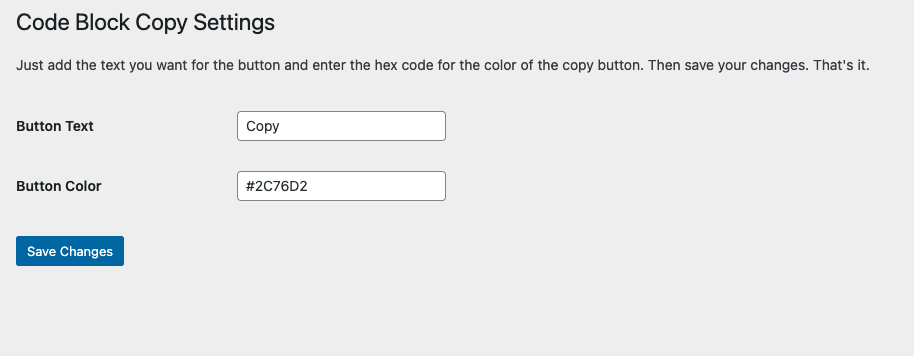
– Customize the button text (e.g., “Copy”, “Copy Code”).
– Change the button color to match your site’s theme.
– Clean, modern SVG icon included in the button.
– Simple settings panel under Settings > Code Block Copy.
– Works with both Classic and Gutenberg editors.
– Includes an optional promotional banner in the admin panel.
License
This plugin is licensed under the GPL2 license. See https://www.gnu.org/licenses/gpl-2.0.html for details.
スクリーンショット

インストール
- Upload the plugin files to the
/wp-content/plugins/code-block-copy-buttondirectory, or install it directly through the WordPress plugins screen. - Activate the plugin through the ‘Plugins’ screen in WordPress.
- Navigate to Settings > Code Block Copy to configure the button text and color.
FAQ
-
How do I use this plugin?
-
Simply install and activate it. The Copy button will appear automatically on all
<pre>code blocks. Use the settings page to customize the button text and color. -
At this time, the button is placed at the top-right of each code block. Future updates may include position customization.
-
Does this plugin support Gutenberg blocks?
-
Yes! It works with the Gutenberg Code block, Preformatted block, and any manually added
<pre>tags.
評価
このプラグインにはレビューがありません。
貢献者と開発者

変更履歴
1.5.5
- Corrected readme metadata (Tested up to, upgrade notices) and refreshed asset cache-busting versions.
1.5.4
- Updated button functions and plugin description.
1.5.3
- Changed admin settings ad link to point to CopyMyIP.dev
1.4
- New admin settings, SVG icon added, duplicate button fix, and improved copy functionality.
1.3
- Finalized admin settings with instructions and promotional banner.
- Cleaned up SVG icon for modern display.
- Prepared for WordPress repository submission.
1.2
- Added admin settings page.
- Included options for button text and color customization.
1.1
- Added Settings link directly from the Plugins page.
1.0
- Initial release. Copy button automatically added to code blocks.