

説明
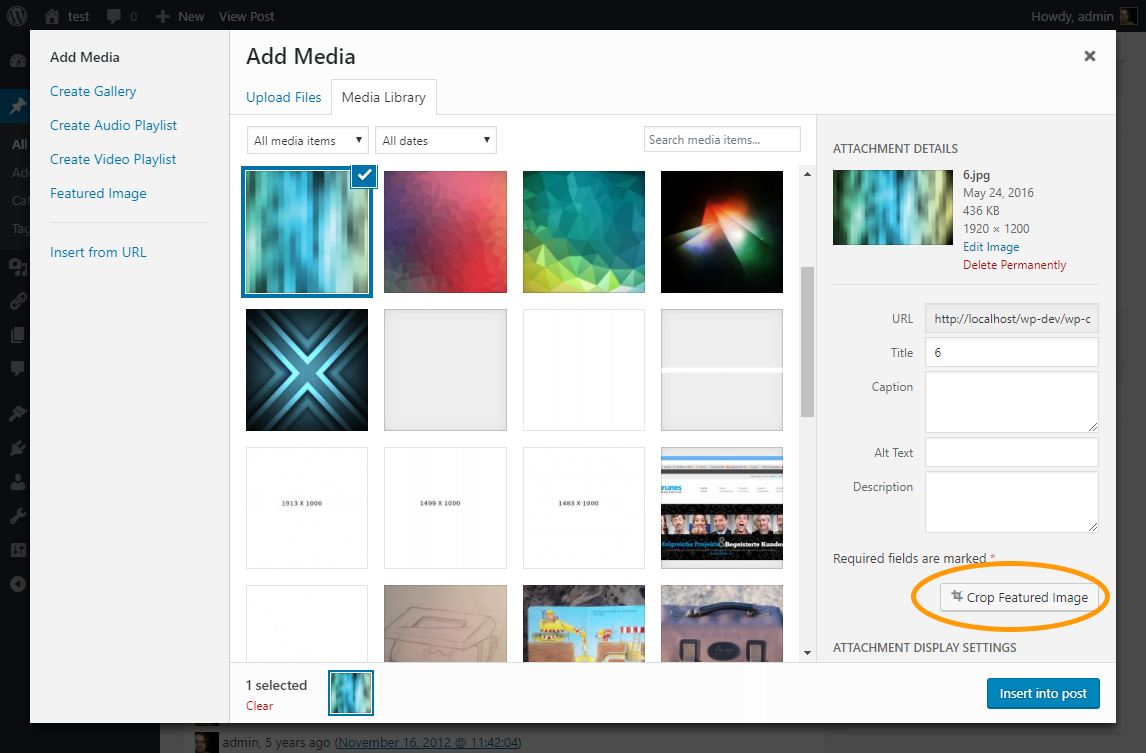
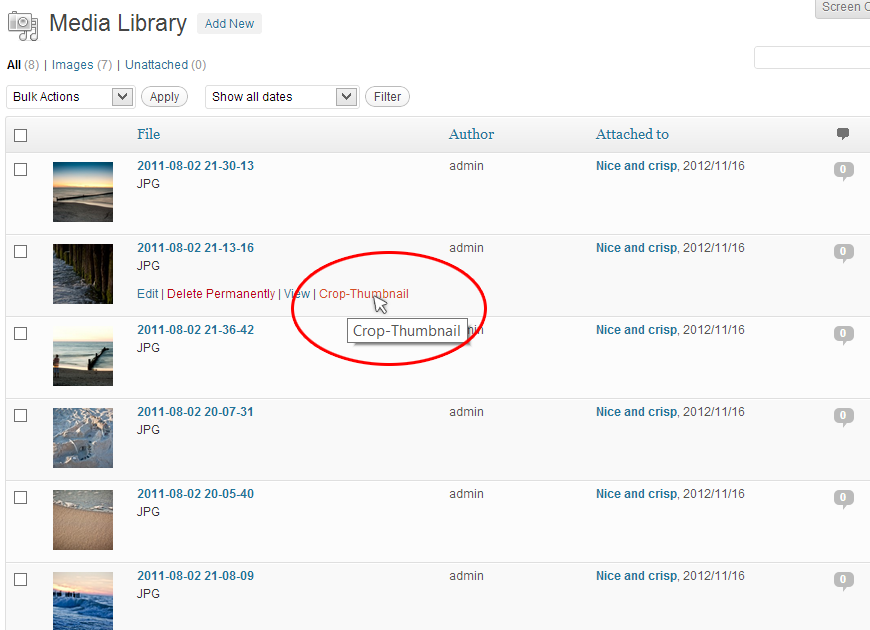
このプラグインは、切り抜き画像の切り抜き範囲を調整する機能を提供します。 編集ページとメディアダイアログに切り抜きエディタにアクセスするためのボタンを追加します。
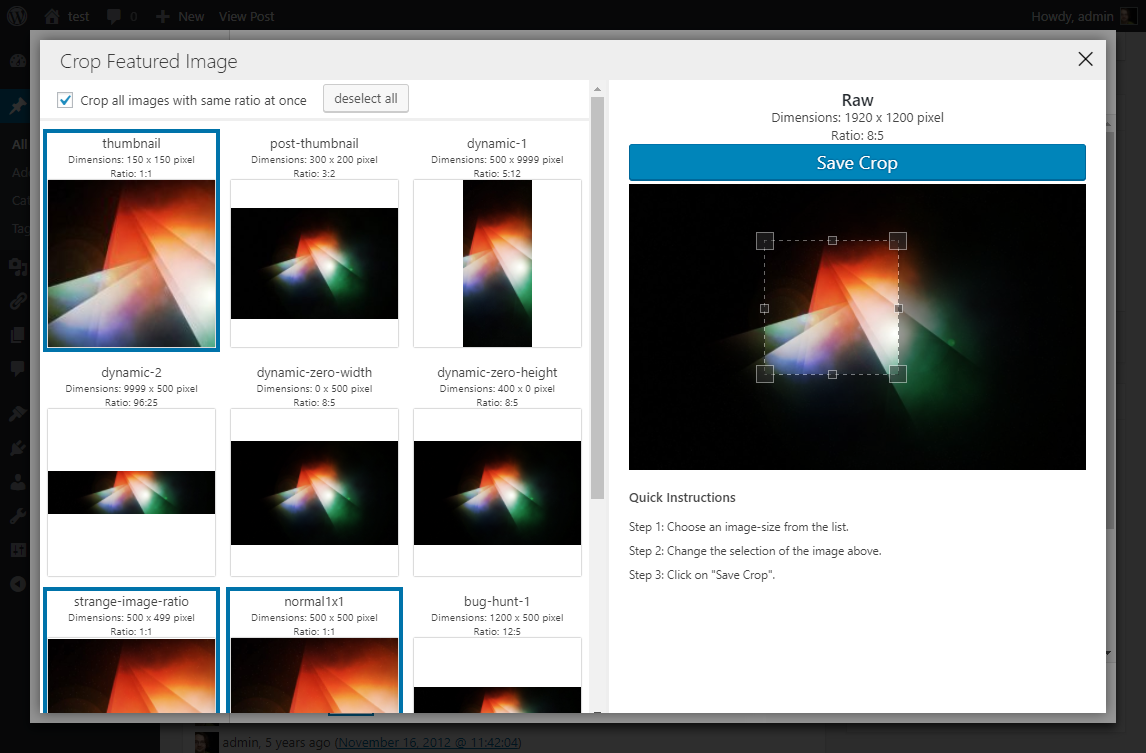
切り抜きエディタでは、1つまたは複数の (同じ比率の) 画像サイズを選択し、画像の必要な部分の切り抜きができます。
このプラグインは、切り抜き画像のサイズを完全にコントロールしたいテーマ開発者に特に便利です。 さらに深く知りたい場合は、フックとフィルタに関する情報をプラグインの github ページで得ることができます。
スクリーンショット
インストール
You can use the built in installer and upgrader, or you can install the plugin manually.
- You can either use the automatic plugin installer or your FTP program to upload it to your wp-content/plugins directory the top-level folder. Don’t just upload all the php files and put them in /wp-content/plugins/.
- WordPress の「プラグイン」メニューからプラグインを有効化してください
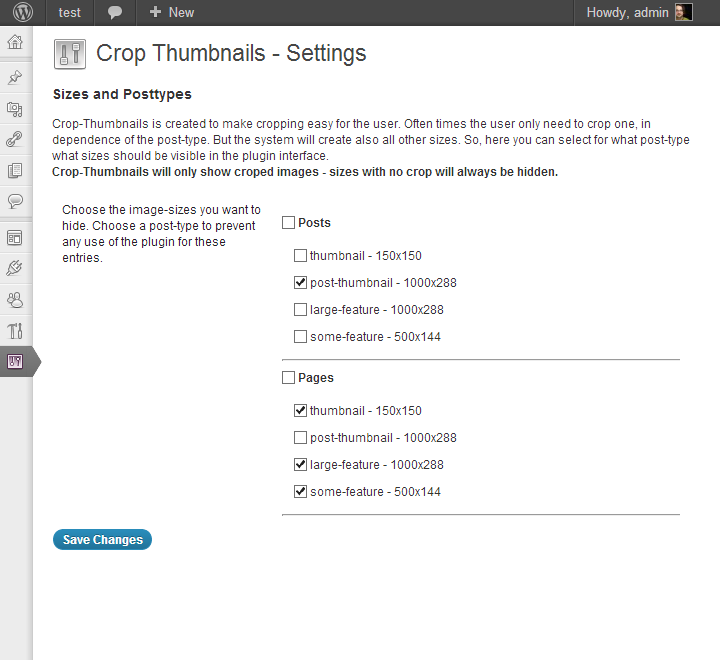
- Configure any settings from “Settings > Crop-Thumbnails”.
- Use it.
FAQ
-
How to define cropped image sizes?
-
The plugin do not add additional image sizes, it only provides functionality to edit the crop area.
You can use “
add_image_size” inside your functions.php to add additional cropped image sizes. See “add_image_size” documentation.add_action( 'after_setup_theme', 'my_adjust_image_sizes' ); function my_adjust_image_sizes() { //add an cropped image-size with 800 x 250 Pixels add_image_size( 'my-custom-image-size', 800, 250, true ); /** * The following image sizes use a dynamic value. * USE WITH CARE * Also the plugin supports these image-sizes, i do not recommend them! **/ //a dynamic cropped image size with 500 pixel height and the width of the original image add_image_size( 'my-dynamic-width-1', 9999, 500, true ); //a dynamic cropped image with the same ratio as the original image and 500 pixel width add_image_size( 'my-dynamic-zero-height-1', 500, 0, true ); }After you add the image-size any futher image uploads will produce a cropped image “my-custom-image-size” which you can use in post-loop:
if ( has_post_thumbnail() ) { the_post_thumbnail( 'my-custom-image-size' ); } -
What internal rules the plugin use for cropping?
-
- The plugin will only crop image-sizes where crop is set to “
true” (hard crop mode – see: https://codex.wordpress.org/Function_Reference/add_image_size). - If you had set one image dimension in add_image_size() to “
0“, the plugin will crop it in the ratio of the original image. - If you had set one image dimension in add_image_size() to “
9999“, the plugin will change the 9999 to the actual size of the current original image. - You are able to crop all images with the same ratio at once (default) or and any imagesize (and ratio) seperate.
- The plugin will only crop image-sizes where crop is set to “
-
How to use this plugin on ACF taxonomy-images
-
The “Adavanced Custom Fields” plugin has a functionality to add images to taxonomies. To add cropping functionality on these images you have to add a small code-snippet to your functions.php
Have a look on the github readme-page for details. -
I’ve cropped the image, but the new version do not appear in the frontend.
-
If you had viewed your image on the site before, your browser has cached the image. You can hard refresh the page by hitting:
* “CTRL + F5” (on Windows)
* “Apple + R” or “command + R” (on Mac/Apple) -
Is it possible to crop an non-cropped image-size?
-
No. The purpose of this plugin is to provide control for the wordpress automatic crop. If you want to crop let’s say the full-size image you should
- a) upload it in a better format in the first place
- OR b) use the Standard WordPress-Image editor to crop the image.
-
Where can I get developer information?
-
A documentation with a list of all actions and filters can be found on the Github page of the project.
-
I have two image-sizes that have nearly the same ratio. I want to make use of the feature “Crop all images with same ratio at once”, but cause the ratios are slightly different they wont be selected together.
-
You can add the following filter in the functions.php of your theme to adjust the ratio of one or more specified image-sizes.
CAUTION: use only when the ratios are really close.add_filter( 'crop_thumbnails_editor_printratio', 'my_crop_thumbnails_editor_printratio', 10, 2); function my_crop_thumbnails_editor_printratio( $printRatio, $imageSizeName) { if($imageSizeName === 'strange-image-ratio') { $printRatio = '4:3';//do override ratio } return $printRatio; } -
I display the cropped image in the backend in an custom meta-box. It does not update after the modal-dialog closed. Is there a way to fix this
-
Yeah, there is a way. After the crop-thumbnails-modal closed it triggeres a javascript event on the body element. You could use jQuery to cache-break your cropped thumbnail (in backend-view).
The event called “cropThumbnailModalClosed”. The plugin also provides a global function that could be called (only in post-edit-view and mediathek) to do the cache-break.
Example-Code:$('body').on('cropThumbnailModalClosed',function() { CROP_THUMBNAILS_DO_CACHE_BREAK( $('.your-image-selector') ); }); -
What languages are supported?
-
You may have a look on the Translation Page.
-
I want to contribute code.
-
Fantastic, i published the code on github. But be warned, i am carefully evaluate new features.
If you fork and planning to publish the forked plugin, please contact me.
評価


貢献者と開発者

変更履歴
1.9.7
- fix the script loading in the backend if using wp_enqueue_script_module
- Remove legacy filter with typo error: “crop_thumbnails_activat_on_adminpages”
- update dependencies
1.9.6
- change the basesize for cropping from “large” to “full” to prevent that the wrong dimensions are created for the crop
1.9.5
- fix wrong filter parameter count for “image_editor_output_format”
- add filter
crop_thumbnails_crop_datato make the crop-area-background-image editable - make
crop_thumbnails_crop_data_image_sizesdeprecated in favor ofcrop_thumbnails_crop_data
1.9.4
- add wp-api script to wp-backend (seems that wp_enqueue_script_module to not do this on there own)
1.9.3
- use rename instead of copy-unlink to move the files from the temporary directory
- improve logging
1.9.2
- hardend the crop solution by calculating the crop region in the frontend
- lower the minimal wordpress version to 5.0 (add a fallback for wp_enqueue_script_module)
1.9.1
- remove of a debug message that was visible in the frontend
- raise minimal wordpress version to 6.5 (because of usage of wp_enqueue_script_module)
1.9.0
- there was a contribution by Aaron Summer (https://github.com/aaronsummers) via Github to make the plugin more compatible with the Imagify plugin – Thank you Aaron!
- recalculate the crop region on the server side to always use the original uploaded image for cropping (instead of the eventually scaled “full” image)
- the settings screen > user settings do have a new option. You can set the a global “same ratio option” that is applied to all users.
- add image/avif to allowed mime types
- update frontend libraries
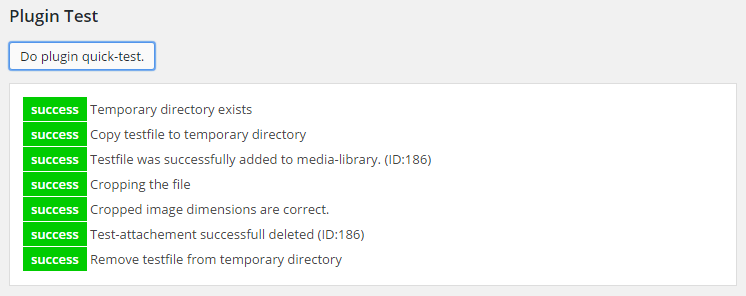
- improve plugin test: add plugin list and copy to clipboard button
- change all remaining ajax request to rest-api
1.8.0
- add to more filters for controlling what crop-sizes should be available (thanks to https://github.com/wijzijnweb)
- update frontend libraries
1.7.2
- fix php notice on settings screen
1.7.1
- fix settings screen not loading
1.7.0
- refactored backend settings
- Typo error at filter corrected (crop_thumbnails_activat_on_adminpages -> crop_thumbnails_activate_on_adminpages) for compatibility purpose the old name is still working
- Add new filter (crop_thumbnails_create_new_metadata) after processing the metadata of a certain imagesize.
- add backend setting to include the plugins javascript files on all admin pages
- no longer include jcrop style or script
- improved visibility of corner handles
- reintroduce keyboard-shortcuts on selection (left, right, up, down to move selection, ESC to leave the selection)
- bugfixes and improvements
1.6.0
- change crop library (now using https://advanced-cropper.github.io/vue-advanced-cropper)
- revert php requirements back to 7.4
- improve touch capabilities by adding an option for large handles
- refactoring and code improvements
1.5.0
- bugfix for adding the crop-link multiple times (see https://github.com/vollyimnetz/crop-thumbnails/issues/72)
- direct support for WebP-Express (see https://github.com/vollyimnetz/crop-thumbnails/issues/48)
- add php namespace (crop_thumbnails)
- update backend js build to vitejs
- js-library updates
1.4.0
- its possible to crop webp files with the plugin
- library updates
- code cleanup
- add fix for using replacement MIME-type specified for sub-sizes (thanks to https://github.com/benjibee – https://github.com/vollyimnetz/crop-thumbnails/issues/55)
1.3.1
- crop-editor: if grouped, the notification for not yet cropped image-sizes now is visible if at least one of the images in the group is not yet cropped
- fix bug on settings page (noticible only on strict configured php environments)
- fix bug in file saving (noticible only on strict configured php environments)
1.3.0
- remove support for Code below PHP 5.4: ( the construct dirname(FILE) become __DIR, arrays will also be initialized using [] )
- remove legacy language translation (in pot/po/mo files) – if you want to have the plugin in your language you can use https://translate.wordpress.org/projects/wp-plugins/crop-thumbnails/
- change app deployment to vue-cli
- add functionality for grouping of image-sizes in crop editor
- add the actions “crop_thumbnails_before_crop” and “crop_thumbnails_after_crop” to hook directly before and after the cropping
- add the filter “crop_thumbnails_do_crop” to make an exchange of the cropping function possible
- fix broken link (thanks to TangRufus – https://github.com/TangRufus)
- add code contribution of TangRufus to make plugin compatibility with “Crop Thumbnails CDN Cache Busting” (thanks to TangRufus – https://github.com/TangRufus)
- add the filter “crop_thumbnails_should_delete_old_file” to make an exchange of the check for file-deleting possible
1.2.6
- update dependencies
- fix typo
- fix a bug where the image name of the thumbnail changed to “imagename-scaled-…” cause of the new features of WordPress 5.3
- extend the filter “crop_thumbnails_filename” by the image-metadata-array
1.2.5
- fix a bug that may occur on utf8-filenames
- update vue.js and the other libraries to current version
- refactoring vue-code and build
1.2.4
- change the enqueue-name of the vue.js-library provided with the plugin to “cpt_vue” to make it possible to prevent this specific include
- update js-dev dependencies
- add the filter “crop_thumbnails_filename” to make it possible to change the target path/filename (thanks to https://github.com/matzeeable)
- improve readme
1.2.3
- fix a php-notice displayed on the settings-screen
1.2.2
- fix calling a non static function in a static statically (fixes a bug where the plugin do not run locally)
1.2.1
- fix a javascript-bug that occurs in WordPress 4.9.2 in relation with yoast seo-plugin
1.2.0
- the used cropping data are now stored in the image after the crop, making it possible to code a plugin for restoring the cropped region on new image-sizes
- fix for hiding crop sizes is not working when the image_size_names_choose-filter is used for that post-type
- change permission from ‘upload_files’ to ‘edit_files’ (Attention: authors will no longer able to crop the thumbnails)
- add a filter function to override the permission to crop thumbnails (crop_thumbnails_user_permission_check)
- add settings-section to set if users can crop thumbnails with capability “edit_files” or “upload_files”
- get featured image panel button working in wordpress v5
1.1.3
- add a filter (crop_thumbnails_activat_on_adminpages), for adding the plugins js/css on futher admin-pages like the taxonomy edit-page.
- update js and webpack dependencies
1.1.2
- add an css-class on the listing of image-sizes
1.1.1
- bugfix change use of mime_content_type() to wp_check_filetype() – it seems on some servers mime_content_type() is undefined
1.1.0
- bugfix variable was used but not defined (php)
- bugfix image-size with custom name where not updated in view after crop
- bugfix all same image-sizes where selected, even if they are not visible
- in the settings-panel, add more quick-test informations
- redesign settings-panel
- make selected image-sizes more clear
- optimize development-build-process
- add warning sign for not yet cropped images-sizes
1.0.3
- fix js error handling
- add warning to the backend if the script cant connect the server
- fix where escape of language-strings make no sense (exceptions in save.php)
1.0.2
- improve i18n
- change language text domain from ‘cpt_lang’ to ‘crop-thumbnails’
- rename language files to match text domain exactly
- change ‘CROP_THUMBS_VERSION’ to ‘CROP_THUMBNAILS_VERSION’
- correct translations of the plugins name
1.0.1
- fix code that mess with old php versions
1.0.0
- modal dialog rewritten
- crop functionality refactored
- changed the crop-library for improved touch support
- the action “crop_thumbnails_modal_window_settings” is gone, you can adjust style by override admin-css
- the filter “crop_post_thumbnail_window_css” is gone, you can adjust style by override admin-css
- adjusting dialog style – make it more responsive
- reviewed dynamic sizes: sizes with 9999 will no longer have ratio of the original image
- reviewed dynamic sizes: filenames will no longer be changed
- fix image-metadata polution
- refactoring and cleanup a lot of the code
- change from a language constant to ‘cpt_lang’
- secure translations
0.10.15
- bugfix: use wordpress-function to determine mime-type, as some servers do not define “mime_content_type” (Thank you Eskil Keskikangas for the submission)
0.10.14
- bugfix: add mime-type to image-metadata (the mime-type was deleted by crop-thumbnails before unintentional)
0.10.13
- bugfix: filter-settings will work again in media-dialog
0.10.12
- add italian translation (thanks to akteon18)
0.10.11
- bugfix: hide disabled image-sizes in the crop-editor again
0.10.10
- bugfix: Checks if the current page have a featured image box in the first place
0.10.9
- bugfix: click on the button in the featured image box (WP 4.6 and above)
- button in featured image box is no longer visible if no image is choosed
- minor style improvements
0.10.8
- change empty-array-definition to be compatible with old PHP-Versions (prior 5.4)
0.10.7
- fix a behaviour where the ‘image_size_names_choose’-filter could remove image-sizes from the settings page
- add a seperate filter ‘crop_thumbnails_image_sizes’ to remove/adjust image-sizes used by the plugin (use carefully)
- use DIRECTORY_SEPARATOR in the save-function
- add a quicktest to the settings screen
0.10.6
- improve the bugfix of 0.10.5 (sorry for that)
0.10.5
- bugfix: proper handling of non latin characters in filenames
0.10.4
- i18n of the button in the image-media-view changed
- add ‘medium_large’ size to (intern) default-sizes (fix notice)
- add action-hook ‘crop_thumbnails_after_save_new_thumb’ after save the new thumbnail
- add filter-hook ‘crop_thumbnails_before_update_metadata’ before update metadata
- add filter-hook ‘crop_thumbnails_editor_jsonDataValues’ in the editor, to adjust dataValues
- add filter-hook ‘crop_thumbnails_editor_printratio’ in the editor (see F.A.Q. for details of usage)
0.10.3
- small language adjustments
0.10.2
- make the modal-dialog more robust against css-overriding of other plugins
0.10.1
- small enhancement for developers: add the ‘same_ratio_active’ parameter in the ajax-request (https://wordpress.org/support/topic/return-same-ratio-daja-in-ajax-request)
0.10.0
- refactoring some parts of the code to make it more modular
- adding a cache breaker to the backend, so in post-view and mediathek the image should be refreshed after the modal-dialog closes
- provide a javascript-event (‘cropThumbnailModalClosed’) after the modal is closed (see F.A.Q. for details)
- provide the human-readable Name of the Crop-Size (if available), using the “image_size_names_choose” filter
- provide some size settings for the modal-dialog – via filter “crop_thumbnails_modal_window_settings”
- mini language update
0.9.0
- add crop-thumbnail-button to the default attachement-screens so i could accessed better
- change modal-dialog from thickbox to ui-dialog
- fix the missing crop-thumbnail-button in the attachment-list-view
0.8.4
- fix a bug that may occur on some systems with xdebug enabled and low xdebug.max_nesting_level (see: https://wordpress.org/support/topic/error-when-trying-to-crop-a-certain-image)
- add dutch language (thanks to Max Gruson)
0.8.3
- fix a bug for systems with comma as dezimal seperator (https://wordpress.org/support/topic/doesnt-save-the-cropped-image-anywhere?replies=12#post-4563377)
- reduce capabilities from “edit_pages” AND “upload_files” to only “upload_files”
- more informations logged in the console if an error occurs while saving
0.8.2
- add filter for customize the style of the crop-thumbnail content (‘crop_post_thumbnail_window_css’)
- add a fix for dynamic height/width images (https://wordpress.org/support/topic/dynamic-widthheight)
- add ukrainian language (thanks to Jurko Chervony from www.skinik.name)
0.8.1
- fix warning: when settings are saved
0.8.0
- change Constant from CPT_VERSION to CROP_THUMBS_VERSION
- bug fix: wrong calculated scale in the cpt-crop.js (selection will again always fill the maximum space)
- change behavior: on landscape-ratio-images the selection will be initial in the middle of the image (portrait-ratio-images stay the same – i asume that portrait-ratio images are mostly portraits)
- add current jcrop (version v0.9.12) directly into the plugin to get rid of the subversion of cpt-crop.js for an prior version of jcrop in wordpress 3.4
- add settings-option to display debug (js and/or data)
- handle image-sizes with zero width or height
- fix notices: not set variables
- fix warnings: if an image-size is zero
0.7.2
- bug fix: change the way the link in the featured Image-Box is set
- languages: some adjustments
0.7.1
- add language: brazilian portuguese (pt_br)
- bug fix: fixes for the upcoming WordPress 3.5
- bug fix: in crop editor, if an original image is larger than a single selected image-size, the predefined selection will now be on maximum possible size
- bug fix: ensure that other plugins can´t add styles and scripts into the crop-thumbnail-iframe
0.7.0
- workflow-enhancement: change the way the plugin handled same image-ratios (faster editing and less warnings)
- the image-size with the biggest dimensions now is used for the min-boundaries (jcrop)
- if the min-boundaries (jcrop) are bigger than original image the min-boundaries turned off
0.6.0
- add a settings link in the plugin-listing
- add a support-author area in the settings
- update language files
- Fix the readme-file for correct display informations on wordpress.org
- add screenshots for wordpress.org
- add license.txt
0.5.0
- Initial Version