
説明
Foliocast is made for artists, designers, photographers, architects and studios who already show their work on a WordPress site and want an Instagram feed that keeps up, without spending their evenings on it.
The plugin reads the projects of your portfolio (posts, pages or the project post type of your theme), prepares the Instagram posts for you and publishes them at the planned time, straight from your site. Your computer can stay off.
What the free plugin does
- Reads your portfolio: finds your published projects and their images (featured image and galleries), whatever your theme.
- Portfolio built elsewhere? If your projects live on Squarespace, Wix, Webflow, Shopify, Framer, Cargo, Behance or a hand-made site, paste its address: Foliocast reads the public pages, you tick the projects to import (title, text and up to 12 images each), and new projects are picked up once a day. They are kept on this site as Foliocast projects (never shown as pages of this site) and link back to your portfolio.
- Plans the feed: a weekly rhythm (new project, close-up, signature image) spread over the coming weeks, which you review before anything is scheduled.
- Formats the visuals: crops each image to Instagram’s 4:5, 1:1 or 9:16 formats around a point of interest, on your own server (Imagick or GD).
- Single images and carousels, with no monthly limit.
- Captions and hashtags: hooks, credits, calls to action and hashtag sets in English, French, Spanish, German, Italian, Portuguese or Dutch, editable by hand. Credits and place written on the project page (“Photo: …”, “Architect: …”, “Location: …”) are added to the caption automatically.
- True colors: photos in Adobe RGB, ProPhoto or Display P3 are converted to sRGB, so they don’t look washed out on Instagram.
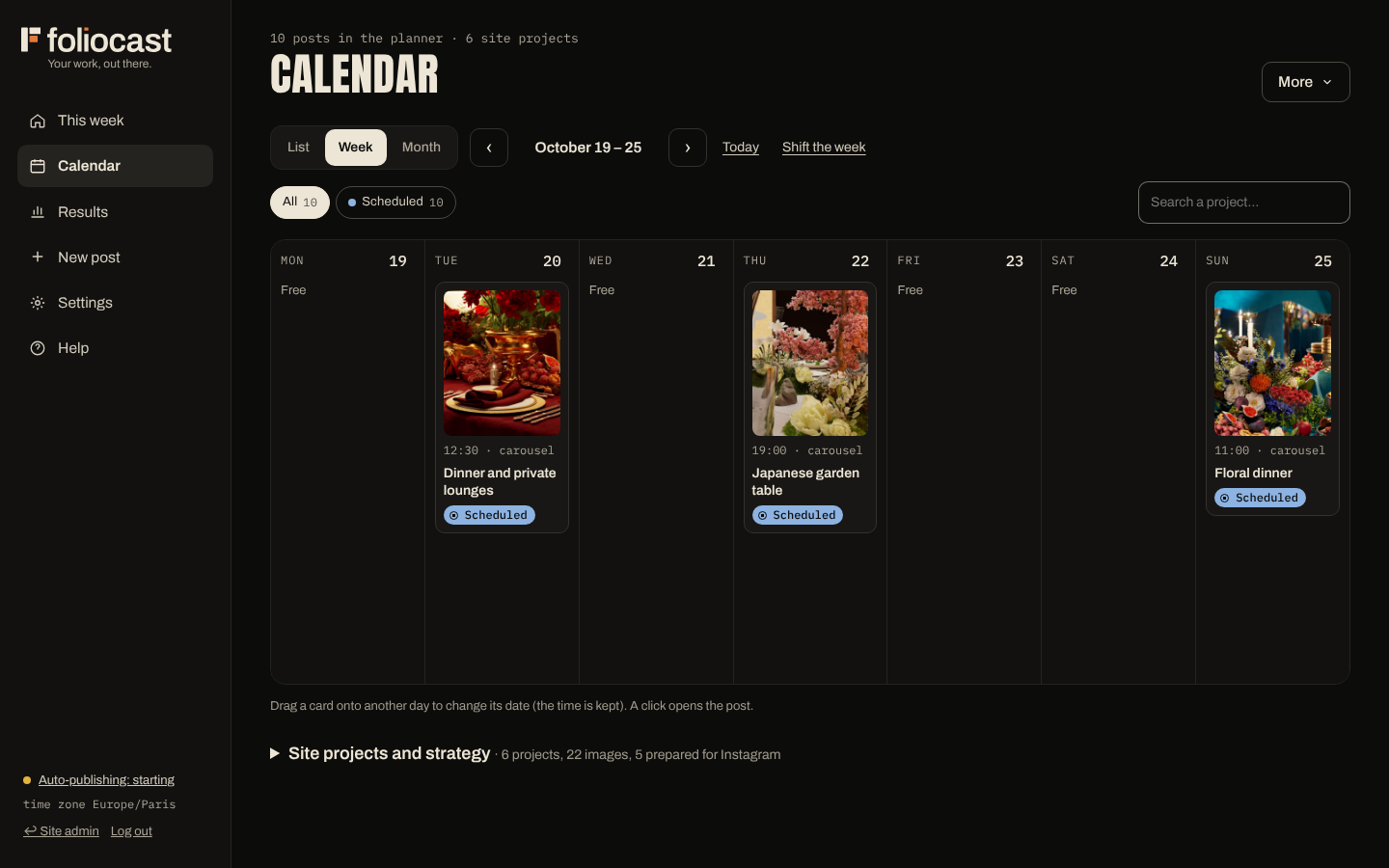
- Grid preview: see your profile as it will look, drag a post to move it, the dates follow.
- On-time publishing with one click: turn on “On-time publishing by Foliocast” and our free service calls your site every minute, so posts go out on time without a cron job at your host (or keep your own cron job).
- Automatic publishing at the planned time through the official Instagram API, with retries, alerts and a clear status for every post.
- Statistics: reach and engagement of each published post, and visits to your site coming from Instagram (counted on your own site, without storing any IP address or fingerprint; a technical cookie with no identifier, deleted by the browser after one hour, avoids counting the same visit twice).
- Email alerts when a post is published or fails, a daily summary and a monthly report (your scores, your best posts, one tip).
- Light or dark: the app opens in a light theme; dark is one click away and follows each person’s account on all their devices.
- Grow the account: a link page for your Instagram bio with your latest projects, a weekly suggestion to bring a project that did well back in the spotlight (as a draft to approve), and a first comment for each post, where your hashtags can go.
- Your own videos: publish a video you upload as a Reel (optional Cloudinary account to crop it to 9:16 on shared hosting).
- Help screen: an installation check that tells you what to fix, with no password, token or key shown.
- Installable app: install Foliocast as an app on Windows, Mac, Android, iPhone and iPad, straight from your own site (no app store, nothing to pay): its own icon and window, a QR code to open it on your phone, and photos shared from your Android phone’s gallery go straight to a new post. Your posts still go out from your site, whatever the device.
The interface is available in English, French, Spanish, German, Italian, Portuguese and Dutch (it follows your WordPress profile language, or your choice).
Paid plans: Solo, Studio and Agency
The paid plans come as a separate add-on that installs next to this plugin and keeps your schedule and settings:
- Solo: 8 Reels a month made automatically from your images (with music), 30 AI captions a month and automatic tuning of posting times and hashtags from your statistics, for one site.
- Studio: unlimited Reels, your own music, grid banners (one wide image split across 3 or 6 posts), companion stories, a private approval page for your clients, publishing to Facebook, Threads, LinkedIn and Pinterest as well, and up to 2,000 AI captions a month, for one site.
- Agency: every Studio feature on 5, 10 or 25 sites, the “My spaces” dashboard, monthly reports in your agency’s name and priority support.
Every paid plan also adds notifications on your phone and computer (post published, failed or on hold, video not ready, Instagram to reconnect, and your client’s approval on Studio and Agency), sent by your own site and encrypted for each device.
Plans and prices: foliocast.fr. Nothing in this free plugin is locked or limited: it is complete on its own.
Requirements
- A professional Instagram account (Creator or Business, free to switch in the Instagram app).
- A WordPress site reachable on the internet (Instagram downloads the images from your site, or from Cloudinary if you connect it).
- For publishing exactly on time: one click on “Turn on on-time publishing” (free Foliocast service), or a cron job at your host that calls your site every minute (the exact command is shown in the plugin). Without either, WordPress’s built-in scheduler is used, which runs only when someone visits your site.
External services
This plugin connects to the following third-party services. Nothing is sent before you connect an account or enable the feature.
Instagram API (Meta)
Used to publish your posts and read your account details and post statistics. Requests go from your site to graph.instagram.com (or to graph.facebook.com if you pasted an access token made with Facebook login, for an Instagram account linked to a Facebook Page).
- When: when you connect your Instagram account, when a post is published, when the app shows your live Instagram grid or checks whether a published post still exists, when the access token is renewed (about every 50 days) and when the statistics of a post are refreshed (during its first 30 days: every 3 hours at first, then every 12 hours, then every 2 days).
- What is sent: your Instagram access token and account ID, the public addresses of the images or videos to publish, the caption and the alternative text of each image.
- Instagram Terms of Use: https://help.instagram.com/581066165581870
- Meta Privacy Policy: https://www.facebook.com/privacy/policy/
Foliocast Connect (foliocast.fr)
Used only for the “Connect with Instagram” button: it lets you log in on Instagram’s official page without creating your own Meta developer app. It is run by the author of this plugin.
- When: only when you click “Connect with Instagram”. The plugin first checks that the service is available (a request to
foliocast.fr/connect/healthwith no data from your site; a positive answer is remembered for one day, a failure for one hour, and in the meantime no new check is made), then opens the service’s login page. Opening the setup assistant sends nothing. - What is sent: the address of your site and a one-time security code. Instagram sends your access token to the service, which hands it straight to your site; it is kept encrypted for 5 minutes at most for that handover, then deleted.
- Tester invitation: while Meta reviews the Foliocast app, only accounts invited as Instagram testers can connect. If you fill in the “Request my invitation” form shown after clicking “Connect with Instagram”, the plugin sends the e-mail address and Instagram account name you typed, your site’s host name and the interface language to
foliocast.fr/connect/invite, so that the team can invite your account and e-mail you the steps. Nothing is sent if you do not fill in the form. - Terms: https://foliocast.fr/cgu.html
- Privacy policy: https://foliocast.fr/privacy.html (in French: https://foliocast.fr/confidentialite.html)
You can also connect Instagram without this service, by pasting an access token from your own Meta app in Settings.
Foliocast Pulse (foliocast.fr, optional)
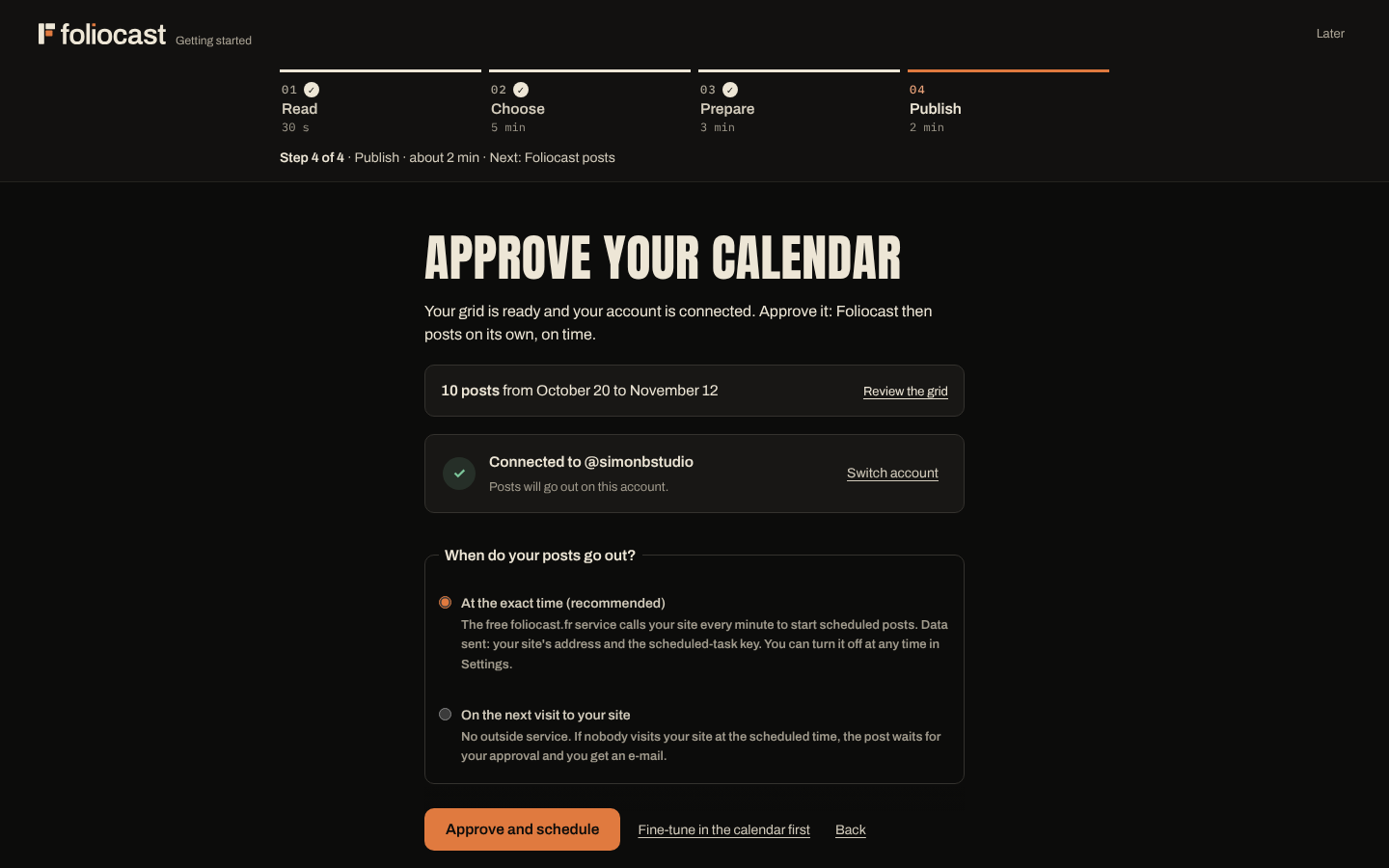
Used only if you choose “At the exact time” in the last step of the setup assistant, or click “Turn on on-time publishing” in Settings Automatic publishing. The service calls your site every minute so that scheduled posts go out on time without a cron job at your host. It is run by the author of this plugin. With a paid plan add-on, it turns on by itself when your site (HTTPS only) has no cron job, unless you chose “On the next visit to your site”; you can turn it off in Settings.
- When: when you turn it on or off, when you create a new scheduled-task key while it is on (the service receives the new key), and when you open Settings while it is on (status check, remembered for 10 minutes). Then the service calls your site’s check address every minute.
- What is sent: your site’s address, its check address (/wp-json/foliocast/v1/tick) and the scheduled-task key, which only allows starting that check. Turning it off deletes this data from the service.
- Terms: https://foliocast.fr/cgu.html — Privacy policy: https://foliocast.fr/privacy.html
Your portfolio on another site (optional)
Only if you choose to import a portfolio that is not on this WordPress site.
- When: when you paste its address in the setup assistant, then once a day to look for new projects.
- What is requested: the public pages, sitemap, feed and images of the address you entered, from your own site, with the user agent
FoliocastReader. Nothing about you or your visitors is sent. A site can refuse it withUser-agent: FoliocastReaderandDisallow: /in its robots.txt. - More: https://foliocast.fr/robot.html
Cloudinary (optional)
Only if you enter your own Cloudinary credentials in Settings. Cloudinary then hosts the images and videos at publishing time, and converts videos to the 9:16 Reel format when your server cannot.
- When: when you save your Cloudinary credentials (a check of the credentials), when a post is published (upload, then deletion of the copy once Instagram has it), and when you import a video while Cloudinary is connected.
- What is sent: the image or video file, signed with your Cloudinary API key.
- Cloudinary Terms of Use: https://cloudinary.com/tos
- Cloudinary Privacy Policy: https://cloudinary.com/privacy
Credits
- Demo images (assets/demo, used only by the live preview): original artworks created for the Foliocast demo, GPL-2.0-or-later.
- Instrument Sans font (used to write the optional brand band on images), Copyright 2022 The Instrument Sans Project Authors, SIL Open Font License 1.1 (fonts/OFL.txt).
- Anton font (interface headings), Copyright 2020 The Anton Project Authors, SIL Open Font License 1.1 (assets/app/fonts/OFL.txt).
- Archivo font (interface text), Copyright 2019 The Archivo Project Authors, SIL Open Font License 1.1 (assets/app/fonts/OFL.txt).
- IBM Plex Mono font (interface figures and codes), Copyright © 2017 IBM Corp. with Reserved Font Name “Plex”, SIL Open Font License 1.1 (assets/app/fonts/OFL.txt).
Source code
All JavaScript and CSS in this plugin is shipped unminified and human-readable; nothing is obfuscated, and there are no minified files.
assets/app/style.css,assets/app/clair.css,assets/app/pwa.css,assets/app/shim.js,assets/app/theme.js,assets/app/pwa.js,assets/app/sw.js,assets/admin.jsandassets/admin.cssare written by hand and are their own source (no build step).assets/app/app.js(the app on the Foliocast admin page) is written by hand too, in several files shipped with the plugin inassets/app/src/(i18n.js,app.js,reels.js,learn.js,results.js,system.js,ui.js,onboard.js,help.js,growth.js). It is not transpiled, bundled or minified: it is these files put end to end, in this order. To rebuild it, run this command inassets/app/src/:cat i18n.js app.js reels.js learn.js results.js system.js ui.js onboard.js help.js growth.js > ../app.js(see alsoassets/app/src/README.md).- No third-party JavaScript or CSS library is bundled. The only third-party files are the fonts listed under Credits (SIL Open Font License 1.1, license texts in
assets/app/fonts/OFL.txtandfonts/OFL.txt); nothing is loaded from another site.
スクリーンショット
インストール
- Install and activate the plugin from Plugins Add New, or upload the zip file.
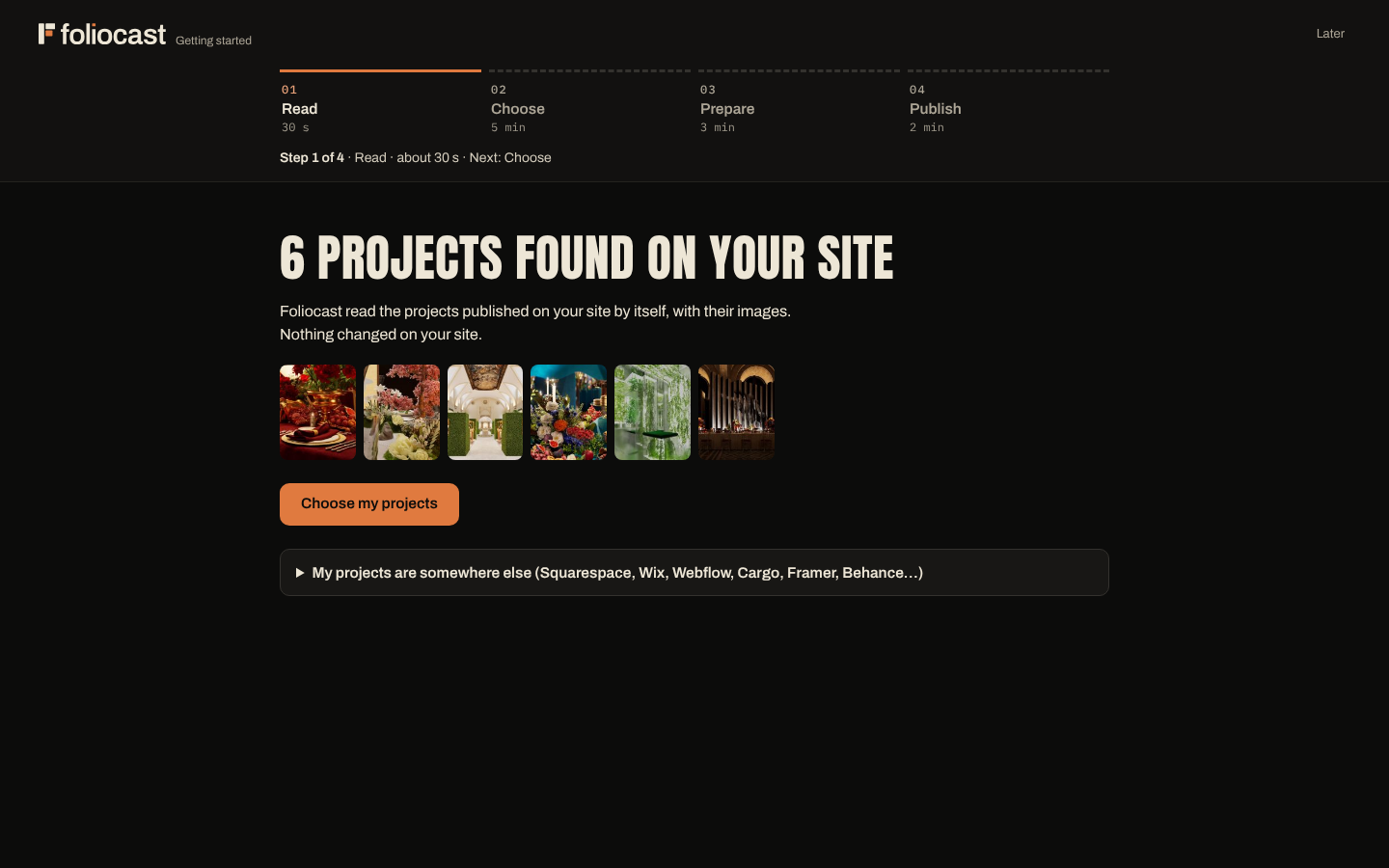
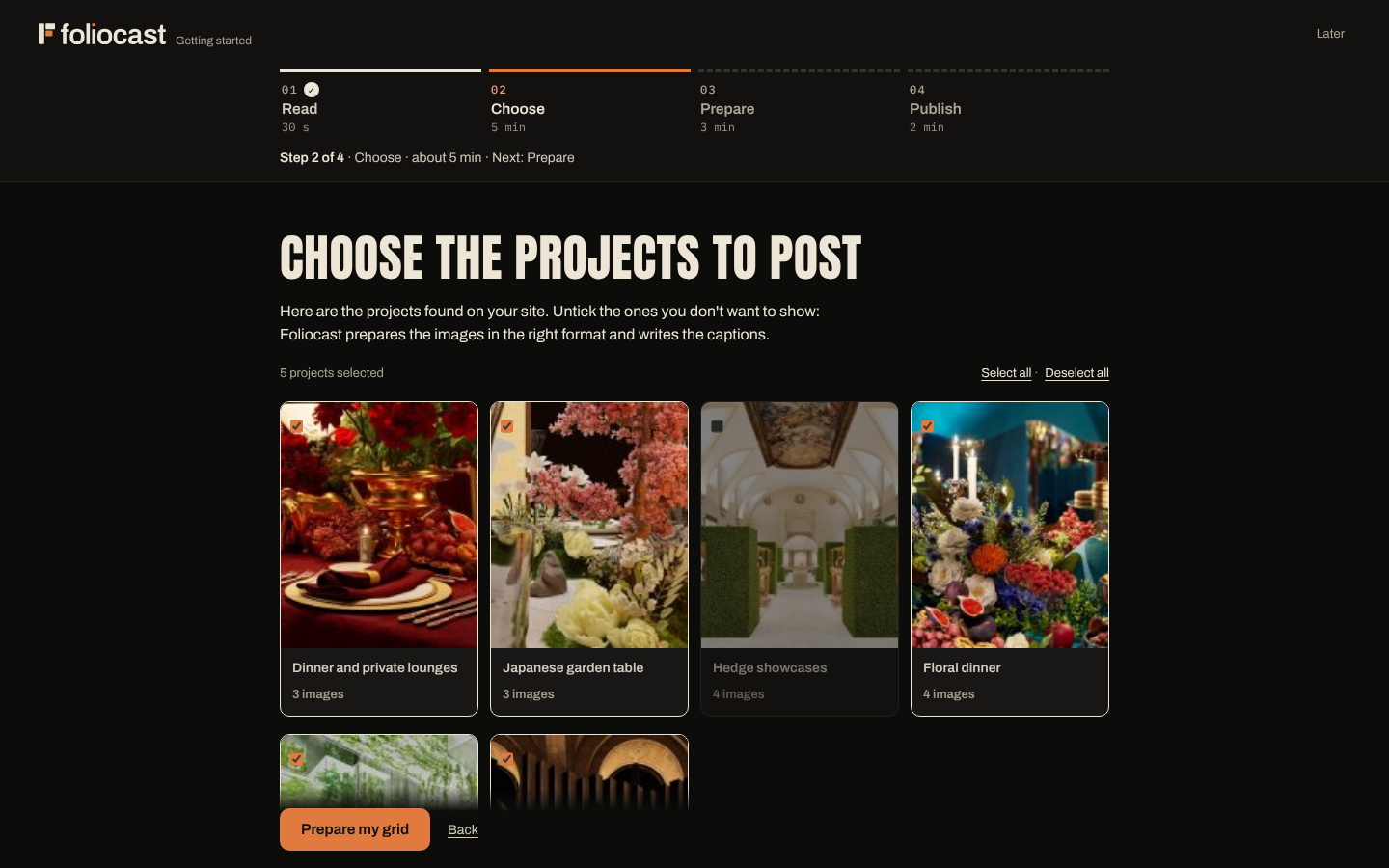
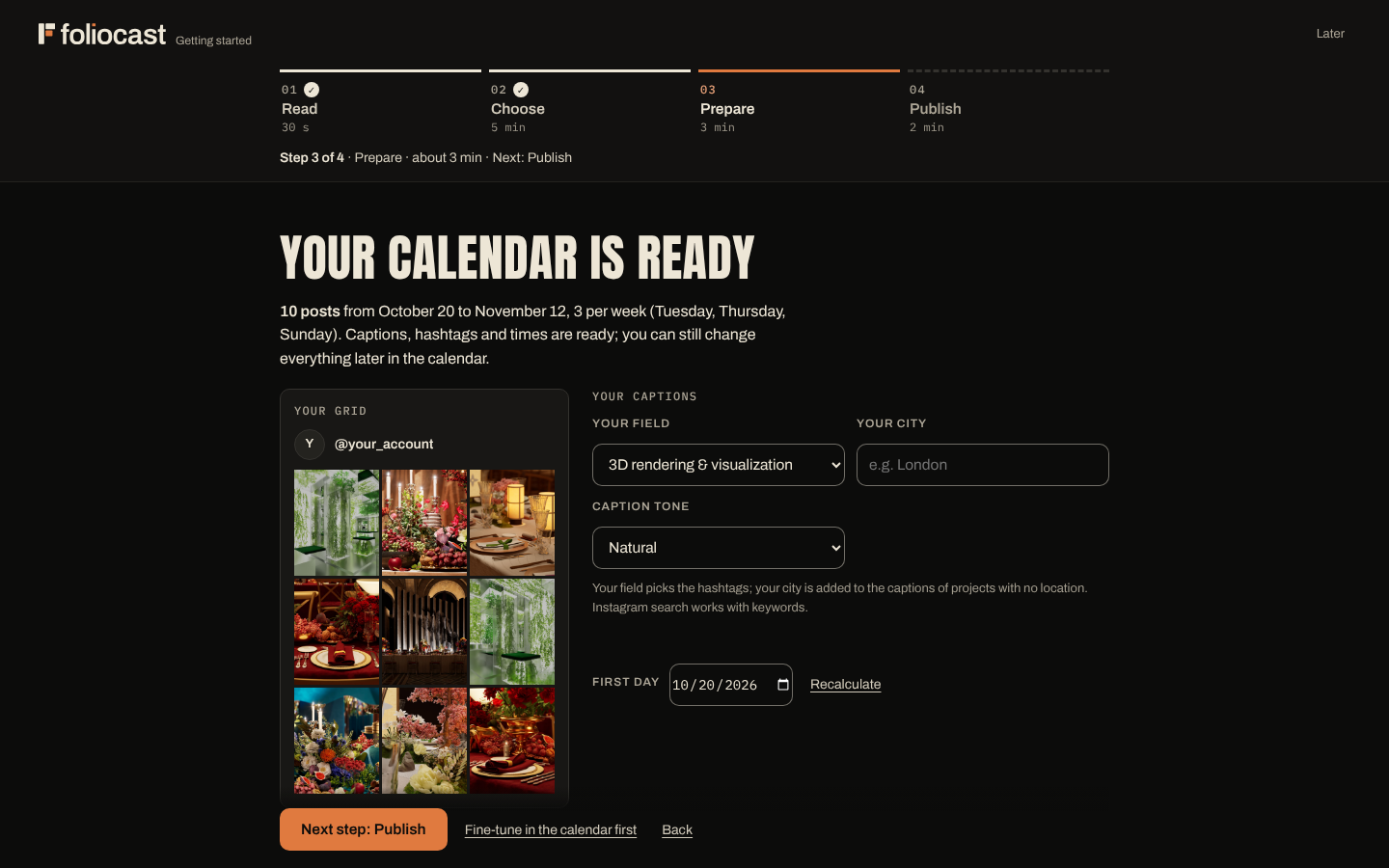
- Open Foliocast in the admin menu. The setup assistant guides you through four steps: 01 Read (Foliocast finds the projects of your site, or reads your portfolio elsewhere), 02 Choose (tick the projects to publish), 03 Prepare (your feed, captions and hashtags are ready; nothing is scheduled yet), 04 Publish (connect Instagram, then approve the plan).
- In Settings Automatic publishing, click Turn on on-time publishing (or, if you prefer, copy the cron command and add it to your host’s cron jobs, every minute). The status turns green within two minutes.
FAQ
-
Does my Instagram account need to be professional?
-
Yes. Instagram only lets applications publish for professional accounts (Creator or Business). Switching is free and reversible in the Instagram app: Settings Account type and tools.
-
Where are my data stored?
-
On your own site: schedule, visuals and settings. The Instagram access token is stored encrypted. Removing the plugin keeps your data, unless you tick “Delete all data when uninstalling” in Settings Show all Maintenance Advanced options.
-
How do I protect the Instagram token with my own encryption key?
-
Foliocast stores your secrets (the Instagram access token and, if you use it, the Cloudinary API secret) encrypted in your database. By default the encryption key is a random key created once and kept in the database too. To keep the key out of the database, so that a copy or backup of the database alone is not enough to read your token, add this line to
wp-config.php, above the line “That’s all, stop editing!”:define( 'FOLIOCAST_ENCRYPTION_KEY', 'a-long-random-string-of-at-least-32-characters' );Use your own random value (for example a password generator, 32 characters or more) and keep it safe: if the constant is changed or removed later, the stored secrets can no longer be read. After adding it, connect Instagram again (and re-enter your Cloudinary secret if you use it), because secrets saved before cannot be read with the new key.
-
My posts are published late.
-
Without a cron job at your host, WordPress only checks for posts to publish when someone visits your site. Add the command shown in Settings Automatic publishing as a cron job that runs every minute, or use a free external service such as cron-job.org.
-
My portfolio is not on WordPress.
-
Install Foliocast on any WordPress site (even a blank one), then paste the address of your portfolio in the setup assistant. Squarespace, Wix, Webflow, Shopify, Framer, Cargo, Behance and most hand-made sites are read from their public pages. The projects you tick are imported with their images and published to Instagram as usual; your portfolio itself is not changed.
-
Does it work with my theme?
-
Foliocast reads any public post type with a featured image or galleries: regular posts, pages, or the “project” or “portfolio” type of your theme. You choose the post type in the setup assistant.
-
Does Foliocast add anything to my captions?
-
Only what you set up. The optional #foliocast mention stays off until you choose it: the plugin asks you once, with two equal answers, and you can change your mind at any time in Settings.
-
Is there a mobile app?
-
Yes: Foliocast installs as an app from your own site, on Windows, Mac, Android, iPhone and iPad. Open Foliocast, go to Settings, “The app”, and follow the steps for your device (on a computer, a QR code opens it on your phone). There is nothing to download from an app store, and the app uses the same account, schedule and settings as your site.
-
Can I use Foliocast on several sites?
-
Yes. Each site publishes to its own Instagram account. On a multisite network, activate the plugin site by site.
評価
このプラグインにはレビューがありません。
貢献者と開発者
Foliocast – Portfolio Auto Post & Scheduler for Instagram はオープンソースソフトウェアです。以下の人々がこのプラグインに貢献しています。
貢献者

変更履歴
2.21.0
- Vertical previews (Reels and stories) get an “Overlay zones” button: it shows what Instagram’s interface covers (account name and audio at the top, caption, collaborators and buttons at the bottom and on the right), so you can check that nothing important sits there.
- With the brand band turned on, 9:16 images (stories and Reel covers) now carry it above Instagram’s reply bar and caption, instead of at the very bottom where the interface hid it.
- Help: a new answer for text hidden by Instagram’s interface.
2.20.1
- The first comment with the project link (Settings Grow the account) shows its text again: the field looked empty.
- Clearer words everywhere: “On site visits” instead of “WordPress fallback” in the help screen and the plugin page, and on-time publishing by Foliocast recommended before a cron job.
- Free version: the monthly report e-mail and the plans card now name the right place in Settings (Tracking Email alerts) and what each plan adds (Solo: Reels, AI captions and learned times; Studio and Agency: unlimited Reels with your music, grid banners, stories and the other networks).
- In English, the links to the calendar now say “calendar”, like its tab. Brazilian Portuguese: the account and subscription texts are now in Brazilian Portuguese throughout.
- Help screen: a long error message is shortened on a whole word, and each check reads well on a phone.
- Phones: larger tap targets for the point of interest, the window close buttons and the sound button of the preview.
- A thumbnail whose file was deleted from the site no longer shows a broken image icon.
2.20.0
- The app now opens in a light theme (paper and ink, same orange for actions). Dark stays one click away: the button at the bottom of the sidebar on a computer, the More menu on a phone, or Settings, Appearance. The choice is saved in each person’s account, follows them on all their devices, and the page loads straight in the right theme, without a flash.
- Your accent color works in both themes; shades that are too dark are lightened to stay readable.
- The opening animation, Instagram previews, videos and Reels stay dark in both themes.
- Home screen, lighter: alerts are grouped under “To do”; each one reads in one sentence, and the explanation unfolds under “Why, and what to do”.
- Clearer words: “Auto-publishing: on site visits” replaces “WordPress fallback”; settings section titles are calmer, so each page has a single poster title.
- Phones: the “New post” button of the home screen is gone (the Create tab of the bottom bar does the same), and alert buttons keep their natural size.
2.19.5
- Video previews (grid, schedule, posts to approve, galleries, results) become a picture taken from each video: one video is read at a time, only when its preview is on screen, then its download stops. The picture is kept, so later launches open no video at all. Before, a slow host could keep about 27 video downloads open at once, and opening a post took up to 17 seconds instead of under one.
- The home screen no longer refreshes every 20 seconds while the app is in the background, while a post is open, or while a request is running.
- Installed app on Android: the opening animation picks up exactly where the phone’s launch screen ends, so the logo is no longer drawn twice; the home-screen icon matches it.
- The card shown after your first published post now says how much editing time Reels save (about 45 minutes each).
2.19.4
- Faster on slow hosts: background reads now run one at a time, after the app is shown, so a post you open is never stuck behind them.
- The installed app’s manifest is kept by the browser for a day (its address changes with each version): one less page for your site to build at every launch.
- Video previews in the grid, the posts to approve and the post window show a still frame instead of downloading and playing every video when the app opens.
2.19.3
- Phones: the post window opens at once with “Loading…” while the post is read, instead of seeming to ignore the tap on a slow host. Tapping the same post again sends nothing more.
- Phones: the post window now grows with its content, so its background goes all the way down (no more text over the schedule), and it sits above the bottom bar.
- Schedule: the “Being made” filter can be selected.
- The app always shows the Foliocast logo, tab icon and title, even when a profile gives the interface a studio’s name and logo.
- Lighter start on slow hosts: background reads (alerts, video rendering status, network report) wait until the app is shown and never get ahead of what you asked for.
2.19.2
- Installed app: a short opening animation at launch. The Foliocast logo builds itself and the Foliocast name slides out beside it, with the site name below, then the app appears. Shown once per launch, never in the browser, and kept still when the phone asks for less motion.
- iPhone and iPad: no more white screen while the installed app opens. The launch screen now uses the app’s dark background.
2.19.1
- Phones: the bottom bar now shows This week, Calendar, Create and Results, with “More” for Settings, Help, the site admin and sign out. Labels no longer overlap, even with a larger text size set on the phone.
- The installed app is always called Foliocast, with the Foliocast icon and window title.
- Opening the app of another site from the app stays in the app window, with a “Back to” button when both sites share the same address.
2.19.0
- Installable app: Foliocast installs as an app on Windows, Mac, Android, iPhone and iPad, from your own site, with no app store. Settings, “The app”: an install button (Chrome, Edge), the steps for iPhone, iPad and Mac (Safari), and a QR code to open the app on your phone.
- In the installed app: its own icon and window, shortcuts on the icon (New post, Calendar, Results), the phone’s safe areas respected (notch, home bar), and the view you had open refreshes when you come back after a few minutes.
- Post from your phone: on Android, “Share” photos from the gallery to Foliocast to open New post with the photos already processed (Windows too, from the file explorer). The photo picker offers the gallery and the camera.
- Without a connection, the app shows a clear “No connection” page instead of a browser error. Scheduled posts never depend on the device: they go out from your site.
- Privacy: the app’s service worker only handles the Foliocast page, never keeps any API answer or admin page, and the rest of the WordPress admin never goes through it. Nothing is sent to foliocast.fr.
2.18.4
- Faster with large portfolios: the projects list and the setup assistant read a 200-project portfolio with a few dozen database queries instead of nearly 2,000. The images found for each project are remembered and looked up again only when the project or the media library changes.
- “It’s on” screen: “even with your computer off” now only appears with on-time publishing or a real cron job; otherwise the screen says that posts go out when your site gets a visit, or wait for your approval with an e-mail. Its count now includes the grid banner tiles scheduled together.
- Undo after a deletion: the focus moves to “Undo”, Ctrl+Z (Cmd+Z on Mac) undoes while the message is shown, and the 10 seconds only start after your first action.
- Settings, “Essential” view: the cron instructions and technical details are folded under “Advanced”. Help explains GD, Imagick, WP-Cron and the REST API in plain words.
- Step 03 shows “Photo” instead of “Post”, a new post preselects the 4:5 format, exhibition designers get their own vocabulary, and projects imported from another site are labelled as imported.
- Accessibility: every settings field has its label; the Reels progress chip never covers a window or a menu.
- Security and privacy: values inserted in the interface are escaped by default; the public visit counter is rate-limited without storing any IP address; uninstall with data purge also removes the #foliocast setting and the remembered project images.
- Translations: missing Dutch entries completed, four texts added to the translate.wordpress.org catalogue.
- Clearer name on WordPress.org: Foliocast – Portfolio Auto Post & Scheduler for Instagram.
2.18.3
- Optional #foliocast mention: the plugin asks you once, on the dashboard, whether to add #foliocast at the end of your posts’ hashtags. Nothing is added unless you choose “Yes”, and you can switch it off at any time in Settings. The mention is skipped when a caption already has 30 hashtags or is close to Instagram’s 2,200-character limit.
2.18.2
- Undo after a deletion: a slot whose post already went out (or failed) keeps its link to that post when you undo, so nothing can be sent twice; a grid banner tile comes back with its banner data.
- Shift a week: one calendar save per shift instead of one per slot (your backup history is kept), a warning when a shift would land a post inside a grid banner, and invalid dates are refused cleanly.
- “Repost in 6 months” is refused when a repost is already planned, and the button is hidden; the copy comes back to approve again on its new date.
- Shift menu: stays on screen (above the button when there is no room below), no longer closes by itself, keyboard and screen-reader friendly. Toast notifications are announced to screen readers, pause while you hover or focus them, and the Undo button is easier to tap.
- Portfolio reader: one-page portfolios with hundreds of images are read in a fraction of a second (a quadratic step was removed), thumbnails and folders are matched more precisely. Also read correctly now: Squarespace 7.0 galleries (one gallery per project), Cargo 3 sites, Format galleries (image addresses with commas), one-page sites whose projects open in modal windows, WordPress project pages whose gallery sits outside the article; blog posts are no longer mistaken for projects, Wix titles keep their apostrophes, and titles keep their hyphenated parts (only the site name is removed).
- Imports from another site: very large images (more than 40 megapixels) are skipped instead of exhausting memory, and a failed image no longer blocks the next ones.
- Uninstall with data purge now removes every Foliocast option, including the newest ones.
2.18.1
- Portfolio reader: numbered pages at the root of a site, one-page portfolios, lazy-loaded galleries and album pages are now read as projects (the 2.18.0 note announced them; they are in this version).
2.18.0
- Undo for 10 seconds after deleting a post from the schedule: the slot and its scheduled post come back exactly as they were (no more confirmation box).
- Shift a whole week in one click (holidays, trade show): one week later, two weeks later or one week earlier; grid banners move as a whole, posts already sent stay where they are, and the shift can be undone.
- “Repost in 6 months” on a post that is already live: it comes back in the schedule, to approve, with the same images and caption.
- Portfolio reader: reads WordPress portfolio post types (Salient, WPBakery, Uncode…), numbered pages at the root of a site, one-page portfolios and lazy-loaded galleries.
2.17.1
- Recover deleted slots: only slots you deleted yourself are listed (a rebuilt schedule no longer shows its old slots), never a slot whose post already went out, never a single tile of a grid banner.
- Cloudinary settings: leaving the three fields empty now keeps your settings, as the help says.
- Paid plans open on 1 December: until then the app points to early access instead of a 14-day trial that is not open yet.
2.17.0
- Recover deleted slots: Settings, Schedule backups now lists the upcoming slots you deleted that the automatic backups still hold. Tick the ones to bring back; the rest of the schedule does not change.
2.16.0
- A post prepared with its own files (New post) now shows its first image or video in the preview, with the right number of slides.
- Changing the date or caption of such a post, once scheduled, now saves both as typed (the new date was ignored before).
- The daily reminder email no longer lists, as drafts to finish, slots that already hold a scheduled post.
2.15.1
- No more duplicate posts: when Instagram answers the final publish call with a limit or temporary error, Foliocast now checks the account before any new attempt, instead of assuming nothing went out.
- A media error on a post already sent is checked against the account first: a post that is live is marked published, not failed.
- Limit messages now show the exact Instagram code, for support.
2.15.0
- Pause everything in one click (Planning, More): nothing goes out until you resume; late posts then wait for your approval.
- Setup asks how posts should wake up: at the exact time (recommended) or at the next visit to your site.
- Instagram connection: a “Try again” button when the service does not answer, and a tester invitation request.
- Choose the tone of your captions (natural, warm, understated) at setup or in Settings.
- Weekly themes named after your trade.
- Settings in two levels: Essentials, or Show all.
- Turning a post into a Reel keeps its date and time; changing Instagram account refreshes the grid at once.
- Ready-made files are checked before upload (format and ratio), with automatic conversion to JPEG.
- Accessibility: every field has a label, drop zones work with the keyboard.
- Clean-up: no leftover from paid features in the free edition, no emoji in the interface.
2.14.2
- The monthly report’s logo is now served by the plugin itself: nothing is loaded from another site.
- Preparing several projects at once no longer loses one on databases without named locks (SQLite).
- New post: the project name is taken from the file when empty, large phone photos are resized in the browser before upload, and the same file can be dropped again.
- When a late post is put on hold (no visit to your site at the scheduled time), you get an e-mail.
- “Retry” first checks on Instagram whether the post is already online, so it is never sent twice.
- No score out of 10 during a post’s first 48 hours, while its numbers settle.
- Wording: “token” is now “jeton” in French, no more exclamation marks, “Show” buttons instead of an emoji.
2.14.1
- Fairer score out of 10: each post’s reach and reactions are compared with your median for the period, equally weighted. A Reel that reaches many people is no longer rated below a post few people saw.
- A short sentence in Results explains how the score works.
2.13.0
- Consistent wording: network names in the same order everywhere, and the right path to email alerts (Settings Reels, stories and tracking Email alerts).
2.12.1
- Monthly email report on the 1st of each month: key figures, your 3 best posts and why, one tip, what’s scheduled next. Preview it from Results, switch it off in Settings.
- Portfolio reading: when the home page only links to a “Works” or “Projects” page, Foliocast follows it; project titles no longer repeat the site name; each project gets its own text (never the site description); client, date and category written on the page are read; images and texts repeated on every page (about block, logo) are ignored.
- The whole interface is translated into English (some setup and Results labels were still in French).
2.12.0
- New 4-step setup: Read your portfolio, Choose your projects, Prepare your grid, Publish. Instagram is connected last, once your grid is ready; every screen shows the step, the time left and what comes next.
- New Results view: a score out of 10 for each post (5 = your average), key numbers for the period, and plain-language insights on what works (format, day and time, projects).
- Captions open with the project name when there is no hook; no more empty line.
- Safer portfolio import: every redirect is checked like the first address.
- A progress bar shows where you are until your first post goes out.
2.11.1
- Portfolio import: each project is imported in short steps and resumes after an interruption; a Stop button; a clear message when everything is already imported.
- The daily check of your portfolio never brings back a project you unticked, runs in its own request, and can be turned off in Settings (“Follow my portfolio”).
- The same project published twice (translation, “-2” copy) is imported once.
- Clearer messages: address not found, site too slow, password-protected site, expired session.
- The reader only fetches public addresses of the site you entered; images are limited to 25 MB.
- French plurals: 0 and 1 use the singular.
- Uninstalling with “Delete all data” now also removes imported projects and recent settings.
2.11.0
- Better spaced calendar: a project never comes back within two weeks, its Reel at least three weeks after it is presented.
- Large portfolios are prepared in waves (the first 16 projects at once, the others over the following weeks), with a detailed progress view.
- Portfolio not on WordPress? Foliocast reads it from its public address (Squarespace, Wix, Webflow, Shopify, Framer, Cargo, Behance and most hand-made sites) and imports the projects you choose, then picks up new ones every day.
- Password-protected posts are never offered as projects.
- Settings: a table of contents; two new help answers (on-time publishing, posting to other networks); correct plurals.
2.10.3
- Clear message when a file is larger than your host’s upload limit, with the setting to change.
- End of the setup wizard: every planned Reel is counted, including those made later.
- Site check suggests one-click on-time publishing before a server cron job.
- The Reels progress bar no longer hides the bottom of the menu.
2.10.2
- Pro module (Studio, Agence): LinkedIn profiles now connect with one click through foliocast.fr.
2.10.1
- Pro module (Studio, Agence): Facebook Pages and Threads now connect with one click through foliocast.fr, like Instagram. No token to copy.
- Small fixes.
2.10.0
- On-time publishing with one click: turn on “On-time publishing by Foliocast” in Settings Automatic publishing. Our free service calls your site every minute, so posts go out on time without a cron job at your host. Your own cron job keeps working if you prefer it.
- Getting started list on the home screen: connect Instagram, prepare the schedule, turn on on-time publishing, first post.
- The Studio features now come as a module installed next to this plugin, which keeps your schedule and settings. Studio can be tried for 14 days.
- New name on WordPress.org: Foliocast – Portfolio Auto Post & Scheduler.
2.9.2
- Live preview: clearer demo (sample studio with a job and a city in captions, no misleading “sent automatically” or “feed unavailable” messages, a note on the Settings and Help pages).
2.9.1
- Instagram connection: while Meta reviews the Foliocast app, only invited tester accounts can connect. The plugin now explains it and lets you request your tester invitation from a short form.
- Live preview: try Foliocast on WordPress.org without installing it (demo mode, nothing is published).
2.9.0
- Languages: Foliocast now speaks Spanish, German, Italian, Brazilian Portuguese and Dutch (interface, e-mails, captions, hashtags).
- Translations: every other language can be translated on translate.wordpress.org; installed language packs are used automatically.
2.8.1
- Wording: “early access” replaces “beta” in the licence screen, help and diagnostics.
2.8.0
- Overview: a “Your last 30 days” card shows posts published and visits from Instagram.
- Alert two weeks before your schedule ends, with a button to extend it.
- Simpler labels in New post.
2.7.1
- More varied schedule: the same project no longer appears twice in a week.
- Settings: reconnect Instagram in one click; technical fields are folded away.
- Instagram search line: you can set the profession shown.
- Link-in-bio page: WordPress’s default tagline is no longer shown.
2.7.0
- Instagram search: captions can start with your profession and the project location; image alt text mentions the location.
- Link-in-bio page: the latest post is featured, Reels are marked, and the most opened projects are counted.
2.6.6
- “This week” screen: the week dates now read correctly in English.
2.6.5
- New option: post the project link as the first comment (“Full project here: link”) under every post.
2.6.4
- New Foliocast logo in the app, the WordPress menu and the browser tab icon.
2.6.3
- Visit counting no longer stores any IP address or fingerprint on the server: a technical cookie with no identifier (“foliocast_seen”, value 1), deleted by the browser after one hour, avoids counting the same visit twice. Fingerprints left by 2.6.2 are deleted at update.
- The suggested privacy policy text has been updated accordingly.
2.6.2
- Visitors can object to the counting of visits from Instagram at any time: new [foliocast_opposition] shortcode (link to stop or resume being counted), added to the suggested privacy policy text.
- The fingerprint used to avoid counting a visit twice is only kept for the current hour and is deleted as soon as the hour ends.
2.6.1
- Visits from Instagram are no longer counted when the visitor’s browser sends Global Privacy Control or Do Not Track. The suggested privacy policy text describes the counting precisely.
- The link page for the bio loads its styles the WordPress way (no inline style tag).
- The free edition ships only readable JavaScript (no minified file); the readme lists every source file of the app.
2.6.0
- New “Grow the account” section in Settings.
- Link page for your Instagram bio: one click creates a page on your site with your latest published projects, each tile leading to the project. Visits from it are counted as Instagram visits.
- Your best projects back in the spotlight: once a week, Foliocast can suggest a new post for a project that did well a few months ago, with different images when possible. It arrives as a draft: nothing goes out without your OK.
- First comment: write one per post (editor, Options), or move your hashtags to the first comment to keep captions clean. If Instagram refuses, the option turns itself off and the hashtags go back into the caption.
2.5.4
- Setup prepares three projects at a time: about 40 % faster on large portfolios (36 s instead of 61 s for 60 projects in our tests).
- A video placed on a project page (from your Media Library) now becomes that project’s Reel, as is.
- Invite up to 3 accounts as collaborators on a post (editor, Options): if they accept, the post also shows on their profile.
- Three more fields recognised from your site: landscape and gardens, jewelry, product design (hashtags, caption wording and alt texts).
- Instagram limits updated (Reels from 3 seconds to 15 minutes, videos up to 300 MB). When Instagram can’t fetch an image, the message now suggests Cloudinary.
- The grid preview shows your account or site name instead of a placeholder.
- Lighter interface script (minified; the readable source stays in the plugin).
- After your first published post, a single card presents Foliocast Pro. “Not now” hides it for good.
2.5.3
- Instagram refusals are explained in plain words, with what to do (image not reachable, format, size, daily limit, expired connection), instead of Instagram’s raw English message.
- Image alt texts now describe your field (“an architecture project”, “a handmade piece”) instead of a generic category.
- A post that missed its time is shown “To approve”, with a “Publish now” button right on the line.
- The first post goes out on the first slot after setup (often the next day), not the following week.
- Clearer editor: one save button, the reason of a failure shown first, no invented “likes” in the preview.
- Keyboard: Escape closes the editor, focus stays in open windows and is always visible. Missing labels and alt texts added.
- Phone: week and month views fit the screen, larger tap targets and labels.
- Week headings now read Monday to Sunday; file fields and wording (“images” rather than “renders”) are clearer.
2.5.2
- Images pasted in a project page as HTML (imports, page builders) are now found in the media library, including resized copies.
- HTML tags in a project title no longer end up in the caption.
- Setup assistant: “wedding” alone no longer makes a wedding photographer an event agency.
- End of the setup assistant: the number of Reels to be made right away is now accurate (those of the next 10 weeks).
2.5.1
- Sites whose security plugin restricts the REST API to logged-in users: the automatic-publishing check (/tick) now gets through when it presents its key; every other address stays restricted.
- Ready for PHP 8.5: no more deprecation notices (image, file-type and cURL handles are freed the PHP 8 way).
- Tested with WordPress 6.0, 6.6 and 7.1 on PHP 8.3 and 8.4.
- Setup assistant: finds where your projects live (posts, pages, a “Project” or “Portfolio” type, WooCommerce products) and suggests your field for the starting hashtags; you can change both.
- Projects whose images are stored in fields (ACF galleries, WooCommerce product galleries) now bring all their images.
- Captions start with the presentation sentence written on the project page, and describe the work done according to your field.
- Multilingual sites (Polylang, WPML): each project is planned once, in the site’s main language.
- A project published between installing Foliocast and finishing the setup assistant no longer leaves the other projects unchecked.
2.5.0
- Internal changes shared with Foliocast Pro (redesigned Reel layouts, music library in Pro). No visible change in the free version.
- Uninstall with “delete data” now also removes the settings added since 2.2.
2.4.0
- Internal changes shared with Foliocast Pro (new Reel layouts and music styles in Pro). No visible change in the free version.
2.3.0
- Photos in Adobe RGB, ProPhoto or Display P3 are converted to sRGB when they are formatted: no more dull, washed-out colors on Instagram.
- Credits and place read from the project page (“Photo: …”, “Architect: …”, “Location: …”, definition lists, common custom fields) and added to the caption; a street address is never used.
2.2.2
- Assets enqueued the WordPress way: the app page’s accent color and settings are added with wp_add_inline_style() and wp_add_inline_script() (no style or script tag printed by the plugin).
- Uploads (images and videos) go through WordPress’s file uploader, wp_handle_upload(), with the same file-type checks and limits.
- The Foliocast menu now takes WordPress’s default position, after the core menus.
- Source code notes: the JavaScript sources of the app are shipped in assets/app/src/, with the command that assembles assets/app/app.js (see “Source code”).
- In-app title: Foliocast – Portfolio Post Scheduler.
2.2.1
- New plugin name: Foliocast – Portfolio Post Scheduler.
- Code review fixes for WordPress.org: error messages escaped, WordPress file and HTTP APIs used everywhere (Cloudinary uploads of large videos are now sent in parts, with no size limit of their own).
2.2.0
- Internal rename of the code prefix for WordPress.org; automatic migration of settings and data.
2.1.0
- Redesigned interface, with its fonts bundled in the plugin (no request to another site).
- One status vocabulary everywhere: to prepare, to approve, scheduled, published, failed.
- “This week” overview: posts waiting for your approval with an “Approve all” button, the week’s lineup, 7-day totals.
- Planner in list, week or month view: drag a post onto another day to change its date.
- The post editor adapts to the post: one main action, date at the top, live posts are read-only.
- Settings: status at a glance, accent color taken from your logo or theme, automatic-publishing key hidden on screen.
- Phone layout with a bottom tab bar; nothing overflows the screen anymore.
2.0.0
- First version on WordPress.org: the complete free plugin (unlimited posts and carousels, captions, hashtags, schedule, grid preview, automatic publishing, statistics).