説明
FRELENA connects your WordPress site to FRELENA (https://frelena.app), a software-as-a-service platform that writes articles, creates featured images, renders short vertical videos and publishes them to your social channels on a schedule.
The plugin is free to install. It contains the WordPress interface (business profile, articles, video, calendar, social and connection screens) and the code that saves the generated content into your site. The AI processing, video rendering and social publishing are performed by FRELENA Cloud, so a FRELENA account is required. A free plan is available; a paid monthly plan gives higher limits.
Languages: the interface follows the language of your WordPress user profile (or the site language). English and Bulgarian are included and further languages can be added through translate.wordpress.org. Generated content follows the language of your business profile / site.
Features
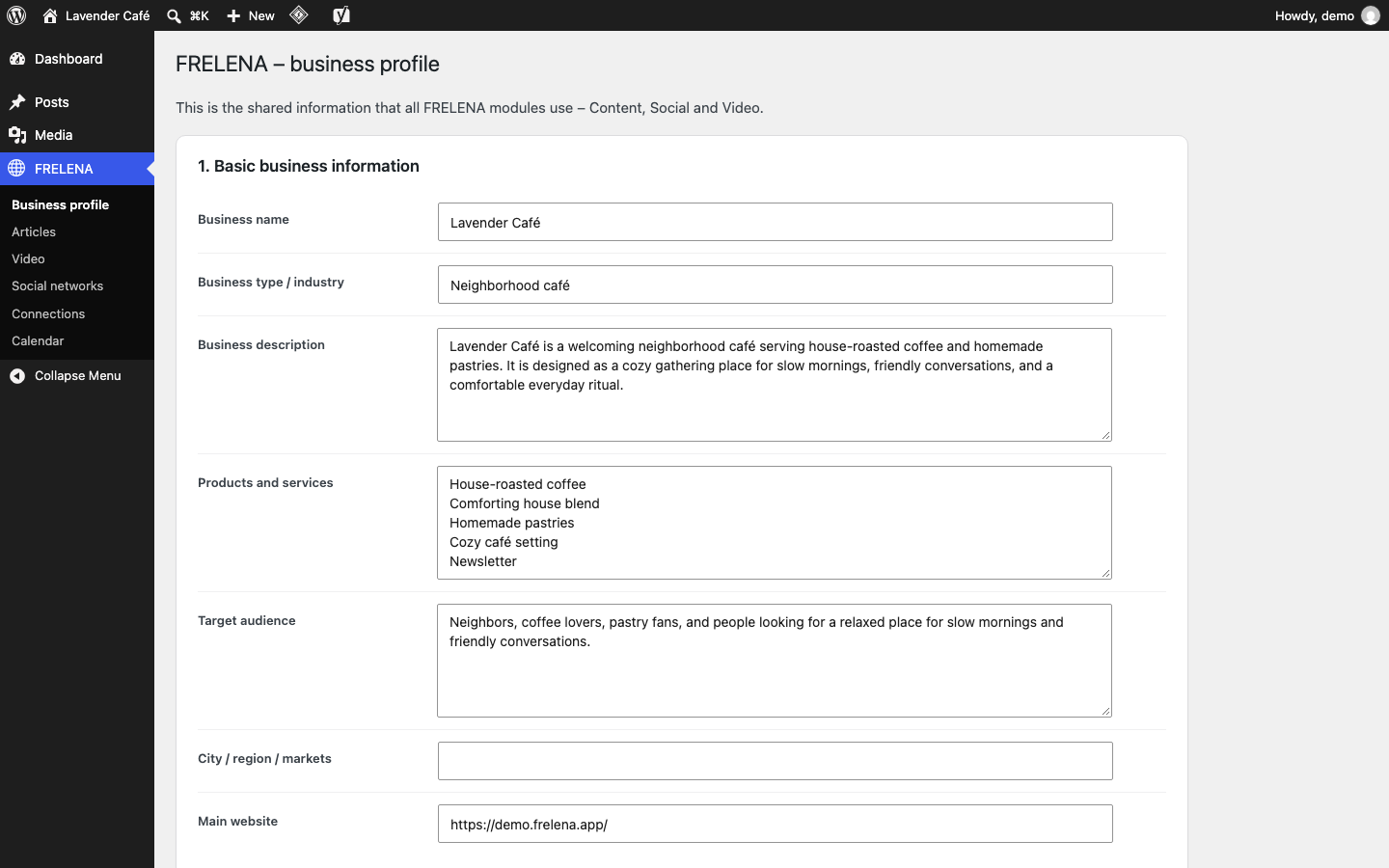
- Business profile – describe your business once (services, audience, tone, preferred and forbidden words). A first draft can be prefilled from your own site content.
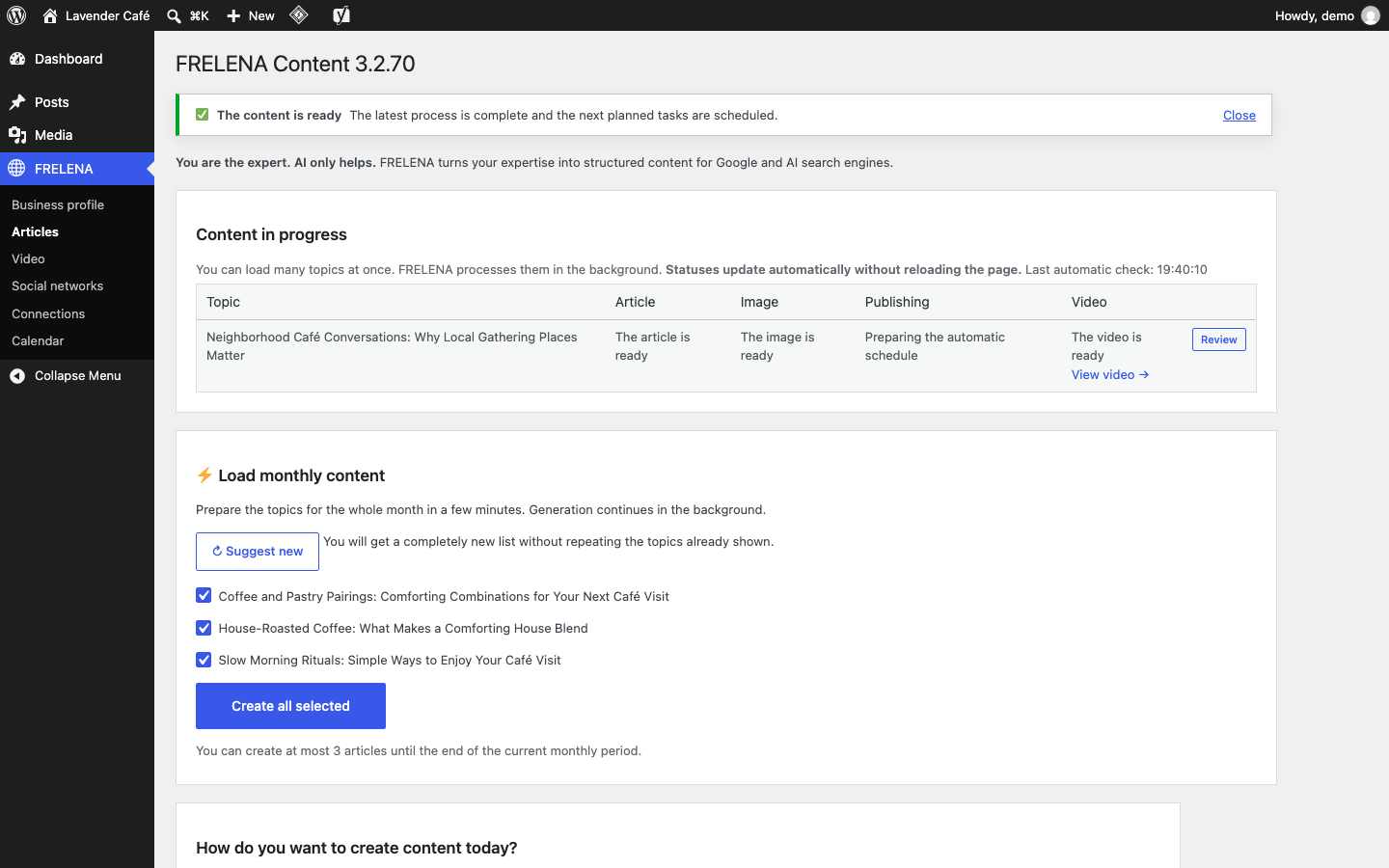
- Articles – get suggested titles, generate full SEO-ready articles with a featured image, review them as drafts or let them be scheduled. Titles, key phrases and topics are checked against your existing posts to avoid duplicates. Yoast SEO fields are prefilled when Yoast is used.
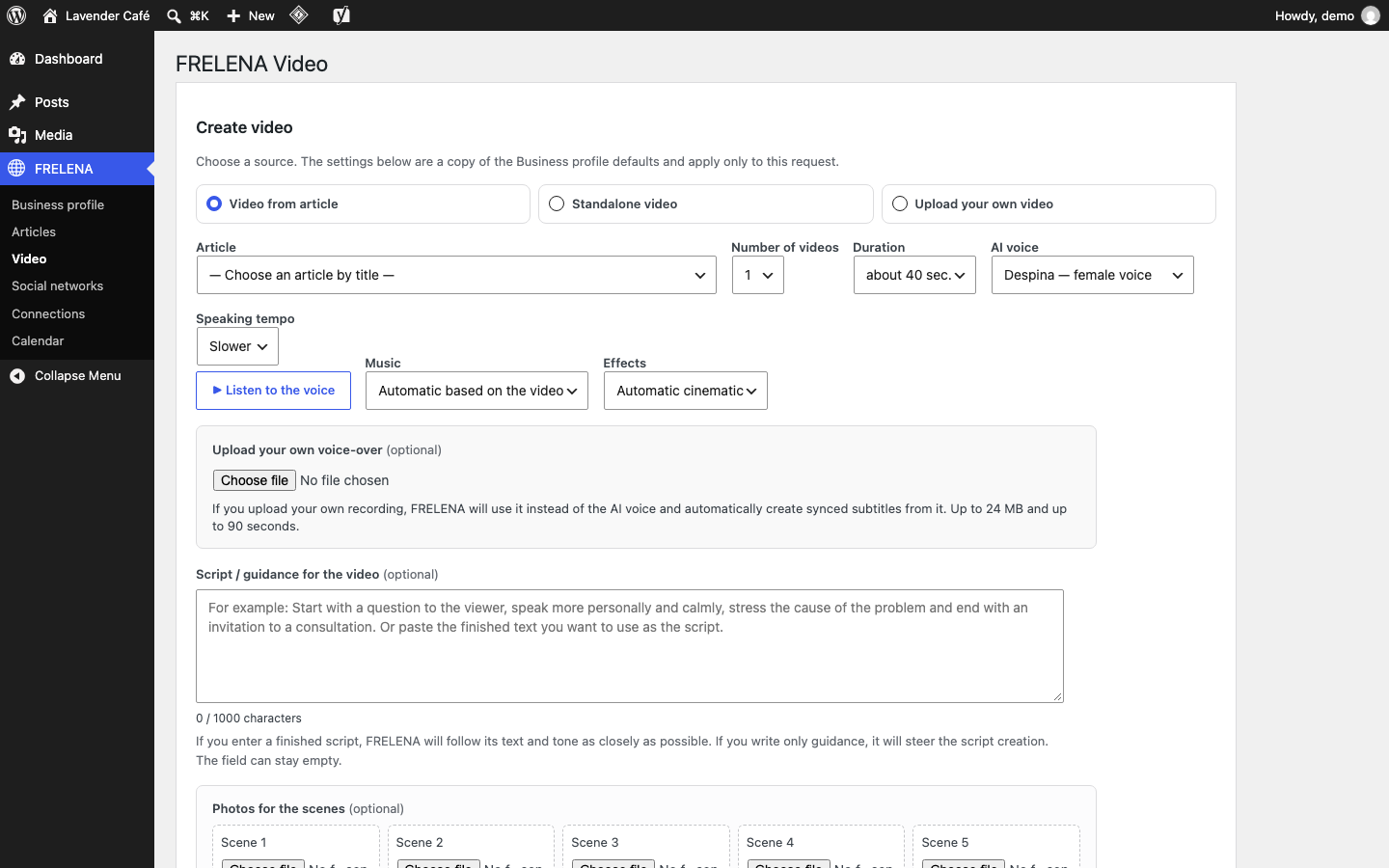
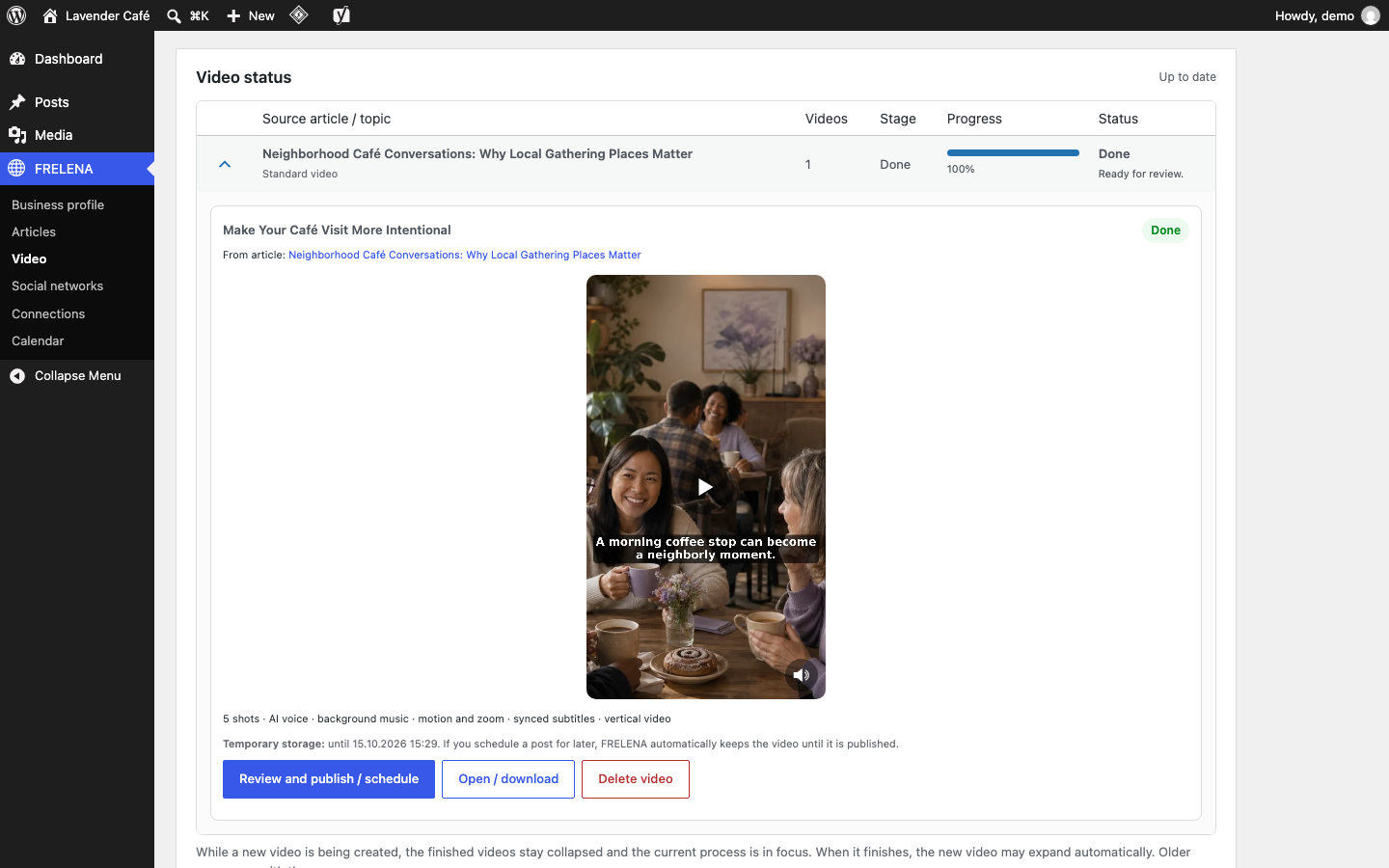
- Video – create short vertical videos (reels) from an article, from your own photos or from an uploaded video, with AI voice-over, music and subtitles.
- Calendar – an editorial calendar that spreads articles, posts and videos evenly over time; reschedule or cancel any item.
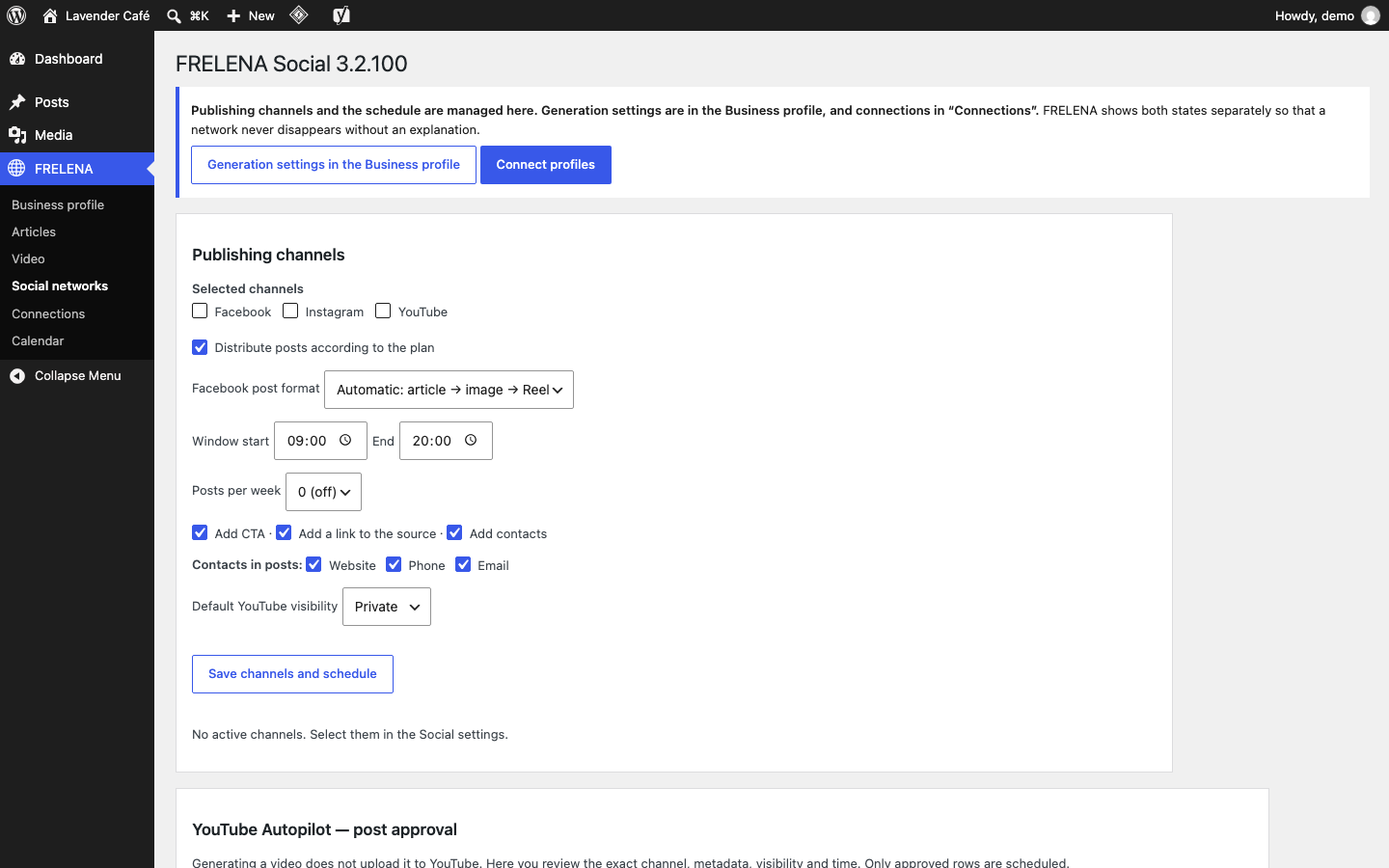
- Social – publish or schedule posts, stories, carousels and reels to connected Facebook Pages and Instagram professional accounts, and YouTube Shorts after your explicit approval.
- Autopilot – an optional plan-driven schedule that keeps your site and channels active.
Getting started
- Register a free FRELENA account at https://frelena.app/ (or use your existing one).
- Connect the site in FRELENA FRELENA Cloud.
- Fill in FRELENA Business profile.
- Create your first article in FRELENA Articles, then a video in FRELENA Video.
- Optionally connect Facebook, Instagram and YouTube on the connection screen and plan posts in FRELENA Calendar.
SaaS Service Disclosure
This plugin is an interface to the external FRELENA Cloud service operated by the plugin author. Without a connected FRELENA account the plugin does not generate, render or publish anything. All plugin code is included and fully available; plan limits (number of articles and videos per 30-day period) are enforced by the FRELENA Cloud service, not by locked code in the plugin.
Free and Paid Plans
- Free – €0. Limited monthly number of articles and videos.
- Optimal – €120 per month. Higher monthly limits.
Plans are purchased and managed on https://frelena.app/ – never inside WordPress. Current limits: https://frelena.app/. Usage periods are 30 days from the start of the subscription; a payment, renewal or plan change starts a new period.
Privacy and External Services
This plugin relies on external services. It only contacts them after you connect your site (FRELENA FRELENA Cloud) and accept the data-sharing notice.
FRELENA Cloud – https://frelena.app (API: cloud.frelena.app)
Operated by the plugin author. Used for: account connection (email code), plan and quota status, article and image generation, video rendering, social publishing and scheduling.
What is sent and when:
- When connecting: your email address, the site name and URL, WordPress and PHP versions, site language and the plugin version.
- After connecting (once): a text snapshot of your home page, used to prefill empty business-profile fields.
- When you use a feature: your business profile, the topics/keywords and instructions you enter, article text and images, photos or videos you upload for a video, and your social publishing choices.
- When you click Upgrade or Increase the limit: the site asks FRELENA Cloud for a one-time checkout code for this site (no other data is sent), then your browser opens the payment page on https://frelena.app/ with that code. Payment is made on frelena.app, never inside WordPress.
- While connected: plan/quota status checks, only while an administrator uses the FRELENA screens or a FRELENA task runs; status of running jobs (articles, images, videos, social posts) is polled until they finish.
- Optional, OFF by default (FRELENA FRELENA Cloud Privacy): every 15 minutes module health, WordPress/PHP versions and the site URL; PHP errors raised by FRELENA code with the request URL; the service may trigger a fixed list of built-in maintenance commands (health check, recovery of stuck jobs, rescheduling FRELENA cron events, refreshing the plan status, clearing FRELENA locks). Arbitrary code cannot be sent or executed.
The service stores the data needed to provide it (account, site, business profile, generated content and job history). Connection tokens for social networks are stored by FRELENA Cloud, not on your site. After disconnecting, the site no longer sends anything; data stored by the service is handled as described in the privacy policy.
To provide the service, FRELENA Cloud uses these providers on its own servers (your site does not contact them directly): OpenAI (text and image generation), Google Cloud Text-to-Speech (voice-over), YouTube Data API (YouTube publishing, only after you connect YouTube) and the Meta Graph API (Facebook/Instagram publishing, only after you connect them).
- Terms of service: https://frelena.app/terms/
- Privacy policy: https://frelena.app/privacy-policy/
Meta Graph API – https://graph.facebook.com
Only if you use the legacy direct Facebook publishing settings (page access token stored on your site): the plugin sends the post text, media URL and your page access token directly to Meta to publish the post. Meta terms: https://developers.facebook.com/terms/ – Meta privacy policy: https://www.facebook.com/privacy/policy/
YouTube
YouTube uploads are performed by FRELENA Cloud using YouTube API Services. YouTube Terms of Service: https://www.youtube.com/t/terms – Google Privacy Policy: https://policies.google.com/privacy
TikTok
TikTok posts are performed by FRELENA Cloud using the TikTok Content Posting API, only for videos you approve in the TikTok queue. TikTok Terms of Service: https://www.tiktok.com/legal/page/global/terms-of-service/en – TikTok Privacy Policy: https://www.tiktok.com/legal/page/global/privacy-policy/en
スクリーンショット
インストール
- In WordPress go to Plugins Add New, search for “FRELENA” and click Install Now (or upload the ZIP via Plugins Add New Upload Plugin).
- Activate the plugin.
- Go to FRELENA FRELENA Cloud, enter the email address of your FRELENA account, tick the consent box (data-sharing notice) and click to receive a code.
- Enter the 6-digit code from the email. The site is now connected to your FRELENA account.
- Fill in your business profile and start creating content.
Disconnecting
Go to FRELENA FRELENA Cloud and click Reconnect. This deletes the connection key stored on your site and immediately stops all communication with FRELENA Cloud. Your posts, images and videos already saved in WordPress stay untouched. To disconnect a social network, open FRELENA Connections and click Disconnect next to it. To delete your FRELENA account and the data stored by the service, contact FRELENA as described in the privacy policy.
FAQ
-
Is the plugin free?
-
Yes. The plugin is free and GPL licensed. Using the FRELENA Cloud service requires an account; a free plan is available and the paid plan is a monthly subscription.
-
Is an account required?
-
Yes. Text, image and video generation, rendering and social publishing are performed by FRELENA Cloud.
-
Does the plugin send data without my consent?
-
No. Nothing is sent until you connect your site and tick the consent box. Optional diagnostics/remote support is a separate setting that is OFF by default.
-
Does the plugin add a “Powered by” link to my site?
-
No. The plugin never adds a “Powered by” link, credit or any other FRELENA text to your site’s public pages, and there is no option to turn one on.
-
What happens when I deactivate or delete the plugin?
-
Deactivation stops all FRELENA background tasks. Your posts, media, settings and scheduled items stay in WordPress, so reactivating continues where you left off. Deleting the plugin removes its code but keeps your posts and media; FRELENA settings stay in the database so that a reinstall keeps your connection.
-
Facebook Pages, Instagram professional accounts and YouTube (Shorts, published only after your approval). Other networks are not supported in this version.
評価
このプラグインにはレビューがありません。
貢献者と開発者

変更履歴
3.2.166
- Used-up quota: the buttons for a new article or video are disabled, with a clear message to renew the quota with a new payment and a “Renew the quota” button. The same message appears when a request is refused because of the quota.
3.2.165
- Video – upload your own video: up to 90 seconds (was 60) and up to 150 MB (was 100 MB), or the lower hosting limit.
3.2.164
- TikTok: “Recent TikTok posts” shows the status from TikTok (processing, published with a link to the video, in the TikTok inbox, or failed) and lists the newest post first.
3.2.163
- TikTok: like YouTube, every new video waits for approval with a proposed time (one video a day, in the evening reel time). Autopilot no longer sends TikTok inbox drafts on its own.
3.2.162
- TikTok approval: the list of generated videos is always open, so the newest videos are visible without expanding it.
3.2.161
- Video: a video that is already scheduled or sent to TikTok (for example an Autopilot draft in the TikTok inbox) shows a TikTok line with the date and a link to the TikTok approval instead of hiding TikTok.
- TikTok approval: the newest video is at the top and open; older videos are collapsed.
3.2.160
- All FRELENA screens are easier to use on phones and tablets: tables are shown as cards, forms and buttons use the full width and nothing goes off the screen.
- Upgrade: the payment page opens in the language of the site.
3.2.159
- Video: a deleted video no longer comes back in the table as the latest video when the status check runs at the same time.
- Business profile: new “Fill empty fields from the site” button; it fills only the empty fields from the site and the AI draft.
- Business profile: on existing sites the empty fields are filled automatically once after the update; filled fields are never changed.
- The “Speaking pace” menu was removed from the business profile and the Video screen; the voice always uses the normal pace.
3.2.158
- YouTube approval: the videos are shown as a table with “Select all”; only the newest video is expanded, the others are collapsed with their title and checkbox.
- YouTube approval: each video has a “Delete” link that removes it from the approval queue only; the video file stays in Video.
3.2.157
- Autopilot video: a video that fails for good gets one automatic new attempt; after that the article shows “The video could not be created” instead of staying queued.
- Articles whose video stayed queued after a failed or removed video job are recovered automatically.
- Content in progress: when all articles are published, the table shows “There are no active or recent tasks” instead of empty headers.
- The “added for generation” notice is no longer shown again after reloading the page.
3.2.156
- Social calendar: at most one automatic reel a day in each network; the reel takes the plan’s evening time first, so it no longer uses the article and image post times.
- Business profile: new “Your customers are” choice (consumers / businesses / both) that sets the daily social publishing times.
- Carousel: the video scenes sent by FRELENA Cloud are kept and imported into Media, so the carousel of the article series can be scheduled.
- A finished video is no longer imported into Media several times when a persistent object cache is active.
- Only the Free and Optimal plans are listed in the plugin.
3.2.155
- Faster admin screens: the social calendar no longer asks FRELENA Cloud again about posts that are already published, and on admin page loads it is synced at most every 5 minutes (the background task is unchanged).
- A finished video is imported only once, even when two checks run at the same time.
- “Add for TikTok” does not add a second copy of a video that is already waiting for approval.
3.2.154
- Connected networks (for example TikTok) no longer look disconnected when FRELENA Cloud answers slowly or with an error; the last known connection status is used.
- The connection status check waits at most 8 seconds, so admin screens are not held up.
3.2.153
- A video is prepared automatically after a new article when “Prepare a video automatically when an article is ready” is on, also when full autopilot is off.
- The Video column in Articles now says why there is no video: “Off in the settings” or “Not included in the plan”.
3.2.152
- New “Upgrade” menu item on the Free plan: opens the frelena.app payment page for this site (one-time code from FRELENA Cloud, new tab).
- “Increase the limit” buttons are shown again when the monthly article quota is used up and open the same payment page.
- Small code-quality notes for Plugin Check (no behaviour change).
3.2.151
- Calendar day/month navigation no longer runs the Cloud synchronization on every view load (faster calendar).
- Scheduled and sent TikTok posts are shown in the content calendar.
3.2.150
- Posts per day now come from FRELENA Cloud together with the plan (falls back to the built-in values with an older Cloud).
- Review and publish / schedule without a selected network shows a translated message and no longer calls Cloud.
- Video quota box refreshes as soon as a video job finishes; the AI video quota label now says “AI videos (from articles or topics)”.
3.2.149
- Admin JavaScript moved to enqueued files in assets/js (wp_enqueue_script + wp_localize_script); no output buffering left in the plugin.
- Calendar navigation loads the calendar page directly instead of a separate AJAX view.
- Form input is unslashed and sanitized when it is read; generated admin HTML is escaped with wp_kses() at output.
3.2.148
- TikTok in the video status table: a “TikTok requires manual approval” bar with “Add for TikTok” (or “Open TikTok approval” when the video is already waiting).
- Publish / schedule dialog: new “TikTok (manual approval)” option. The video is added to the TikTok approval queue; it is never sent with the package for the other networks.
3.2.147
- Articles – “My topics / titles”: “Add to queue” now sends the titles straight to background generation. Duplicates of existing articles are skipped and listed; titles over the monthly limit stay in “My topics”.
- TikTok: the “TikTok — post approval” block in “Social networks” is shown when TikTok is connected or selected; new “Generated videos” list with “Add for TikTok” for already generated videos.
3.2.146
- TikTok queue: the notice now points to “Social networks” “Publishing channels” (instead of the Business profile).
- Connections: opening the screen refreshes the cached connection status, so a newly connected network is shown immediately.
3.2.145
- TikTok (video only): new “TikTok — post approval” queue. Each video is posted only after explicit approval, with the account, privacy level (no default), comments/Duet/Stitch (off by default), commercial content disclosure, Music Usage Confirmation, AI label and a video preview. Choose “Direct post” or “Draft” (sent to the TikTok inbox). TikTok is never part of the automatic article flows.
3.2.144
- Admin JavaScript and CSS are now loaded through the WordPress script and style queues (wp_add_inline_script, wp_enqueue_style) instead of inline tags. FAQ schema uses wp_print_inline_script_tag().
- Uploaded files are sanitized (file name, type, error code, size) before they are handled. Request values are unslashed before sanitizing.
3.2.143
- Videos: videos removed from the server after their storage period (5 days) disappear from the video status table one by one; a task row disappears when none of its videos remain. Videos without a stored expiry date use the creation date plus 5 days.
3.2.142
- Videos: the full publishing status (date, channels, per-channel result with post link, calendar link) is shown only on the collapsed video row; the duplicate status box inside the expanded video was removed. The row status also refreshes right after “Publish now”.
3.2.141
- Videos: when YouTube is already published from another package, the “YouTube requires manual approval / Schedule for YouTube now” notice no longer shows, and the stale pending YouTube approval item is removed so the video cannot be uploaded twice.
3.2.140
- Standalone videos: the separate “Text / script” field was removed; the “Script / video guidelines” field is used as the video text.
- YouTube approval: removed the notice that YouTube may force uploads to stay Private (the app is now verified by Google).
3.2.139
- Videos: after a video was scheduled for YouTube and published right away on Facebook/Instagram, a page reload no longer shows Facebook/Instagram as unpublished with a publish button again.
3.2.138
- Connections: Facebook, Instagram and YouTube are shown as equal cards. Instagram details (account, publishing status, reason, Connect/Disconnect Instagram) are in the Instagram card instead of the Facebook block.
3.2.137
- Connections: the Instagram row no longer shows a second “Connect Instagram” button; Instagram is connected only from the Facebook block, and the row shows the status and the reason.
3.2.136
- Connections: when Instagram is not connected, the screen shows the reason (missing Meta permissions or no Instagram account linked to the Facebook Page) instead of “Cloud setup required”.
3.2.135
- The Articles and Social pages no longer show old internal version numbers in their titles.
- Updated screenshot captions.
3.2.134
- Plugin header: removed the duplicate Author URI (same as Plugin URI).
3.2.133
- Removed: the “Frelena” watermark on featured images for the free plan. Images are never modified after generation.
3.2.132
- Security hardening for WordPress.org Plugin Check: all admin output is escaped, request data is unslashed and sanitized, and files are deleted with wp_delete_file(). Tested up to WordPress 7.1.
3.2.131
- Fix: the first video on a site (empty video table) now appears in the Video status table as soon as it is ready, without reloading the page.
3.2.130
- Video quota: always read fresh from FRELENA Cloud, so a cache in front of Cloud cannot show another site’s video quota.
3.2.129
- Video – upload your own video: the requirements (up to 60 seconds, up to 100 MB or the lower hosting limit, MP4/MOV/WebM, best vertical 1080p at 30 fps) are shown above the upload button. The browser checks the size, length and resolution right after a file is chosen, before anything is uploaded; a refused file is not sent and the tips “How to make the video smaller” open. MOV videos from iPhone are accepted.
- Business profile: with automatic detection the language menu shows the detected language; the slug format “Automatic” follows the article language (Cyrillic for bg/ru/uk/mk/sr/be, Latin for the rest).
- Business profile: “▶ Preview voice” button under the speaking tempo plays a short sample with the selected voice and tempo.
- Demo account: on a demo site the Connections screen is shown, but social networks cannot be connected.
3.2.128
- Articles: the short texts FRELENA adds to a generated article (summary heading, “learn more” and “see also” links, social follow line, connecting sentences) now follow the language of the article. Bulgarian and English are built in; for other languages these optional texts are not added instead of mixing languages.
- Fix: the social follow line was inserted inside the FAQ heading; it is now placed before the heading.
3.2.127
- Internationalisation: the Video screen, the publishing preview, the video status table and the Content calendar (day and month view) are now translatable with a bundled Bulgarian translation. The whole admin interface now follows the WordPress language.
- The published state of a video is compared through one translated label, so it works in every language; stored Social channel statuses are unchanged and only translated for display.
- The calendar prefetches its navigation links by a data attribute instead of their text.
3.2.126
- Internationalisation: the Social screen (channels, publishing settings, YouTube approval, per-network preview), social status labels and Social error messages are now translatable with a bundled Bulgarian translation. Stored channel statuses are unchanged and are only translated when shown.
3.2.125
- Internationalisation: the Articles (Content) screen, its live status table, notices, batch status messages and approval emails are now translatable with a bundled Bulgarian translation. Text inserted into generated articles is unchanged and still follows the content language.
- The sticky notice on the Articles screen also hides the English “Dismiss this notice.” screen-reader text.
3.2.124
- Internationalisation: the Business profile, Modules, FRELENA Cloud (connection) and Connections screens, the dashboard widget and the related messages are now translatable (English in code) with a bundled Bulgarian translation. The interface follows the WordPress user/site language. No change in functionality or saved settings.
3.2.123
- WordPress.org preparation: English plugin name, description and readme with full external-services disclosure.
- The plugin no longer deactivates other plugins on activation or update (old standalone FRELENA modules are still prevented from loading twice).
- Removed the plans/referral button from the FRELENA dashboard widget.
- Capability check added to the social test-publish action.
- Home-page fetch for the profile draft uses the standard WordPress loopback SSL setting.
- Internal module files no longer carry their own plugin headers; removed an unused text-domain loader.
3.2.122
- Maintenance release.
3.2.120
- Video: new AI voices for Bulgarian; “Speaking style” is now “Speaking tempo”.
3.2.118
- Fix: fatal error on hosts without the PHP calendar extension.
3.2.117
- Social: every article gets a series of posts (article post, story, carousel, image post, reel and video story) in all selected networks.
3.2.106
- Consent checkbox and external-services disclosure on the connection screen; diagnostics, heartbeat, remote recovery and the public credit became opt-in (off by default).