
説明
Google カレンダーのイベントを WordPress サイトに取り込むには Simple Calendar がもっとも簡単な方法です。すばやい設定、必要に応じた細かい調整、レスポンシブ対応、美しいデザイン
Simple Calendar の特長
- 公開 Google カレンダーからイベントを表示します
- Google カレンダーでイベントの管理を続けてください。WordPress でイベントを作成する必要はありません。
- どんなテーマの外観にもマッチするデザイン
- 月間グリッドビューとリストビューは完全にレスポンシブ対応しています
- イベント内容の表示をシンプルなタグでカスタマイズできます。コーディングは不要です
- 明示的もしくはカテゴリーを使用して、複数のカレンダーをひとつのカレンダーにまとめます
- 微調整のための直感的で、シンプルな設定表示切替
- 上級設定: タイムゾーン調整、日付 / 時刻フォーマット、週の始まり設定
- Event Calendar Newsletter と統合して、イベントをニュースレターに合ったフォーマットに変換
- アドオンで追加機能を提供
- Translations available with more being added on a regular basis. Translations welcome!
- Open source with code hosted on GitHub. Contributions welcome!
FullCalendar アドオンの特長
- 月間ビューに加えて週間ビューと日別ビューをご用意
- イベントタイトルと開始時刻をカレンダーに直接表示
- 月間、週間、日別ビューを切り替えが早い
- 訪問者が簡単にビューを切り替えできるようヘッダーナビゲーションボタンを構成
- 複数日程のイベントに直感的なデザイン
- Customizable calendar heights with optional scroll bars.
- 週間ビューと日別ビューでのデフォルトの開始時刻を設定
- 週間ビューと日別ビューにおける表示時間を限定
- Google Calendar Pro アドオンと合わせることで、色付きのイベントを各ビューに表示できます
- Priority email support with a 24-hour response time during weekdays backed by a top-notch team.
Google Calendar Pro アドオンの特長
- プライベートと公開両方の Google カレンダーからイベントを表示します
- Google カレンダーイベントに設定した色にマッチしたイベントをハイライト表示します
- プライベートイベント、公開イベント問わず、参加者の名前、アバター、招待への返信ステータスを表示します
- Display event organizer information.
- Display a list of attachments with links to their original source.
- Secure connection established between your site and Google using the OAuth standard.
- FullCalendar アドオンを合わせれば、美しい月間ビュー、週間ビュー、日別ビューに色分けされたイベントを表示できます
- Priority email support with a 24-hour response time during weekdays backed by a top-notch team.
Simple Calendar を試してみたいですか ? デモをご覧ください
スクリーンショット

基本グリッドビュー 
基本リストビュー 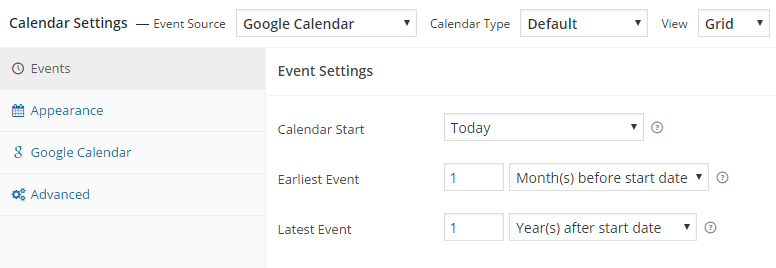
カレンダー設定 – イベント 
カレンダー設定 – 外観 
カレンダー設定 – Google カレンダー 
カレンダー設定 – 上級 
カレンダーウィジェットを追加 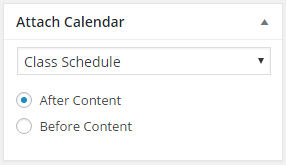
投稿や固定ページにカレンダーを貼り付け
FAQ
-
プラグインの説明ページはどこにありますか ?
-
説明ページはこちらです docs.simplecalendar.io
-
あたらしいリリースを E メールで通知してもらうことはできますか ?
-
主な特長やアップデートを E メールで通知されるようこちらから購読してください。
-
Simple Calendar にどのように貢献できますか ?
-
We’d love your help! Here’s a few things you can do:
- プラグインを評価して世界に広めてください !
- サポートフォーラムで質問への回答を手伝ってください。
- バグの報告 (再現のためのステップも添えてください) やプルリクエストの送信は GitHubへお願いします。
- Help add or update a plugin translation.
評価

2026年4月25日
1 reply
I need a simple way to put a Google calendar on a page and got exactly that!

2026年3月4日
1 reply
Plugin worked as required with straight forward setup. I’m really pleased with how it is working. I did have a question for their support but they were quick to replay.

2026年1月15日
1 reply
This a great plug-in, comprehensive yet simple interface. Support staff such as John Gachari has been super responsive and helpful in fixing display errors caused by integrations with the Oxygen Builder and JQuery Migrate settings.

2026年1月9日
1 reply
had a minor issue, support answered almost immediately! Helped me fix my issue right away.

2025年12月30日
1 reply
Not sure about some of the bad reviews. This plugin (free version) has worked and is working flawlessly for me without any problems whatsoever. In addition, the markup it serves and the presentational (css) layer are well thought out. Beats another paid plugin I wont name hands down.

2025年11月14日
1 reply
Highly recommended plugin to connect your Google Calendar events with your Wordpress site.
貢献者と開発者
Simple Calendar – Google Calendar プラグイン はオープンソースソフトウェアです。以下の人々がこのプラグインに貢献しています。
貢献者


変更履歴
3.6.2
- Fix: Date format inconsistency in List View navigation bar now uses the calendar’s configured date format consistently.
3.6.1
- Fix: Make a new release to fix a “Class not found” error for GetUniverseDomainInterface.
3.6.0
- Dev: Breaking change: Support for PHP versions below 8.0 has been discontinued.
- Fix: An issue where the cover image was not displayed for Google Calendar events when using the OAuth Via Simple Calendar.
- Fix: An Insecure Direct Object Reference (IDOR) vulnerability.
- Dev: Added cache clearing on first plugin activation and during manual plugin updates.
3.5.9
- Fix: Resolved a critical issue where the recent update caused site breakage for users who are using various page builders.
- Dev: Users can now control Lazy Loading functionality via a dedicated toggle in the Advanced settings.
3.5.8
- Fix: Fixed issue where the calendar incorrectly calculated weekday offsets when the week start day was changed in advanced settings.
- Fix: Fixed asset loading for all registered shortcodes in page builders like Avada Live Builder.
3.5.7
- Fix: Assets (JS/CSS) now correctly load when a calendar widget is present.
3.5.6
- Fix: accessibility issue by adding descriptive text to calendar navigation buttons.
- Dev: admin notice to inform users about end of PHP 7 support after November.
- Dev: Optimized assets: JS and CSS now load only on calendar post type and pages with calendar shortcode.
3.5.5
- Fix: Network error when fetching calendars after authentication with Oauth via Simple Calendar on fresh installs.
- Fix: JS issue preventing custom CSS from applying to qTip tooltips in version 3.5.4.
3.5.4
- Fix: Fixed multi-day events incorrectly displaying on all days when the “No, display only on first day of event” option is enabled.
- Fix: Resolved issue where event details (qTip) were not showing in mobile portrait view.
- Fix: Fixed layout issues on the admin settings page for fresh installations.
3.5.3
- Fix: Even after upgrading to PHP 8.x, an admin notice still appears to upgrade to PHP8.
3.5.2
- Dev: Make compatible with WordPress v6.8.1.
- Dev: Added notice to update PHP version if version is less then 8.1.
3.5.1
- Fix: Event were not showing on page with shortcode when using OAuth via Xtendify.
3.5.0
- Dev: To make the first attachment appear as the cover, add a new shortcode [cover-image] for GCal-Pro Addon.
3.4.9
- Fix: Resolved the issue where multi-day events were not rendered correctly on the last day.
Thanks to MartinixH for the contribution!
3.4.8
- Dev: Added print calendar option on list view.
- Fix: Translation month name on first load.
3.4.7
- Fix: Compatibility warnings with PHP 8.
3.4.5
- Fix: UI gaps in the calendar CPT.
3.4.4
- Fix: Fixed deprecation notices and warnings to ensure compatibility with the latest WordPress updates.
- Fix: Resolved an issue where multi-day events were being rendered as double events on the same day.
- Fix: De Authentication issue fix.
3.4.3
- Fix: Event color not showing in Calendar when using OAuth via Xtendify.
- Fix: Date format inconsistencies when using shortcodes in certain conditions.
- Fix: Calendar start date issue in Grid View causing incorrect date display.
- Fix: Print calendar index not found issue.
- Fix: Cross-Site Scripting(XSS) vulnerability.
3.4.2
- Fix: Event rendering issue for public calendar while using Auth via Xtendify.
3.4.1
- Dev: Add OAuth helper functionality.
- Dev: Make OAuth helper option compatibble with Appointment add-on.
- Update: Update dependency prettier to v3.3.3.
3.4.0
- Dev: Added Print calendar feature.
- Dev: Make compatible with WordPress v6.5.5.
3.3.1
- Fix: Persistent update notification appearing for add-ons even after updating the plugin.
3.3.0
- Dev: Compatibility with the OAuth Helper plugin.
3.2.8
- Fix: Cross Site Scripting (XSS) vulnerability.
3.2.7
- Fix: Cross Site Scripting (XSS) vulnerability.
3.2.6
- Fix: CSRF vulnerability for bulk actions.
- Dev: Update dependencies Carbon, Dayjs and TailwindCSS.
3.2.5
- Fix: Possible CSRF vulnerability.
- Dev: Make compatible with Unyson plugin.
3.2.4
- Fix: Compatibility with WP 6.3.1.
3.2.3
- Fix: Add PHP polyfill to fix regression “Call to undefined function str_contains()” error.
3.2.2
- Dev: Update Google API client library to 2.13.1.
- Fix: ‘if-not-today’ shortcode with all day event display issue.
- Dev: Revamp admin setting page banner design.
3.2.1
- Dev: Revamp welcome page.
3.2.0
- Dev: Revamp admin setting page.
- Fix: ‘Simple Calendar Widget’ Calendar selection on block editor.
- Fix: ‘if-not-today’ and ‘add-to-gcal-link’ shortcode with all day event display issue.
3.1.47
- Dev: Added admin notice for plugin update.
- Fixed: Possible CSRF vulnerability.
3.1.43
- Fixed: Cross Site Request Forgery (CSRF) vulnerability.
3.1.42
- Dev: Testing with WordPress version 6.2.
3.1.41
- Fix: Event bubbles not working on mobile devices.
3.1.39
- Fix: ‘Class “Parsedown” not found’ by adding
erusev/parsedownvia PHP Scoper. - Fix: Replaced Moment with Dayjs, it helps with speed and addresses security issues with the Moment library.
- Chore: Data type check for loading scripts and styles.
- Chore: Upgraded NPM packages resolving security issues present with trim-newlines library.
- Fix: Include unmodified assets in the build for a better debugging experience.
- Fix: Multi-day events not showing properly. Shoutout to MartinixH.
3.1.38
- Fix: Add PHP polyfill to fix “Call to undefined function str_contains()” error.
- Fix: Update Google API client to v2.9.2.
3.1.37
- Dev: Tested up to WordPress 6.1.1 and PHP 8.1
- Chore: Updated Github path.
3.1.36
- Fix: Namspace conflicts with other plugins and composer libraries. Huge shoutout to @mickwall001 on github for this.
3.1.35
- Fix: Get rid of empty needle PHP warning
3.1.34
- Dev: Tested up to WordPress 5.6
- Fix: OR searches will now work as OR, not as AND
- Fix: Revert Guzzle to < 7.x version to avoid conflicts (temporary)
3.1.33
- Fix: Trimmed overall size of the plugin to reduce errors from installation failing.
- Dev: Updated minimum PHP requirement to 7.3
- Dev: Updated all vendor packages to latest versions.
- Dev: Tested up to WordPress 5.5.1
3.1.32
- Fix: Undefined index error when saving calendar.
- Fix: Updated Carbon library to latest version.
- Fix: Update date check on list view to remove PHP deprecated warnings.
- Dev: Tested up to WordPress 5.4.2
3.1.28
- Feature: Automatically sort events with the same day and time alphabetically.
- Fix: Issue with jQuery not being added as a script dependency.
- Fix: Updated google/apiclient to ^2.0 to fix Gmail conflicts with other SMTP plugins.
- Security: Updated dependencies.
3.1.27
- Reverted codebase to 3.1.22 version to skip recent update that has an error.
3.1.22
- This bumps the version number but is the same code as 3.1.20 so plugins can auto update to the fixed version.
3.1.20 – December 13, 2018
- Dev: Add the “simcal_post_type_registration_args” filter to allow changes to the calendar post type registration arguments.
3.1.19 – July 25, 2018
- Fix: Issue with moment.js not being available/throwing JS errors.
3.1.18 – July 3, 2018
- Dev: Add filter “simcal_additional_link_attributes” to facilitate additional event link attributes.
3.1.17 – June 6, 2018
- Fix: Issue with calendar settings not saving.
3.1.16 – June 6, 2018
- Fix: Issue with slow loading admin settings page.
3.1.15 – May 22, 2018
- Fix: Issue with jQuery $.ajax call parameter compatibility with older versions of jQuery.
- Fix: Issue with Google API feed sorting not showing correct events in list view.
- Fix: Issue with duplicate default calendar JSON data being output.
3.1.14 – February 15, 2018
- Fix: Issue where navigation to next month would be disabled when multi-day events extended to future months.
3.1.13 – February 5, 2018
- Fix: Issue where calendar event pop-ups would display without content.
3.1.12 – January 4, 2018
- Backwards Compat: Restored previous version (v1) of Google API Client lib to support older versions of PHP.
- Fix: Fixed bug present in PHP 7.2 which was causing fatal errors.
3.1.11.1 – January 3, 2018
- Fix: Bump required PHP version to match 3.1.11 requiring PHP 5.5 so site’s running older versions don’t crash when updating.
3.1.11 – January 2, 2018
- Dev: Update Google API Client libraries to v2. NOTE: Version 5.5+ for PHP now required.
- Fix: Default calendar list view not showing pro calendar coloring when Calendar Settings > Appearance > Limit Visible Events is set.
3.1.10 – August 22, 2017
- Fix: Fixed an issue where Google Calendar API key sometimes wouldn’t save on the settings page.
- Feature: Allow administrators to set spacing within the datetime separator under individual advanced calendar settings.
- Tweak: Add the updated separator to the end date for multi-day events for consistency. i.e. if separator is ” @ “, multi-day events date/time would display similar to “August 27 2017 @ 10:00 am-September 04 2017 @ 11:00 am” on tooltip or list view.
3.1.9 – December 9, 2016
- Feature: Add [if-today] and [if-not-today] event template tags. Props @followfung
- Fix: List view incorrectly shifts events between 12 & 1am, or all day events, to previous day.
- Fix: Navigation disabled incorrectly in some cases.
- Dev: System report tweaks for PHP 7 compatibility.
- Dev: Tested up to WordPress 4.7.
3.1.8 – October 18, 2016
- Fix: Multi-day events should not show duplicate events in one day in some time zones.
- Fix: List view heading dates corrected for some time zones.
- Fix: Grid view starting month corrected for some time zones.
- Fix: Remove duplicate “Event source default” option when add-on enabled.
- Tweak: Set “Expand multi-day events” default value to “No, display only on first day of event”.
3.1.7 – October 4, 2016
- Fix: Add month/day/time translations back in that stopped working after 3.1.5.
3.1.6 – September 26, 2016
- Fix: Account for events without an end date/time when using the [when] tag.
3.1.5 – September 25, 2016
- Fix: Multi-day events in the future should now display first day of event when selecting “No, display on all days of event up to current day”.
- Fix: Correct dates in day headings in list view being off for some time zones.
- Tweak: Clearer warning about using timezone setting “Event source default”.
- Dev: Added filters to add your own custom event template tags. Props @Brummolix
- Dev: Remove all calls to date_default_timezone_set() due to the way WordPress core sets it to ‘UTC’ to calculate offsets from there.
3.1.4 – September 19, 2016
- Fix: “Add to Google Calendar” link now uses source calendar’s timezone (except for all-day and UTC timezone events).
3.1.3 – September 12, 2016
- Feature: Added “Add to Google Calendar” link event template tag.
- Fix: Corrected all structured data/schema.org output errors caught by Google’s structured data testing tool.
- Fix: Default colors specified for today and events with days should now work even when colors blanked out.
- Dev: System report tweaks for PHP 7 compatibility.
- Dev: Sass 3.4 compatibility.
- Dev: Move load_plugin_textdomain call to plugins_loaded hook. Not needed with WP 4.6+.
3.1.2 – July 13, 2016
- Fix: Multi-day events do not stop short a day.
- Fix: Events that end at midnight no longer duplicate on the next day.
- Fix: Header shows correct date in list view when there are no events to show.
- Tweak: Tightened up security a bit.
- Dev: Tested up to WordPress 4.6.
3.1.1 – June 16, 2016
- Fix: Correct all-day events displayed in multiple days in some cases.
- Fix: Paging navigation links now hidden when no more events exist past the current page in list view.
- Tweak: “Powered by Simple Calendar” author credit opt in moved to individual per calendar settings.
3.1.0 – May 25, 2016
- Fix: qTips arrow should line up with events more accurately.
- Fix: Cache interval will now update correctly when saved.
- Fix: Mobile-view bullet colors now show custom event colors when used with the Google Calendar Pro add-on.
- Fix: [id] event builder code now just returns the event ID.
- Feature: Added new template tag [ical-shortcode] to return the iCal ID.
- Dev: Switched to set version of qTip library instead of latest release for compatibility issues.
- Dev: Duplicate dropdowns when adding a custom view are now handled properly with JS.
3.0.16 – March 30, 2016
- Fix: Multiple events at the same time on a grouped calendar should now show correctly.
- Fix: PHP notice when adding a new calendar should no longer appear.
- Fix: Issues with Carbon fatal error should not happen.
- Dev: Tested up to WordPress 4.5.
3.0.15 – March 19, 2016
- Fix: Timezone issues with event source option should now work correctly.
- Fix: Tooltips should no longer be empty after a resize.
- Tweak: Removed event source option for grouped calendars.
- Tweak: Allow other plugin or theme shortcodes to be used in the event template.
- Dev: Removed Browser.php from composer so we can use it standalone with customizations.
- Dev: Constructor for Browser.php now compatible with future versions of PHP.
- Dev: Removed PHP 5.2 compatibility code.
3.0.14 – February 10, 2016
- Fix: Updated schema to pass W3C validation. Props @martinburchell
- Fix: Search queries using quotes should now work as expected. Props @justdave
- Fix: Better character encoding for small screen mode characters. Props @witchdoktor
- Fix: Events that start at 12 A.M. will now display correctly. Props @TaylorHawkes
- Fix: Corrected PHP error when removing first recurring event. Props @petersonca
- Fix: Max number of events should no longer refresh to 2500 on change.
- Fix: Default cache interval should now display correctly.
- Fix: Custom date should now show correct month when set to the first of a month.
- Fix: Visual editor is available again when editing event template tags.
- Tweak: Updated default event template tags formatting.
- Tweak: Added an edit calendar link.
- Tweak: Updated how the timezone is handled for calendars. Also fixes an issue with imported calendars.
- Dev: Corrected PHP notice showing in media gallery grid view. Props @Daronspence
- Dev: Added filters to give control over the grid view paging columns. Props @thoronas
- Dev: Updated imagesloaded library to 4.1.0.
3.0.13 – January 25, 2016
- Tweak: Lists that start on a custom date will start at the beginning of the day now.
- Tweak: Make it so grouped calendars are properly sorted by event time.
- Tweak: Updated option for controlling multi-day events.
- Tweak: Allow line breaks from Google calendar description to persist if not using the html attribute.
- Tweak: Updated text output for human date times.
- Fix: Multi-day events that span over to the first day of the month should now show correctly.
- Feature: Added dropdown option on how to handle line breaks and paragraphs for the event template tags.
- Dev: Removed WP Requirements from Composer.
- Dev: Removed always enqueue and disable scripts options so scripts will load automatically on every page.
3.0.12 – January 5, 2016
- Fix: All-day events on the first day of the month will now show up correctly.
- Fix: Calendar start dates using a variable number will now start on the correct date.
- Fix: Disable scripts and disable styles advanced options should now work as intended.
- Tweak: Added “before” and “after” text for human date event builder codes.
- Dev: Added jquery.qtip.min.map file to vendor assets.
3.0.11 – December 31, 2015
- Fix: Custom date and time format settings should no longer override everything else when not selected.
- Fix: Limiting description with HTML tags should now work better.
- Fix: Events from different calendars not showing on a grouped calendar should display properly now.
- Fix: Grouped calendars will now clear the cache of all attached calendars.
- Fix: Cache was requiring a manual clear sometimes and should now work automatically.
- Dev: Updated CSS class for [start-location] and [end-location] tags.
- Tweak: Updated date and time preview to show properly escaped values.
3.0.10 – December 21, 2015
- Fix: Pagination tweak to prevent grouped calendars from getting cut off by last calendar in list.
- Fix: Welcome screen now shows up correctly after a fresh installation.
- Fix: i18n short day names should now display properly.
- Fix: i18n truncated event titles should now display properly.
- Tweak: Allow setting a cache duration of 0.
- Tweak: Pagination will now always show unless the calendar is static.
- Tweak: Allow responsive grid view to use hover option.
3.0.9 – December 16, 2015
- Fix: Fixed all-day events with an end time showing on an extra day.
- Fix: Fixed a bug with site default timezone setting not pulling in correctly.
- Tweak: Make always enqueue option enabled by default for new installs.
- Tweak: Translations moved from .po/.mo files to official wordpress.org translation packs.
- Tweak: Minor text fixes to admin UI.
3.0.8 – December 1, 2015
- Fix: Fixed bug for Google Calendar Pro add-on organizer event builder code.
- Fix: Fixed some inconsistencies with all-day events and multi-day events when combined.
3.0.7 – November 28, 2015
- Fix: Fixed all day multi-day events showing on an extra day.
- Fix: Fixed multi-day events that span less than 24 hours to show up on both days.
- Fix: Fixed multi-day events that span 2 days to show up correctly.
- Fix: Fixed issues with grouped calendars using categories not loading.
- Tweak: Additional empty check for previous array_combine PHP error.
- Tweak: Remove extra qtip triangle image from popup.
3.0.6 – November 24, 2015
- Fix: Fixed bug with days being off by one day.
- Fix: Added check for array to avoid array_combine() PHP error.
- Fix: Allow last list event to show correctly.
- Tweak: Update shortcode to not check for a singular page.
3.0.5 – November 19, 2015
- Fix: Fixed a bug where HTML in event description was not being rendered properly.
- Fix: Fixed a script loading issue when using the CPT view.
- Feature: Check for required PHP extensions upon plugin activation (curl and mbstring so far).
3.0.4 – November 18, 2015
- Fix: Fixed always enqueue option to work correctly.
- Fix: Fixed issue where multiple shortcodes would sometimes not load scripts correctly.
- Fix: Fixed z-index issue for admin tooltips.
- Tweak: Change default “today” color to blue (#1e73be).
3.0.3 – November 13, 2015
- Feature: Added option to display a compact list view.
- Feature: Added option to hide the header in list view.
- Tweak: Improved CSS styling for default list and grid CSS.
3.0.2 – November 12, 2015
- Fix: Fixed bug where calendar days were off by one day.
3.0.1 – November 9, 2015
- Fix: Fixed bug with update script being skipped via attachment to activation hook.
3.0.0 – November 8, 2015
- Announcement: Plugin renamed to Simple Calendar.
- Announcement: Visit our new website at simplecalendar.io!
- Feature: Modular and extensible plugin, add-ons ready.
- Feature: Reworked default calendar views, now fully responsive (and titles in grid).
- Feature: Completely redesigned the admin user interface.
- Feature: Many new settings panel in admin dashboard, with better semantics and organization.
- Feature: A System Report page to help you troubleshoot problems and improve support response.
- Tweak: Use categories to organize your calendars.
- Tweak: Feeds moved from ‘gce_feed’ to ‘calendar’ post type slug, permalink change.
- Fix: Timezones handling are more accurate.
- Fix: Incompatibilities with themes and other plugins.
- Fix: Several other bugfixes.
- Refactor: Plugin rebuilt from ground up: namespaces, closures, Composer support, entirely OOP.
- Dev: PHP 5.3 minimum required.
- Dev: All requests to Google from now on will be handled with the official Google API PHP Client.
- Dev: Tested up to WordPress 4.4.
2.4.0 – September 29, 2015
- Announcement: Simple Calendar is coming, changes ahead.
- Deprecation: The bundled/default Google API key reached it’s quota and was shut off. Using your own API key is now required.
2.3.2 – September 1, 2015
- Fix: Bug in HTML support in events description.
2.3.1 – August 31, 2015
- Fix: Fallback for DateTime::setTimestamp() for installations still using PHP 5.2.
- Fix: Support HTML in events description when using
html="true"attribute in shortcode. - Localization: Added Finnish translations, courtesy of Ville Myllymäki.
2.3.0 – August 24, 2015
- Fix: Improve timezone handling when sending a request to Google.
- Tweak: Reintroduced imagesloaded library to improve compatibility with themes using Isotope and Masonry.
2.2.91 – August 18, 2015
- Fix: Calendar not working correctly with custom date range grid after 2.2.9 changes.
2.2.9 – August 14, 2015
- Fix: Event links pointing to Google Calendar have a timezone argument from feed setting.
- Fix: Improved assets loading, only load scripts on posts and pages that have a calendar.
- Localization: Updated Norwegian translations.
2.2.8 – August 7, 2015
- Fix: Improved security when saving plugin settings.
- Fix: Added URL encoding to fix some issues with API keys containing special characters.
- Tweak: Use calendar feed timezone or website timezone (default calendar).
2.2.7 – July 31, 2015
- Feature: Added an ‘Add Calendar’ button to quickly add a shortcode in posts.
- Fix: Reverted register scripts hook to init.
- Localization: Updated French translations.
- Tweak: Flush permalinks on plugin activation and deactivation.
- Tweak: Added
[if-not-location]event builder conditional shortcode. - Tweak: Added a ‘gce_no_events_message_text’ filter when no events are found.
- Tweak: Added a clear cache bulk action for clearing caches of multiple feeds.
2.2.6 – July 16, 2015
- Plugin performs a requirements check to ensure users are running a recent version of WordPress.
- Added ‘.gce-has–events’ class to count events in each day in grid display.
- Removed unnecessary imagesLoaded JS library (optional dependency of the qTip2 library).
- Fixed a bug with the start month of the custom date range grid view.
- Fixed a bug with backslashes in date ant time custom format inputs.
- Fixed scripts and styles loading issues.
- Fixed bugs when custom date range values were left blank.
- Added Russian translation provided by Vadim Reutskiy.
- Added Swedish translation provided by Familjedaghemmet Chicos.
- Tested up to WordPress 4.3.
2.2.5 – April 22, 2015
- Updated calls to add_query_arg to prevent any possible XSS attacks.
- Fixed bug with fatal error in rare cases by rearragning order of plugin file includes.
- Fixed bug with navigation links sometimes returning -1.
- Corrected typo with paging links title attributes.
2.2.4 – April 6, 2015
- Updated French translation files.
- Fixed Catalan translation files.
- Fixed encoding bug with [maps-link] new window attribute.
2.2.3 – March 26, 2015
- Fixed bug with the “More details…” link encoding.
- Added note about total event limit of 2,500 now enforced by the Google Calendar API.
- Updated earliest feed event date default to 1 (one) month back.
- 0 (zero) value now allowed for earliest and latest feed event dates (sets them to the current date).
- Minor public script improvements.
- Added Brazilian Portuguese translation files.
- Updated jQuery UI datepicker CSS CDN reference for feed settings pages.
- Tested up to WordPress 4.2.
2.2.2.1 – March 17, 2015
- Option to always enqueue scripts & styles now enabled by default.
2.2.2 – March 15, 2015
- Added option to always enqueue scripts and styles on every post and page.
- Added custom date range grid option to display modes.
- Added option to disable the plugin CSS file.
- Fixed bug with list intervals.
- Fixed bug with event list showing past events.
- Minor public JavaScript performance updates.
2.2.1 – February 28, 2015
- Enqueue scripts & styles on all posts & pages temporarily until better detection can be put in place.
- Fixed GCal ID encoding in feed settings.
- Updated Italian translation.
- Updated French translation.
2.2.0 – February 25, 2015
- Added custom date range options.
- Added option to hide tooltips on grid display.
- Added additional save button at the bottom of the feed settings.
- Performance updates to script enqueues.
- Updated Catalan translation files.
- Updated list output logic.
- Fixed bug with multi-day events sometimes not showing up in list view.
- Fixed bug with calendar ID field not getting encoded.
- Fixed bug with tooltips scrolling on mobile.
- Fixed bug with Google Hangout event links.
- Fixed bug with widget settings not being unique.
- Widget UI enhancements.
- Feed settings UI enhancements.
- Error messaging updates.
- Security improvements.
2.1.7 – December 14, 2014
- Restructured next and back paging navigation script.
- Updated Italian translation files.
2.1.6.1 – December 5, 2014
- More tooltip (qTip2) effects & styling.
2.1.6 – December 5, 2014
- Fixed bug with tooltip (qTip2) in some cases by now including it’s imagesLoaded script.
- Tooltip style improvements.
- Tooltip minified JS map file now included.
- Updated French translation.
- Updated Lithuanian translation.
- Fix bug with grouped-list multi-day event title.
- Fix bug when saving a bulk edit.
2.1.5 – December 2, 2014
- Updated jQuery tooltip library to qTip2. Previously using unmaintained original qTip library.
2.1.4 – November 26, 2014
- Reverted CSS enqueue change.
- Added Catalan translation – Provided by Toni Ginard & Monica Grau of agora.xtec.cat.
- Updated AJAX security code.
- Fixed bug with calendar ID field not trimming extra spaces.
- Updated French translation – Pull Request by @Jojaba
- Tested up to WordPress 4.1.
2.1.3 – November 23, 2014
- Only load plugin scripts and stylesheets when the viewable page is rendering output from this plugin.
- Fixed bugs with simple display options.
- Added better error checking and output options to help in debugging GCal feeds.
- Added Dutch translation – Provided by Henri van Werkhoven.
2.1.2 – November 21, 2014
- Fixed bug with quick edit clearing out feed settings.
- Fix bug with pagination creating extra DOM elements.
- Localization string fixes – Pull Request by @Jojaba
- Added HTML to group events of the same day semantically – Pull Request by @martinburchell
- Fixed bug with [cal-id] event builder code.
- Add in post data resets.
2.1.1 – November 20, 2014
- Fixed bug with all day events not displaying.
- Added missing timezone parameter to internal query.
2.1.0 – November 19, 2014
- Updated to use Google Calendar API version 3. Version 2 deprecated on Nov. 17, 2014.
2.0.7.1 -November 17, 2014
- As of Nov. 17, 2014 the GCal API v2 is deprecated, which breaks all calendar feed displays. This update will temporarily hide the display while we work on a solution that uses GCal API v3.
2.0.7 – October 28, 2014
- Events will now display if it hasn’t ended yet for list views.
- Fixed bug with date() call causing a display error in some cases.
- Fixed bug with with widget tooltip text display.
- Added cache clearing on upgrade.
- Added filters for Previous and Next link text.
- Internationalization and language file updates.
- Simplified text domain function.
- Added Lithuanian translation – Provided by Andrius Mazeika of mazeika.info.
2.0.6.2 – October 22, 2014
- Reverted previous bug fix that introduced new bugs.
2.0.6.1 – October 22, 2014
- Added Polish translation – Provided by Michał Pasternak of iplweb.pl.
- Updated Italian translation.
- Updated French translation.
- Fixed bug with date() call causing a display error in some cases.
- Minor bug fixes.
2.0.6 – October 16, 2014
- Added minimum and maximum feed date options to fix event display issues and boost performance.
- Fixed a caching issue to increase performance.
- Fixed bug where backslashes kept getting added to event titles that already contained single quotes when navigating through pages in widget.
2.0.5.1 – October 15, 2014
- Fix timezone issue.
2.0.5 – October 10, 2014
- Fixed display bug with event date and grouped lists.
- Fixed broken paging links when feed IDs contain spaces between them.
- Fixed bug with start offset and grouped lists not working properly.
- Fixed bug where clear cache link was showing on any type of CPT.
- Added German translation – Provided by Stefanie Drucker of kreativhuhn.at.
- Added Norwegian translation – Provided by Tore Hjartland of aliom.no.
2.0.4 – October 7, 2014
- Added option to show/hide paging.
- Added option to limit display to any number of days or events per page.
- Added option to set the start date offset any number of days back or ahead (list view).
…