

説明
Gozer makes your entire WordPress site private by requiring visitors to log in before they can see any content. Perfect for intranets, membership sites, development environments, or any site that needs restricted access.
Unlike other force login plugins, Gozer gives you complete control over exceptions. Configure exactly what should remain publicly accessible through an intuitive settings page.
Key Features
- One-click activation – Enable force login with a single checkbox
- Admin bar toggle – Quick on/off switch directly from the toolbar
- System exceptions – Keep REST API, WP-Cron, WP-CLI, and AJAX working
- SEO-friendly – Allow search engine bots, sitemaps, and robots.txt
- Verified bots – Optionally confirm crawlers by reverse DNS so nobody can fake being Googlebot
- Custom paths – Define specific pages that should remain public
- Advanced IP whitelist – Supports individual IPs, CIDR notation, and wildcards, with configurable IP detection for sites behind Cloudflare or a reverse proxy
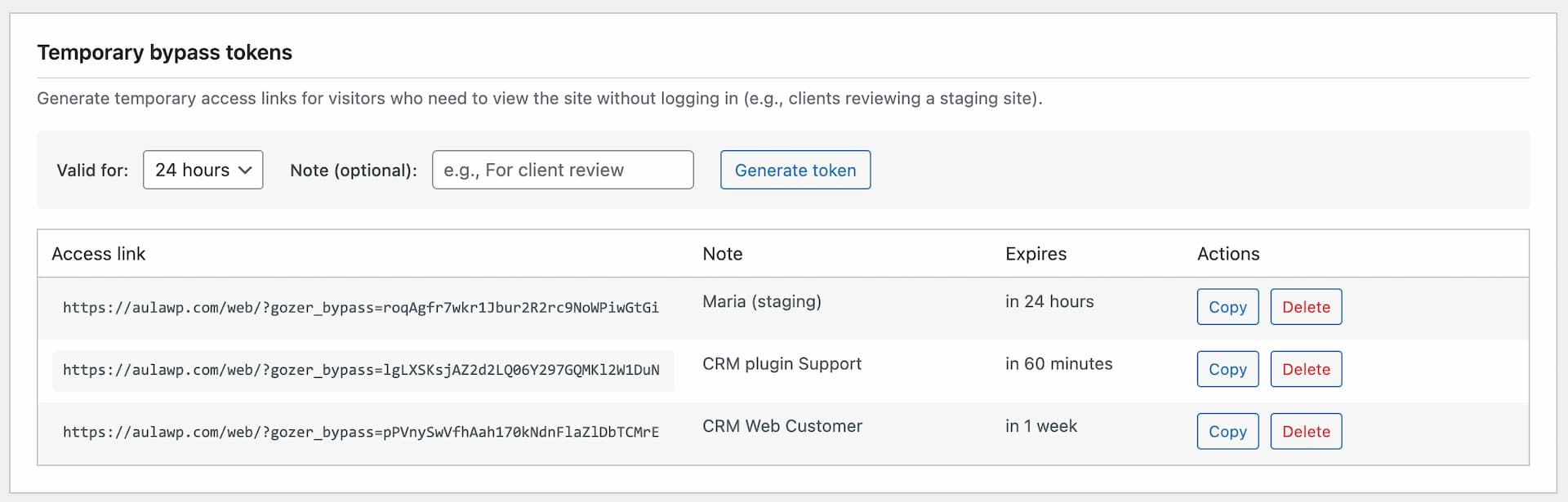
- Temporary bypass tokens – Generate shareable links for temporary access
- User agent rules – Grant access to monitoring services
- Flexible redirects – Choose login page, 403 error, or custom URL
- Lightweight – No bloat, just the features you need
IP Whitelist Formats
The plugin supports multiple IP formats:
- Individual IPs:
192.168.1.1 - CIDR notation:
192.168.1.0/24or10.0.0.0/8 - Wildcards:
192.168.*or10.*.*.*
Temporary Bypass Tokens
Generate secure, time-limited access links perfect for:
- Client reviews of staging sites
- Sharing with contractors or agencies
- Temporary access for support teams
- Preview links for stakeholders
Use Cases
- Private company intranets
- Client staging sites
- Membership communities
- Development and testing environments
- Employee portals
- Educational platforms
Support
Need private support or custom development?
Do you need one-on-one help, priority troubleshooting, or a custom feature, integration, or tweak built specifically for your site? I offer private support and custom development. Just contact me and tell me what you need.
Need help or have suggestions?
Love the plugin? Please leave us a 5-star review and help spread the word!
About AyudaWP
We are specialists in WordPress security, SEO, and performance optimization plugins. We create tools that solve real problems for WordPress site owners while maintaining the highest coding standards and accessibility requirements.
スクリーンショット



インストール
- Upload the
gozerfolder to/wp-content/plugins/ - Activate the plugin through the ‘Plugins’ menu in WordPress
- Go to Settings > Gozer to configure options
- Enable the “Require login to access the site” checkbox
- Configure exceptions as needed
FAQ
-
Will this break my site?
-
The plugin is designed with safe defaults. Critical functionality like REST API, WP-Cron, and AJAX are allowed by default to prevent breaking the block editor or scheduled tasks.
-
Can search engines still index my site?
-
Yes, if you enable the “Search engine bots” option. Major search engine bots (Google, Bing, etc.) will be able to access and index your content.
-
Can someone fake being Googlebot to see my private site?
-
If “Search engine bots” is enabled (the default), yes: bots are recognized by their user agent, which any visitor can set freely, so a curl request claiming to be Googlebot gets through. If your site must stay private to everyone except real search engines, enable “Verify bots by reverse DNS”: Gozer then confirms the claim with a forward-confirmed reverse DNS lookup against the engine’s official domains (Google, Bing, Yahoo, Yandex, Baidu, and Apple) and blocks impostors, as well as bots that cannot be verified this way (such as social network preview fetchers). If the site should be completely hermetic, disable the “Search engine bots” exception altogether.
-
I am behind Cloudflare or a reverse proxy and my allowed IPs stopped working
-
Since 2.1.0 Gozer reads the visitor IP from the direct connection by default, because trusting proxy headers on sites not behind a proxy allowed anyone to impersonate an allowed IP by forging a header. Behind Cloudflare or a reverse proxy, the direct connection is the proxy itself, so go to Settings > Gozer > “Visitor IP detection” and select the header your infrastructure sets (CF-Connecting-IP for Cloudflare, X-Real-IP or X-Forwarded-For for other proxies). Your IP whitelist will work as before.
-
How do I allow specific pages to be public?
-
Go to Settings > Gozer and add paths to the “Allowed paths” field. Enter one path per line, like
/contact/or/about/. -
How do I whitelist an entire IP range?
-
Use CIDR notation (e.g.,
192.168.1.0/24for a /24 subnet) or wildcards (e.g.,192.168.*for all IPs starting with 192.168). -
How do bypass tokens work?
-
Generate a token in Settings > Gozer, then share the generated URL. Anyone with that link can access the site without logging in until the token expires.
-
Can I use it on a multisite network?
-
Yes, the plugin works on multisite installations. Each site can have its own configuration.
-
Why “Gozer”?
-
Gozer the Gozerian is the supernatural entity from Ghostbusters (1984) who asked “Are you a god?” before denying access to mere mortals. Just like our plugin does with your site visitors.
-
Why can a logged-in user still not see my site?
-
If you set a “Minimum access level” higher than the user’s role, logged-in users below that level are treated like logged-out visitors and shown a 403 page. This front-end restriction is independent from the WordPress dashboard: a Subscriber can still reach their profile screen but will not see the front-end. Set the access level back to “Any logged-in user” to allow every logged-in user through.
-
I enabled private mode but old pages still load without logging in
-
A page cache (a caching plugin, your host, or a CDN) can serve pre-generated HTML without running WordPress, so Gozer never sees those requests. Gozer purges the major caching plugins automatically when you activate the plugin, toggle private mode, or save settings, but if your host or CDN caches HTML you may need to purge it once after enabling Gozer.
評価

貢献者と開発者
Force login to make the site private – Gozer はオープンソースソフトウェアです。以下の人々がこのプラグインに貢献しています。
貢献者

変更履歴
2.1.2
- Fix: Security. The “Search engine bots” exception could be opened by anyone. Bots were recognized by their user agent alone, a header the visitor chooses, so an unauthenticated request sending Googlebot (or Applebot, WhatsApp, Slackbot, TelegramBot and others, matched anywhere inside the string) was served the whole private site while a normal browser was sent to the login page. “Verify bots by reverse DNS” now ships enabled, so a crawler must prove it belongs to the engine it claims. Existing sites are migrated automatically on update, page caches are purged, and a notice explains the change.
- Improved: The “Search engine bots” and “Verify bots by reverse DNS” settings now spell out what each one does and does not guarantee, and name the fetchers that verification leaves out (DuckDuckBot and social network link previews), so allowing them by user agent or IP is a deliberate choice.
2.1.1
- Improved: Compatible with WordPress 7.1.
- Improved: The WP-Cron, WP-CLI and “Static files” exceptions now describe what they actually do. Cron and command-line requests run without a browser session, and real files (CSS, JavaScript, images, fonts, and uploads) are served by your web server without loading WordPress, so Gozer never sees any of them and turning those exceptions off never closed anything. Wording only: how your site is protected does not change. To keep uploaded files private, block them in your server or hosting configuration.
2.1.0
- New: “Visitor IP detection” setting. Choose where Gozer reads the visitor IP: direct connection (the new default), Cloudflare’s CF-Connecting-IP, X-Real-IP, or X-Forwarded-For. If you use the allowed-IPs exception behind a proxy or CDN, select your header so the whitelist keeps working.
- New: Optional verification of search engine bots. With “Verify bots by reverse DNS” enabled, a visitor claiming to be Googlebot, Bingbot, Slurp, YandexBot, Baiduspider or Applebot must pass forward-confirmed reverse DNS against the engine’s official domains (verdict cached per IP). Bots that cannot be verified this way, like social preview fetchers, are blocked while it is on.
- Improved: The “Search engine bots” setting now states plainly that bots are recognized by their user agent, which anyone can forge, so you can decide whether to disable the exception or verify crawlers on sites that must stay hermetic.
- Improved: Recommendations banner synced with the AyudaWP catalog (updated plugin names and descriptions).
- Fix: Security hardening of the allowed-IPs exception. The visitor IP was read from client-controlled proxy headers (CF-Connecting-IP, X-Real-IP, X-Forwarded-For) even on sites not behind a proxy, so a visitor could impersonate an allowed IP by forging a header. The IP now comes from the direct connection unless a proxy header is explicitly selected, and X-Forwarded-For uses the address added by the proxy instead of the client-editable first entry.
For older changelog entries, please check the changelog.txt file