
説明
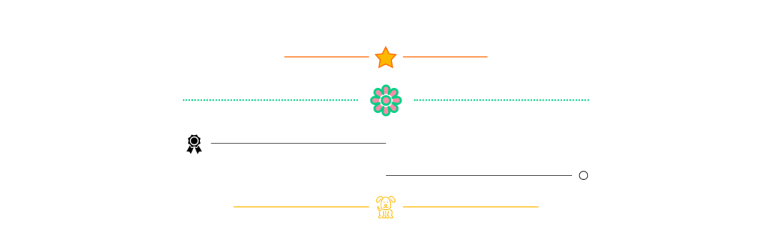
A simple, lightweight, accessibility-ready icon separator block.
Key Features
- Customize the icon width, spacing, color and position.
- Customize the separator width, style, color and position.
- Accessibility ready with ‘separator’ role.
- Simple and easy to use but included full settings even with responsive width and responsive vertical margin.
- An icon library included icons from “Bootstrap Icons”, “Ionicons”, “Dashicons” and new “WordPress Icons”.
Please take a look at these custom block patterns that use this block to see how it can be applied to real-world sites.
If this plugin is useful for you, please do a quick review and rate it on WordPress.org to help us spread the word. I would very much appreciate it.
Please check out my other plugins if you’re interested:
- Content Blocks Builder – Build custom layouts and blocks visually in the Block Editor without needing a code editor, using only core blocks and native Gutenberg features.
- Meta Field Block – A single block to display custom fields in the Block Editor without coding. It supports ACF, MetaBox, WooCommerce, meta, rest field, shortcode and more. Works everywhere: in the Site Editor (FSE), the Block Editor, inside Query Loop, WooCommerce Product Collection, Term Query blocks, and even in template files.
- SVG Block – A block to display SVG images as blocks. Useful for images, icons, dividers, and buttons. It allows you to upload SVG images and load them into the icon library.
- Breadcrumb Block – A simple breadcrumb trail block that supports JSON-LD structured data and is compatible with WooCommerce.
- Block Enhancements – Adds practical features to blocks like icons, box shadows, transforms, etc.
- Counting Number Block – A block to display numbers with a counting effect
- Better YouTube Embed Block – A block to solve the performance issue with embedded YouTube videos. It can also embed multiple videos and playlists.
The plugin is developed using @wordpress/create-block.
スクリーンショット

Create an icon separator

Change the separator’s settings
ブロック
このプラグインは1個のブロックを提供します。
- Icon Separator A simple horizontal separator with icon.
インストール
- Upload the plugin files to the
/wp-content/pluginsdirectory, or install the plugin through the WordPress plugins screen directly. - Activate the plugin through the ‘Plugins’ screen in WordPress
FAQ
-
What problem does this plugin solve?
-
It is like the core/separator block but supports an icon.
-
When should we use this plugin?
-
To make a simple, beautiful horizontal separator.
-
Why needs this plugin?
-
Because you want to make a beautiful horizontal separator.
-
Who needs this plugin?
-
Anyone can use this plugin.
評価


貢献者と開発者

変更履歴
1.2.5
Release Date – 07 May 2026
- Improved – Updated inspector control styles
1.2.4
Release Date – 22 November 2024
- Updated – SDK to improve controls and utilities.
- Fixed – SVGs from the media library overriding icons from the icon library.
1.2.3
Release Date – 24 October 2024
- Updated – SDK to implement minor UI changes and remove deprecated code
- Improved – Replaced classnames with clsx
- Updated – Tested compatibility with WP 6.7 and set minimum requirement to WP 6.5
- Added – Support clientNavigation interactivity
1.2.2
Release Date – 23 May 2024
- Improved – Render line style popup on the left side
1.2.1
Release Date – 28 April 2024
- Updated – icon library
- Removed – Upload SVGs to the media library
1.2.0
Release Date – 31 March 2024
- Added – Allow uploading and loading SVG icons from the media library
- Improved – Use the ToolPanel for inspector settings
- Improved – Make the line rounded by default
- Updated – Update SDK
1.1.8
Release Date – 23 September 2023
- Updated – Using the default BorderControl for the line style
- Updated – Update ‘Requires at least’ to 6.3 for new the spacing sizes control style
1.1.7
Release Date – 02 September 2023
- DEV – Using the default SpacingSizesControl for margin
- DEV – Add Unit and Range control for custom spacing
1.1.6
Release Date – 09 August 2023
- DEV – Update the icon library popup style for WP 6.3
- DEV – Add keywords
- DEV – Refactor code
1.1.5
Release Date – 11 March 2023
- DEV – Update icon library
1.1.4
Release Date – 09 February 2023
- DEV – Add SVGO GUI tool to the SVG help text
- DEV – Update SDK
1.1.3
Release Date – 23 October 2022
- DEV – Refactor SVG controls
- DEV – Replace client caching by loading the icon library from the REST API
1.1.2
Release Date – 18 September 2022
- FIX – Compatibility issue with the Gutenberg plugin
1.1.1
Release Date – 16 September 2022
- FIX – Load all localization text
1.1.0
Release Date – 27 July 2022
- DEV – Support converting from/to core/separator
- DEV – Allow double click to insert icon from the modal
1.0.8
Release Date – 30 Jun 2022
- FIX – Convert inline style to style object
1.0.7
Release Date – 20 Jun 2022
- DEV – Allow uploading icon
1.0.6
Release Date – 12 May 2022
- REFACTOR – Update SDK
1.0.5
Release Date – 30 April 2022
- DEV – Update color format
1.0.4
Release Date – 28 April 2022
- DEV – Add the title to block registration in JS.
1.0.3
Release Date – 21 April 2022
- DEV – Add separator role for accessibility
1.0.2
Release Date – 19 April 2022
- REFACTOR code
1.0.1
Release Date – 16 April 2022
- DEV – Add shortcut keys to the icon library modal, focus on the search box when opening the modal
- DEV – Make it compatible with common themes
1.0.0
Release Date – 14 April 2022