

説明
WordPress 用カスタムブロックプラグイン
★★★★★
WordPress カスタムブロックを作る、開発者のための魔法のステッキ。 WordPress プラグイン「Lazy Blocks」は、すべての開発者がアクセスできる、WordPress ブロックエディター (通称 Gutenberg) をベースにしたサイトを素早く立ち上げるための強力なツールです。
視覚的にカスタムブロックを作成し、ドラッグ & ドロップでブロックにコントロールを追加したり、HTML や PHP コードでブロックの出力を書くことが可能です。特定の投稿タイプのカスタムブロックやカスタムメタフィールドを作成することができます。さらに、任意の投稿タイプ用に定義したブロックを持つ投稿テンプレートを作成することも可能です。
簡単に始められる
WordPress エディターへのカスタムブロックの配置に必要なのはこれだけ。
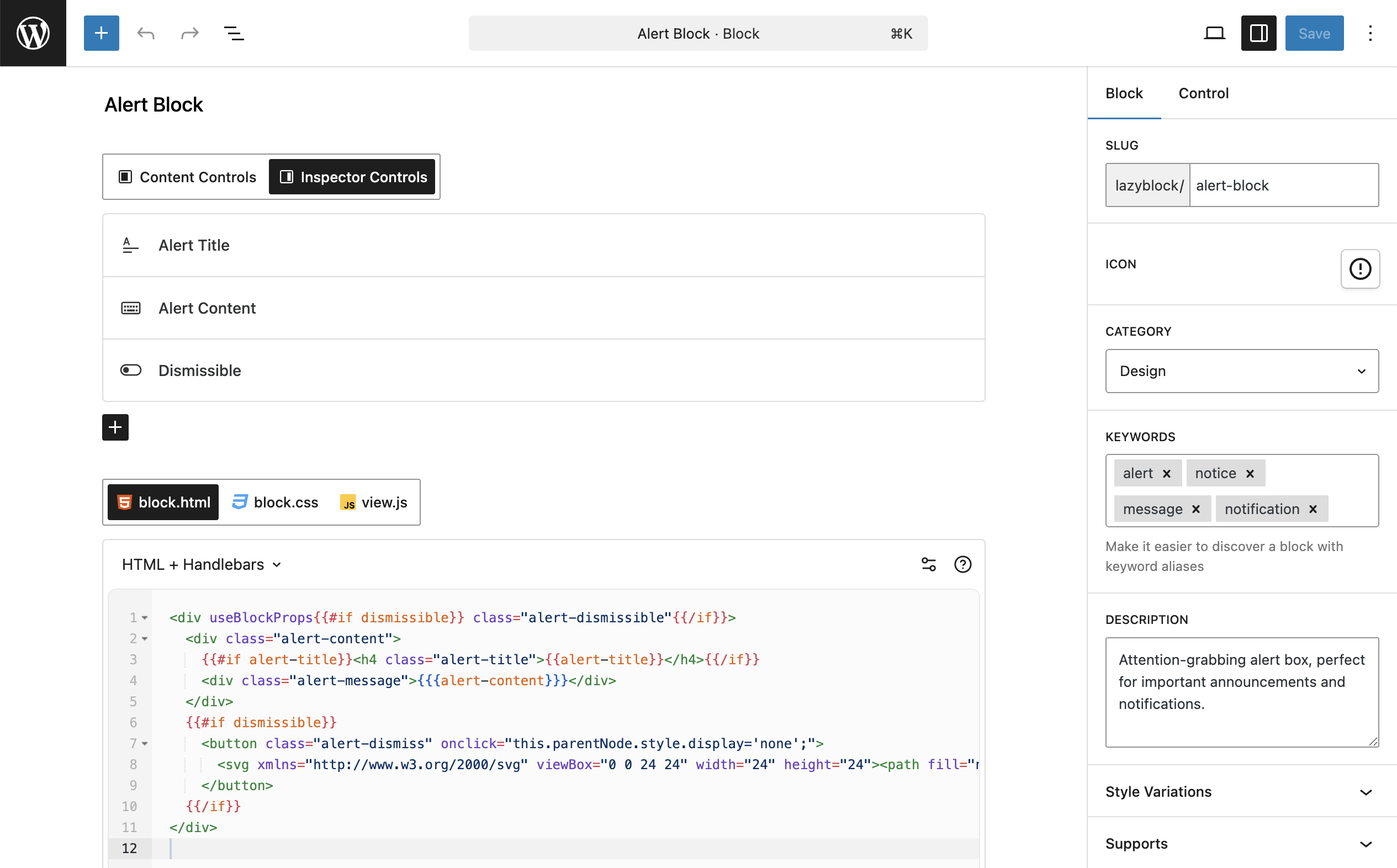
1. カスタムブロックの設定
カスタムブロックの名前、アイコン、カテゴリーなどを設定します。
2. コントロールの追加
シンプルなテキスト、複雑な画像選択などのコントロールフィールドを追加します。
3. 出力コードを書く
HTML や PHP を使用して、カスタムブロックの出力を定義します。
🌟 機能
- 出力コード付きのカスタムブロック
- 投稿メタフィールドのカスタムブロック
- 多数の定義済みコントロール
- ブロックコンテンツ/インスペクタにコントロールを表示
- 複数の出力方法が可能
- Custom PHP
- カスタム HTML + Handlebars
- テーマフォルダ内のテンプレートファイル
- Export / Import blocks
🔥 コントロール
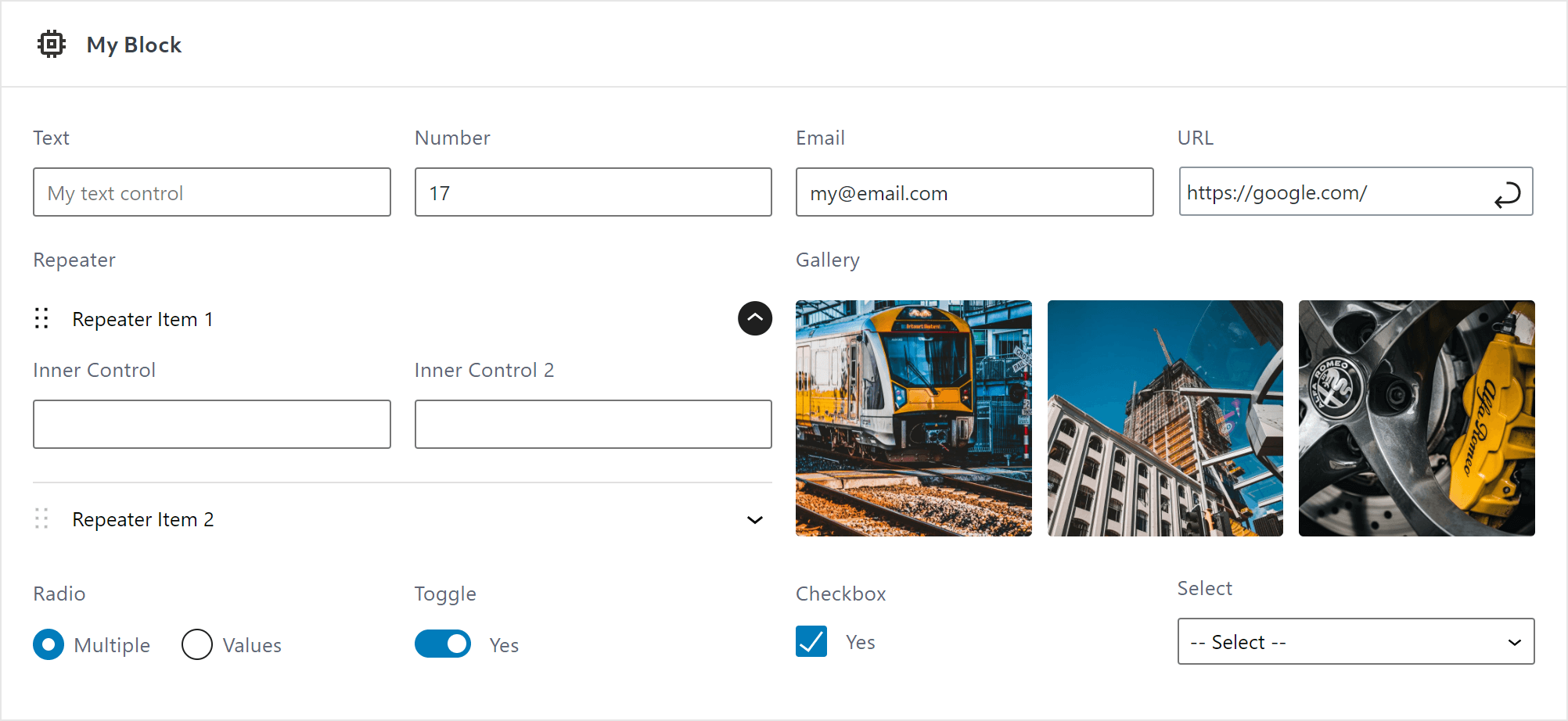
To manage custom blocks attributes you need to use Controls. Lazy Blocks have a large set of controls predefined for you:
- ベーシック
- テキスト
- テキストエリア
- 数値
- 範囲
- URL
- メール
- パスワード
- 本文
- 画像
- ギャラリー
- ファイル
- リッチテキスト
- クラッシックエディタ
- コードエディター
- 内部ブロック
- 選択式フォーム
- セレクトボックス
- ラジオボタン
- チェックボックス
- 切り替え
- 高度な設定
- カラーピッカー
- 日時ピッカー
- レイアウト
- 繰り返し
- カスタムコントロール 詳細なドキュメントを読む
🏳️ 多言語対応
Lazy Blocks は WPML との互換性をさらに強化します。カスタムブロックのすべてのテキストコントロールは WPML と互換性があり、翻訳に対応しています。https://www.lazyblocks.com/docs/multilingual/
🛠 開発者向けに構築
Lazy Blocks built by developers, for developers and gives you unlimited freedom to create custom blocks. Furthermore, there are PHP filters and actions to customize every part of your custom blocks from the backend. Possibility to use PHP and theme templates system.
シンプルなカスタム ブロックの場合は、すべての UI パーツが直感的に操作できるようになっていますが、より複雑なものを作成する場合は、詳細なドキュメントを読む必要がある場合があります。
🔥 Lazy Blocks Pro
さらに多くのコントロールや機能が含まれている Lazy Blocks プラグインのプロフェッショナル版もご利用できます! Lazy Blocks Proの詳細についてはこちら
プラグインの無料版を継続的に提供し、迅速かつ効果的なサポートを無料で提供するために、プラグインの Pro バージョンを提供しています。Pro バージョンでは以下のことが可能です:
-
拡張コントロール
- 投稿 – 投稿タイプまたはタクソノミーに基づいて投稿を検索して選択
- タクソノミー – カテゴリ、タグ、その他のカスタムタクソノミーを検索して選択
- ユーザー – ユーザーの役割に基づいてユーザーを検索し選択
- Units – Advanced number input with possibility to select any CSS unit
- メッセージ – コントロール間に役に立つメッセージを表示
- コードエディター – 構文強調表示機能付きエディターを使用してコード部分を挿入する
-
コントロールの表示条件
条件付き表示を使うと、条件付きで表示/非表示することができます。ブロックが大量のコントロールで煩雑にならないよう、他のコントロールの値によって一部のコントロールを隠すことができます。 -
Styles & Scripts
Add custom CSS and JavaScript to your blocks. Define styles for editor and frontend, and script for interactive frontend functionality. Assets are automatically loaded only when needed for optimal performance. -
パネルと区切り
パネルと区切りを利用して、コントロールをグループ化して構造化することができます。ブロックパネルのUIをより整理しやすくなります。 -
ブロックのプリロード
ページエディターが読み込まれるとすぐにブロックのプレビューが表示されます。 -
SEO 強化
Rank Math および Yoast SEO プラグインでのコンテンツ分析の追加サポート。
スクリーンショット
ブロック
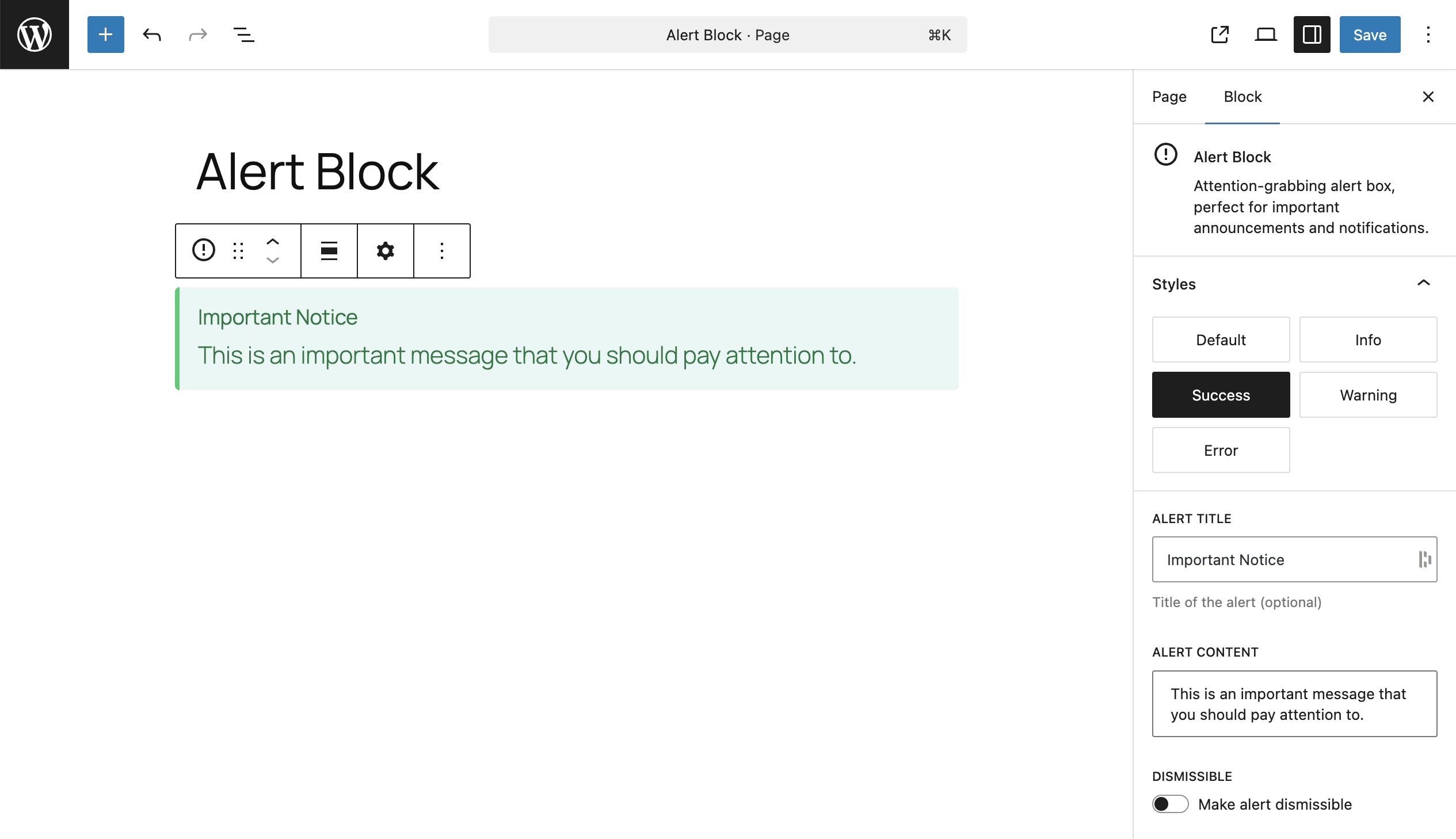
このプラグインは2個のブロックを提供します。
- Block Builder
- Free Content
インストール
自動インストール
自動インストールは、 WordPress がファイル転送自体を処理し、 Web ブラウザを離れる必要がないため、最も簡単なオプションです。 Lazy Blocks の自動インストールを実行するには、 WordPress のダッシュボードにログインして、[プラグイン]メニューに移動し、[新規追加]をクリックします。
検索フィールドに「Lazy Blocks」と入力し、プラグインを検索をクリックします。 このプラグインを見つけたら、ポイントリリース、評価、説明など、それに関する詳細を表示できます。 もちろん最も重要なのは、「今すぐインストール」をクリックするだけでインストールできることです。
手動インストール
手動インストールは、Lazy Blocks プラグインをダウンロードしてお好きな FTP アプリケーションから Web サーバーにアップロードする、という手順で行います。WordPress codex にプラグインの手動インストール方法の説明が記載されています。
評価


貢献者と開発者

変更履歴
4.4.1 – Aug 31, 2026
- changed Lazy Blocks to stay active next to Lazy Blocks Pro instead of being deactivated
4.4.0 – Aug 26, 2026
- added WordPress 7.1 compatibility
- added filters for extending how a block renders in the editor preview
- improved the Gallery control in the block builder, which now previews its images in a grid
- improved Gallery control loading speed on galleries with many images, fetching image data in one request instead of one per image
- fixed dragging values in a multi-select control inside the editor canvas
- fixed Image, File and Gallery values not being read when written as raw JSON in block markup
- fixed Repeater values not being read when written as a raw array in block markup
- Pro:
- added a Rich Text control that edits inline the way a core block does, and rebuilt the wizard presets on it
- fixed the update notice still offering a version already installed
4.3.1 – Jun 11, 2026
- improved performance by caching prepared
get_blocks()results within a single request - fixed Lazy Blocks role capability sync to run once on plugin upgrade instead of on every admin request
- Pro:
- fixed SEO frontend preload performance by batching initial block renders in a single request
- fixed code editor syntax highlighting when system dark mode is enabled
4.3.0 – May 4, 2026
- added compatibility for WordPress 7.0
- added support Groups 本文 and List groups for controls in Inspector
- fixed Checkbox with multiple options and Save in Meta error
- fixed possible vulnerability – stronger checks on who can change block code (editor, front-end output, and scripts), so permissions are respected even if something tries to update block meta outside the normal editor
- fixed displaying unfinished block drafts with an empty slug
- minor fixes and changes
4.2.1 – Feb 4, 2026
- fixed context-aware capability check for PHP block rendering (resolves XSS)
4.2.0 – Dec 3, 2025
- added caching for the get_blocks() function to prevent loading block custom posts on every page load. This fixes the issue with heavy SQL calls on sites using a large number of blocks (20+)
- fixed URL control inside the ‘content’ placement. Since you asked to keep it working in Content, we restored the control here and now display settings in a Modal – this is a workaround for Gutenberg limitations with URL components inside iframe preview
- fixed required control check and post locking when a block is rendered inside a preview example
- Pro:
- added Link control: https://www.lazyblocks.com/docs/blocks-controls/link/
- added Token Field control: https://www.lazyblocks.com/docs/blocks-controls/token-field/
- added Token Field appearance for Taxonomy control
- fixed incorrect path display for theme template code folder for blocks with custom namespace
4.1.1 – Sep 25, 2025
- security fix: prevent unauthorized block export access
- added
$contentattribute tolzb/block_render/outputfilters - Pro:
- fixed rendering blocks in widgets screen when Rank Math is active
4.1.0 – Aug 18, 2025
- !breaking change – in Theme Templates renamed
$contextto$render_locationto use$contextfor Gutenberg blocks Context feature instead: https://www.lazyblocks.com/docs/blocks-code/relationships/ - requires PHP version 8.0 or higher, with version 8.3 and above recommended
- added JS filter for devs:
lzb.registerBlockType.args - added PHP filters for devs:
lzb/register_blocks,lzb/get_blocks - fixed content wrapper controls color inheritance from parent
- fixed losing focus from input fields in the inspector controls when block render preview updated
- fixed URL control rendering in Content – display fallback Text control
- disable possibility to add URL control inside Repeater inserted inside Content
- remove child controls when the repeater control removed
- minor fixes
- Pro:
- added support for block relations and context
- improved block content retrieval for SEO plugins to enable accurate analysis and added preload to prevent multiple fetches on editor page load. Learn more -> https://www.lazyblocks.com/docs/blocks-code/relationships/
4.0.3 – Jul 7, 2025
- Pro:
- fixed incorrect displaying controls in inspector inside different groups
4.0.2 – Jun 26, 2025
- fixed displaying block border in editor when used repeater in inspector
4.0.1 – Jun 4, 2025
- restored
lzb/block_render/allow_wrapperfilter to prevent existing user blocks from breaking, but we now deprecate this hook and display a notice to migrate to the useBlockProps attribute - Pro:
- 時々アクセス禁止エラーを引き起こすアップデータキャッシュの問題を修正
4.0.0 – Jun 2, 2025
- deprecated Templates feature. You need to migrate to the WordPress FSE theme and use Template editor natively. Learn more -> https://wordpress.org/documentation/article/template-editor/. Our implementation will still work for existing sites, but it is deprecated for future use.
- improved Block Builder UI and reworked some option names and placement
- added possibility to control the block wrapper and remove the block border from the editor https://www.lazyblocks.com/docs/blocks-code/use-block-props/
- added setup wizard with predefined blocks for quick start your custom blocks https://www.lazyblocks.com/docs/create-block/#setup-wizard
- added more Supports options: color, layout, shadow, spacing, dimensions, typography https://www.lazyblocks.com/docs/create-block/#block-settings
- ブロック登録データを上書きするための
lzb/register_block_type_dataフィルターを追加 lzb/block_render/allow_wrapperPHP フィルタを削除
これにより、ユーザーはブロックコード内で独自のラッパーを提供できるようになります- ブロックのカスタム CSS オプションとの衝突を防ぐため、「スタイル」の名前を「スタイルバリエーション」に変更
- Ghost Kit のサポート設定の保存を修正
- fixed duplicated block IDs after duplicating 2 and more blocks at once
- fixed URL control size in Inspector
- 出力が ‘0’ 文字列の場合のブロックレンダリングの修正
- ブロックビルダープレビューでのブロック属性の表示を修正
- ブロックビルダープレビュー内のレンダリングコンテキストを修正
- 軽微な修正と改善
- Pro
- added possibility to add Styles and Scripts for your block https://www.lazyblocks.com/docs/blocks-code/styles-scripts/
- 投稿管理設定に投稿ステータスのサポートを追加
- 条件付きロジックでのメタコントロールのサポートを追加
- added in SEO plugins proper handling of blocks content, which does not have Editor code output but only Frontend
- 検索テキストが追加されていない場合、投稿とユーザーのコントロールにデフォルトでオプションを表示
useBlockProps属性を使用するようにするためネイティブ ブロック スタイル機能を削除- 複数の投稿、タクソノミー、ユーザーコントロールのデフォルト値を修正
- fixed SEO plugins don’t count blocks content length
- fixed $wpdb->prepare syntax error in Maria DB
3.8.3 – Dec 21, 2024
- fixed XSS issue in admin blocks list page
3.8.2 – Dec 13, 2024
- Pro
- プラグインの自動更新を修正。プラグインを自動更新できない場合は、手動でインストールしてください。https://www.lazyblocks.com/docs/account-and-license/download-lazy-blocks-pro-plugin/
3.8.1 – Dec 10, 2024
- remove experimental notice under WPML setting
- minor changes in readme
- Pro:
- 存在しないコントロールに条件付きロジックを追加したときに発生するブロッククラッシュを修正
3.8.0 – Dec 7, 2024
- added WordPress 6.7 compatibility
- ブロックに無効な必須コントロールがある場合、ブロックインスペクタとエディタツールバーに適切なエラーメッセージを追加
- 「メタに保存」オプションが有効になっているコントロールを含むブロックを削除した後、投稿からメタデータを削除するプロンプトを追加
- ギャラリーコントロールをクリアする機能を追加
- リピーターコントロールに行の複製ボタンを追加
wp_get_attachment_imageハンドルバーヘルパーを追加- added possibility to activate/deactivate blocks
- クラシックエディターコントロールへの埋め込みリンクのサポートを追加
- added Groups for Inspector – Default, Styles and Advanced
- added reset button to Time control
- チェックボックスコントロールに複数オプションのサポートを追加
- improved Repeater control UI
- ブロック複製プロセスの改善 – 拡張子コピーを追加し、デフォルトでブロックを無効化
- カスタムフィールドをサポートしていない投稿のエディターでメタに保存を表示する機能の改善
- ブロックが登録されていない場合の無効なブロックビルダーレンダリングを修正
- ブロックビルダープレビューの offsetHeight JS エラーを修正
- fixed hardcoded
wp-contentstring in the block builder UI: changed to wp content dir core constant - fixed displaying default block icon in blocks list admin UI
- fixed saving of Repeater row addition and removal in undo/redo manager
- align 属性が無効になっている場合のブロック内の align クラスのレンダリングを修正
- ブロック投稿のステータスを変更できないようにする – 下書きと公開のみサポート
- コンストラクタの名前をブロックビルダーに変更
- 相対リンクまたはアプリケーションへのリンクで必要なチェックが失敗するのを防ぐために、URL コントロールから高度な検証を削除
- Gutenberg がここで正しくレンダリングしなくなったため、コンテンツ内で URL コントロールを使用する機能を削除
- Pro:
- ブロックスラッグの名前空間を変更し、コレクションを登録する機能を追加
- コードコントロール拡張機能のブロックエディタースタイルを修正
- migrate Pro plugin from Paddle to LemonSqueezy
3.7.0 – May 23, 2024
- 必須コントロールオプションの改善 – 検証チェックの追加とエラーメッセージの改善
- 従来のウィジェット画面でのクラシックコントロールの読み込みを修正
- fixed Number/Range controls default value
0when it is not selected lzb.editor.control.isValueValidフックをlzb.editor.control.validateに変更- 非推奨のためリッチテキストコントロールからマルチラインオプションを削除
3.6.2 – May 1, 2024
- ブロック出力に無効な HTML がある場合にエディターでブロックが壊れるのを防ぐためのエラー ハンドラーを追加
- fixed get_meta_value_by_block method to not crash if no meta available
3.6.1 – Mar 21, 2024
- reverted the code for validating HTML as it does more harm than good. In the next update, we will need to add error handlers in JS instead of trying to validate HTML inside PHP.
3.6.0 – Mar 15, 2024
PRO プラグイン:
- fixed decoding of WPML encoded strings in conditional logic in editor
Free + PRO プラグイン:
- added compatibility for the latest Gutenberg and WordPress 6.5
- added error handler for invalid HTML. The block will no longer crash, it will display the error message
- 新しい Ghost Kit 拡張機能のサポートを追加
- changed Classic control to use Modal since we can no longer use the TinyMCE inside editor iframe
- エディターの iframe にスタイルがキューに追加される問題を修正
- fixed adding default toggle/checkbox value in the new repeater row
- エディターの iframe 内でレンダリングされる
react-selectスタイルを修正 react-selectが X ボタンをクリックするとアイテムを削除する問題を修正- エディターのリピーター、ギャラリー、ファイル、画像コントロールにおける WPML エンコードされた文字列のデコードを修正
- fixed displaying Navigation and Patterns in block Condition selector
- fixed loading block control scripts in block builder when no blocks registered yet
3.5.1 – Aug 30, 2023
- fixed JS error in editor in block containing
<script>tag in content when preview showed
3.5.0 – Aug 18, 2023
- WordPress 6.3のサポートを追加
- all blocks now have
apiVersion3, which means that in the latest Gutenberg you will have an iframed page editor - fixed block rendering error inside core/group block
- fixed editor error when view block preview or add a couple of reusable blocks
- 軽微な変更
3.4.5 – Jul 24, 2023
- fixed wrong template rendering in Editor after InnerBlocks component used
3.4.4 – Jul 20, 2023
- fixed InnerBlocks component rendering number values with
$character
3.4.3 – Jul 12, 2023
PRO プラグイン:
- fixed JS error in Posts control in editor
無料プラグイン:
- fixed blocks rendering on Widgets screen
- fixed default value with an empty array element of multi select
- fixed JS error in multiple Select control in editor when null value
3.4.2 – Jul 1, 2023
PRO プラグイン:
無料プラグイン:
- fixed Anchor option and ID attribute rendering in the block wrapper (Gutenberg reverted feature for automatic Anchor render in the dynamic blocks)
3.4.1 – Jun 30, 2023
PRO プラグイン:
- added higher priority for block preloading feature to let 3rd-parties hook the output before preloading
無料プラグイン:
- added defaults to user registered blocks (fixes the problem, when old registration configs fails when we add new parameters)
- added
remove_blockmethod to the Blocks class to allow removing user registered blocks - added filter
lzb/block_render/allow_inner_blocks_wrapper - added support for
classNameattribute in<InnerBlocks />component - skip control assets enqueue if there are no blocks registered (fixes the JS error in editor)
- fixed nested blocks not displaying appender button with InnerBlocks component
3.4.0 – Jun 24, 2023
PRO プラグイン:
- added controls conditions based on selected block style or for a specific class name
- added support for Term ID output in Taxonomy control
- added
lazy-blocks.phpfile as a helper when included within a theme or plugin - added support for Equal and Contains conditions for Units control
- added
==classand!=classcondition operators - changed saved attribute of Taxonomy control to ID when selected Term Object
- fixed Posts and URL controls not displaying all available post types
無料プラグイン:
- added
<InnerBlocks />component support. Learn more here – https://www.lazyblocks.com/docs/blocks-code/inner-blocks/- it is required to change your block code to use
<InnerBlocks />component if you use the InnerBlocks control - the old InnerBlocks control is now marked as deprecated and will be removed in future plugin updates
- it is required to change your block code to use
- added possibility to register Block Styles https://developer.wordpress.org/block-editor/reference-guides/block-api/block-styles/
- added option for Image control to insert from URL
- added new Supports settings – Reusable and Lock
- added possibility to sort tags inside the Select component
- added width support for controls in the block builder UI
- added apiVersion 3 to blocks
- added
include_withinmethod to include plugin within theme or plugin. Learn more here https://www.lazyblocks.com/docs/examples/include-lazy-blocks-within-theme-or-plugin/#how-to-include-plugin-files - added
lzb/control_valuefilters. Learn more here https://www.lazyblocks.com/docs/php-filters/lzb-control_value/ - added
filter_control_valuemethod into the Base control class for 3rd-party controls - added JS hook
useBlockControlPropsto use in 3rd-party controls - added helpful attributes to control wrappers such as
data-lazyblocks-control-name - added control values filtering inside the repeater rows
- added
Toggle alllabel to Repeater control toggle - improved Repeater control to automatically open a newly added Row
- improved Free block and InnerBlocks appender style in editor (Displays like in core blocks)
- improved usage of Lazy Block’s
render_callbackto prevent conflicts with Gutenberg’srender_callback - improved meta controls, templates editor – use
useEntityPropinstead ofeditPost - カラーピッカーコントロールの改良 :
- 1回のトグル操作でフルカラーパレットを開く
- added option to disable color palette
- added Alongside text option
- moved Ghost Kit supports settings to separate panel in block builder
- moved Edit Block icon to the block toolbar
- changed
import_blockmethod to public in Tools class - changed bundler to
wp-scripts– faster builds and development process - fixed styles loading inside the editor iframe
- fixed block render duplicate custom CSS and anchor
- fixed Classic Editor error in widgets editor
- fixed block builder styles in editor with Astra theme
- fixed JS error when
conditionfield is not added in the PHP block registration - fixed sortable inside editor iframe
- fixed displaying label and help in controls, where these settings are disabled
- ブロックビルダー内での Redux ストアの重複読み込みを修正
- removed CodeEditor component from lazyblocks Redux store (reduced editor.js file size)
- removed
throttle-debounceusage, use lodash instead - removed HTML elements from block descriptions, as it is deprecated since WordPress v6.2
3.3.0 – Jan 4, 2023
PRO プラグイン:
- added support for Repeater control in the Conditional Logic
無料プラグイン:
- added notice for invalid control name when creating block
- fixed Preview component JS actions call after fetch complete
- fixed displaying Date and Time pickers
- fixed Date Time Picker displaying date in the toggle label
3.2.1 – Dec 4, 2022
PRO プラグイン:
- fixed block preloading inner-blocks attribute
- fixed displaying controls in columns
無料プラグイン:
- WPMLのサポートを追加
- added “Edit Block” link inside the block description
- fixed incorrect detection of the selected block to hide/show controls and preview
- fixed displaying control label with Required mark
- fixed margin between control and help text
- fixed block render error when add “Hide If Not Selected” option to Inner Blocks control
- fixed error “Render callback is not specified” when preview block with empty output code
- fixed export block PHP closing function call
- fixed JS error when change value of new control inside existing repeater
- fixed Classic Editor and Repeater save attribute conflict
- fixed debounce preview is not always reloaded after changes
- fixed usage of deprecated action “lzb_handlebars_object”
- fixed deprecated warning even if no deprecated hook used
3.1.0 – Nov 16, 2022
PRO プラグイン:
- added block preloading feature – all blocks loaded immediately, when you open the page editor
- added support for content analysis in Rank Math and Yoast
- added setting to remove block frame in page editor and display it as native block
- added Link Suggestions option to URL control (select post types to suggest links when typing)
- added Rich Preview option to URL control (display page title and image of selected URL)
無料プラグイン:
- added support for Blocks API v2
- added
lzb/inithook for developers to register blocks in PHP - added autoFocus to block builder control Type popup input search
- added autoFocus to choices component when adding new choice
- added JS filters –
lzb.components.PreviewServerCallback.allowFetch,lzb.constructor.code-settings.output-method,lzb.constructor.code-settings.output-code,lzb.constructor.code-settings.output-template,lzb.constructor.code-settings.preview,lzb.constructor.code-settings.additional - added PHP filters –
lzb/block_defaults,lzb/block_data - added PHP actions –
lzb/init - ブロックビルダーのコントロールタイプのポップアップのパディングを修正
- fixed block builder code preview iframe width
- fixed admin PHP warning when user with Editor role
- fixed blocks conditional displaying in selected post types
- fixed registering user blocks which don’t have all control parameters
- fixed registering block inside
inithook - fixed BaseControl help with HTML generates JS errors in console
- fixed Select control with Multiple option CSS overflow problem
- fixed templates custom meta settings width
- fixed control label displaying when it is empty
- changed block configs sanitization function priority to prevent possible conflicts
- removed URL control Reset button, use standard icon instead
- disabled custom class name support in Free block
- deprecated action
lzb_handlebars_object, uselzb/handlebars/objectinstead
3.0.0 – Nov 9, 2022
PRO プラグイン:
- Lazy Blocks Pro is finally released and available here – https://www.lazyblocks.com/pro/
無料プラグイン:
- a lot of code rewrites to improve stability and performance
- added support for Image control data in the repeater title short tags
- added possibility to save block data with html tags. Supported block description, controls labels and help fields
- added basic styles to the Code Editor control
- added support for “Content Only” lock in Templates
- added support for multiple color palettes (registered in the theme and in Gutenberg itself) in the Color Picker control
- fixed enqueue styles in FSE
- fixed “Hide if block is not selected” option when control displayed in both placements (Inspector and Content)
- fixed “Hide if block is not selected” option to work with inner blocks
- fixed adding defaults to the new row in repeater
- fixed unlocking post saving when remove locked block
- URL コントロールスタイルの修正
- fixed icon box in admin block list ui when no icon selected
- fixed block builder rendering when 3rd parties use the
allowed_block_types_allhook - fixed widgets screen block error
- fixed Classic Editor control in Widgets Screen
- Rest 権限チェックエラーを修正
- fixed error message displaying when block preview is not rendered
- simplified exported block configs (removed fields with default values)
- changed
react-sortable-hoctodnd-kit– no more error messages in the console - removed limitation for 3 tags per block
- removed wrapper from controls displayed inside Inspector
- 軽微な変更
2.5.3 – Jan 8, 2022
- added block inserter preview (thanks https://github.com/nk-crew/lazy-blocks/pull/230)
- PHP8の非推奨警告を修正
- fixed security issue in the code for duplicating post (thanks to the Wordfence team)
- 軽微な変更
2.5.2 – Dec 6, 2021
- added support for color slugs in the Color controls when using new FSE themes
- added code preview in the block builder (thanks https://github.com/nk-crew/lazy-blocks/pull/227)
- fixed propagating cut event in the block builder (thanks https://github.com/nk-crew/lazy-blocks/pull/226)
- removed default value generated for repeaters, as it was not working correctly
2.5.1 – Nov 5, 2021
- added “Free Content” block in the Templates editor
- fixed PHP warnings when migrating to v2.5.0
2.5.0 – Nov 5, 2021
- improved Templates editor (now you can use Gutenberg editor and insert full-featured blocks)
- fixed
get_lzb_metaoutput of array and object values - fixed Block Builder screen title click in WP 5.9
- fixed long block names word wrap in export page
- fixed Color Picker control styles in editor
2.4.3 – Sep 27, 2021
- changed post types list limit in the templates editor ()
- changed minimal PHP version to 7.2
2.4.2 – Sep 22, 2021
- added option to use the color slug in the Color Picker control (see Output Format option)
- fixed js errors in the widget screen
- changed minimal WP version to 5.8
2.4.1 – Aug 27, 2021
- fixed ‘wp-editor’ deprecated error
- fixed conflict with Widgets Gutenberg editor
- 繰り返しソートエラーを修正
- removed accepted list for file control Upload button since it is not working correctly in some cases
2.4.0 – Aug 18, 2021
- WordPress 5.8のサポートを追加
- added a lot of UI improvements
- added slug check in the block name before register block (fixes possible errors)
- added placeholder color in image and gallery controls if images no more exist in media library
- added control names autocompletion to code editor in the block builder
- fixed multiple select control wrong height and styles
- fixed displaying control post meta using function
get_lzb_metawhen live reload preview - fixed Classic Control toolbar sticky
- 日付コントロールのJSエラーの修正
- fixed long words render in control labels and descriptions
- PHP 8 非推奨エラーの修正
- fixed wrong activation hook call
2.3.1 – Mar 19, 2021
- added compatibility with WordPress 5.7
- added possibility to display default meta value (without hard code, using native WordPress 5.5+ API)
- improved date time picker styles
- ブロックビルダーのコントロールのレンダリングコードの改善
- fixed double classes rendering in editor, when Single Output code enabled
- 軽微な変更
2.3.0 – Jan 10, 2021
- added possibility to duplicate blocks
- added top toolbar to admin pages
- 日時ピッカーの改良
- always display TimePicker component (to let users manually set day, month and year)
- display only necessary parts of TimePicker component
- better format on button label
- ブロックビルダーのタイプセレクターをモーダルに変更
- fixed Classic control initialize problem in WordPress 5.6 update
- ブロックビルダーの無効になっている更新ボタンの修正
- 固定ブロックビルダーはラベルの余白を制御
- fixed compatibility with Amazon S3 Offload Media plugin (changed image and gallery controls image URL retrieve method)
- 軽微な変更
Further changelog entries can be found in the CHANGELOG.md file.