
説明
Post Views Counter allows you to collect and display how many times a post, page, or other content has been viewed in a simple, fast and reliable way.
Post Views Counter gives you clear, accurate post view stats — right inside WordPress. No external tools. No bloat. Just the numbers you need to see what’s working.
Key Benefits
Clarity, speed, and control:
- Clear, Focused Metrics — You get a clear picture of how your posts are performing.
- Made for WordPress — Runs entirely in your site. No GA, no third-party pipes; accurate counts in your Dashboard.
- Privacy-first — Data lives on your server, with controls that respect visitors’ rights and privacy regulations.
- Works at scale — Minimal overhead, no external scripts, Multisite-ready.
- Display anywhere — Automatically show counts, or place them exactly where you want via blocks or shortcode.
Features
Practical features that matter:
- Count & display views for any post type you select.
- Three counting modes: PHP, JavaScript, REST API
- Dashboard post views stats widget
- Sortable Post Views admin column
- Exclude bots, logged-in users, specific roles, or IPs
- Manually adjust a post’s views when needed.
- Query and order content by views (developer-friendly)
- カスタム REST API エンドポイント
- Option to set count interval
- One-click data import from WP-PostViews, Statify and Page Views Count
- Post views display position, automatic or manual via shortcode
- Multisite compatibile
- WPML/Polylang compatible; translation-ready (.pot)
Post Views Counter Pro
More capability without extra complexity:
- Fast AJAX counting for more accurate data.
- Caching optimization that guarantees performance even under heavy traffic.
- Reports: Views by Date, Post, Author to spot winners, trends, and top contributors.
- Customizable Views Period (e.g., last 7/30 days) to control the views count timeframe.
- Export to CSV/XML to download and share data.
- Integrations for ordering by views in popular builders (e.g., Elementor Pro, Divi, GenerateBlocks).
スクリーンショット

screenshot-1.png 
screenshot-2.png 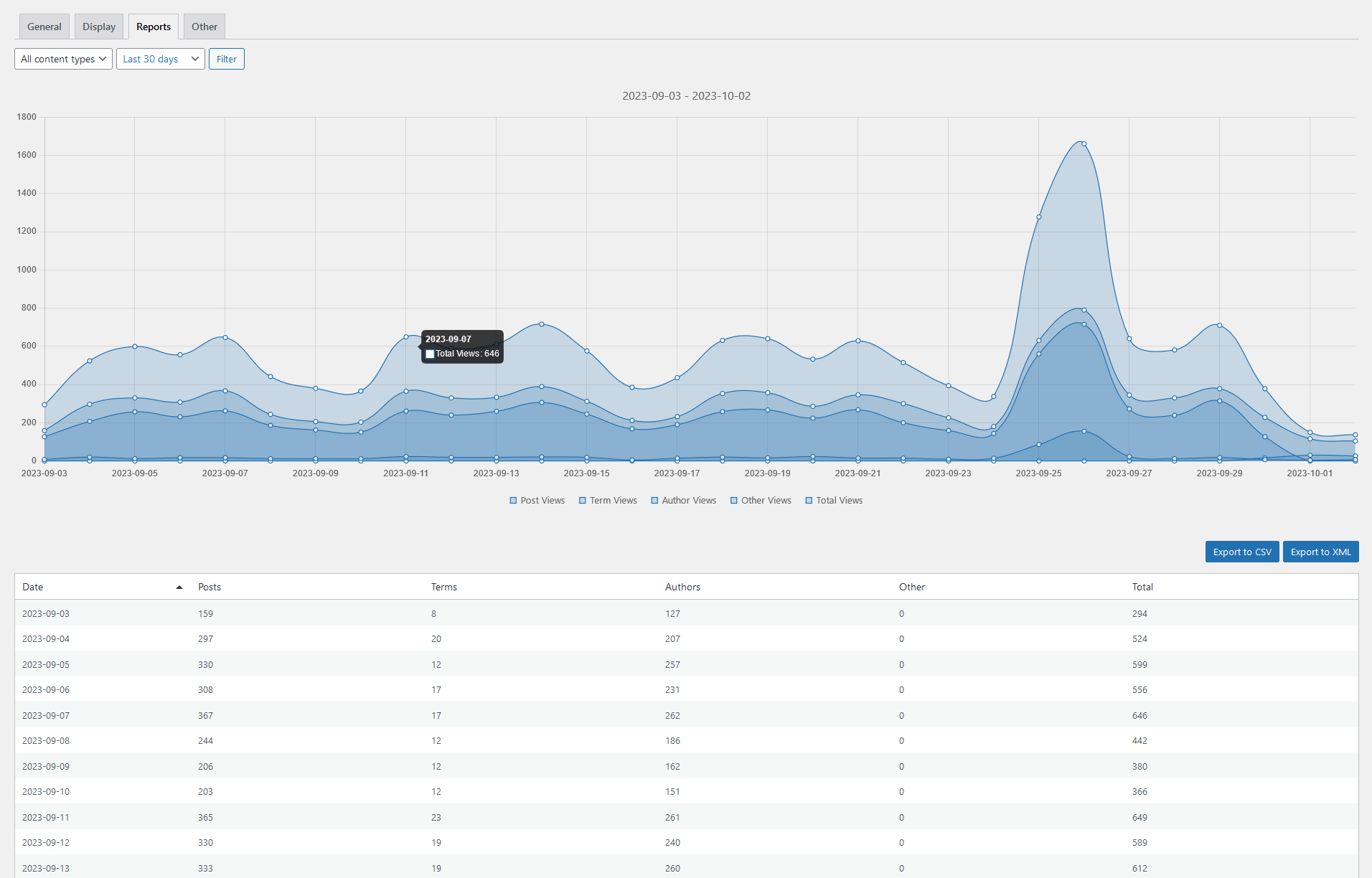
ブロック
このプラグインは7個のブロックを提供します。
- Most Viewed Terms Displays a list of the most viewed terms. Requires Post Views Counter Pro.
- Term Views Display views for a given term. Requires Post Views Counter Pro.
- Site Views Display site views. Requires Post Views Counter Pro.
- Most Viewed Authors Displays a list of the most viewed authors. Requires Post Views Counter Pro.
- Author Views Display views for a given author. Requires Post Views Counter Pro.
- Post Views Display post views for a given post.
- Most Viewed Posts Displays a list of the most viewed posts.
インストール
- WordPress.org プラグインのディレクトリを介して、または、サーバーにファイルをアップロードすることによって、Post Views Counter をインストールします
- WordPress の「プラグイン」メニューからプラグインを有効化してください
- Post Views Counter の設定に移動し、詳細を設定します。
FAQ
For many frequently asked questions check the Post Views Counter Docs.
-
Why use Post Views Counter vs Google Analytics?
-
Post Views Counter gives you clean, per-post view counts inside WordPress — fast, cache-friendly, and privacy-first, with data that stays on your server. Google Analytics might be an overkill when you just need accurate post/page views for editorial decisions.
-
Can I use Post Views Counter alongside Google Analytics?
-
Of course — many sites use both. Post Views Counter handles on-site, per-post view counts inside WordPress (no third-party scripts), while Google Analytics covers marketing funnels and acquisition.
-
Is Post Views Counter GDPR compliant?
-
Post Views Counter runs entirely inside WordPress with no third-party scripts and keeps data on your server — aligning with GDPR-style expectations.
-
How do I get support?
-
If you’re using the free version, please post your question in the WordPress.org support forum.
If you’ve purchased Post Views Counter Pro, your license includes one year of updates and premium support. You can contact us directly through our dedicated support channel available after logging into your account at Post Views Counter, and our team will get back to you.
評価


貢献者と開発者

変更履歴
1.7.10
- New: Session-based counting migration with legacy compatibility.
- Fix: Admin post views ordering fallback.
- Tweak: Normalize Count Interval to hours-only.
1.7.9
- New: Lazy-load widgets loading.
- New (Pro): Add Kadence Blocks integration for Posts block ordering by views
- New (Pro): Add CoBlocks integration for Posts and Post Carousel ordering by views
1.7.8
- Fix: Harden option-backed in_array() checks to prevent PHP 8.x TypeErrors.
- Fix: Add IPv6 support for excluded IP matching in settings and counting.
- Tweak: Update internal build tooling.
1.7.7
- Fix: Prevent undefined array key warnings when saving Display settings menu position.
1.7.6
- Fix: Prevent SQL errors in pvc_get_post_views function.
1.7.5
- Tweak: Optimize traffic signals database query performance.
- Tweak: Admin columns display priority and traffic signals comparison alignment.
1.7.4
- New: Month-over-Month anomaly detection traffic signals in admin columns.
- Tweak: Add loading state UI to modal charts.
- Fix: Month period rollover calculation in chart navigation.
- Fix: Cookie validation for empty or malformed segments in frontend.
1.7.3
- Fix: Settings validation for exclude/restrict display checkbox fields.
- Fix: Map nested array format to flat field keys before validation.
- Fix: Restrict display merge logic using correct field names.
1.7.2
- Fix: jQuery wrapper applied to vanilla JS files in build output.
1.7.1
- New: Enhanced settings UI with modern theme and improved visual design.
- Tweak: Improved settings field conditional visibility and validation.
- Tweak: Better taxonomy display controls and IP exclusion field descriptions.
- Fix: JS redeclaration errors by wrapping editor bundles in IIFE.
- Fix: Conditional visibility for nested import settings fields.
1.7.0
- New: Integrations page with user-controlled handling for third-party plugins.
- New (Pro): Beaver Builder integration for ordering posts by views in modules.
- New (Pro): Improved JetEngine integration copy and settings UI.
- Tweak: Refactored settings into modular page classes with backward compatibility.
- Fix: Editor JS scope collisions by wrapping editor bundles in IIFE.
1.6.1
- Tweak: Switch to Vite build system for improved development workflow.
- Fix (Pro): Fixed empty user agent handling in Fast AJAX mode.
- Tweak: Additional UI improvements for settings pages.
1.6.0
- New: Dedicated import framework with provider-aware analysis/reporting and strategy selector.
- New: Option to import views from Statify and Page Views Count plugins.
- New (Pro): Additional import strategies (skip existing, keep higher count, fill empty-only).
- New: Plugin Status panel now surfaces detected PVC database tables for easier troubleshooting.
- Tweak: Settings UI reorganized with refreshed copy, clearer visitor exclusion controls, and a polished Other tab experience.
- Tweak: Menu placement option moved to Display settings and mirrored for backward compatibility.
1.5.9
- New: Admin column modal chart with post views data
- New: Extended admin column modal with yearly and weekly views data (Pro)
- New: Admin column modal chart for terms and users (Pro)
1.5.8
- Tweak: Updated default value for object cache flushing interval
- Tweak: Treat empty or missing user agent as bot
1.5.7
- New: Count visits by referrer (Pro)
- Prevent duplicate AJAX calls in REST API mode
- Fix: Major improvements for FastAjax handling (Pro)
- Fix: Major object cache support improvements (Pro)
- Fix: Apply crawler/bot check filter for REST API endpoints
- Tweak: Remove unused storage and mutator methods
1.5.6
- New: Count visits by device, browser and OS (Pro)
- New: Count visits by browser language (Pro)
- New: Traffic Information dashboard widget (Pro)
- New: HTTP request improvements for caching and security (Pro)
- New: Client size bot detection (Pro)
- Tweak: Fix and simplify post views shortcode for loops
- Tweak: Adjust the post views display in Gutenberg editor
- Tweak: Check db query results and log error
1.5.5
- New: Count Time option to store the views in GMT or Local time (Pro)
- New: Reports extended with Author Posts and Author Archive (Pro)
- New: Counting Jet Engine Profile Builder user profiles as archive view (Pro)
- Tweak: Improved logic for Admin Display and Admin Edit
- Tweak: Settings UI improvements
1.5.4
- New: Caching compatibility option (Pro)
1.5.3
- Tweak: WordPress 6.8 compatibility
- Tweak: Move admin column options to Display settings
- Tweak: Added pvc_current_scheme_color filter hook to adjust chart colors
1.5.2
- Tweak: Updated crawlers list
- Tweak: Updated Chart.js to 4.4.8
- New: Add orderby post_views support to Elementor Pro posts query (Pro)
- New: Add orderby post_views support to Divi theme blog module (Pro)
- New: Add orderby post_views support to GenerateBlocks query (Pro)
- New: Option to exclude AI bots visits from counting (Pro)
1.5.1
- Fix: Undefined variable $post_type warning in admin columns
1.5.0
- Fix: Deprecated DateTime dynamic property
- Tweak:Implement AJAX queue for saving dashboard user options
- Tweak: Update bot detection class
- Tweak: Add widget loaded JS event
- Tweak: Fix typo in widget tooltip
- Tweak: Improve dahboard widgets UI
- New: Dashboard widgets revamp (Pro)
- New: Added weekly and yearly dashboard widgets navigation (Pro)
- New: Added trend (increase/decrease) to dashboard widget charts (Pro)
- New: Taxonomy & Terms selection in Views by Post reports (Pro)
1.4.8
- 新機能: 投稿ビューブロックの導入
- 新機能: 最も閲覧された投稿ブロックの導入
- 調整: Chart.js を 4.4.6 に更新しました
1.4.7
- 新機能: 動的ビュー読み込みオプション (Pro版)
- 修正: post_views orderby パラメータを使用した複数ソートクエリ
1.4.6
- 修正: 一括投稿選択
- 修正: 追加のSQLクエリのエスケープ
- 調整: 未定義の関数 is_favicon() を呼び出す
- 調整: メイン スクリプトをフッターではなくヘッダーにエンキュー(格納)する
- 調整: JS エラー処理の改善
- 調整: Chart.js を 4.4.2 に更新しました
1.4.5
- 修正: 投稿ビューの一括保存のセキュリティ
- 調整: クローラー検出のボットとして WP Rocket を削除しました
1.4.4
- 新機能: ビューをインポートするための meta_key を入力するオプション
- 新機能: 日付別ビュー、投稿別ビュー、作成者別ビューのレポートが改良されました (Pro版)
- 新機能: 投稿、サイト、用語、ユーザービューの REST API サポート (Pro版)
- 新機能: 合計ではなく選択した期間のビューを表示するビュー期間オプション (Pro版)
- 新機能: [site-views] 総サイトビュー数表示用ショートコード (Pro版)
- 調整: アイコン処理の改善
- 調整: クローラー検出の更新
1.4.3
- 調整: 言語ファイルの更新
1.4.2
- 新機能: プラグインメニューの位置を選択するオプション
1.4.1
- 修正: フロントページの閲覧が正しく記録されない
1.4
- 新機能: 投稿ビューカウンター Pro のご紹介
- 新機能: 高速 Ajax ビュー カウント モード (Pro版)
- 新機能: Google AMP サポート (Pro版)
- 新機能: タクソノミータームビュー (Pro版)
- 新機能: 投稿者アーカイブビュー (Pro版)
- 新機能: Cookie/Cookieなしのデータ保存オプション (Pro版)
- 新機能: 専用レポートページ (Pro版)
- 新機能: ビューを CSV または XML ファイルにエクスポート (Pro版)
- 調整: 検証とサニタイズの改善
- 調整: Chart.js を 4.3.0 に更新しました
1.3.13
- 新機能: WP 6.2 および PHP 8.2 との互換性
- 修正: 秒単位の無効な年
- 修正: ビューストレージに不正なクッキーデータが保存される可能性がある
- 修正: デフォルトのデータベースプレフィックス
- 調整: wp_localize_script から wp_add_inline_script に切り替える
- 調整: ボット検出を更新
1.3.12
- 修正: フロントエンドの JavaScript を jQuery から Vanilla JS に書き換えました
- 修正: すべてのページで管理バー スタイルが読み込まれる
- 修正: 新しいサイトのネットワーク初期化プロセス
- 修正: IP アドレスの暗号化
- 修正: REST API エンドポイント
- 修正: 非推奨の機能をいくつか削除しました
- 調整: chart.js スクリプトをバージョン 3.9.1 に更新しました
- 調整: Cookie に SameSite 属性を追加
1.3.11
- 修正: エッジケースの DB クエリで投稿ビューのカウントが誤っている可能性がある
- 修正: ダッシュボードに空のチャートが表示される可能性がある
- 修正: ダッシュボード ウィジェットのユーザー オプションの保存が正しく行われない
- 調整: Chart.js をバージョン 3.7.0 に更新しました
1.3.10
- 修正: 投稿ビュー列が正しく機能しない
- 調整: IP 暗号化に openssl_encrypt 方式を採用しました
- 調整: ユーザー入力のエスケープの改善
1.3.9
- 調整: 不要なプラグインファイルを削除
1.3.8
- 調整: ユーザー入力のエスケープの改善
1.3.7
- 調整: 内部設定APIを実装しました
1.3.6
- 修正: 管理バー チャートを非表示にするオプション
1.3.5
- 新規: 管理バーチャートを非表示にするオプション
- 修正: ビューラベルの小さなセキュリティバグ
- 微調整: すべてのページで不要な CSS を削除
1.3.4
- 新規: 管理バーでの投稿ビューの統計プレビュー
- 新着: 人気の投稿データがダッシュボードウィジェットで利用可能に
- 微調整: IP 暗号化でプライバシーを向上
- 調整: PHP 8.x 互換性
1.3.3
- 修正: PHP Notice: 非オブジェクトのプロパティ ‘colors’ を取得しようとしました
- 修正: PHP Notice: register_rest_route が正しく呼び出されていなかった
1.3.2
- 新: ダッシュボードウィジェットナビゲーションの導入
- 新規: メディア画像等のカウンターサポート (添付ファイル)
- 微調整: 複雑な日付 / 時刻リクエストを処理するための拡張クエリ
1.3.1
- 修正: GutenbergのCSSファイルが見つからない問題
- 微調整: POT 翻訳ファイル更新
1.3
- 新: Gutenberg との互換性
- 新規: ウィジェットの追加オプション: 投稿者と表示スタイル
- 修正: IP 保存が有効な場合の未定義の変数
- 修正: FastAjax モードで Cookie がトリガーされていないことを確認
- 修正: implode 関数の引数が無効で、警告が発生することがあった問題
- 修正: サムネイルのチェックボックスをチェックした後、サムネイルサイズオプションが表示されないことがあった
- 修正: 投稿を保存すると (クイック編集モードでも) 投稿ビューが更新されませんでした
1.2.14
- 修正: 投稿表示数の一括編集カウントリセットの問題
1.2.13
- 新規: 実験的な高速 AJAX カウンターメソッド (10倍以上高速)
1.2.12
- 新着: Cookie NoticeプラグインとのGDPR互換性
1.2.11
- 微調整: オプションとして追加 IP 有効期限チェックを追加
1.2.10
- 新規: 追加の一時ベースの IP 有効期限チェック
- 微調整: Chart.js スクリプトを2.7.1に更新
1.2.9
- 修正: WooCommerceの商品リストテーブルが壊れている問題
1.2.8
- 新: マルチサイト互換性
- 修正: post_views_counter / contains /settings.php の未定義のインデックスpost_views_column
- 微調整: ユーザー IP 処理の改善
1.2.7
- 修正: 有効期限パラメーターがないため、オブジェクトキャッシュされたインストールのグラフデータが更新されない問題
- 修正: ユーザー権限グループに基づいてカウンターを非表示にできないバグ。
- 修正: 管理ダッシュボードリクエストの Undfined Notice
1.2.6
- 修正: ハードコードされた post_views データベースのテーブルの接頭辞
1.2.5
- 新着: REST API カウンターモード
- 新規: ダッシュボードチャートの色を管理カラースキームに調整
- 微調整: ダッシュボードチャートのクエリー最適化
- 微調整: post_views データベーステーブルの最適化
- 微調整: プラグインのドキュメンテーションリンクを追加
1.2.4
- 新: 高度なクローラー検知
- 微調整: Chart.js スクリプトを2.4.0に更新
1.2.3
- 新: IP ワイルドカードのサポート
- 微調整: 非アクティブ化時に post_views データベーステーブルを削除します
1.2.2
- 修正: 未定義の変数: post_ids を通知。zytzagoo に感謝
- 微調整: 翻訳ファイルのストレージをローカルから WP リポジトリに切り替え
1.2.1
- 新規: 選択したページタイプに投稿ビューを表示するオプション
- 微調整: ダッシュボードウィジェットのクエリー最適化
1.2.0
- 新規: ダッシュボードの PV 統計ウィジェット
- 修正: メソッド名のいくつかの誤字
1.1.4
- 修正: 壊れていた Dashicons のリンク。
- 微調整: WordPress 4.4との互換性を確認
1.1.3
- 修正: カスタム投稿タイプで重複した表示数がカウントされる問題
- 修正: 訪問者を除外するチェックボックスが機能しない問題
1.1.2
- 修正: 最も表示された投稿ウィジェットの不具合
1.1.1
- 微調整: 新しい投稿の編集ビューを有効にします。
- 微調整: post_views を使用して WP_Query 投稿データを拡張します
1.1.0
- 新着: 投稿表示数のクイック編集
- 新着: 表示数の一括編集
- 微調整: 管理 UI 改善
1.0.12
- 新着: イタリア語翻訳追加。Rene Querin に感謝
1.0.11
- 新着: フランス語翻訳追加。Theophil Bethel に感謝
1.0.10
- 新規: PV の編集を管理者のみに制限するオプション
1.0.9
- 新着: スペイン語翻訳追加。Carlos Rodriguez に感謝
1.0.8
- 新着: クロアチア語翻訳追加。Tomas Trkulja に感謝
1.0.7
- 新規: 各投稿のビュー数を手動で設定する機能
- 新着: プラグイン開発を dFactory GitHub レポジトリに移動
1.0.6
- 新着: オブジェクトキャッシュに対応。Tomas Trkulja に感謝
- 新着: ヘブライ語翻訳追加。Ahrale Shrem に感謝
1.0.5
- 微調整: 表示されたビュー数に number_format_i18n を追加
- 微調整: 開発者向けの追加アクションフック
1.0.4
- 修正: remove_post_views_count 関数で発生する可能性のある問題
1.0.3
- 新着: ロシア語翻訳追加。moonkir に感謝
- 修正: 抜粋が空の場合、投稿の抜粋から [post-views] ショートコードを削除
1.0.2
- 修正: プラガブル関数が初期化されるのが遅すぎた問題
1.0.0
最初のリリース