
説明
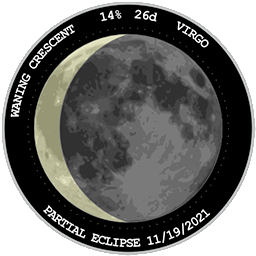
This plugin allows you to add The Moon to your post, page or sidebar. It will show a graphical representation of The Moon, along with additional information such as the name of the current phase, the percentage of the moon that is illuminated, the age of the moon, the current constellation that the moon is inside, and the date of the next lunar eclipse.
Features
- Can be added via a widget or shortcode
- Uses SVG and JavaScript. Compatible with all major browsers and mobile devices
- Customizable
Usage
- Via Appearance > Widgets in your WordPress admin console. Click the + button and then click “The Moon” to add it to your sidebar or other widget section.
- Via the shortcode [themoon], you can add this to any post or page. See the FAQ for customization options.
Privacy
This plugin does not:
– collect any information
– set any cookies
– connect to remote servers
スクリーンショット


ブロック
このプラグインは1個のブロックを提供します。
- The Moon
インストール
WordPress
In your WordPress Admin section, select Plugins > Add New and then search for “The Moon”.
Click Install
Return to the listing of your plugins. Find “The Moon” and click “Activate”.
Manually
Download zip file.
Go to Plugins > Add New > Upload Plugin and upload the zip file.
OR
Decompress the zip file and using an FTP program to copy the contents to the /plugins/ folder of your WordPress installation.
Go to the Plugins page of your WordPress admin console and activate the plugin.
FAQ
-
How to add via a widget
-
- In your WordPress admin console go to Appearance > Widgets.
- Click the + button and then click “The Moon” to add it to your sidebar or other widget section.
- Click “Update” to save the changes.
- You can click on “The Moon” widget to show a customization form. The available options are:
A. Background color
B. Maximum size of the widget
C. Whether to show an arrow on the edge of the moon’s terminator shadow showing the direction that it is moving.
-
How to add via a shortcode
-
- When editing a post or page, add a shortcode block and type [themoon]
- You can customize some options by including them in your shortcode.
A. Background color. The default is transparent. [themoon color=”#ff00ff”]
B. Maximum Width in pixels. The default is no maximum. [themoon maxwidth=”250″]
C. Whether to show an arrow on the edge of the moon’s terminator shadow showing the direction that it is moving. The default is to show the arrow. [themoon hidearrow=”1″] - Full customization example: [themoon color=”#ff00ff” maxwidth=”250″ hidearrow=”1″]
評価


