

説明
****GDPR-compliant web analytics without cookies!****
Analyze and evaluate the visitor statistics of your website – simply and 100% GDPR compliant.
Trackboxx – Visitor tracking Made in Germany.
👉 Check out our live demo OR sign up for a free 30-day trial
You need a subscription to Trackboxx Analytics to track your stats. There’s a free 30-day trial with no credit card required.
Note: With our “Free Plan,” you can use Trackboxx 100% free – up to 2,500 pageviews a month with limited features. Our paid plans start at €5/month. Use the 30-day free trial with unlimited usage without the need for a credit card.
Why Use Trackboxx?
Navigating Google Analytics can be cumbersome, perplexing, laggy, and invasive in terms of privacy. Here’s where Trackboxx Analytics steps in – a streamlined, potent, feather-light, open-source, and privacy-conscious solution. Here’s why Trackboxx stands out as an outstanding alternative to Google Analytics:
Third-Party Service Terms
Before using this plugin, it is recommended to review the terms of use and privacy policies of the Trackboxx service:
By using this plugin, you acknowledge and agree to the terms and policies of the third-party service.
Note: This documentation is provided for legal protection, ensuring that users are informed about the integration with third-party services. Please keep this information up to date to reflect any changes in service usage or associated terms.
Why Trackboxx
Privacy-first analytics for WordPress site owners and shop operators. 100% SaaS (not self-hosted) with a quick setup via plugin or code snippet. Start on the free plan or use our 30-day Trial with no credt Card required. Upgrade anytime for advanced features.
Simple Insights, Not Overwhelm
Clear live dashboard with page and landing-page reports—no complex menus or custom report building required.
E-Commerce Tracking
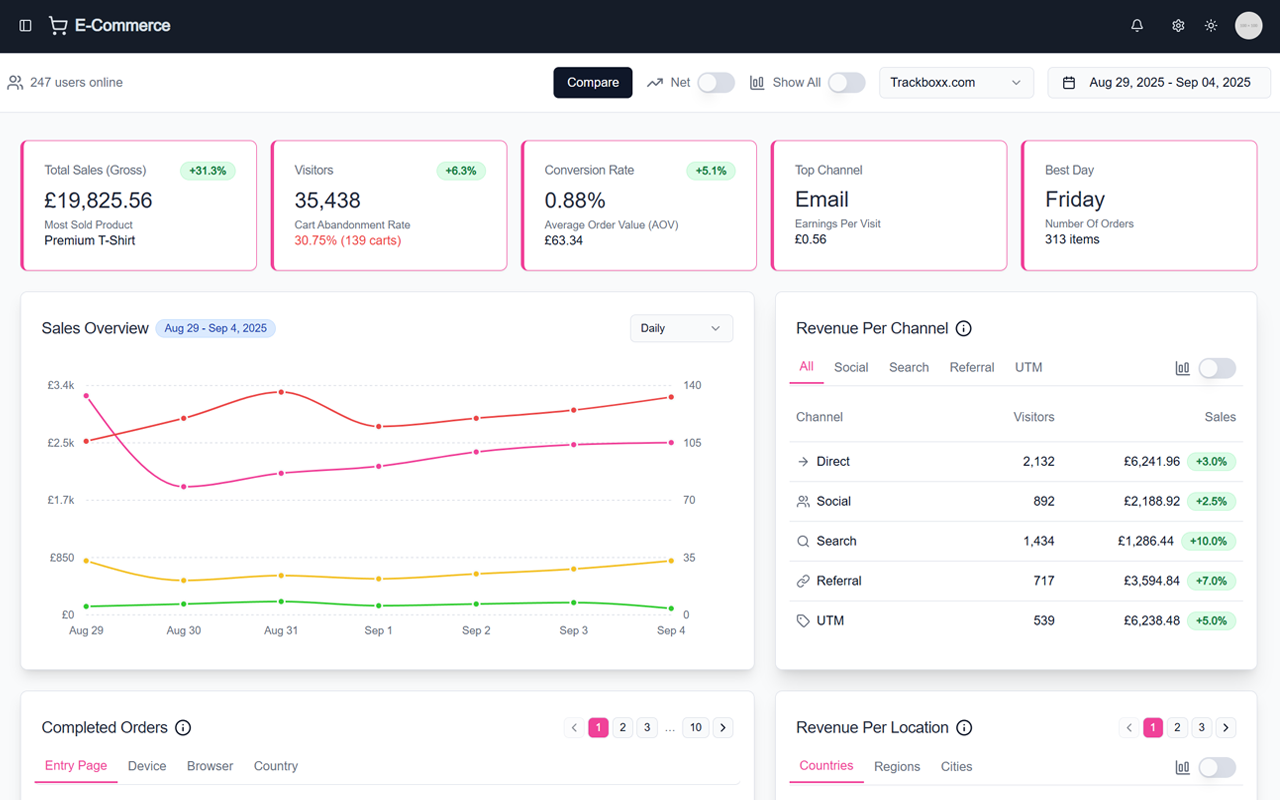
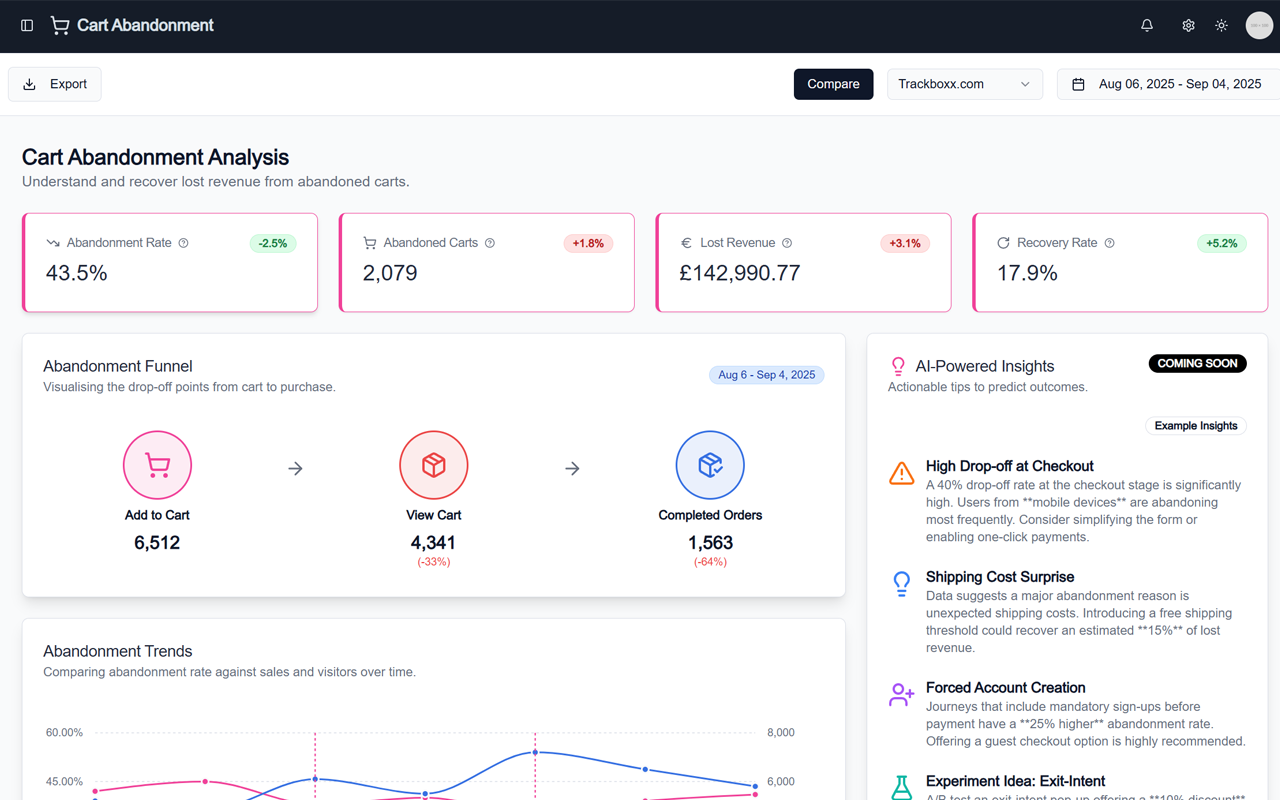
Full online shop analytics: sales, orders, revenue, average order value, and conversion rates. Track cart and checkout funnels, including cart abandonment. Works great with WooCommerce; more platforms via integrations.
Privacy & Compliance
Anonymous measurement by design—no cookies and no consent banners required. GDPR-friendly data handling with data minimization.
Performance
Lightweight tracking script that keeps your site fast and responsive.
Campaigns, Goals & Segments
Set up goals in minutes and track marketing campaigns (e.g., UTM). Break down performance by traffic sources, content, device, and more.
Team & Sharing
Invite team members, assign user roles, and share read-only views securely.
WordPress Integration
Automatic insertion of the tracking code in your site’s header. Clean settings page with clear options. View Trackboxx stats directly in your WordPress dashboard. Opt-out option for visitors included.
Getting Started
Install the plugin, connect your Trackboxx site ID, and you’re ready to go—start free, upgrade when you need more.
Additional Features:
- Easy onboarding
- Automatically includes tracking code in the header of your site
- Simple plugin settings page with clear options
- View your Trackboxx stats directly in your WordPress dashboard
- OptOut Option
- Activation of e-commerce options (coming soon)
- Set up goals
Setting up this WordPress Plugin
External services
This plugin communicates with two external domains operated by Trackboxx:
-
Script loading (
cdn.trackboxx.info) – When a page on your site loads, the Trackboxx tracking script is downloaded fromhttps://cdn.trackboxx.info/p/tracker.js. This request retrieves the JavaScript file and does not transmit any visitor data beyond the standard HTTP request for the script. -
Event endpoint (
hit.trackboxx.info) – After the script is loaded, anonymised visit data and e‑commerce events are sent tohttps://hit.trackboxx.info/hit-action. The payload includes the current page URL, referrer, your Trackboxx site ID and any WooCommerce events (product names, values, coupons, etc.). IP addresses are anonymised before being transmitted. This endpoint is contacted on each page view and whenever tracked WooCommerce events occur.
Terms of Service: Trackboxx Terms of Use
Privacy Policy: Trackboxx Privacy Policy
スクリーンショット
インストール
- Log into WordPress
- Go to Plugins, Add New
- Search for Trackboxx Analytics
- Click Install Now, then Activate
- Begin the onboarding
FAQ
-
How do I add the tracking opt-out to my privacy page?
-
Add the shortcode
[trackboxx_optout]to your privacy page. It renders a toggle your visitors can use to opt out of tracking. Alternatively, the onboarding wizard (step 3) also shows the complete HTML code. -
How do I add the privacy policy notice for Trackboxx?
-
Add the shortcode
[trackboxx_privacy]to your privacy policy page. It outputs a ready-made GDPR notice describing how Trackboxx processes data (localized in German and English). The onboarding wizard (step 3) also shows the complete HTML code so you can review and adapt the wording before publishing.For more details about Trackboxx, visit our website or check out our documentation.
-
Difference between Google Analytics and Trackboxx?
-
Google Analytics is a free service from Google. Trackboxx offers a GDPR-compliant tracking analysis.
-
Difference between the Free package and the 30-day free trial?
-
The Free package is a completely free option to use Trackboxx on your website. The 30-day trial version can be used with any package and includes all features.
-
What happens when I’ve used up my page views?
-
There are no additional costs if you exceed the maximum number of page views. After exceeding the limit, no further statistics will be saved.
-
What happens if I delete my account?
-
You have the option to cancel your subscription, but we will still store your traffic data (max. 6 months).
評価
このプラグインにはレビューがありません。
貢献者と開発者

“Trackboxx Analytics” をあなたの言語に翻訳しましょう。
開発に興味がありますか ?
変更履歴
1.5.4
- Maintenance update to refresh WordPress.org update metadata.
1.5.3
- Added a [trackboxx_privacy] shortcode that outputs a ready-made GDPR privacy-policy notice for the analytics service (localized: German, including formal “Sie”, and English).
- Onboarding step 3 now also offers the privacy notice as a shortcode or complete HTML code (with copy-to-clipboard), alongside the opt-out.
- Added a small spacing between the consent notice and the opt-out toggle.
- Removed a leftover “Custom Dashboard” entry from the WordPress Dashboard menu; the onboarding page is now hidden but still reachable via the setup link.
- Fixed an incorrect German translation of the tracking ID help text on the settings page.
1.5.2
- Opt-out widget now includes a consent notice and a live status line, and is rendered from a single source on the Settings page, in the onboarding wizard, and via the [trackboxx_optout] shortcode.
- Accessibility: replaced an invalid label wrapper in the opt-out markup (a stray label “for” reference).
- Localization: added formal German (“Sie”) translations, load the plugin text domain explicitly, and recompiled the .mo files.
1.5.1
- Added a [trackboxx_optout] shortcode so the opt-out can be embedded on the privacy page without pasting raw HTML.
- Onboarding step 3 now lets you choose between the shortcode and the complete HTML code, each with a copy-to-clipboard button.
- Fixed a trailing space in the English opt-out help-center link.
1.5.0
- Added a selectable tracking method in the onboarding wizard: Standard tracking (tracker.js) and the new Advanced tracking (tracker-ad.js).
- Advanced tracking enables automatic tracking of key conversions without adding any extra code to the site.
- The selected mode controls which tracker script is loaded in the site head. Existing installations keep Standard tracking by default; no migration changes the behavior.
- Added strict validation of the new tracking mode option and updated language files (de_DE).
- Security: Onboarding step AJAX handler now requires the manage_options capability instead of relying on the nonce alone.
1.4.0
- Added view cart tracking functionality for improved event accuracy.
- Added product view tracking to support enhanced behavioral analytics.
- Extended WooCommerce integration to enable precise cart view detection.
- Enables Trackboxx to calculate cart abandonment rates more reliably.
- Updated public classes and loader to include new tracking hooks.
1.3.34
- Bugfixing Onboarding Process
1.3.33
- Added new signup information block to the onboarding wizard.
- Updated language files (de_DE) with new translations.
1.3.32
- Security: Added nonce validation and capability checks to the activation redirect logic. Bulk activations now bypass the redirect unless a valid
bulk-pluginsnonce is present. The redirect is further gated bycurrent_user_can( 'manage_options' )to ensure only authorized administrators are redirected.
1.3.31
- JS/CSS: Removed the remaining raw
<script>blocks from the plugin. The frontend loader is now injected viawp_add_inline_script(), and the dashboard iframeonmessagelogic has been moved into an enqueued admin script handle. These changes align with WordPress.org guidelines for enqueueing scripts.
1.3.30
- Prepares the plugin for WordPress.org submission: updated metadata, added privacy & FAQ, i18n POT, and assets guidance. No breaking changes.
1.3.28
- Cleanup: Uninstall now removes the legacy
website_typeoption if present. - i18n: Admin settings script now declares
wp-i18ndependency and registers translations viawp_set_script_translations(). - i18n: Ensure text domain loaded on
init(fallback), keeping previous behavior intact.
1.3.27
- i18n: Load plugin textdomain on init and enable JS string translations via
wp_set_script_translations()for onboarding/admin scripts. - Scripts: Added
wp-i18nas a dependency where appropriate to prepare for translatable JS. - Docs: Synced version and stable tag.\n\n= 1.3.26 =
- Fix: Resolved PHP parse error by removing stray backslashes preceding superglobals in onboarding wizard file.
1.3.25
- Security hardening: added
current_user_can( 'manage_options' )checks to onboarding AJAX handlers and gate wizard loading to administrators. - Switched nonce verification in AJAX endpoints to
check_ajax_referer( 'trackbox-data-nonce', 'nonce', false )for clarity and consistency. - Sanitized onboarding POST values using
wp_unslash()+sanitize_text_field()before saving options.
1.3.23
- Admin escaping hardening: switched input
valueescaping toesc_attr(), textarea toesc_textarea(), and URLs toesc_url()where applicable.
1.3.22
- Fix: Resolved a PHP parse error introduced during inline‑script refactor by removing stray PHP open/close tags and properly embedding Purchase event JSON via
wp_json_encode().
1.3.21
- Switched remaining inline script output to proper WordPress script handling via
wp_register_script,wp_enqueue_script, andwp_add_inline_script(frontend and admin). - Loaded admin scripts/styles only on Trackboxx pages to reduce overhead.
- Synchronized plugin metadata (Version/Stable tag) and set Requires PHP: 8.2.
1.3.11
- Updated the minimum required PHP version to 8.2 to align with current supported releases.
- Added the
Requires PHPheader to the main plugin file. - Normalized contributors list to reference valid WordPress.org usernames (
fastwpde,trackboxx).
1.3.12
- Added an External services section documenting the use of Trackboxx’s CDN (
cdn.trackboxx.info) and event endpoint (hit.trackboxx.info).
This section explains what data is sent, when and why it is transmitted, and links to the service’s Terms and Privacy Policy.
1.3.18
- Added unique prefixes to onboarding step functions and admin setting tab functions to avoid naming collisions. Backwards-compatible wrapper functions maintain support for older function names used by previous versions.
- Sanitized the
pageparameter in the admin settings to prevent misuse when disabling admin notices. - Updated the license URL to use HTTPS and kept documentation in sync with WordPress.org requirements.
- Miscellaneous sanitization and escaping improvements across the plugin to meet WordPress.org coding standards.
1.3.19
- Rolled back the onboarding step function renaming to restore the original function names (
step_*). The onboarding wizard now uses the original callbacks again to ensure it functions correctly. - Removed legacy wrapper functions and updated the wizard mapping accordingly.
- Retained other improvements from earlier versions, including sanitization of inputs, secure script enqueuing, and external service documentation.