

説明
2要素認証プラグインは、パスワードに加えて別の認証方法をユーザーに要求することで、WordPress のログインにセキュリティの層を追加します。これにより、パスワードが漏洩した場合でも、不正アクセスから保護できます。
セットアップ手順
重要: 各ユーザーは、2要素認証設定を個別に構成する必要があります。
個人ユーザー向け
- プロフィールに移動: WordPress 管理画面で「ユーザー」「プロフィール」を選択
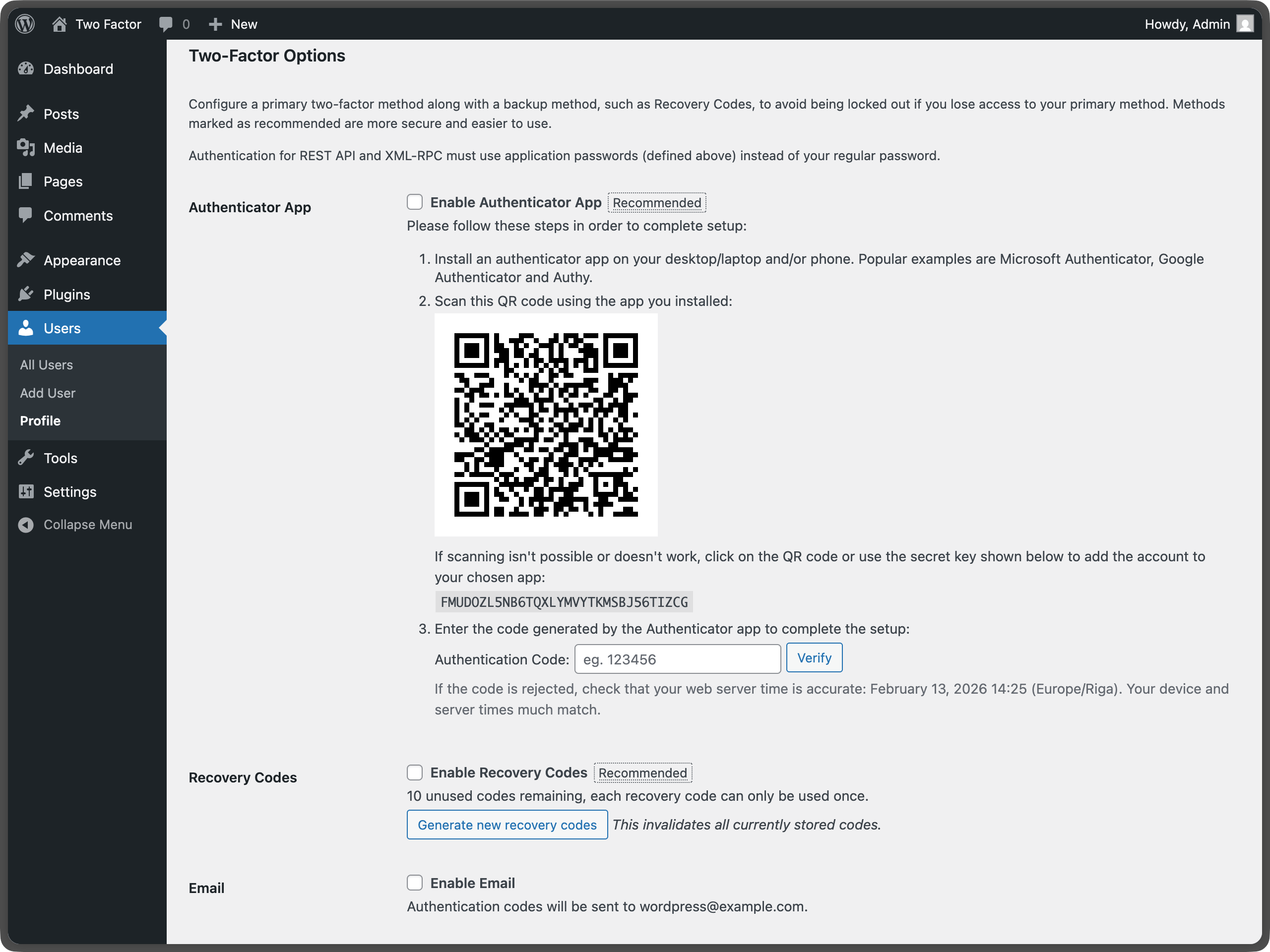
- 2要素認証オプションを探す:「2要素認証オプション」のセクションまでスクロール
- 方法を選択: 1つ以上の認証プロバイダを有効化 (サイト管理者が1つ以上のプロバイダを非表示にしている場合があるため、利用可能なプロバイダは異なる場合があります):
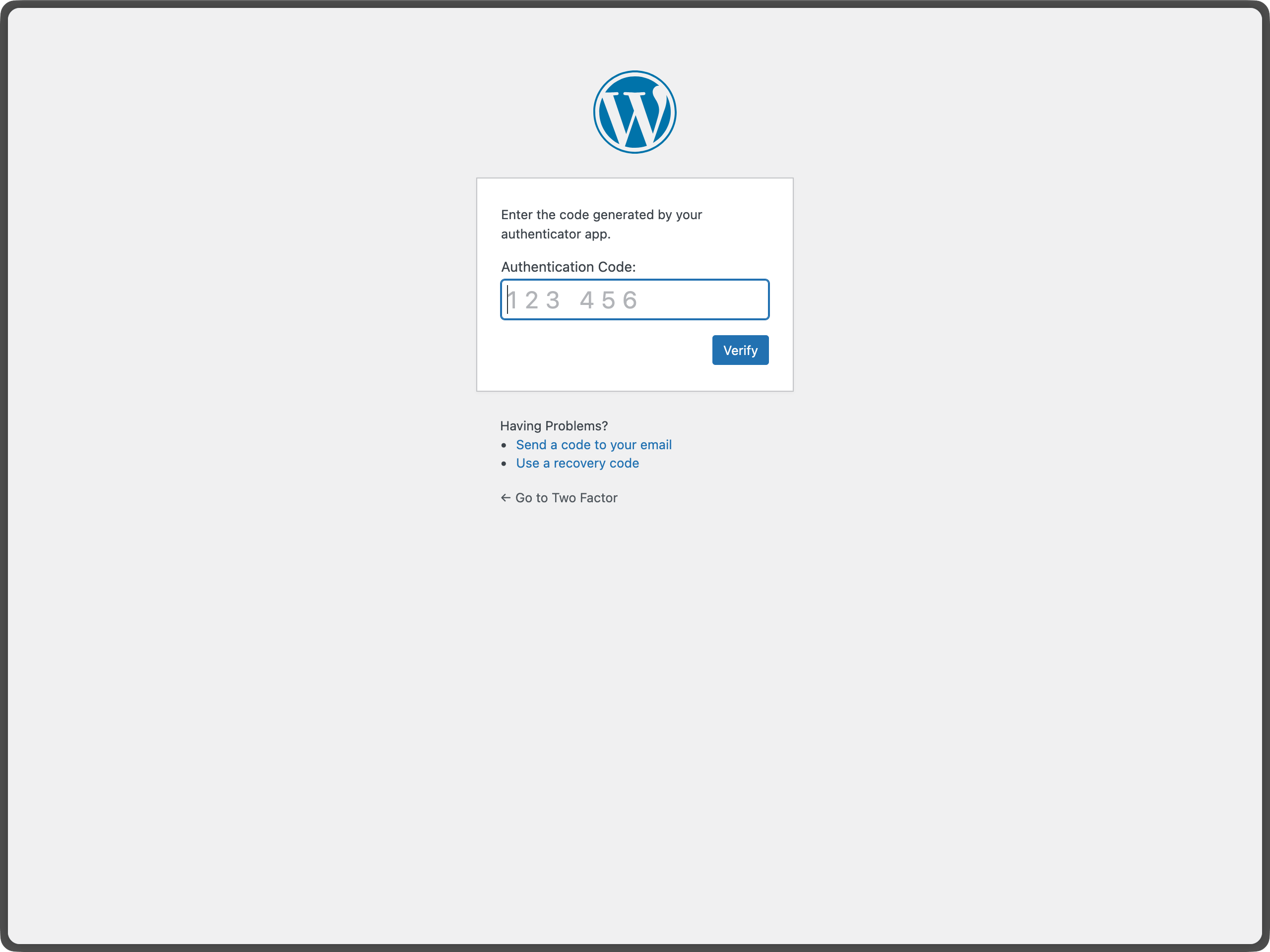
- Authenticator App (TOTP) – Google Authenticator、Authy、1Password などのアプリを利用
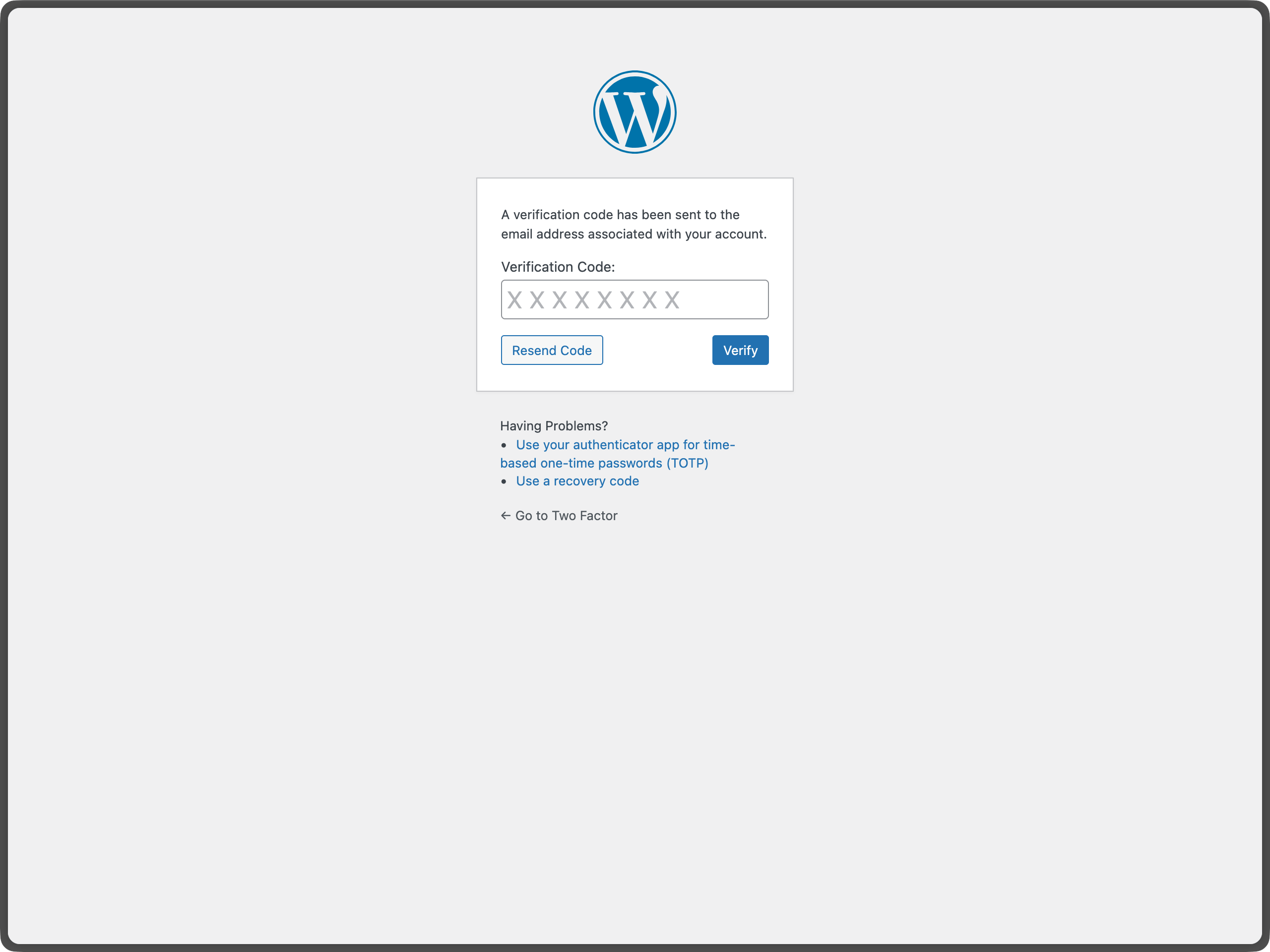
- メールコード – メールでワンタイムコードを受信
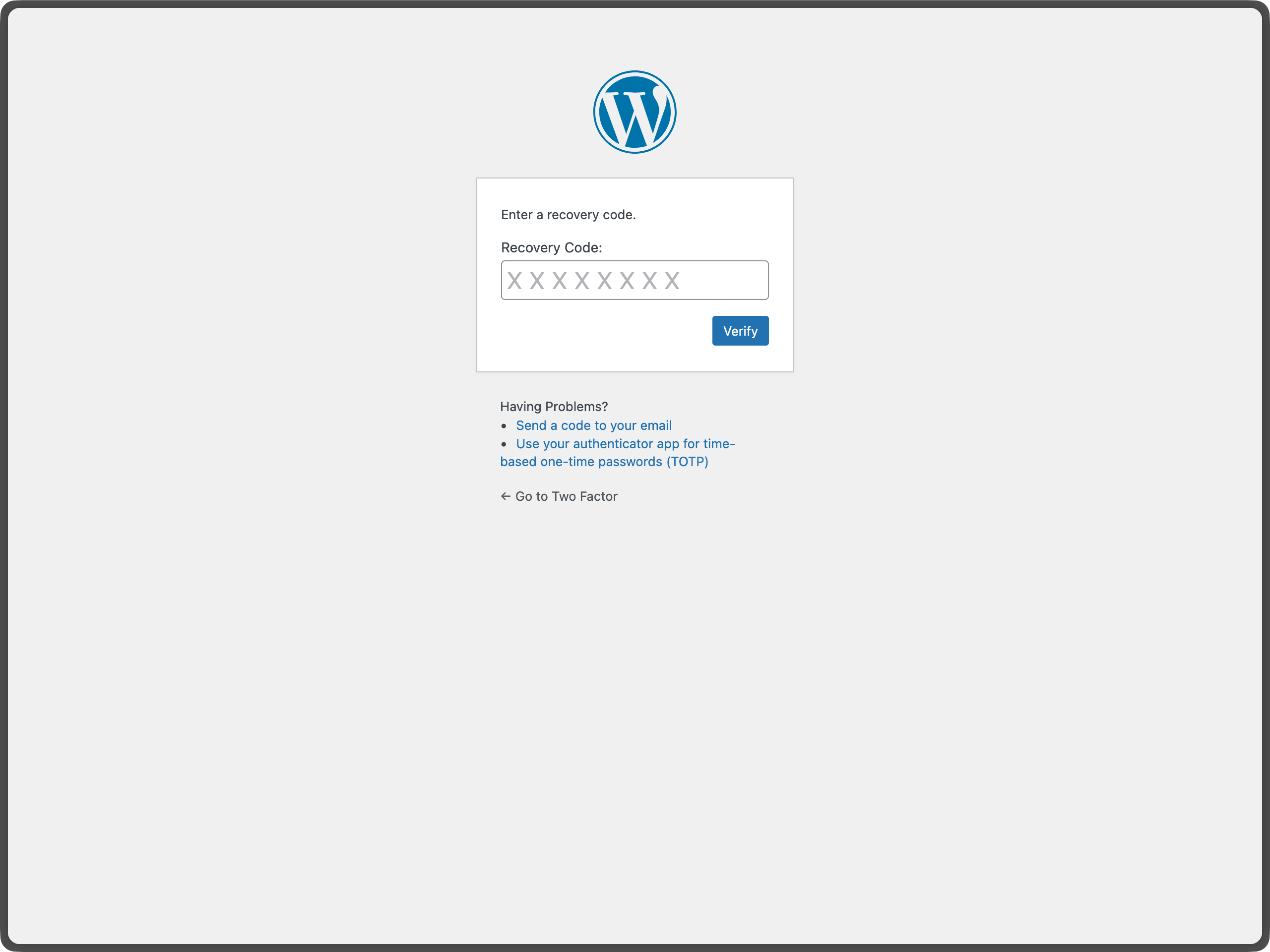
- バックアップコード – 緊急時用のワンタイムバックアップコードを生成
- ダミーメソッド – テスト専用 (WP_DEBUG が必要)
- 各方法の設定: 有効にした各プロバイダのセットアップ手順に従う
- メイン方法の設定: デフォルトの認証として使用する方法を選択
- 変更の保存:「プロフィールを更新」をクリックして設定を保存
サイト管理者向け
- プラグイン設定:「設定 Two-Factor」配下に設定ページがあり、サイト全体で無効にするプロバイダを設定できます。
- ユーザー管理: 管理者は他のユーザーのプロフィールを編集することで2要素認証を設定できます
- セキュリティの推奨事項: アカウントのロックアウトを防ぐため、ユーザーにバックアップ方法の有効化を促す
利用可能な認証方法
認証アプリ (TOTP) – 推奨
- セキュリティ: 高 – 時間ベースのワンタイムパスワード
- 設定方法: 認証アプリで QR コードをスキャン
- 互換性: Google Authenticator、Authy、1Password などの TOTP アプリと連携
- 最適な用途: ほとんどのユーザー。優れたセキュリティと使いやすさを両立
バックアップコード – 推奨
- セキュリティ: 中 – 一度だけ使用するコード
- 設定方法: 緊急アクセス用のバックアップコードを10個生成
- 互換性: 特別なハードウェア不要で、あらゆる環境で動作
- 最適な用途: 他の方法が使えない場合の緊急アクセス用
メールコード
- セキュリティ: 中 – メールで送信されるワンタイムコード
- 設定方法: 自動 – WordPress のメールアドレスを使用
- 互換性: メール送受信が可能なあらゆる端末で動作
- 最適な用途: メールベースの認証を好むユーザー
FIDO U2F セキュリティキー
- ブラウザーのサポート終了に伴い、非推奨となり削除されました。
ダミーメソッド
- セキュリティ: なし – 常に成功
- 設定方法: WP_DEBUG が有効な場合のみ利用可能
- 目的: テストおよび開発専用
- 最適な用途: プラグインをテストする開発者
重要な注意事項
HTTPS 要件
- すべての方式は HTTP・HTTPS サイトの両方で動作する
ブラウザーの互換性
- TOTP とメール方式はすべての端末・ブラウザーで動作する
アカウント復元
- アカウントのロックアウトを防ぐため、常にバックアップコードを有効にしておく
- すべての認証方法にアクセスできなくなった場合は、サイト管理者に連絡してください。
セキュリティのベストプラクティス
- 可能な場合は複数の認証方法を使用する
- バックアップしたコードを安全な場所に保管する
- 認証設定を定期的に確認・更新する
WordPress での2要素認証の詳細については、WordPress Advanced Administration セキュリティガイドをご覧ください。
詳細な経緯は、この記事を参照してください。
アクション & フィルター
プラグインで提供するアクションフックとフィルターフックは以下のとおり:
two_factor_providersフィルターフックは、メールや時間ベースのワンタイムパスワード (TOTP) などの利用可能な2要素認証プロバイダを上書きします。配列の値は2要素認証プロバイダの PHP クラス名です。two_factor_providers_for_userフィルターは、特定のユーザーが利用可能な2要素認証プロバイダを上書きします。配列の値はプロバイダクラスのインスタンスで、2番目の引数にはユーザーオブジェクトWP_Userを指定します。two_factor_enabled_providers_for_userフィルターフックは、ユーザーに対して有効化している2要素認証プロバイダの一覧を上書きします。最初の引数は有効なプロバイダクラス名の配列で、2番目の引数はユーザー ID です。two_factor_is_required_for_userfilter controls whether two-factor authentication is required for a user. Returnfalseto bypass the two-factor flow (e.g. for trusted IP addresses). First argument is a boolean (whether the user has a primary provider configured), the second argument is theWP_Userobject.two_factor_fallback_provider_for_userfilter overrides the provider forced on when none of a user’s stored two-factor providers are still registered (e.g. after a provider plugin is deactivated). Defaults toTwo_Factor_Email. First argument is the provider classname, the second is the user ID, the third is the array of provider classnames that were stored for the user but are no longer registered. The returned provider must be registered and available to the user (is_available_for_user()), or the user is shown an error instead of being let through with a fallback.two_factor_user_authenticatedアクションフックは、認証処理直後に発火し、ログインしたユーザーを判別するための第1引数としてログイン済みのWP_Userオブジェクトを受け取ります。two_factor_user_api_login_enableフィルターは REST API と XML-RPC での認証をアプリケーションパスワードのみに制限します。2番目の引数にユーザー ID が提供されます。two_factor_email_token_ttlフィルターフックは、メールトークン生成後の有効期間を秒単位で上書きします。第一引数として秒単位の時間を受け付け、また、認証するWP_Userオブジェクトの ID も受け付けます。two_factor_email_token_lengthフィルターは、メールトークンのデフォルト文字数8を上書きします。two_factor_backup_code_lengthフィルターは、バックアップコードのデフォルトの文字数「8」を上書きします。関連付けられているユーザーのWP_Userを2番目の引数として指定します。two_factor_rest_api_can_edit_userフィルターは、REST API を介してユーザーの2要素認証の設定を編集できるかどうかを上書きします。1番目の引数は現在の$can_edit(真偽値)、2番目の引数はユーザー ID です。two_factor_before_authentication_promptアクションは、プロバイダオブジェクトを受け取り、認証入力フォームのプロンプト表示前に発火します。two_factor_after_authentication_promptアクションは、プロバイダオブジェクトを受け取り、認証入力フォームのプロンプト表示後に発火します。two_factor_after_authentication_inputアクションは、プロバイダオブジェクトを受け取り、認証入力フォームの入力欄の後に発火します (フォームに入力欄がない場合はtwo_factor_after_authentication_promptの直後に発火します)。two_factor_login_backup_linksは、2要素認証ログインフォームに表示されるバックアップリンクをフィルタリングします。two_factor_login_nonce_failedaction which fires when a login nonce fails verification. Provides the ID of the user the nonce was presented for as the first argument, and the reason as the second:no_nonce_stored,expired, ormismatch.two_factor_log_login_nonce_failuresfilter overrides whether a failed login nonce verification is written to the PHP error log. Defaults to true forexpiredandmismatch, and false forno_nonce_stored, which any unauthenticated request can reach. Provides the user ID as the second argument and the reason as the third.
WP-CLI Commands
The plugin includes a wp two-factor WP-CLI namespace for managing two-factor authentication from the command line. All commands accept a user by ID, login, or email.
wp two-factor status <user>— Shows a user’s current 2FA status (read-only). Supports--format=json.wp two-factor list-providers— Lists all registered two-factor providers.wp two-factor enable <user> <provider>— Enables a provider for a user. Providers that require a shared secret (like TOTP) can’t be enabled this way and will point you to the profile page instead.wp two-factor disable <user> [<provider>]— Disables a single provider, or performs a full reset of all 2FA for the user when no provider is given. Both forms prompt for confirmation unless--yesis passed.wp two-factor backup-codes generate <user> [--count=<n>]— Generates a fresh set of backup codes for a user, replacing any existing ones. Defaults to 10 codes.wp two-factor unlock <user>— Clears a user’s login rate-limit/throttle without changing their 2FA configuration.
Run wp help two-factor for the full list, or wp help two-factor <command> for options and examples for a specific command.
2要素認証後のリダイレクト
2要素認証の確認後に特定の URL へリダイレクトするには、WordPress コアに組み込まれている login_redirect フィルターを使用してください。このフィルターは通常の WordPress ログインフローと同じように機能します:
add_filter( 'login_redirect', function( $redirect_to, $requested_redirect_to, $user ) {
    return home_url( '/dashboard/' );
}, 10, 3 );
スクリーンショット
FAQ
Two-Factor プラグインはどのバージョンの PHP と WordPress をサポートしていますか ?
このプラグインは最新2つの WordPress メジャーバージョンとその WordPress がサポートする最小の PHP バージョン をサポートしています。
フィードバックを送信したり、バグに関するサポートを受けるには
バグ、機能の提案、その他セキュリティに関連しないフィードバックを報告するには、GitHub 上の Two Factor レポジトリのイシューを利用してください。新しいイシューを立てる際には、既存のイシューを検索し、他の誰かが同じフィードバックを報告していないかどうか確認してください。
セキュリティ関連のバグを報告するには
プラグイン開発チームおよび WordPress コミュニティは、セキュリティ関連のバグ対応を真摯に受け止めています。責任ある開示にご尽力いただいたことに感謝するとともに、そのご貢献を正式に認識できるよう最善を尽くします。
セキュリティの問題を報告するには、WordPress HackerOne プログラムにアクセスしてください。
すべての認証方法へのアクセスを失った場合はどうすればよいですか ?
バックアップコードを有効にしている場合は、いずれかのコードを使用してアクセスを回復できます。バックアップコードがない、またはすべて使い切った場合は、サイト管理者にアカウントのリセットを依頼する必要があります。ロックアウトを防ぐため、常にバックアップコードを有効にして安全な場所に保管してください。
このプラグインを WebAuthn と一緒に使用できますか ?
The plugin previously supported FIDO U2F, which was a predecessor to WebAuthn. There is an open issue to add WebAuthn support here.
Two-Factor でパスキーやハードウェアセキュリティキーを使用する推奨方法はありますか ?
Yes. For passkeys and hardware security keys, you can install the Two-Factor Provider: WebAuthn plugin. It integrates directly with Two-Factor and adds WebAuthn-based authentication as an additional two-factor option for users.
Does this plugin work on WordPress Multisite?
Yes. The Two-Factor plugin is compatible with WordPress Multisite. Each user configures their own 2FA settings via their profile, and because authentication codes are stored in WordPress user meta, the configuration is tied to the user account and valid across all sites in the network. However, there are no network-wide settings — a super admin cannot enforce or configure 2FA globally from the Network Admin dashboard. To manage 2FA for a specific user, edit their profile on any site where they have an account.
How do I disable 2FA for a user who is locked out?
As an administrator, go to Users All Users in the WordPress admin, click Edit on the affected user’s profile, scroll down to the Two-Factor Options section, and uncheck all enabled methods, then click Update User. This will remove 2FA for that user, allowing them to log in with their password alone. You can also do this via WP-CLI with wp two-factor disable –yes, which performs a full reset (see the WP-CLI Commands section above). Once they’re back in, encourage them to re-enable 2FA and generate fresh backup codes.
Can I require 2FA for all users or specific roles?
Not through the plugin’s interface — there are no built-in enforcement settings. However, developers can use the
two_factor_providers_for_userfilter to control which providers are available per user or role, and combine it with custom logic to redirect users who haven’t set up 2FA. Native enforcement support is a known and tracked feature request — follow the discussion at GitHub issue #255.
評価


貢献者と開発者
Two-Factor はオープンソースソフトウェアです。以下の人々がこのプラグインに貢献しています。
貢献者


変更履歴
0.17.0 – 2026-09-25
- Security Fixes: Ensure that regular passwords can’t bypass the two-factor requirement for REST API and XML-RPC requests by @faisalahammad in #989. Thanks mqrble for responsibly reporting the issue.
- Security Fixes: Add diagnostics for failed login nonce verification by @georgestephanis in #973. Thanks Ananda Dhakal (Patchstack) for responsibly reporting the issue.
- New Features: Add WP-CLI support with
wp two-factorcommands by @masteradhoc in #905 - New Features: Respect intentional bypass via the
two_factor_is_required_for_userfilter by @masteradhoc in #882 - New Features: Add a
two_factor_fallback_provider_for_userfilter for when a user’s stored providers are no longer registered by @masteradhoc in #882 - New Features: Add early notice for soon exhausting recovery codes by @masteradhoc in #907
- New Features: Add privacy policy content registration by @masteradhoc in #869
- Bug Fixes: Fail closed when CSPRNG is unavailable during nonce generation by @dknauss in #877
- Bug Fixes: Only clear the login nonce once it has expired by @georgestephanis in #980
- Bug Fixes: Fix unslashed
REMOTE_ADDRwarning in email provider by @masteradhoc in #975 - Bug Fixes: Fix TOTP verify button after resetting authenticator app by @lakrisgubben in #979
- Bug Fixes: Remove
two_factor_enabled_providersoption on uninstall by @faisalahammad in #903 - Bug Fixes: Fix misleading notice by @masteradhoc in #858
- Bug Fixes: Reword mixed-audience login failure notice to be informational by @dknauss in #922
- Bug Fixes: Rework fail-safe by @masteradhoc in #927
- Bug Fixes: Add coverage for provider-specific fallback notices by @dknauss in #923
- Bug Fixes: Fix HTML5 validation issues by @masteradhoc in #910
- Bug Fixes: Fix users list table fatals (
wp_die) when a user’s 2FA provider is deregistered by @masteradhoc in #933 - Development Updates: Prepare for the WordPress 7.0 release by @masteradhoc in #834
- Development Updates: Prepare for the WordPress 7.1 release by @masteradhoc in #900
- Development Updates: Sync
login_header()andlogin_footer()with WP 7.1 by @masteradhoc in #963 - Development Updates: Update PHPStan to 2.x and exclude
includes/from analysis by @masteradhoc in #972 - Development Updates: Validate against PHPStan version 3, 4 and 5 by @masteradhoc in #948
- Development Updates: Update
wp-coding-standards/wpcsto 3.4.1 by @obenland in #947 - Development Updates: Fix PHPCS and PHPStan issues across multiple files by @aslamdoctor in #818
- Development Updates: Remove
ReflectionProperty::setAccessible()andReflectionMethod::setAccessible()calls in the test suite by @masteradhoc in #942 - Development Updates: Fix Codecov badge by adding OIDC permission for tokenless upload by @nimesh-xecurify in #856
- Development Updates: Update GitHub Actions workflows by @johnbillion in #892
- Development Updates: Update Playground PR preview action to v4 by @obenland in #985
- Development Updates: Add FAQ entries for Multisite, locked-out users, and role enforcement by @masteradhoc in #881
- Development Updates: Update
.mdfiles with the latest two-factor changes and requirements by @masteradhoc in #929 - Development Updates: Update PR template by @masteradhoc in #870
- Development Updates: Unbreak CI: PHPStan false positive and matrix fail-fast by @georgestephanis in #974
- Dependency Updates: Bump the
qrcode-generatorruntime dependency by @kasparsd - Dependency Updates: Bump
qsandexpressby @dependabot[bot] in #895 - Dependency Updates: Bump adm-zip and
@wordpress/scriptsby @dependabot[bot] in #988
0.16.0 – 2026-03-27
- 破壊的変更: レガシーな FIDO U2F プロバイダのサポートを削除 (#439)。
- 新機能: wp-admin にプラグイン設定専用ページを追加 (#764)。
- 新機能: サポートリンクフィルターを追加し、リカバリ/ヘルプリンクのカスタマイズを可能に (#615)。
- 新機能: バックアップコード UI のスタイルと動作を刷新 (#804)。
- バグ修正: TOTP プロバイダを無効化したときに保存済みの TOTP シークレットを削除するよう修正 (#802)。
- バグ修正: プロバイダが消失した場合にログイン/設定チェックが失敗開放にならないよう、プロバイダ処理を強化 (#586)。
- バグ修正: ユーザー設定で設定済みのプロバイダのみが保存・有効化されるよう修正 (#798)。
- バグ修正: 設定ページのアクセシビリティを改善し、プロフィール設定リンクの動作を修正 (#828、#830)。
- バグ修正: プロバイダファイルの PHPCS 違反を解消 (#851)。
- 開発アップデート: ログインスタイルとプロバイダスクリプトをインライン出力からエンキュー/外部アセットに移行 (#807、#814)。
- 開発アップデート: インラインドキュメントを改善し、静的解析 (WPCS/phpstan) との互換性を向上 (#810、#815、#817)。
- 開発アップデート: ユニットテストの安定性を向上し、CI コードカバレッジレポートを統合 (#825、#841、#842)。
- 開発アップデート: readme ドキュメントを更新し、CI ワークフローのインフラを最新化 (#835、#837、#843、#849)。
- 依存関係の更新:
qsを 6.14.1 から 6.14.2 に更新 (#794)。 - 依存関係の更新:
basic-ftpを 5.0.5 から 5.2.0 に更新 (#816)。 - 依存関係の更新: 自動 lint/フォーマット更新と関連 Composer パッケージを更新 (#799)。
0.15.0 – 2026-02-13
- 破壊的変更: 想定されるケースでのみ2要素認証フローを発動するよう変更 by @kasparsd (#660、#793)。
- 新機能: 2要素認証コードのメールにユーザーの IP アドレスと状況に応じた警告を追加 by @todeveni (#728)
- 新機能: TOTP 向けメール文言を最適化 by @masteradhoc (#789)
- 新機能: プラグイン一覧にプロフィールへの「設定」アクションリンクを追加 by @hardikRathi (#740)
- 新機能: フォームフックを追加 by @eric-michel (#742)
- 新機能: RFC6238 への完全対応 by @ericmann (#656)
- 新機能: TOTP セットアップのユーザー体験を統一 by @kasparsd (#792)
- ドキュメント:
@sinceドキュメントを追加 by @masteradhoc (#781) - ドキュメント: ユーザー/管理者向けドキュメントを更新し、スクリーンショット追加の準備 by @jeffpaul (#701)
- ドキュメント: changelog とクレジットを追加し、リリースノートを更新 by @jeffpaul (#696)
- ドキュメント: readme.txt を整理 by @masteradhoc (#785)
- ドキュメント: TOTP セットアップ手順の上に日時情報を追加 by @masteradhoc (#772)
- ドキュメント: TOTP セットアップ手順を明確化 by @masteradhoc (#763)
- ドキュメント: RELEASING.md を更新 by @jeffpaul (#787)
- 開発アップデート:
masterへのマージ時に SVN trunk へのデプロイを一時停止 by @kasparsd (#738) - 開発アップデート: PHP 互換性の CI チェックを修正 by @kasparsd (#739)
- 開発アップデート: Playground の参照を修正 by @kasparsd (#744)
- 開発アップデート: メールへの新しいヘルパーテキスト追加時に既存の翻訳を保持 by @kasparsd (#745)
- 開発アップデート:
missing_direct_file_access_protectionを修正 by @masteradhoc (#760) - 開発アップデート:
mismatched_plugin_nameを修正 by @masteradhoc (#754) - 開発アップデート: Props Bot ワークフローを導入 by @jeffpaul (#749)
- 開発アップデート: Plugin Check: $domain パラメーター欠落を修正 by @masteradhoc (#753)
- 開発アップデート: テスト: サポート対象の WP 6.8 に更新 by @masteradhoc (#770)
- 開発アップデート: PHP 8.5 の非推奨メッセージを修正 by @masteradhoc (#762)
- 開発アップデート: trunk への PHP 7.2・7.3 チェックを除外 by @masteradhoc (#769)
- 開発アップデート: Plugin Check エラー (
MissingTranslatorsComment、MissingSingularPlaceholder) を修正 by @masteradhoc (#758) - 開発アップデート: 最新および trunk 版 WP への PHP 8.5 テストを追加 by @masteradhoc (#771)
- 開発アップデート: 誤検知への
phpcs:ignoreを追加 by @masteradhoc (#777) - 開発アップデート: QR コード URL の
otpauthリンクを修正 (TOTP) by @sjinks (#784) - 開発アップデート: deploy.yml を更新 by @masteradhoc (#773)
- 開発アップデート: 必須 WordPress バージョンを更新 by @masteradhoc (#765)
- 開発アップデート: リダイレクト後に処理が停止することを保証するよう修正 by @sjinks (#786)
- 開発アップデート:
WordPress.Security.EscapeOutput.OutputNotEscapedエラーを修正 by @masteradhoc (#776) - 依存関係の更新: qs と express を更新 by @dependabot[bot] (#746)
- 依存関係の更新: lodash を 4.17.21 から 4.17.23 に更新 by @dependabot[bot] (#750)
- 依存関係の更新: lodash-es を 4.17.21 から 4.17.23 に更新 by @dependabot[bot] (#748)
- 依存関係の更新: phpunit/phpunit を 8.5.44 から 8.5.52 に更新 by @dependabot[bot] (#755)
- 依存関係の更新: symfony/process を 5.4.47 から 5.4.51 に更新 by @dependabot[bot] (#756)
- 依存関係の更新: qs と body-parser を更新 by @dependabot[bot] (#782)
- 依存関係の更新: webpack を 5.101.3 から 5.105.0 に更新 by @dependabot[bot] (#780)
0.14.2 – 2025-12-11
- 新機能: rest_api_can_edit_user_and_update_two_factor_options フィルターを追加 by @gutobenn (#689)
- 開発アップデート: Coveralls ツールを削除し、インラインカバレッジレポートを追加 by @kasparsd (#717)
- 開発アップデート: 削除済みブランチではなく main ブランチから取得するよう blueprint パスを更新 by @georgestephanis (#719)
- 開発アップデート: blueprint と WP.org アセットのデプロイを修正 by @kasparsd (#734)
- 開発アップデート: タグリリース時のみリリースをアップロードするよう変更 by @kasparsd (#735)
- 開発アップデート: playwright と @playwright/test を更新 by @dependabot[bot] (#721)
- 開発アップデート: tar-fs を 3.1.0 から 3.1.1 に更新 by @dependabot[bot] (#720)
- 開発アップデート: node-forge を 1.3.1 から 1.3.2 に更新 by @dependabot[bot] (#724)
- 開発アップデート: js-yaml を更新 by @dependabot[bot] (#725)
- 開発アップデート: 最新の WP コアバージョンでのテスト済みとしてマーク by @kasparsd (#730)
0.14.1 – 2025-09-05
- 表示用の TOTP URL を URI エンコードしないよう修正 by @dd32 (#711)
- 重複していた Security.md を削除 by @slvignesh05 (#712)
- リンターで検出された問題を修正 by @sudar (#707)
- 開発依存関係を更新し、失敗していた QR ユニットテストを修正 by @kasparsd (#714)
- チェックボックスの JS change イベントを発火するよう修正 by @gedeminas (#688)
0.14.0 – 2025-07-03
- 機能: REST API と XML-RPC 認証でアプリケーションパスワードをデフォルトで有効化 by @joostdekeijzer (#697、#698)。以前は two_factor_user_api_login_enable フィルターを true にする必要がありましたが、アプリケーションパスワード認証時はデフォルトで有効になりました。通常パスワードでの XML-RPC ログインは引き続き無効です。
- 機能: 設定を簡略化するため、推奨方法にラベルを追加 by @kasparsd (#676、#675)
- ドキュメント: WP.org プラグインデモを追加 by @kasparsd (#667)
- ドキュメント: WP コアと PHP のサポートバージョンを文書化 by @jeffpaul (#695)
- ドキュメント: リリースプロセスを文書化 by @jeffpaul (#684)
- ツール: SVN trunk から WP.org の重複スクリーンショット・画像を削除 by @jeffpaul (#683)