
説明
Spam bots and freeloaders love disposable email addresses: they register accounts, place fake orders, and post comments with throwaway inboxes — addresses that are dead an hour later.
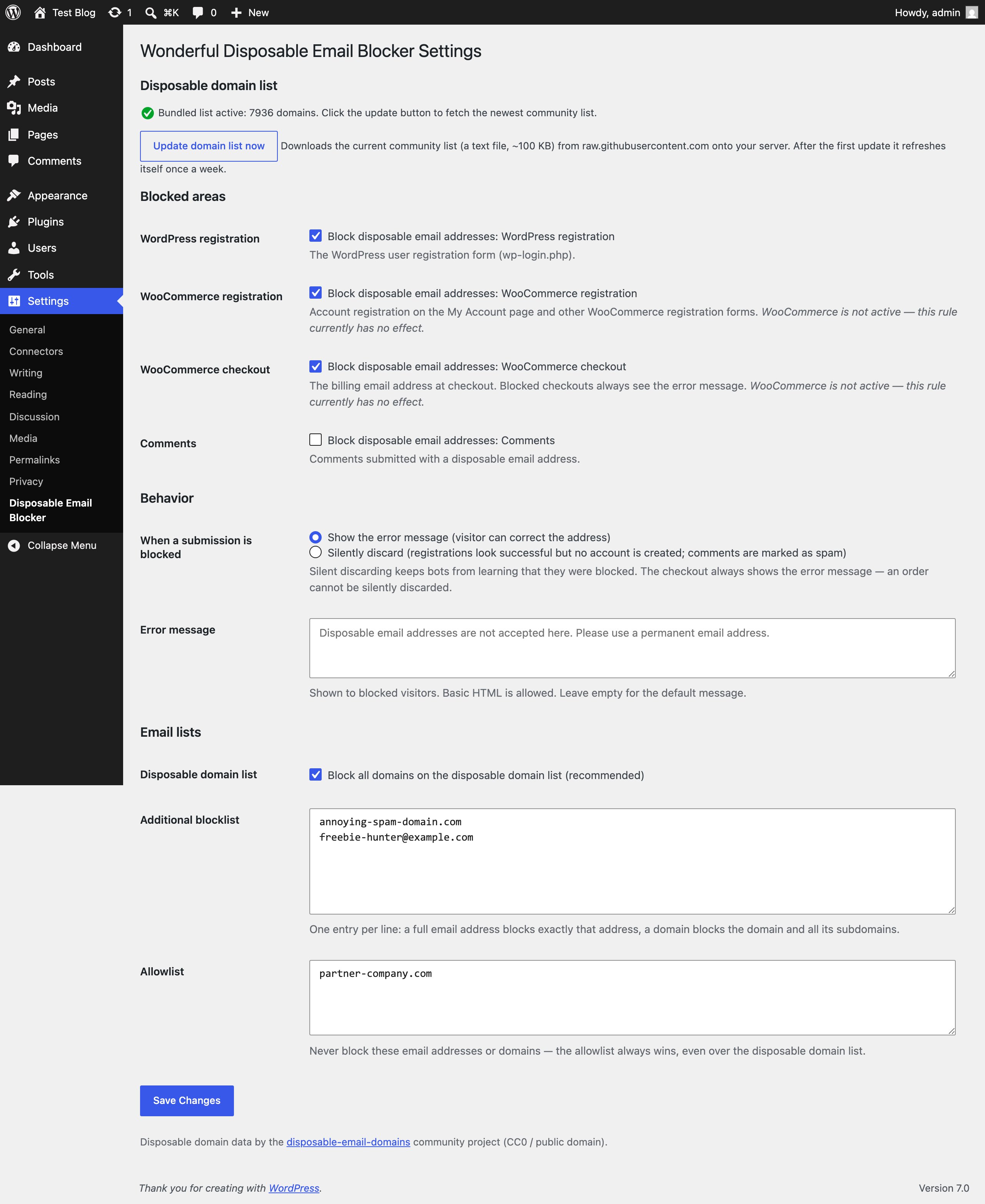
Wonderful Disposable Email Blocker checks the submitted email address against a list of thousands of known disposable email domains and lets you block four areas of your site independently:
- WordPress registration — the wp-login.php registration form.
- WooCommerce registration — account registration on the My Account page and other WooCommerce registration forms (which WordPress-only spam plugins often miss, because WooCommerce validates registrations through its own hook).
- WooCommerce checkout — the billing email address at checkout.
- Comments — comments submitted with a disposable address.
You decide what happens when a submission is blocked:
- Show an error message (customizable, basic HTML allowed) so real visitors can switch to a permanent address, or
- Silently discard — the registration looks successful but no account is created, and comments are quietly marked as spam. Bots never learn they were blocked. (The checkout always shows the error message — an order cannot be silently discarded.)
Your own lists:
- Additional blocklist — one entry per line; a full email address blocks exactly that address, a domain blocks the domain and all its subdomains.
- Allowlist — addresses and domains that are never blocked. The allowlist always wins, even over the disposable domain list.
Built-in safety rails:
- Logged-in administrators are never blocked — you can always test your own checkout.
- Invalid email addresses are left to the form’s own validation; the plugin only ever blocks, it never approves anything.
- If the domain list cannot be read, nothing is blocked — the plugin fails open, never breaks your forms.
- Subdomain trick protection: “anything.disposable-domain.com” is blocked when “disposable-domain.com” is on the list.
Domain data: the plugin ships with a bundled copy of the community-maintained disposable-email-domains list (thousands of domains, CC0 / public domain) and works completely offline out of the box. Optionally, one click downloads the newest list from GitHub onto your server, after which it refreshes itself once a week.
For developers: the wonderful_disposable_email_blocker_pre_is_blocked and wonderful_disposable_email_blocker_is_blocked filters short-circuit or veto any decision, and every block fires the wonderful_disposable_email_blocker_blocked action for logging.
External services
This plugin can download the current disposable domain list from raw.githubusercontent.com (the disposable-email-domains community project on GitHub). The download only happens when you actively opt in by clicking the “Update domain list now” button on the settings page; afterwards a weekly scheduled refresh re-downloads the list from the same URL. The request contains no personal data whatsoever — it is a plain file download. Visitor email addresses are always checked locally on your server and never leave your site. This service is provided by GitHub: terms of service, privacy statement.
Without the opt-in the plugin makes no external requests at all and uses only the bundled list.
スクリーンショット
インストール
- Upload the
wonderful-disposable-email-blockerfolder to the/wp-content/plugins/directory. - Activate the plugin through the ‘Plugins’ menu in WordPress.
- Go to Settings > Disposable Email Blocker and tick the areas you want to protect (registration, WooCommerce registration, checkout, comments).
- Choose what happens with blocked submissions: show an error message or silently discard.
- Optional: click Update domain list now to fetch the newest community list, and add your own entries to the blocklist and allowlist.
FAQ
-
What happens right after activation?
-
Nothing yet — all four areas start switched off. Blocking starts only for the areas you explicitly enable, so activating the plugin can never break a running shop.
-
Does this plugin send my visitors’ email addresses anywhere?
-
No. All checks run locally against a list file on your server. The only external request is the optional domain list download, which you trigger yourself and which contains no personal data.
-
A legitimate customer is being blocked — what do I do?
-
Put their email address (or their whole domain) on the allowlist. The allowlist always wins over every blocklist.
-
Where does the domain list come from?
-
From the community-maintained disposable-email-domains project (CC0 / public domain). A copy is bundled with the plugin, so it works completely offline; the update button fetches the newest version from GitHub.
-
Why does the checkout always show the error message, even in silent mode?
-
A checkout ends with a real order and a payment. Faking success would mean taking the customer’s money without recording an order — so blocked checkouts always get an honest error message instead.
-
Does it work with custom WooCommerce registration forms?
-
Yes, as long as the form creates its customers through
wc_create_new_customer()(the WooCommerce standard), because validation runs through thewoocommerce_registration_errorshook.
評価
このプラグインにはレビューがありません。
貢献者と開発者

変更履歴
1.0.3
- Fixed: WordPress registrations with a disposable address could still slip through when a plugin that creates the account on the
register_postaction was active. The block now also runs onregister_post, before the account is created, so those registrations are stopped in time.
1.0.2
- Added a filter
wonderful_disposable_email_blocker_is_email_blockedso other plugins can reuse the block check (allowlist, custom blocklist, and disposable domain list).
1.0.1
- Readme cleanup: removed third-party service names from the description.
1.0.0
- Initial release.