

説明
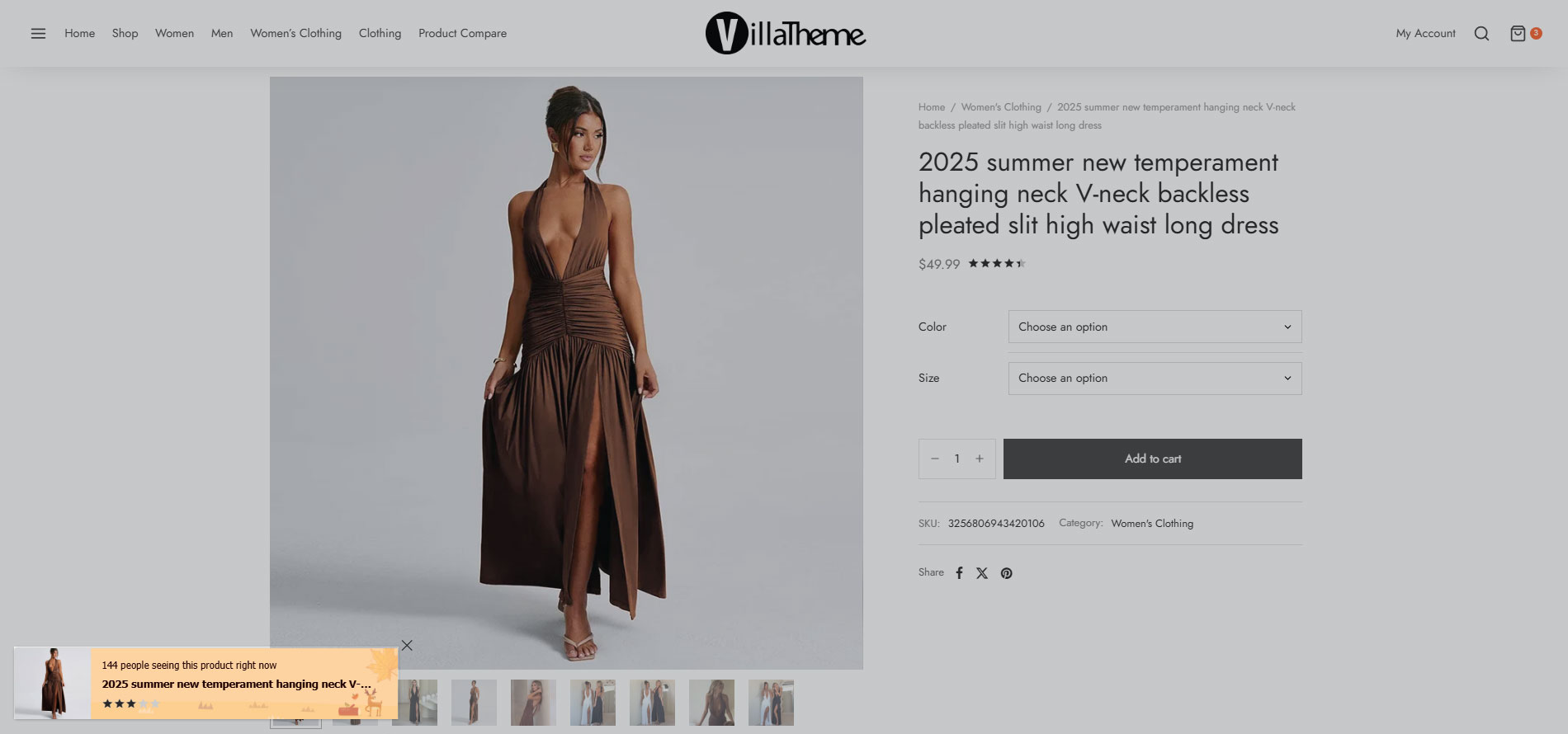
Notification for WooCommerce is a WooCommerce extension that helps you create social proof about a busy store. WooCommerce Notification displays recent orders on your storefront. It’s the online equivalent of a busy store and shows prospective customers that other people are buying your products.
-
Increase conversion rate by highlighting other customers that have bought products.
-
Display orders in real time for buyer validation and social proof!
-
Create a sense of urgency for visitors, and expose new products!
Preview WooCommerce Notification plugin.
Let’s go through this video on how to use the WooCommerce Notification plugin.
IMPORTANT NOTICE
-
Plugin works based on WooCommerce plugin.
-
It is released on WordPress.org and you can use plugin as free to build themes for sale.
FEATURES OF WOOCOMMERCE NOTIFICATION
-
Display recent WooCommerce orders: the plugin will take the information about WooCommerce orders to display. This is the “real order” options. You can select a time to pick up orders. In the last 30 days for example.
-
Display virtual orders: Do you want to increase the sale of some specific products? Do you want to introduce some new product to customers? WooCommerce Notification may help you with the fake orders feature.
-
Create orders for selected products: Select some products and put in the needed information. The plugin will
create fake orders for the selected products. -
Create orders for selected categories: If your store has too many products to select manually. This function will
help you to select products to create fake orders of the product. -
Create orders with the latest products: Create fake orders for the newest products. Help you to introduce new
products to customers.
-
-
Desktop: display order notification pop-ups on desktop.
-
Mobile: display order notification pop-upson mobile.
-
Multiple WooCommerce Notification messages: You can add and configure as many WooCommerce Notification messages as you want. Each message will be displayed on a different single pop-up.
-
Shortcode: Use the shortcodes to configure your messages. The system will get this information from your orders or create it automatically on WooCommerce Notification
-{first_name}: customer’s first name.
-{city}: billing country.
-{state}: billing state.
-{country}: billing country.
-{product}: product title.
-{product_with_link}: product title with link
-{time_ago}: the purchased time
-{custom}: custom shortcode
-{number}: display a random number in a selected range.
-
Current product: in single product pages, the plugin will display on sale notification of the current product or products in the same categories.
-
Background color: change the background color of the pop-up.
-
22 built-in templates: The plugin provides 22 pop-up templates for you to change the front-end of WooCommerce Notification. So you can make the pop-up fit with your website design.
-
Position: select the pop-up position on front-end bottom left, bottom right, top left and top right.
-
Image Position: select to display the product image on the left or right side of the pop-up.
-
Border-radius: select the border radius of the pop-up.
-
Appear/disappear effect: choose the appear/disappear effect of the sale notification pop-up.
-
Custom CSS: an option allows you to enter your own CSS code to change the front-end of the notification pop-up.
-
AJAX loading: Using AJAX to load pop-up. The pop-up will be loaded after your site finish loading and will not affect your site loading speed.
-
Easy to use
PRO VERSION
-
All features from the free version.
-
6 months of Premium support.
-
Unlimited products: With the free version, you are limited by 2 products at max.
-
Time settings: unlock the time settings.
-
Loop: display many sale notifications in each page loading.
-
Loop by session: Set number of notifications per visitor session so that delay between notifications still work when a visitor move to other page of your website
-
Initial delay: select the delay time for the pop-up to appear.
-
Next time display: select the delay time between each pop-up.
-
Display time: the time each pop-up appear on front-end.
-
Sound: display a notification sound along with pop-up.
-
Assign pages: select pages where you want to display the sale pop-ups.
-
Report: the report option helps the system stores information when visitors click on the notification. Then the admin site could be a statistic of number clicks and analysis fluctuation sales. Report system allows to statistic number clicks by date or by-product.
-
Auto update: with purchase code from Envato you can set the plugin to auto-update.
MAY BE YOU NEED
VARGAL – Additional Variation Gallery for Woo
AFFI – Affiliate Marketing for WooCommerce
TMDS – Dropshipping for TEMU and Woo
DEPART – Deposit and Part payment for Woo
HANDMADE – Dropshipping for Etsy and WooCommerce
HAPPY – Helpdesk Support Ticket System
GIFT4U – Gift Cards All in One for Woo
SUBRE – Product Subscription for WooCommerce
Clear Autoptimize Cache Automatically
FEWC – WooCommerce Extra Checkout Fields
EPOW – Custom Product Options for WooCommerce
ChinaDS – Taobao Dropshipping for WooCommerce
9MAIL – WordPress Email Templates Designer
WebPOS – Point of Sale for WooCommerce
Coreem – Coupon Reminder for WooCommerce
COMPE – WooCommerce Compare Products
W2S – Migrate WooCommerce to Shopify
REDIS – WooCommerce Dynamic Pricing and Discounts
EXMAGE – WordPress Image Links
Pofily – WooCommerce Product Filters
Bopo – WooCommerce Product Bundle Builder
WPBulky – WordPress Bulk Edit Post Types
Bulky – Bulk Edit Products for WooCommerce
Catna – Woo Name Your Price and Offers
Product Size Chart For WooCommerce
Product Pre-Orders for WooCommerce
Checkout Upsell Funnel for WooCommerce
Cart All In One For WooCommerce
Email Template Customizer for WooCommerce
ALD – Dropshipping and Fulfillment for AliExpress and WooCommerce
Product Variations Swatches for WooCommerce
Orders Tracking for WooCommerce
Abandoned Cart Recovery For WooCommerce
Customer Coupons for WooCommerce
Virtual Reviews for WooCommerce
Thank You Page Customizer for WooCommerce
Suggestion Engine for WooCommerce
Advanced Product Information for WooCommerce
Product Builder for WooCommerce
Free Shipping Bar for WooCommerce
CURCY – Multi Currency for WooCommerce
Documentation
Plugin Links
スクリーンショット
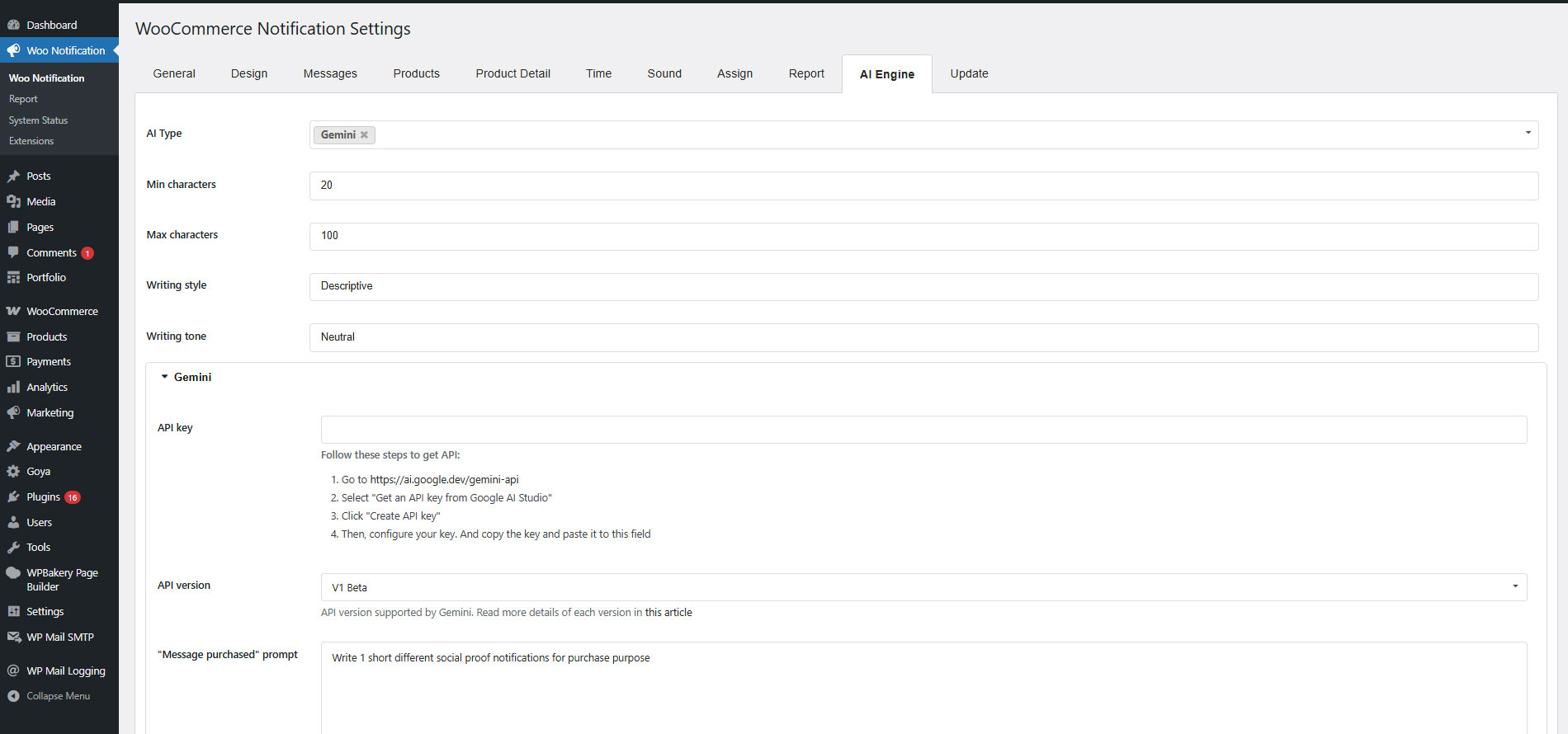
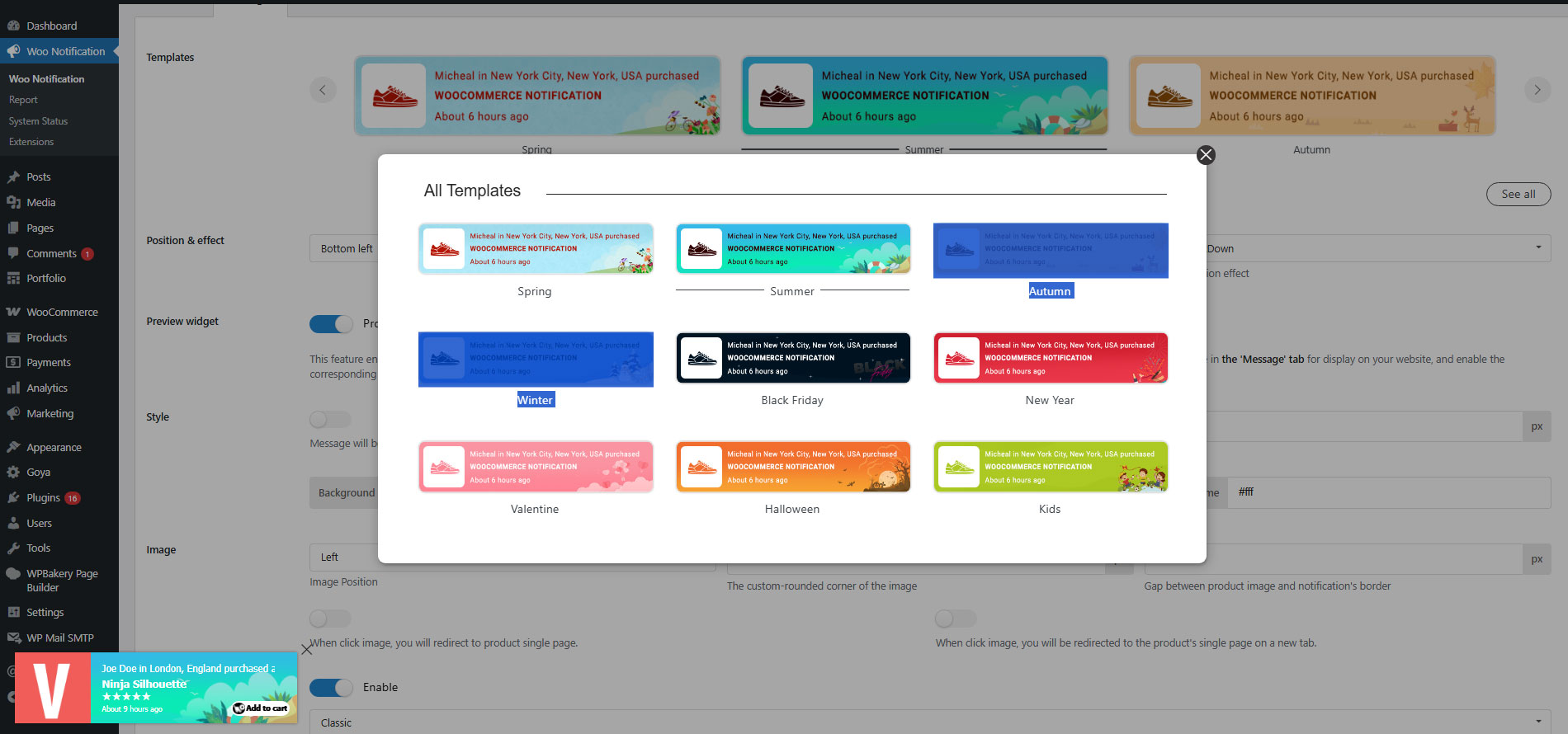
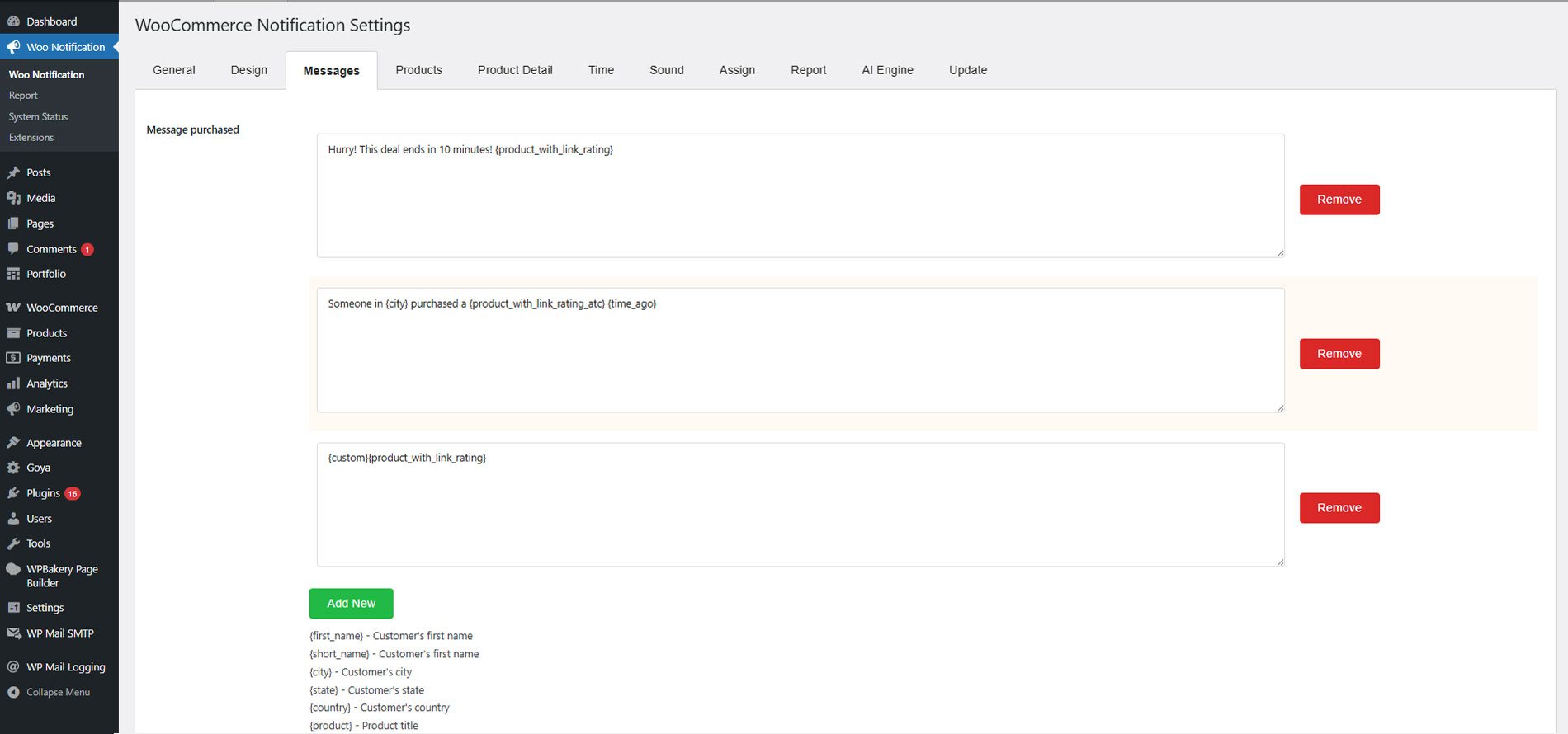
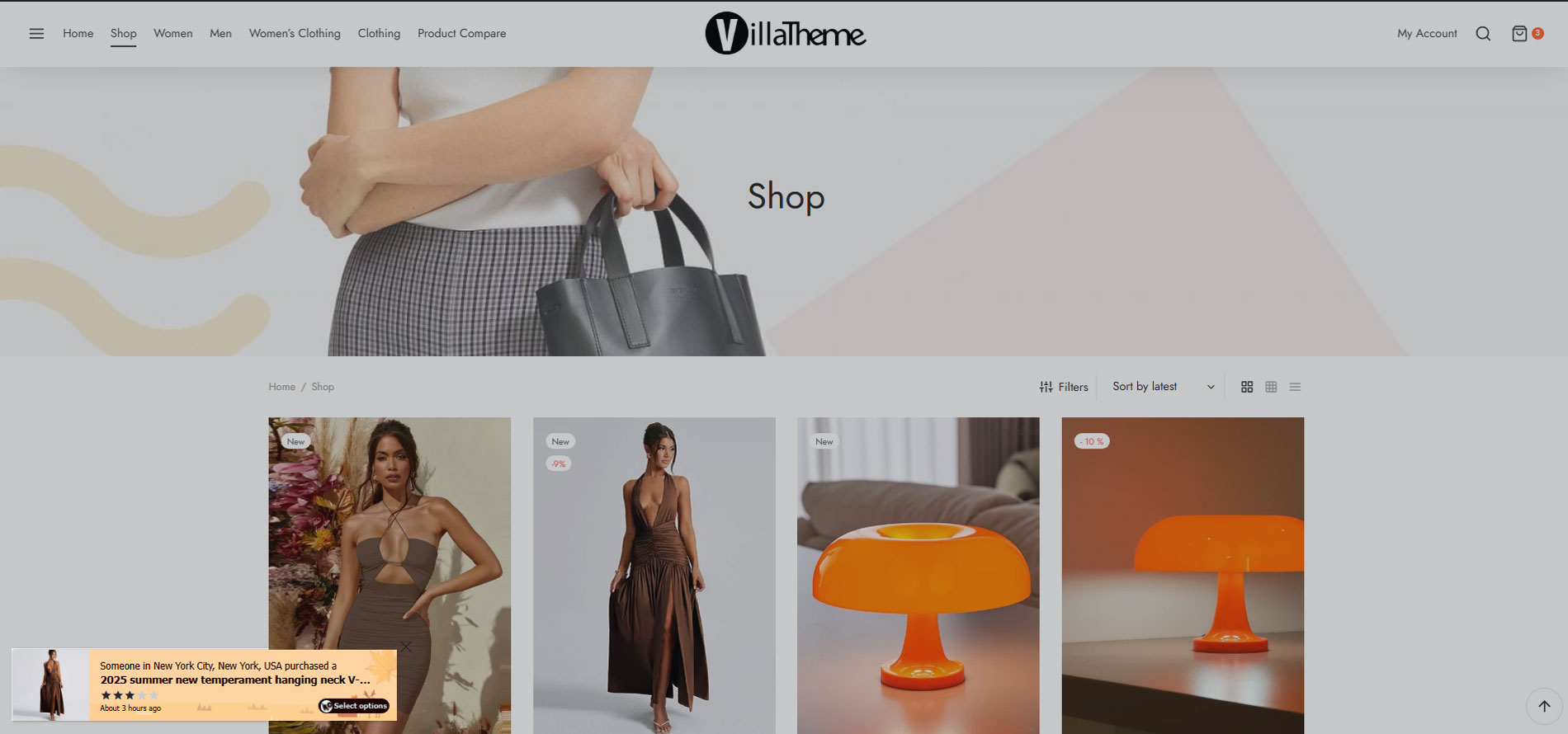
インストール
- Unzip the download package
- Upload
woo-notificationto the/wp-content/plugins/directory - Activate the plugin through the ‘Plugins’ menu in WordPress
評価


貢献者と開発者
Notification for WooCommerce | Boost Your Sales – Recent Sales Popup – Live Feed Sales – Upsells はオープンソースソフトウェアです。以下の人々がこのプラグインに貢献しています。
貢献者

“Notification for WooCommerce | Boost Your Sales – Recent Sales Popup – Live Feed Sales – Upsells” は1ロケールに翻訳されています。 翻訳者のみなさん、翻訳へのご協力ありがとうございます。
開発に興味がありますか ?
変更履歴
2026.08.17 – version 1.4.2
– Updated: Compatible WooCommerce 11.0
2026.06.20 – version 1.4.1
– Updated: VillaTheme support
2026.03.27 – version 1.4.0
– Updated: Optimize code
2026.03.06 – version 1.3.11
– Updated: support class
2025.10.15 – version 1.3.10
– Added: Privacy mask option for customer info
2025.08.13 – version 1.3.8
– Updated: Compatibility with WC6.8.2 and WP 10.0.4
– Updated: support class
2025.07.28 – version 1.3.7
– Fixed: Fixed issue with translate plugin with php 8.3
2025.07.26 – version 1.3.6
– Fixed: Fixed issue with translate plugin
– Updated: Show alt image
– Updated: Compatibility with WC6.8.1 and WP 10.0.3
– Updated: support class
2025.07.01 – version 1.3.5
– Updated: Compatibility with WC6.8.1 and WP 9.9.5
– Update: support class
2025.03.21 – version 1.3.4
– Update: support class
2025.02.21 – version 1.3.3
– Update: support class
2025.02.14 – version 1.3.2
– Fixed: Get data with orrder refunded
– Updated: Compatibility with WC6.7.2 and WP 9.6.2
– Update: support class
2025.01.13 – version 1.3.1
– Fixed: Setting UI save functionality
– Fixed: Security
– Updated: Compatibility with WC6.7.1 and WP 9.5.2
– Update: support class
2024.11.21 – version 1.3.0
– Fixed: Image padding not effected in setting design
– Fixed: Position of notification
– Updated: VillaTheme_Support
– Updated: Setting UI
– Updated: Notification template design
– Updated: Compatibility with WC6.7 and WP 9.4
– Update: support class
– Added: Rounded background image corner style
2024.05.06 – version 1.2.17
– Fixed: Wrong plugin name checking
2024.05.06 – version 1.2.16
– Fixed: Missing min Css support file
2024.04.11 – version 1.2.15
– Updated: Updated support file
2024.01.02 – version 1.2.14
– Updated: Add conditions when retrieving virtual_name and virtual_city
– Fixed: Get short_code, virtual_name, virtual_city, virtual_country in other languages
2023.12.30 – version 1.2.13
– Fixed: default value for notification_product_show_type
2023.07.03 – version 1.2.12
– Updated: Compatible with WooCommerce HPOS(COT)
2023.06.12 – version 1.2.11
-Updated: Change image size slug
2022.09.13 – version 1.2.10
-Updated: Translate for Vietnamese
2022.05.24 – version 1.2.9
– Fixed: Fixed stripslashes_deep textarea
2022.05.24 – version 1.2.8
– Fixed: Fixed minify js
2022.05.21 – version 1.2.7
– Updated: Compatibility with WC6.5.0 and WP 6.0.0
– Updated: Use passive listeners to improve scrolling performance
– Updated: support class
– Fixed: Fixed security
2022.03.29 – version 1.2.6
– Updated: support class
2022.03.21 – version 1.2.5
– Updated: Compatibility with WP5.9 and WC6.3.0
– Updated: support class
2021.12.29 – version 1.2.4
– Updated: Compatibility with WC6.0
– Fixed: Hidden notify in new widget preview wordpress
2021.08.05 – version 1.2.3.9
– Updated: Compatibility with WP5.8 and WC5.5
2021.06.02 – version 1.2.3.8
– Update: support class
2020.12.12 – version 1.2.3.7
– Updated: Compatibility with WP5.6 and WC4.8
2020.08.12 – version 1.2.3.6
– Updated: Compatibility with WP5.5 and WC4.3
2020.04.23 – version 1.2.3.5
– Update: support class
2020.03.23 – version 1.2.3.4
– Fixed: support class
2020.03.23 – version 1.2.3.3
– Update: support class
2019.11.16 – version 1.2.3.2
– Updated: Compatible with WP 5.3 and WooCommerce 3.8
2019.10.07 – version 1.2.3.1
– Updated: Premium URL
2019.09.24 – version 1.2.3
– Fixed: Wrong caching data
– Updated: Encrypt customer info(name, city, state, country) so that real info is not shown in page source
– Added: Support swipe notification to close for mobile devices
– Update: 22 new beautiful templates to replace old templates
– Update: Design
– Added: Rounded corner style
– Added: Image padding
– Added: Close icon color
2019.05.09 – version 1.2.2.5
– Updated: Change plugin name
2019.04.04 – version 1.2.2.4
– Updated: Make admin notices dismissible
2018.12.07 – version 1.2.2.3
– Fixed: Auto detect with SSL
– Updated: Class support
2018.11.29 – version 1.2.2.2
– Fixed: Update minify js and css
2018.11.23 – version 1.2.2.1
– Fixed: Tab JS in backend
– Fixed: Class support
– Fixed: Query out of stock
2018.11.21 – version 1.2.2
– Update: The same premium version
2018.11.10 – version 1.2.1.4.5
– Fixed: Support class
2018.10.17 – version 1.2.1.4.4
– Remove: Upgrade notice
2018.10.15 – version 1.2.1.4.3
– Remove: Upgrade notice
2018.07.13 – version 1.2.1.4.2
– Fixed: Class support
2018.05.11 – version 1.2.1.4.1
– Fixed: Class support
2018.04.16 – version 1.2.1.4
– Fixed: Class support
2018.04.11 – version 1.2.1.3
– Fixed: Class support
2018.04.09 – version 1.2.1.2
– Fixed: Class support
2018.03.05 – version 1.2.1.1
– Fixed: Class support
2017.12.12 – version 1.2.1
– Fixed: Javascript
2017.12.08 – version 1.2.0
– Updated: More feature
2017.11.02 – version 1.1.5.1
– Added: ABSPATH
2017.10.28 – version 1.1.5
– Fixed: Error when deactivated Pro version
– Fixed: Clickable when notification hide
– Fixed: Thumbnail not exist
– Updated: Data init
2017.10.08 – version 1.1.4
– Fixed: Random names and cities
2017.09.06 – version 1.1.3
– Optimized: Request db
– Fixed: Ajax search product with big data
2017.09.06 – version 1.1.2.1
– Optimize: Show on front page without Session
2017.08.20 – version 1.1.2
– Fixed: Compatible with WooCommerce 3.0.0, higher and lower
– Optimize: Get option, Ads
2017.06.28 – version 1.1.1
– Fixed: No sound on mobile
2017.02.17 – version 1.1
– Fixed: Link
– Fixed: Get Product variation
2017.02.17 – version 1.0.3
– Fixed: Admin menu hover
2017.02.10 – version 1.0.2
– Fixed: Save button in backend
– Fixed: Responsive on mobile
– Fixed: Product image thumb
2016.09.14 – version 1.0.1
– Fixed: Conflict JS in Admin setting
– Fixed: Ad Session
– Added: Update Pro version
– Added: Language translate
2016.07.13 – version 1.0.0
– The first released