
説明
Enhance user experience and site navigation with a lightweight, customizable “Scroll to Top” button. This plugin adds a smooth-scrolling button that appears as users scroll down the page and disappears when they return to the top.
Designed for speed and seamless integration, it works with any WordPress theme and includes options for custom icons, button position, color, animation, and intelligent display rules. No coding required—just install and configure in minutes.
Perfect for blogs, long-form articles, eCommerce sites, or any website where easy navigation improves usability.
Key Features & Customization
- Intelligent Display: Automatically appears as users scroll down, then disappears when at the top.
- Smooth Scroll Animation: Provides a fluid and pleasant “back to top” experience.
- Flexible Destinations:
- Internal Page Scroll: Link the button to any specific element within the current page.
- External Page Redirection: Redirect users to any other page or URL.
- Customizable Button Design:
- Choose between text, custom image (PNG/SVG), or Font Awesome icons.
- Use any image URL for complete branding control.
- Responsive Control:
- Mobile-Friendly: Option to hide the button on smaller devices/windows for better mobile UX.
- iFrame Compatibility: Ensures it doesn’t appear inappropriately within iframes.
- Targeted Visibility: Easily show or hide the button on specific pages or posts.
- Temporary Display: Auto-hide the button after a set duration for a cleaner interface.
- Optimized Performance: Utilizes Async JavaScript to ensure fast page loading.
- Accessibility Focused: Built with ARIA labels and screen reader text for inclusive navigation.
- SEO-Friendly Markup: Employs semantically correct HTML elements for optimal search engine and accessibility performance.
- Optimized Performance: Adds functionality without slowing down your site.
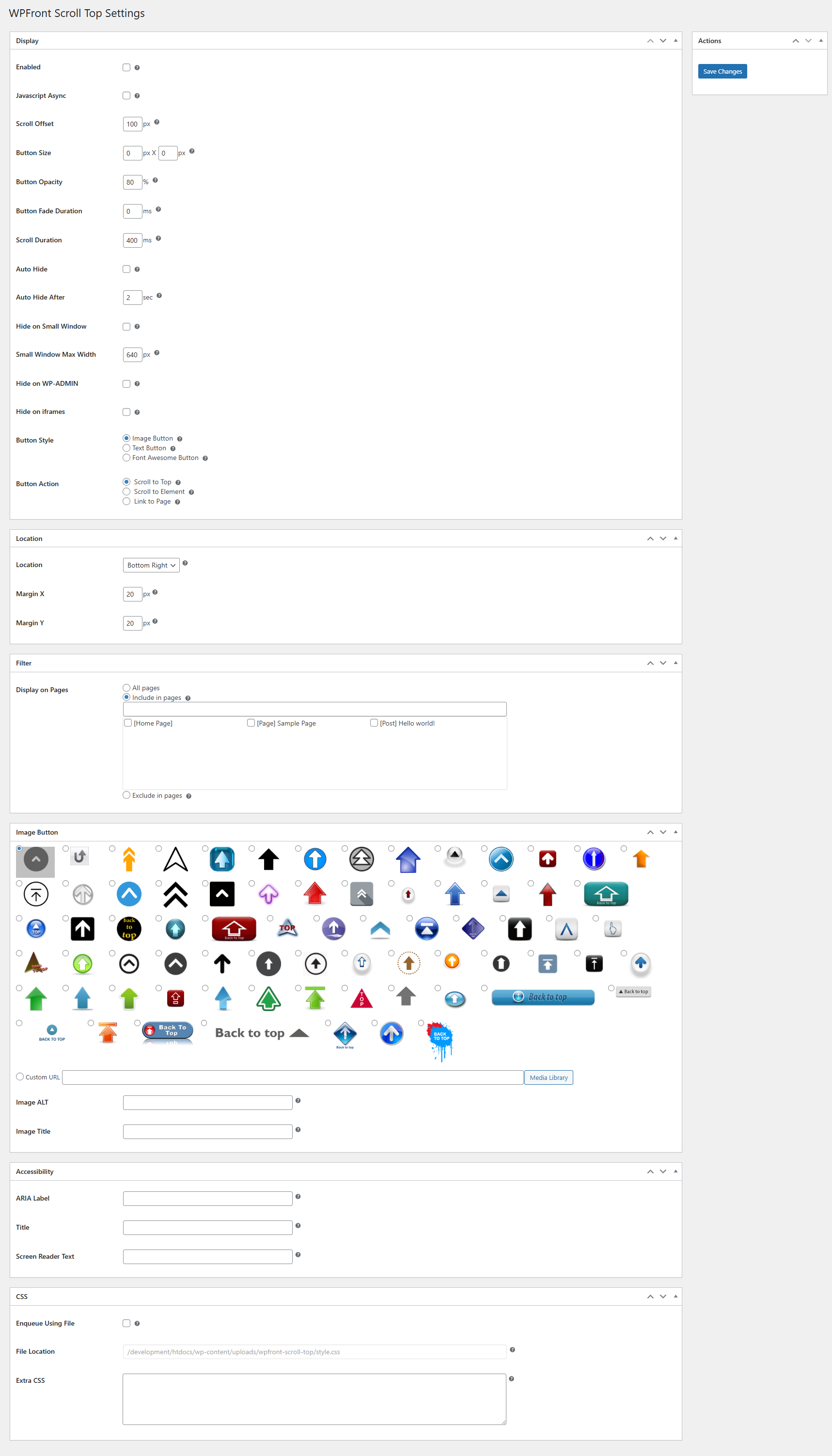
- Easy-to-Use Admin Panel: Configure all settings intuitively from your WordPress dashboard.
スクリーンショット
インストール
- WordPress の管理画面で、「プラグイン」「新規追加」の順にクリックします。
- 「WPFront Scroll Top」を検索してインストールします。
- Configure plugin using Scroll Top link under Settings menu.
FAQ
-
What is the “Scroll to Top” button, and how does it work?
The “Scroll to Top” button is a convenient navigation feature that appears on your website as users scroll down a page. With a single click, it allows them to effortlessly return to the top of the page with a smooth, animated scroll, significantly improving the user experience, especially on long-form content. -
Is the “Scroll to Top” button always visible?
No. The button gracefully appears only after a user has scrolled down a certain distance on the page and disappears when they are at the top, ensuring it doesn’t obstruct content unnecessarily. You can also configure an Auto-Hide feature to make it disappear after a few seconds of inactivity. -
Can I customize the design of the button?
You can choose to use simple text, select from a wide range of Font Awesome icons, or upload your own custom image (PNG or SVG) to perfectly match your website’s branding. You also have full control over its position, size, colors, and hover effects. -
Can the button link to something other than the top of the page?
Besides scrolling to the top, you can configure the button to:- Link to an In-Page Element: Direct users to a specific section or HTML element (like an anchor point) anywhere on the current page.
- Redirect to a Different URL: Use the button to send users to another page on your site or even an external website.
-
Can I control where the button appears on my website?
You can easily enable or disable the “Scroll to Top” button on specific pages, posts, or custom post types through the plugin’s settings, giving you full flexibility over its visibility. -
Is the plugin accessible for all users?
The plugin is built with proper ARIA labels and includes screen reader text, ensuring that users relying on assistive technologies can navigate your site effectively and experience the benefits of the button.
評価


貢献者と開発者

変更履歴
3.0.1
- Defect fix.
3.0.0
- Breaking changes are introduced. Please verify the display after the upgrade.
- These breaking changes are needed for accessibility and SEO friendly markup.
- The container will either be a button or an anchor element.
- There could be multiple span inside the container depending on your configuration.
- Minimum PHP version required is 7.2.
- Accessibility and more CSS settings are available.
- Deprecated settings are removed.
2.2
- 互換性の修正。
2.1.1
- Bug fix.
2.1
- [Deprecated] Small device settings.
- New UI.
- Title HTML attibute.
- PHP compatibility fixes.
- HTML validation fixes.
- パフォーマンスの向上。
2.0.7
- XSS に対する脆弱性を修正 (Vlad Visse の貢献に感謝)。
2.0.6
- XSS に対する脆弱性を修正 (Asif Nawaz Minhas の貢献に感謝)。
2.0.5
- XSS に対する脆弱性を修正。
2.0.4
- WordPress の互換性に関する修正。
2.0.3
- jQuery の非推奨事項の修正。
- 互換性の修正。
- SiteGround とのコンフリクトを修正。
2.0.2
- WordPress 5.2 のサイトヘルス、wp_version_check、コンフリクトなどの問題を修正。
2.0.1
- 要素へのリンク機能を追加。
- ページへのリンク機能を追加。
- メディアライブラリから簡単に画像を選べるようにした。
- パフォーマンスの向上。
1.6.2
- PHP 5.3以上が必須となった。
- バグの修正。
- 設定画面へのリンクを WordPress 管理画面の「設定」メニュー配下に移動した。
- PHP 7.2の互換性に関する修正。
1.6.1
- 未定義変数の修正。
1.6
- Font Awesome アイコンをサポート。
- アイコン画像を更新。
- 「設定」メニュー配下のメニュー表示を調整。
- パフォーマンスの向上。
- UI の改善。
- PHP 7の互換性修正。
1.5
- JavaScript を非同期で読み込むように変更。
- ファイルを最小化。
- 言語ファイルを削除。
1.4.5
- ウクライナ語の翻訳ファイルを追加 (Ivanka Skakun の貢献に感謝)。
1.4.4
- Zerif テーマとの互換性を修正。
1.4.3
- メディアアップロードの不具合を修正。
1.4.2
- バグの修正。
- ドイツ語の言語ファイルを追加。
1.4.1
- バグの修正。
- ロシア語の言語ファイルを追加。
1.4
- 画像の ALT 属性の追加。
- 翻訳まわりの更新。
1.3
- 自動的に非表示にする設定を追加。
- wp-admin 配下での非表示設定を追加。
- iframe のときの非表示設定を追加。
- 固定ページ / 投稿 ごとの表示 / 非表示設定を追加。
1.2
- テキストボタンのオプションを追加。
- バグの修正。
1.1.1
- 安定性の向上。
- メニュー構成を刷新。
1.1
- モバイル端末で非表示にするオプションを追加。
- 他のプラグインとのコンフリクトを修正。
1.0.1
- バグの修正。
1.0
- 最初のリリース。