
内容をスキップ
WordPress.org

日本語

  • テーマ
  • プラグイン
  • ニュース
    • ドキュメンテーション
    • フォーラム
  • 概要
  • 参加・貢献
  • このサイトについて
  • WordPress を入手
WordPress を入手
WordPress.org

Plugin Directory

Classic Visual Editor Options

  • プラグインを申請
  • お気に入り
  • ログイン
  • プラグインを申請
  • お気に入り
  • ログイン

Classic Visual Editor Options

作者: DVeb
ダウンロード
  • 詳細
  • レビュー
  • インストール
  • 開発
サポート

説明

💬
Dear and respected members of the WordPress community, especially those who still believe that “Code is Poetry” — believe it or not, there are people like me for whom this removed feature still matters.

This plugin restores the classic
“Visual Editor Options”
section to the user profile screen.

It’s a clean, dependable tweak — made for those who prefer writing in plain text, without distraction, without visual clutter.

No extra settings. No noise. Just the option that once was.

Perfect for:

  • writers who live in the HTML tab,
  • developers who avoid visual editors,
  • or anyone who simply misses that checkbox.

It works with both the Classic and Block editors,
and doesn’t require any additional plugins.

Just install, and enjoy the silence of plain text.

How It Works

  1. A checkbox labeled “Disable the visual editor when writing” is added to each user’s profile page.
  2. When checked, the plugin disables visual editing features and saves the preference (rich_editing = false).
  3. Both TinyMCE and Gutenberg are bypassed — only the plain text editor is shown.

Additional behaviors (enabled by default):

  • Prevents loading of unnecessary editor scripts and styles for users who opt out.
  • Removes visual editor metaboxes when not needed.
  • Displays a dismissible admin notice if visual editing is disabled but the plugin is no longer active.

Compatibility

  • Works with both Classic and Block (Gutenberg) editors.
  • Compatible with the Genesis Framework and most modern themes.
  • Functions independently — does not require the Classic Editor plugin.
  • Honors native WordPress capabilities like user_can_richedit and use_block_editor_for_post.

Translations

This plugin is translation-ready.
Currently available in:

  • Japanese (thanks to @kimipooh)

If you would like to contribute a translation, please visit:
https://translate.wordpress.org/projects/wp-plugins/classic-visual-editor-options/

スクリーンショット
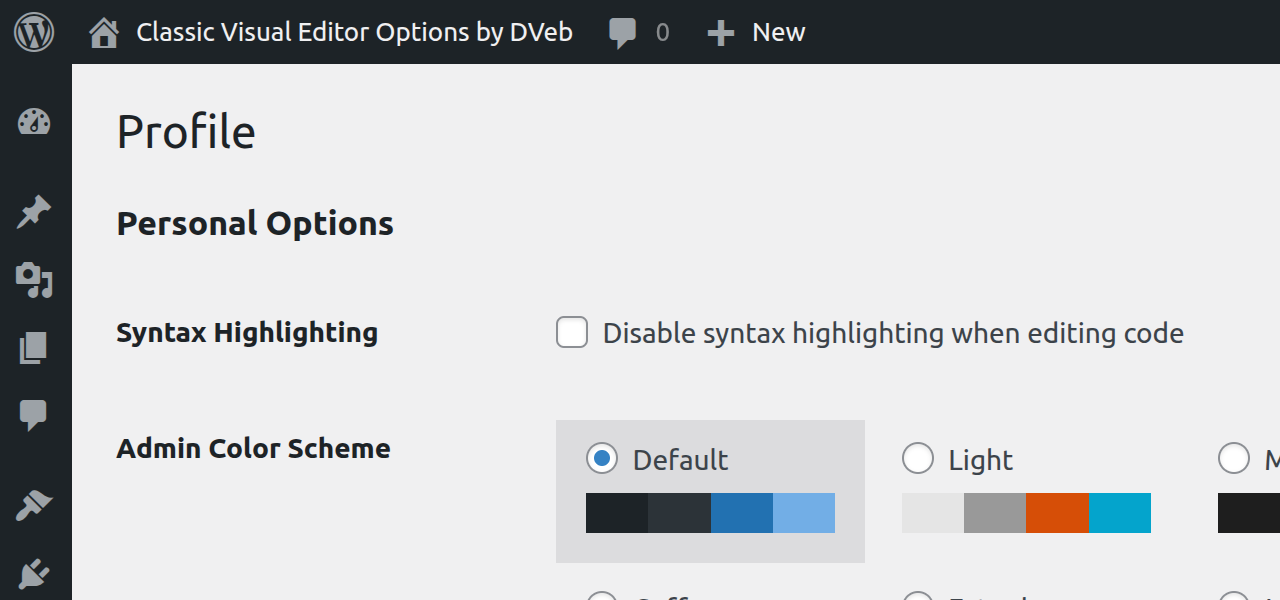
  • Legacy versions of WordPress where the checkbox was removed.
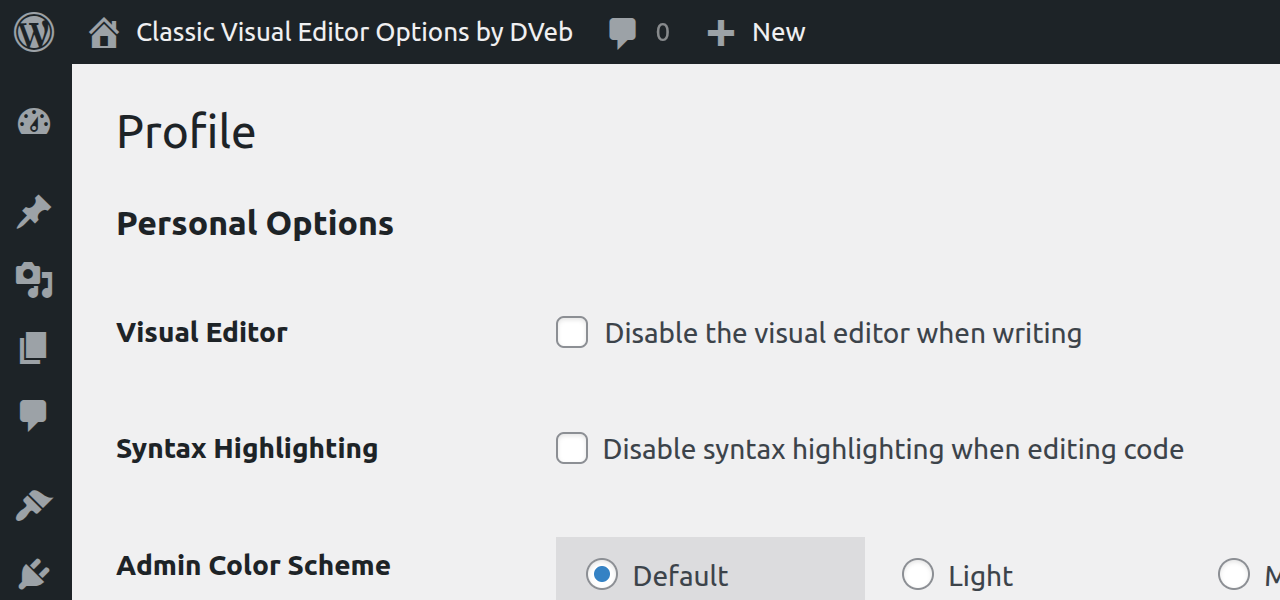
  • The restored checkbox — default state (unchecked).
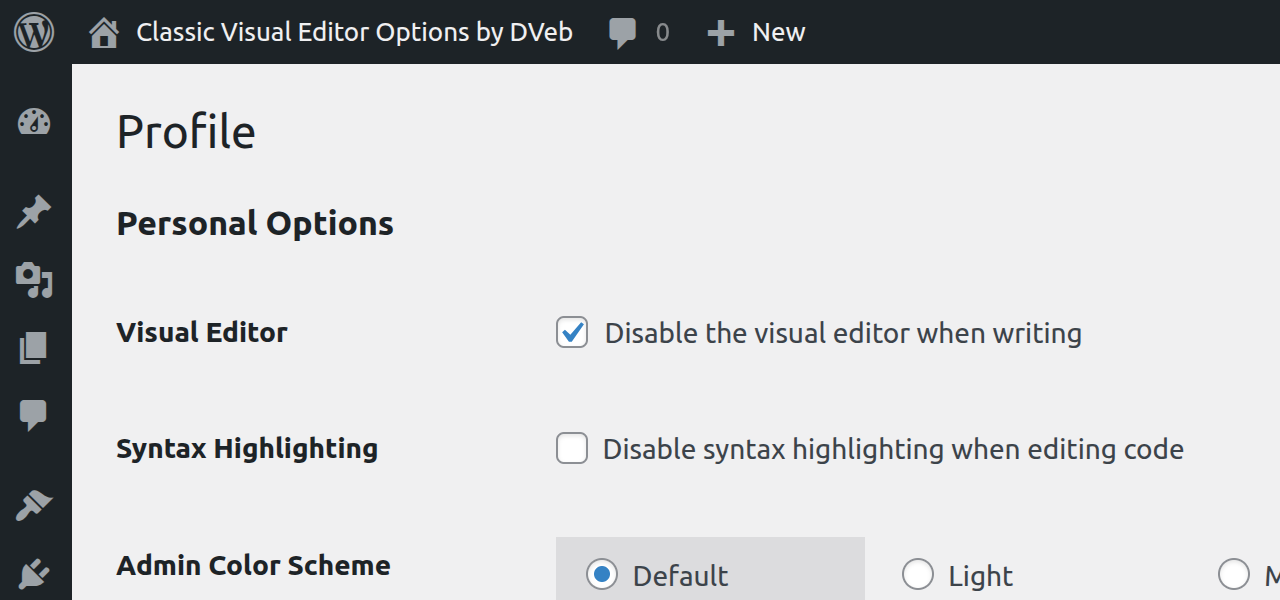
  • The restored checkbox — active (checked), visual editor disabled.

インストール

  1. Upload the plugin to /wp-content/plugins/ or install it directly via Plugins > Add New.
  2. Activate the plugin.
  3. Go to Users > Your Profile, check “Disable the visual editor when writing”, and save changes.
  4. Done. The editor will now default to plain text for that user.

FAQ

Does this really disable Gutenberg?

Yes — for users who disable the visual editor. The plugin uses native filters to bypass both Gutenberg and TinyMCE.

What about other users on the site?

Nothing changes for them unless they also choose to disable the visual editor in their profile.

Do I need the Classic Editor plugin installed?

No. This plugin works entirely on its own.

Is it safe to use with other editor-related plugins?

Yes — as long as those plugins respect WordPress coding standards and core filters.

Is this plugin actively maintained?

Yes — by a developer who still writes in HTML mode.

評価

Perfect!!

Daffydd57 2025年11月6日 1 reply
Why the WP devs would think it was okay to remove the “Disable Visual Editor” option in a user’s profile is beyond idiotic. This plug in puts it back. That’s all it does – no other bloat or extra code – clean and simple. THANK YOU!!!

Great plugin!

kimipooh 2025年9月5日 1 reply
Thank you for providing such a great plugin!I translated the main part into Japanese \^^/;. When entering code in the classic editor, the forced substitution function would sometimes be activated in the visual editor, so this feature was very useful. I agree with Gutenbeng’s philosophy, but it’s a shame that the option for a simpler editor is disappearing.

Brilliant plugin – Thank you!

mikemacd 2025年9月1日 4 replies
I would like to mirror what vizons said in his review. Like vizons, I am also not a fan of wysiwyg editors and I also like having full control over how I write. WordPress used to leave the edit-mode in either visual or text mode – which ever you were using last – so that if you were editing in text mode, the site stayed in text mode. Then they changed it so that if defaulted to opening visual mode on every edit, which is when I changed my user profile to have the visual mode disabled. Now they disabled that option which I only discovered today when adding a new user to a site. WordPress – why force me to edit in a mode I don’t like? Happily I found the Classic Visual Editor Options plugin in a comment from the author on Reddit thread. Super! Thank you SO much for producing this lightweight, problem-solving tool. It solves the problem perfectly!

Thank you so much for CLASSIC VISUAL EDITOR OPTIONS PLUGIN!!!

vizons 2025年6月26日 1 reply
I was completely distraught yesterday to find that every time I saved my post in classic editor that it kept saving it in visual mode. I use a Mac and write all my posts in textedit plain text mode so I can style it with css and then paste all of my writing/code into the classic editor. I was deeply depressed yesterday about the fact that the WordPress developer team decided to remove the text/code saving capability. The way they downgraded this option is completely backwards because for people like me who never had the “disable visual editor when writing” in user profile checked, it causes major issues when writing and saving in text/code mode. I never had that option checked before they completely removed it because the classic editor always worked the way I like to use it which is stay in text/code mode when writing and saving my posts. As you said in the post on your website about restoring the freedom of choice concerning the classic editor, they took away our freedom to use classic editor according to our preferences. I am NOT a fan of wysiwyg editors. I like having full control over what I create. Thank you many, many times over for creating this plugin. When I found it this morning, it was like the sun came out from a dark, dismal day!!!!!
4件のレビューをすべて表示

貢献者と開発者

Classic Visual Editor Options はオープンソースソフトウェアです。以下の人々がこのプラグインに貢献しています。

貢献者
  • DVeb

“Classic Visual Editor Options” は1ロケールに翻訳されています。 翻訳者のみなさん、翻訳へのご協力ありがとうございます。

“Classic Visual Editor Options” をあなたの言語に翻訳しましょう。

開発に興味がありますか ?

コードを閲覧するか、SVN リポジトリをチェックするか、開発ログを RSS で購読してみてください。

変更履歴

1.0.2

  • Updated “Tested up to” to WordPress 6.9.
  • Prefixed a global variable to meet WordPress PHPCS standards.
  • Added a minor security hardening check for $_SERVER['PHP_SELF'].
  • General maintenance and compatibility updates.

1.0.1

  • Added Japanese translation credit (@kimipooh)
  • Readme updates

1.0.0

  • Initial release.
  • Plugin was originally submitted as “Restore Visual Editor Options.”
  • Renamed to Classic Visual Editor Options for clarity and naming consistency.

メタ

  • バージョン 1.0.2
  • 最終更新日 2か月前
  • 有効インストール数 200+
  • WordPress バージョン 5.0またはそれ以降
  • 検証済み最新バージョン: 6.9
  • PHP バージョン 7.4またはそれ以降
  • 言語

    English (US)、Japanese.

    プラグインを翻訳

  • タグ
    classic editordisable editorplain textuser profilevisual editor
  • 詳細を表示

評価

5つ星中5つ星
  • 4 5-星レビュー 5つ星 4
  • 0 4-星レビュー 4つ星 0
  • 0 3-星レビュー 3つ星 0
  • 0 2-星レビュー 2つ星 0
  • 0 1-星レビュー 1つ星 0

レビューを追加

すべてのレビューを見る

貢献者

  • DVeb

サポート

意見や質問がありますか ?

サポートフォーラムを表示

  • WordPress とは
  • ニュース
  • ホスティング
  • プライバシー
  • ショーケース
  • テーマ
  • プラグイン
  • パターン
  • Learn
  • サポート
  • 開発者
  • WordPress.tv ↗
  • 参加・貢献
  • イベント
  • 寄付 ↗
  • Five for the Future
  • WordPress.com ↗
  • Matt ↗
  • bbPress ↗
  • BuddyPress ↗
WordPress.org
WordPress.org

日本語

  • X (旧 Twitter) アカウントへ
  • Bluesky アカウントへ
  • Mastodon アカウントへ
  • Threads アカウントへ
  • Facebook ページへ
  • Instagram アカウントへ
  • LinkedIn アカウントへ
  • TikTok アカウントへ
  • YouTube チャンネルへ
  • Tumblr アカウントへ
Code is Poetry.