

説明
DentalZaikoMaker は、歯科医院・歯科技工所のために作られた材料在庫・経費管理プラグインです。ロットと使用期限を管理し、材料ごとに仕入先を1件以上登録させることで常に発注できる状態を保ち、価格・イベント・購入履歴から推奨仕入先を提示し、月々の節約額を可視化します。ユーザーインターフェイスは日本の歯科市場向けに日本語で提供されます。
主な機能
- JAN コードによる在庫登録・管理。連携先の材料データベース Web サービスと自動で同期する
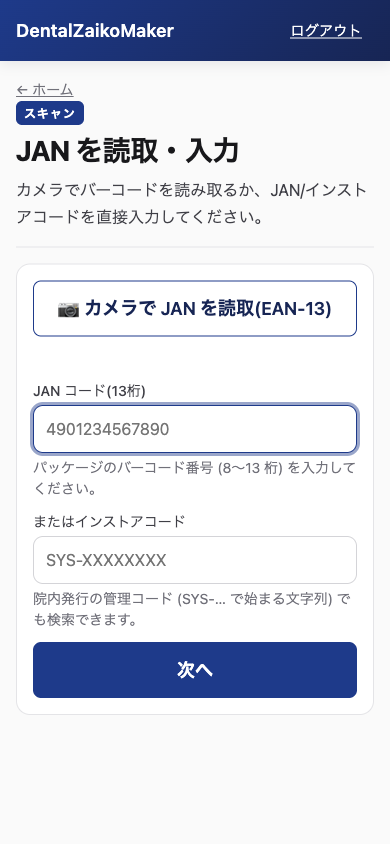
- PWA によるスマートフォンでのバーコード読み取り。JAN/EAN バーコードに加え、医療材料のパッケージに使われる GS1/UDI コード (1次元の GS1-128 / GS1 DataBar、2次元の DataMatrix/QR) を読み取ります。GS1 コードからは入庫時にロット番号と使用期限が自動入力されます。デコードは同梱の純 JavaScript ライブラリーがブラウザー内で行う。コードは常に手入力でも登録できる。
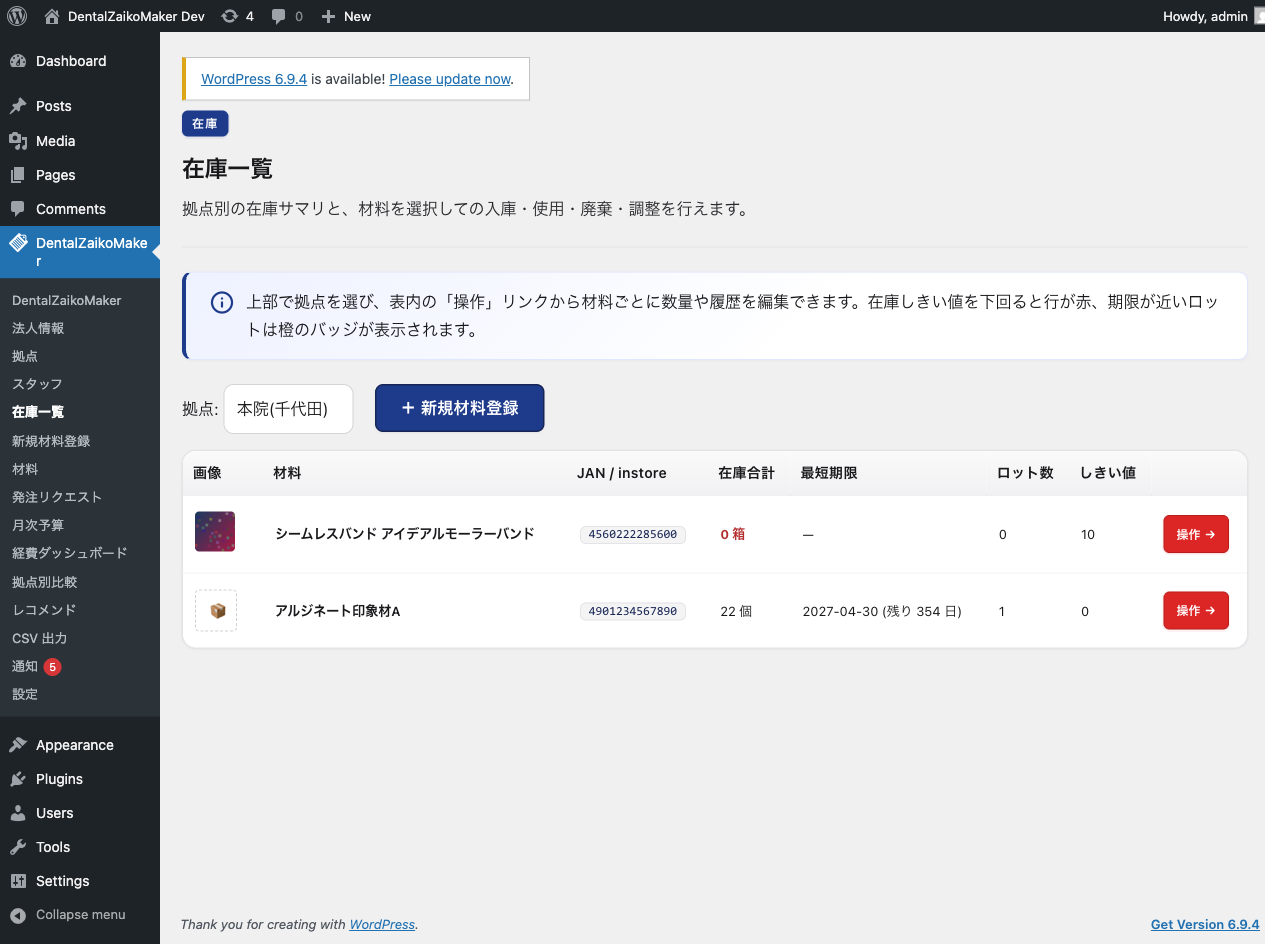
- ロット番号と使用期限の管理、および期限切れアラート
- 在庫しきい値割れアラート (画面内とメール)
- 発注リクエストと管理者による発注承認のワークフロー
- ロールは3段階。管理者 (発注承認・予算編集)、スタッフ (入庫/使用/廃棄)、閲覧のみ
- オフラインに対応する Service Worker キャッシュ
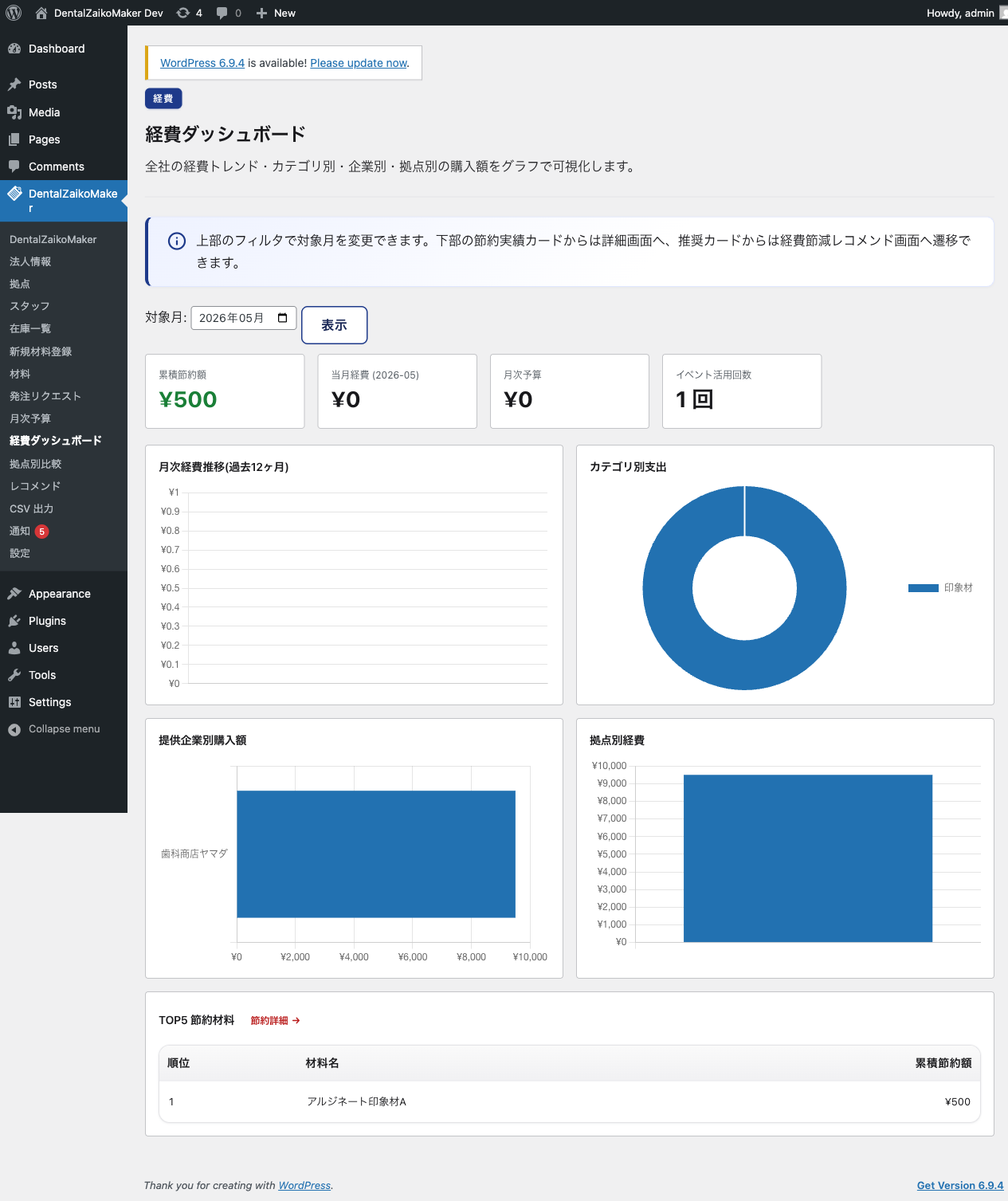
- 経費ダッシュボード。月次推移・仕入先・カテゴリー・拠点の軸で表示します (Chart.js)
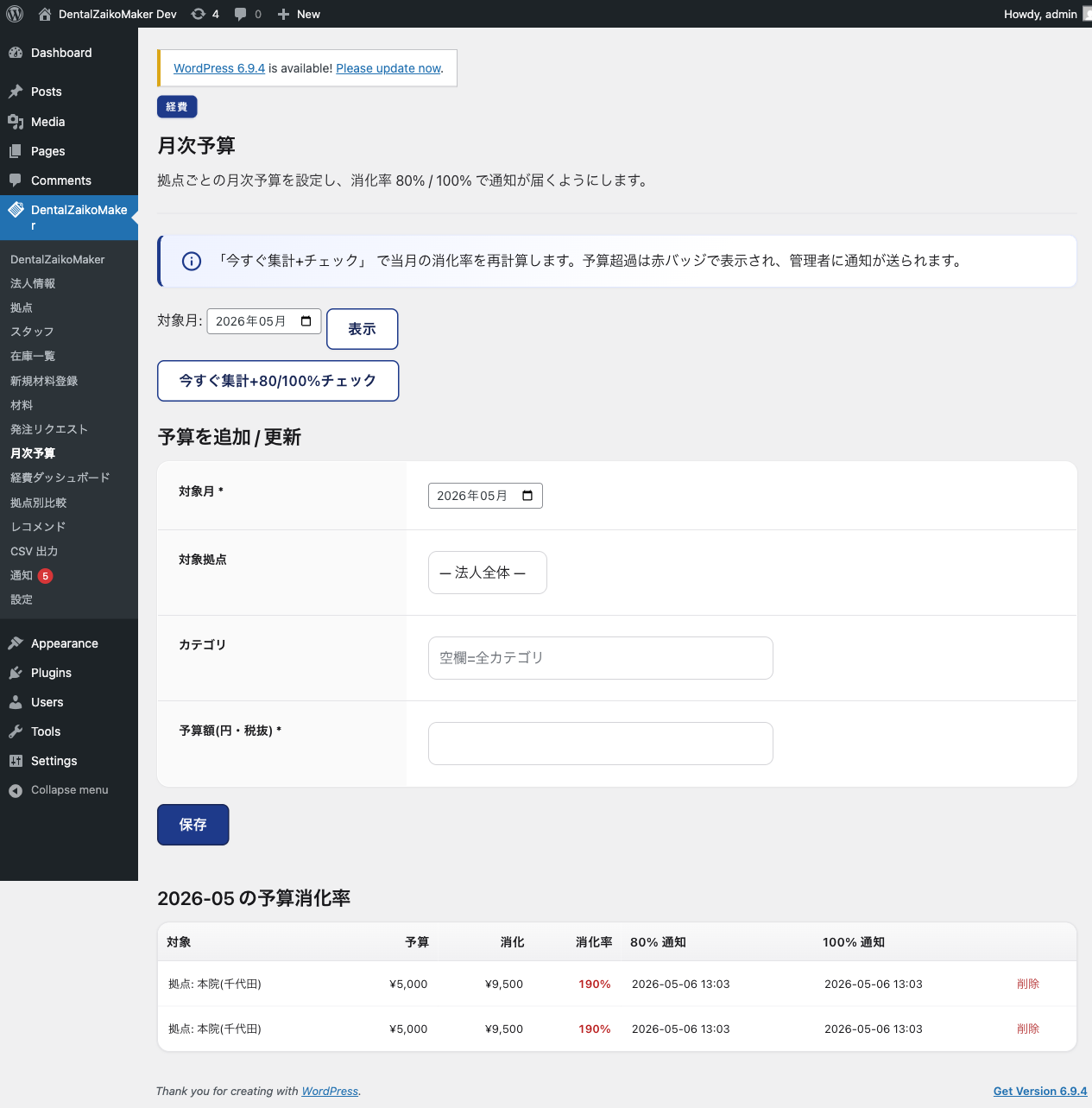
- 月次予算の管理。80% と 100% のしきい値でアラートを出す
- 節約額の可視化と材料別ランキング
- 週次のレコメンド。過剰在庫、死蔵在庫、共同購入を提示する
- freee 形式と マネーフォワード 形式での CSV 出力
- 推奨仕入先のハイライト表示
- 拠点間の単価比較
- 価格推移グラフ (自院のデータのみ。外部への送信はありません)
- 公的機関の価格動向把握に役立てるための月次統計レポート (任意・オプトイン。既定はオフ、既定は匿名)
カメラ読み取り
バーコードのデコードは、同梱の純 JavaScript ライブラリー @zxing/library (public/js/vendor/zxing-library.js。上流の非圧縮ビルド) を使ってブラウザー内で完結します。本パッケージに WebAssembly やバイナリーは含まれず、外部ホストから何かをダウンロードすることもありません。カメラの映像が端末の外に出ることはなく、サイトへ送信されるのは読み取り結果のコード文字列だけです。
カメラで読み取れる書式は EAN-13 / EAN-8 / UPC-A (JAN)、Code 128 (GS1-128)、GS1 DataBar (RSS-14)、GS1 DataBar Expanded、DataMatrix、QR です。GS1 DataBar Limited と UPC-E はこのライブラリーでは読み取れないため手入力になります。カメラ読み取りにはカメラへのアクセスを許可できるブラウザーが必要ですが、どの端末でもコードは手入力で登録できます。
外部サービス連携
本プラグインは、連携先の材料データベース Web サービス (https://healthbanks.org/dzm/) に接続します。
やり取りするデータには、法人 ID、JAN コード / 院内コード、発注内容、材料への投稿が含まれます。何を、いつ、
どの機能が送信するかの全一覧は下記の「通信のタイミング」を参照してください。
連携は、設定画面の「連携を解除する」ボタンからいつでも無効にできます。解除すると、保存されている同意情報とアクセストークンを削除し、以後は一切の API リクエストを送信せず、Web サービスに接続するスケジュール実行のタスクもすべて停止します。医院内に保存されている在庫データはそのまま残ります。本プラグインは、連携先の材料データベース Web サービス (https://healthbanks.org/dzm/) に接続します。
やり取りするデータには、法人 ID、JAN コード / 院内コード、発注内容、材料への投稿が含まれます。何を、いつ、
どの機能が送信するかの全一覧は下記の「通信のタイミング」を参照してください。
連携は、設定画面の「連携を解除する」ボタンからいつでも無効にできます。解除すると、保存されている同意情報とアクセストークンを削除し、以後は一切の API リクエストを送信せず、Web サービスに接続するスケジュール実行のタスクもすべて停止します。医院内に保存されている在庫データはそのまま残ります。
- サービス: https://healthbanks.org/dzm/
- 利用規約: https://healthbanks.org/dzm/terms
- プライバシーポリシー: https://healthbanks.org/dzm/privacy
このほかに、任意の月次統計レポートがあります (下記の「月次統計レポート (任意・オプトイン時のみ)」を参照)。
このレポートは既定でオフであり、連携への同意とは別に、明示的なオプトインが必要です。このほかに、任意の月次統計レポートがあります (下記の「月次統計レポート (任意・オプトイン時のみ)」を参照)。
このレポートは既定でオフであり、連携への同意とは別に、明示的なオプトインが必要です。
月次統計レポート (任意・オプトイン時のみ)
歯科医師会や厚生労働省などの公的機関が材料の価格動向を把握する助けとなるよう
(たとえば診療報酬改定の参考資料として)、本プラグインは集計済みの月次統計レポートを
同じ Web サービス (https://healthbanks.org/dzm/) へ送信できます。歯科医師会や厚生労働省などの公的機関が材料の価格動向を把握する助けとなるよう
(たとえば診療報酬改定の参考資料として)、本プラグインは集計済みの月次統計レポートを
同じ Web サービス (https://healthbanks.org/dzm/) へ送信できます。
- この機能は既定で無効です。医院の管理者が「公的機関レポート」の設定画面で明示的にオプトインし、
何が送信されるかを確認しない限り、何も送信されません。この機能は既定で無効です。医院の管理者が「公的機関レポート」の設定画面で明示的にオプトインし、
何が送信されるかを確認しない限り、何も送信されません。 - 有効にすると、前月分の集計済みサマリーを月に1回送信します。内容は、材料またはカテゴリーごとの
JAN コード、月次単価 (平均・最小・最大)、数量、発注件数に加え、事業区分 (医院か技工所か) と
都道府県です。JAN コードは医院をまたいで統計を比較可能にするためのものです。
発注単位のレコードは含まれません。有効にすると、前月分の集計済みサマリーを月に1回送信します。内容は、材料またはカテゴリーごとの
JAN コード、月次単価 (平均・最小・最大)、数量、発注件数に加え、事業区分 (医院か技工所か) と
都道府県です。JAN コードは医院をまたいで統計を比較可能にするためのものです。
発注単位のレコードは含まれません。 - 発注の生データ、患者情報、診療情報を送信することは決してありません。送信するのは上記の月次集計値のみである。
- 送信者は既定では匿名です。管理者が任意で開示を選ぶこともできる。
- 同じ設定画面からいつでもレポートを停止できます。停止すると直ちに送信されなくなる。
通信のタイミング
医院の管理者が連携を有効にする (設定画面の同意ダイアログ) までは、Web サービスとの通信は一切行われません。
同意後の通信は、その大半が利用者の明示的な操作に応じて発生します。加えて、下記のとおりいくつかのタスクが
スケジュールに従って実行されます。医院の管理者が連携を有効にする (設定画面の同意ダイアログ) までは、Web サービスとの通信は一切行われません。
同意後の通信は、その大半が利用者の明示的な操作に応じて発生します。加えて、下記のとおりいくつかのタスクが
スケジュールに従って実行されます。
利用者の操作にともなう通信:
- サイトの接続時: 管理者が接続キーを入力すると、Web サービスとの間でアクセストークンに引き換えます。トークンは有効期限が切れると更新される
- 接続キーの代わりに申込コードで接続する場合: 申込コードを Web サービスとの間で接続情報に引き換える
- 「接続テスト」ボタン: 材料マスターを1件取得し、サイトから Web サービスへ到達できることを確認する
- 材料の照会・登録時: JAN コードまたは院内コードを入力したとき
- 在庫一覧の表示時: キャッシュが 24 時間より古い場合に状態を再取得する
- 材料詳細の表示時: キャッシュが 24 時間より古い場合に状態を再取得する
- 「サーバーから更新」ボタン: 状態を直ちに再取得する
- 発注リクエストの作成時: 推奨仕入先、廃番フラグ、名称変更を取得する
- 発注承認時: 発注の実績を Web サービスに記録する
- 販売店の紐付け時: 販売店コードを入力すると、登録済みの販売店を紐付け / 解除する
- 紐付けた販売店への発注時: Web サービスを介して発注リクエストを販売店へ送信する
- 材料への投稿時: 材料に対する要望・提案・不具合報告を投稿すると、その材料のメーカーへ届くよう Web サービスへ送信される
- イベント情報の取得: スタッフがマイページを表示している間、実施中の仕入先イベント一覧に変更があるかどうかを条件付き GET (ETag) で Web サービスに問い合わせる
スケジュール実行のバックグラウンドタスク (同意後のみ):
- 販売店受注の同期 (1時間ごと): 紐付けた販売店へ送信した発注の状態 (確定 / 出荷 / 辞退) が更新されていないか Web サービスに確認する
- 材料への投稿の同期 (1時間ごと): 自院が投稿した内容の既読 / 対応状況を Web サービスに確認し、送信に失敗していた投稿があれば再送する
- 月次統計レポート (任意・オプトイン時のみ。連携への同意とは別): 前月分の集計済み価格統計を月次のスケジュールで送信する
このほかに3つのスケジュール実行タスクがありますが、いずれも自サイト内で完結し、Web サービスに接続することはありません。日次の在庫 / 使用期限アラートの確認、週次のレコメンド処理、日次の未使用アップロード画像の整理です。
利用者の操作にともなって送信するデータ: 法人 ID、JAN コード、院内コード、(発注時) 数量と選択した仕入先、(販売店受注の場合) 発注リクエストの明細 (各行の JAN コード・商品名・数量・単価)、(材料への投稿の場合) 投稿の区分、件名、自由記述の本文、材料の JAN コードとメーカー名、匿名 / 至急のフラグ、および医院名と連絡先メールアドレス。
オプトインした月次レポートが送信するデータ: 材料またはカテゴリーごとの月次の平均 / 最小 / 最大単価、数量、発注件数、および材料の JAN コード、事業区分、都道府県。
送信しないデータ: 患者情報、診療情報、個人の健康情報。オプトインした月次レポートが発注の生データを送信することは決してなく、送信するのは上記の集計値のみです。利用者の操作にともなって送信するデータ: 法人 ID、JAN コード、院内コード、(発注時) 数量と選択した仕入先、(販売店受注の場合) 発注リクエストの明細 (各行の JAN コード・商品名・数量・単価)、(材料への投稿の場合) 投稿の区分、件名、自由記述の本文、材料の JAN コードとメーカー名、匿名 / 至急のフラグ、および医院名と連絡先メールアドレス。
オプトインした月次レポートが送信するデータ: 材料またはカテゴリーごとの月次の平均 / 最小 / 最大単価、数量、発注件数、および材料の JAN コード、事業区分、都道府県。
送信しないデータ: 患者情報、診療情報、個人の健康情報。オプトインした月次レポートが発注の生データを送信することは決してなく、送信するのは上記の集計値のみです。
同梱しているサードパーティーライブラリー
同梱しているサードパーティーのファイルは、いずれもバージョンを固定した上流 npm パッケージのビルド済み配布物から、1バイトも変えずにそのままコピーしたものです。本プラグインが圧縮・変換・結合・改変を行うことはありません。3つのうち Chart.js の1つは上流が公開している時点で圧縮されています。各ファイルの人が読める形のソースは下記に示します。正確なバージョンは package.json で固定しています。
検証するには、プラグインのルートディレクトリーで次を実行します。同梱している各ファイルの SHA-256 を照合し、1つでも一致しなければ非ゼロで終了します:
shasum -a 256 -c public/licenses/VENDOR-CHECKSUMS.txt
public/licenses/VENDOR-PROVENANCE.txt に、同梱している各ファイルの上流プロジェクト、ライセンス、コピー元の正確なパス、および npm から再生成するためのコマンドを記載しています。
- @zxing/library 0.23.0 (Apache-2.0 License) — https://github.com/zxing-js/library — public/js/vendor/zxing-library.js。スタッフアプリが使う純 JavaScript のバーコードデコーダーです。上流の非圧縮 UMD ビルド (umd/index.js) をそのまま同梱しており、ブラウザーで動作するコードを人が読める形にしています。TypeScript のソースは https://github.com/zxing-js/library/tree/v0.23.0/src です。WebAssembly も外部へのリクエストも使用しません。ライセンス全文: public/licenses/ZXING-JS-LICENSE.txt。
- Chart.js 4.5.1 (MIT License) — https://github.com/chartjs/Chart.js — 管理画面の経費・価格グラフに使用します (public/js/vendor/chart.umd.min.js)。上流はこのファイルを圧縮した形で配布しています。人が読める形のソースは同じ npm パッケージ内の dist/chart.js で、元のソースは上記のリポジトリーにある。
- qrcode-generator 2.0.4 (MIT License) — https://github.com/kazuhikoarase/qrcode-generator — スタッフアプリのログイン用 QR コードをブラウザー内で生成します (public/js/vendor/qrcode-generator.js)。外部へのリクエストは行いません。上流の非圧縮ソースである。
プライバシーポリシー
- Web サービスへ送信するデータ: 法人 ID と法人名、医院の連絡先メールアドレス、照会した JAN コード / 院内コード、紐付けた販売店へ発注した場合の発注内容 (JAN コード、商品名、数量、単価)、および利用者が投稿を選んだ場合の材料への投稿の全文。
- 任意の月次レポートを有効にした場合のみ送信するデータ: 材料 / カテゴリーごとの JAN コードと集計済みの月次価格統計 (平均 / 最小 / 最大単価)、数量、発注件数、および事業区分 (医院か技工所か) と都道府県。送信者は既定では匿名である。
- 送信しないデータ: 患者情報、診療情報、個人の健康情報。任意の月次レポートが発注の生データを送信することは決してありません。
- すべてのデータは https://healthbanks.org/dzm/privacy のプライバシーポリシーに従って管理されます (利用規約: https://healthbanks.org/dzm/terms)。
スクリーンショット
インストール
- プラグインをアップロードして有効化します。
- WordPress 管理画面で「DentalZaikoMaker > 設定」を開きます。
- 外部サービス連携の同意ダイアログに同意します。
- アカウントに発行された接続キー (「dzmk_」で始まります) を接続キー欄に貼り付けて保存します。法人 ID と API トークンは接続キーから自動で読み取られます。
- 法人情報、拠点、スタッフの順に登録します。
FAQ
-
患者情報を扱いますか ?
-
扱いません。本プラグインは歯科材料の在庫のみを管理し、患者情報や診療記録に触れることはありません。
-
外部サービスとの連携を解除できますか ?
-
解除できます。設定画面に「連携を解除する」ボタンがあります。保存されている同意情報とアクセストークンを削除し、以後はスケジュール実行のタスクを含めて Web サービスへのリクエストを一切行いません。医院内に保存されている在庫データは削除されません。後から改めて同意し、接続キーで再接続することもできます。
-
プラグインが自動でデータを送信することはありますか ?
-
オプトインした場合に限りあります。既定では、プラグインは利用者の操作に応じてのみ通信します。任意機能として月次統計レポートが1つあり、明示的に有効化した場合のみ、月次のスケジュールで集計済みの価格サマリーを送信します (発注の生データや患者情報を送ることはありません)。既定は匿名で、「公的機関レポート」の設定画面からいつでも停止できます。
-
スマートフォンで使えますか ?
-
使えます。管理者がスタッフアプリの URL を共有すると、スタッフはモバイルのブラウザーから在庫操作やバーコード読み取りを行えます。カメラ読み取りは追加の導入作業なしで動作します。デコーダーはプラグインに同梱されており、別途インストールするものはありません (「カメラ読み取り」を参照)。カメラへのアクセスを許可できるブラウザーが必要ですが、コードは常に手入力でも登録できます。
-
オフラインでも使えますか ?
-
Service Worker によるオフラインキャッシュを備えているため、通信できない状態でもスタッフアプリを開いて在庫を閲覧できます。ただし入出庫や発注などの変更操作には通信が必要です。あとで送信するためのキューには入りません。
-
freee や マネーフォワード と連携できますか ?
-
直接は連携しませんが、freee 形式と マネーフォワード 形式の CSV を出力できます。
評価
このプラグインにはレビューがありません。
貢献者と開発者

変更履歴
1.26.0
- Saving the connection settings now runs the connection test in the same step, so the status card reflects the result immediately instead of asking for a separate test.
- Notification e-mails can be sent to several addresses (one per line or comma-separated), and the daily check can be switched between daily and weekly.
- The staff PWA login is now rate-limited: repeated failures from the same address or IP are locked out for a short period. Newly set or changed PINs must be six digits; existing shorter PINs can still sign in.
- Security: the API token is no longer read from the plaintext pending option after setup — any leftover plaintext is migrated to encrypted storage on use. The audit log no longer stores the PIN hash. When AUTH_KEY is undefined, a site-specific random salt is generated for token encryption instead of a shared constant.
- Camera scanning now prompts to type the code in by hand when nothing is read for a while, since some small packages carry a barcode the bundled decoder cannot read.
- CSV import recognises a “supplier product code” column, so materials keyed by a supplier’s own code rather than a JAN code are matched to the same material on re-import.
1.25.0
- Merges the WordPress.org review work (1.21.6) with the features released to clinics in 1.22.x–1.24.0, so both lines are one code base again.
- Supplier records now carry a corporate number (13 digits) and an office name. Entering a corporate number looks up the companion web service and links a registered distributor automatically.
- The daily low-stock e-mail now carries a link to the reorder list, and ordering marks the material as “on order” so the e-mail stops until the stock is received (it is released automatically on stock-in, or after 30 days).
- The reorder list can pause a material’s alert or change its reorder point directly.
- Notification list: search, filter, sort and pagination.
- Supplier saving moved to admin-post, so it no longer depends on output buffering.
- Fix: activating the plugin on a site that already had data stamped the database version to the newest value without running the version-specific migrations, so any migration step that dbDelta cannot express was skipped for good. Activation now goes through the same upgrade path as a normal update. In practice this meant the supplier table kept its old unique key, so a supplier could not be registered twice under the same name with different office names — which is exactly what the corporate-number release added the office name for.
- Readme fix: the feature list said the plugin has “three role tiers: director, staff lead, and staff”. No such roles exist. The three roles are administrator, staff and view-only, as the plugin’s own screens have always said. There is no “staff lead” role, and the “view-only” role was missing from the list.
- The product category grouping on the stock list now matches the companion web service. The “medicine” group is relabelled from “歯科用医薬品” to “医薬品”, 68 keywords the web service had learned since this classifier was written are applied (bone graft materials, radiographic accessories, laboratory casting supplies, hand instruments and others), and a material whose generic name is empty is now grouped by its product name instead of being left unclassified. The same material could previously appear under one group here and another one on the web.
1.21.6
- Camera scanning no longer uses WebAssembly. The decoder is now the bundled pure-JavaScript @zxing/library, so the package contains no binary, has no optional component to install, and references no external host. It reads JAN/EAN, GS1-128, GS1 DataBar, GS1 DataBar Expanded, DataMatrix and QR. GS1 DataBar Limited is no longer decoded by the camera and is typed in by hand.
- Security fix: the staff PWA’s offline snapshot endpoint returned stock summaries for every active branch to any signed-in PWA user. It is now authorised per branch, like every other screen, so staff and view-only accounts see only their own branch.
- Security fix: the staff PWA’s stock use/dispose handler authorised the submitted branch but then loaded the lot by its id alone, so a staff account could decrement or dispose a lot belonging to a branch it has no access to. The lot is now always looked up bound to the already-authorised branch and material.
- Security fix: when registering a material from the staff PWA, the submitted image attachment id was trusted as-is. It is now accepted only if it is a pending upload made by the same operator.
- The PWA’s stylesheet and page scripts are now served directly from the plugin directory with wp_enqueue_style/wp_enqueue_script instead of being streamed through a PHP route. The Service Worker is still returned by PHP, because it needs the Service-Worker-Allowed header to take /dzm-pwa/ as its scope.
- Login to the staff PWA is now CSRF-protected with a nonce, and all display parameters on PWA screens are read through registered query vars or a nonce-checked helper rather than from $_GET inside the templates.
- Input from $_POST is sanitized where it is read (email with sanitize_email, and so on) instead of later on save.
- The plugin no longer calls base64_encode() or base64_decode() anywhere. The encrypted API token is stored as hexadecimal, and the connection key’s base64url payload is decoded with PHP’s own sodium_base642bin().
- New: the settings screen now has a “revoke” button that disables the external service integration. It deletes the stored consent and access tokens, after which the plugin issues no API request at all — including the scheduled tasks. The plugin’s own screens and readme said this was possible, but no such control existed. Local inventory data is kept.
- Fixed: redeeming an application code contacted the web service before consent had been given. It is now gated on consent like every other request, so the plugin really does send nothing until the administrator agrees.
- Fixed: on the “needs reordering” list, the link to the order screen passed the suggested quantity under an unregistered query name, so the order form always opened with a quantity of 1 instead of the shortfall.
- UPC-E was listed as a supported camera format, but the bundled decoder cannot read it, and a UPC-E code that did decode would have been handed to the JAN field in its compressed 8-digit form, matching nothing. It has been removed from the enabled formats and from the documentation. UPC-A, EAN-13 and EAN-8 are unaffected.
- Documentation: corrected several statements in readme.txt that no longer matched the code — the weekly recommendation pass runs three detectors, not four; there is no scheduled manufacturer-list refresh; the campaign digest runs on page view, not on a schedule; offline changes are not queued for later sync; and the lists of what is sent to the web service now name every field, including the material feedback body and the clinic’s contact details.
1.21.5
- Security: all admin-screen GET parameters (display filters, edit links and post-redirect status flags) are now nonce-verified through a single helper; without a valid nonce the screen renders its default state. In the staff PWA, which authenticates with its own JWT session rather than WordPress cookies, the post-redirect banner parameters and the scan hand-off parameters are verified with an equivalent CSRF check before they are read.
- Security: fixed a branch authorization gap on the staff app home screen. The branch given in the query string was used without checking the operator’s permission, so a staff or viewer account could read another branch’s stock summary by changing it. The branch is now re-authorized with the same check used by the other screens, and the branch switcher is shown only to operators who are allowed to cross branches.
- The one-time dzm_* to dzmaker_* option migration now renames only this plugin’s own options from a fixed list of known names instead of scanning wp_options with a LIKE ‘dzm_%’ pattern, so options belonging to other plugins can never be read, renamed or deleted by it.
- Removed a require of wp-admin/includes/media.php whose functions were never used (wp_handle_sideload and wp_generate_attachment_metadata come from file.php and image.php, which are still loaded and used immediately).
- Uninstall additionally removes two API response cache options.
1.21.4
- Database: every query now passes its table name to
$wpdb->prepare()through the%iidentifier placeholder instead of interpolating it into the SQL string. This covers all 117 call sites across 32 files, includingSHOW COLUMNS,ALTER TABLEandDROP TABLE. Because%irequires WordPress 6.2, “Requires at least” is raised from 6.0 to 6.2. - Code quality: removed all 286 file-level
phpcs:disablecomments. The plugin now reports zero errors and zero warnings under PHPCS with the WordPress Coding Standards sniffs that guard database access, request handling, escaping, i18n, prefixing and PHP/WP compatibility (WordPress.DB,WordPress.Security,WordPress.WP.*,WordPress.NamingConventions.PrefixAllGlobals,PHPCompatibilityWP); the remaining suppressions are all line-scoped and each carries a written justification. Thephpcs.xml.distandcomposer.jsonthat reproduce this run are in the plugin’s source repository (they are development tooling and are not part of the distributed package). - Fixed: four call sites queried
wp_dzmaker_corporations/wp_dzmaker_suppliers, tables that do not exist — the real tables arewp_dzm_*. As a result the supplier master and seller-linking features always read corporation ID 0, attaching a linked seller from the staff app always failed, and the 1.2.0 database migration silently skipped its supplier seeding and back-fill step. - Fixed:
public/js/vendor/qrcode-generator.jshad one line altered from the upstream source (the x and y arguments ofrenderTo2dContext()were swapped). Restored to the unmodified upstream 2.0.4 file. - Fixed: the overstock recommendation summed a column that does not exist in the inventory log table, so it errored on every weekly run and never produced a recommendation. It now works.
- The volume-discount and unused-event recommendations are disabled. They queried supplier columns that were never part of the database schema and nothing ever wrote them, so they have never produced a result; they now no longer log a database error on the weekly cron. Nothing that previously worked has been removed.
- Bundled libraries are now pinned in
package.json, copied verbatim from upstream, and verifiable againstpublic/licenses/VENDOR-CHECKSUMS.txtwithshasum -a 256 -cfrom the plugin’s root directory. - Fixed: uninstalling the plugin left two of its twenty database tables behind (
..._dzm_linked_sellersand..._dzm_material_feedback); they were never listed in the uninstaller. All twenty are now removed. - Admin and PWA view templates now prefix their local variables with
dzmaker_, which also resolves 28 collisions with WordPress core global variable names.
1.21.3
- Security: branch-level authorization is now enforced for the My Page inventory view and the PWA stock/order actions. Staff and view-only accounts are restricted to their own assigned branch; only administrators can switch branches. Previously the branch could be changed via a request parameter without a branch-level permission check.
- Privacy/uninstall: the uninstaller now deletes only this plugin’s own known options by explicit name (both the current
dzmaker_and legacydzm_prefixes). It no longer runs a broadLIKE 'dzm_%'sweep, so options belonging to other plugins are never touched. - Hardening: added explicit annotations to the remaining direct database reads (table-name-only queries with no user input; all user-supplied values already go through prepared statements).
1.21.2
- Compliance: renamed the plugin’s internal code prefix from the 3-character “dzm” / “DZM_” to the 4+ character “dzmaker” / “DZMAKER_” across all constants, classes, options, transients, cron hooks, the my-page shortcode, and JavaScript globals, per the WordPress.org unique-prefix requirement. Existing installations are migrated automatically on upgrade (options, scheduled tasks, and the my-page shortcode are carried over; database tables are unchanged, so no data is lost).
- Fix: updated the Author URI to a fast, reliable address.
1.21.1
- Compliance: moved all inline
<script>/<style>blocks in admin and front-end views into enqueued asset files (wp_enqueue_script / wp_enqueue_style / wp_add_inline_style / wp_localize_script). No functional change. - Updated the bundled Chart.js library to 4.5.1.
1.21.0
- New: post requests / suggestions about a registered material to its manufacturer. The 使用材料一覧 (used-materials list) gains a 「投稿」 button per material; the form (with a clear purpose/policy notice, an anonymous toggle, and an “urgent defect” checkbox with an important-notice alert) shows a confirmation screen with 戻る/送信 before sending.
- New: 投稿済一覧 (posted list) screen with progress badges (緊急 / 通知済 / メーカー未開封 / 開封済). “メーカー未開封” means the manufacturer is either not registered in the system or has not opened the post yet.
- The post is stored on the Web side (system of record). Paid manufacturers can view posts limited to their own products on their Web mypage, and receive an email notification linking to the post. Urgent defects additionally notify the system administrator and (when configured) the dental associations.
- Hourly sync pulls the manufacturer “opened” / notification status back into the posted list. DB schema 1.7.0 1.8.0 (adds material_feedback).
- Used-materials list: the per-row 操作 / 投稿 buttons are now laid out side by side without arrows (投稿 is navy). Pressing 操作 now smooth-scrolls to a clearly highlighted operation panel (with a “back to list” link and a short description of what you can do there), and a one-line hint above the table explains both buttons.
- New: a Top (機能一覧) landing page placed at the very top of the admin menu. It presents every feature as a styled, categorized card (title + description) that links straight to the feature page. The former home (initial-setup steps + staff-app QR) is renamed to 「はじめに」 and kept directly below Top.
1.20.2
- Data import (CSV): the JAN code column now accepts GS1 codes too — a GS1 element string (e.g. “(01)…(17)…(10)…” or raw GS1-128/DataMatrix) is parsed to extract the GTIN (matched as a JAN) and, when the expiry / lot columns are blank, the expiry date (AI 17) and lot number (AI 10) are auto-filled.
- Import template: removed the “仕入先URL” column from the sample to keep it simple (the column is still accepted if present).
1.20.1
- Data import (CSV) screen: the “open the Web version” link now goes directly to the Web matching page (/clinic/import); after logging in there, the clinic lands straight on the import page.
1.20.0
- New: bulk CSV import for onboarding (“データ取り込み(CSV)” screen). Import past inventory and purchase history at once instead of entering items one by one. Required columns are just product name and quantity; a downloadable template is provided; UTF-8 and Shift_JIS are both accepted; items without a JAN code are supported (matched by in-store code or product name, or created as custom). A preview shows per-row status before committing.
- Two import modes (auto-detected per row): opening balance (current on-hand stock, not counted as an expense) and purchase history (past purchases with date/price, fed into the expense dashboard and price trend, without inflating current stock — no double counting).
- Guidance to optionally match official product names on the Web side first, then import the cleaned CSV. Added an optional onboarding step.
For the changelog of releases earlier than 1.20.0, see changelog.txt included with the plugin.