

説明
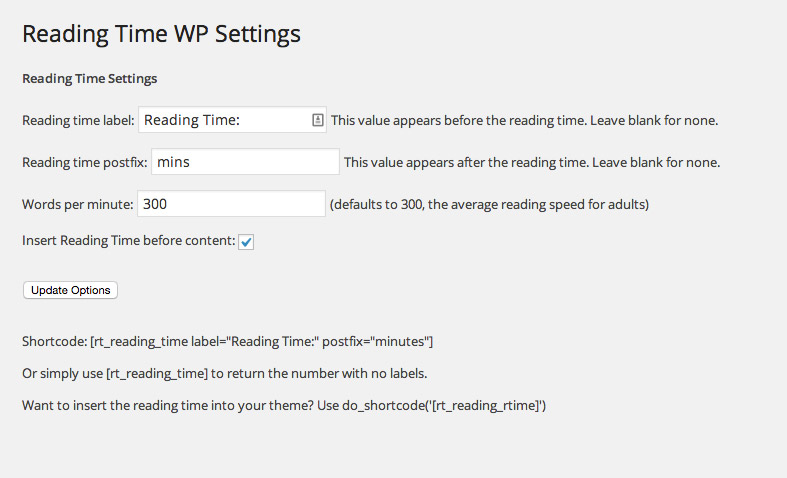
WP Reading Timeを使えば、WordPress の投稿に推定読了時間を簡単に追加できます。プラグインを有効化すると、投稿コンテンツの冒頭に読了時間が自動的に追加されます。この機能は、ダッシュボードの設定メニューからアクセスできる「読了時間」設定で無効にできます。このメニューからラベルと接尾辞を編集することもできます。
読了時間を追加する場所をより細かく制御したい場合は、[rt_reading_time] ショートコードを使用して投稿に時間を挿入できます。このショートコードはラベルと接尾辞の値も受け付けます。これらはオプションです。例. [rt_reading_time label=”読了時間 Time:” postfix=”分” postfix_singular=”分”]。
スクリーンショット

インストール
- 「rt-reading-time-wp」フォルダを「/wp-content/plugins/」ディレクトリにアップロードします。
- WordPress の「プラグイン」メニューからプラグインを有効化してください
- これで完了です。これで、すべての投稿の冒頭に読了時間が挿入されるようになります。
- 設定を編集したり、読了時間をオフにしたい場合は、WP ダッシュボードの設定メニューから読了時間を選択してください
FAQ
-
投稿の前に読了時間を挿入するにはどうすればいいですか。
-
初回インストール時には、テンプレート内の the_content が呼び出された場所に読了時間が表示されるはずです。表示されない場合は、WP ダッシュボードの設定メニューにある Reading Time WP 設定メニューに移動し、「コンテンツの前に読書時間を挿入」オプションがオンになっていることを確認してください。
-
素晴らしいですが、ページやカスタム投稿タイプなど投稿タイプを制御して読了時間を表示するにはどうすればよいでしょうか ?
-
Reading Time WP の設定ページで読了時間を表示したい投稿タイプを選択してください。Reading Time WP のデフォルトは投稿とページです。
-
ところで、特定の投稿にのみ読了時間のを挿入するなど、より細かな制御を行いたいのですが、どうすればいいでしょうか ?
-
簡単です。WordPress のダッシュボードの設定から「コンテンツの前に読了時間を挿入」オプションをオフにしてください。そして、Reading Time WP のショートコード[rt_reading_time label=”読了時間:” postfix=”読了時間”]を使用してください。ラベルと接辞語のパラメータはオプションです。
-
それはいいのですが、それを自分のテーマに挿入するにはどうすればいいのでしょうか ?
-
それでも簡単ですが、WordPress に組み込まれている do_shortcode 関数を使用する必要があります。テーマ内の好きな場所に、
<?php echo do_shortcode('[rt_reading_time label="Reading Time:" postfix="minutes"]'); ?>と記述するだけです。 -
とりあえず the_content の前に入力することにします。読了時間の前後に表示される内容を変更するにはどうすればよいですか ?
-
Reading Time WP の設定「読了時間ラベル」と「読書時間接尾辞」フィールドを編集するだけです。ラベルは時間の前に、接尾辞は時間の後に表示されます。どちらかのフィールドを使用しない場合は、空白のままにしてください。
-
画像も読了時間にカウントされますか ?
-
はい ! Reading Time WP は、こちらのトピックに関する Medium の記事に基づいて画像を計算します: https://blog.medium.com/read-time-and-you-bc2048ab620c。
したがって、最初の画像には12秒を追加し、2番目の画像には11秒を追加し、…、10番目以降の画像にはそれぞ3秒を追加します。
-
個別投稿の読了時間のみを表示するにはどうすればいいですか ?
-
こちらの Gist のコードを functions.php にドロップします https://gist.github.com/jasonyingling/ad2832bc1768d1fbb63341aef072908b
-
Yoast のメタディスクリプションから読了時間を削除するにはどうすればよいですか ?
-
こちらの Gist のコードを functions.php にドロップします https://gist.github.com/jasonyingling/5917dc97b302ca37abce7ceb93a7f4b8
-
たとえば、Advanced Custom Fields のメタ フィールドを Reading Time WP カウントに追加するにはどうすればよいですか ?
-
rtwp_filter_wordcountフィルターを利用して、読了時間の基準となる単語数を増やします。 -
多くの投稿をリストするページで各投稿の読了時間を表示するなど、ショートコードで異なる投稿 ID を指定するにはどうすればよいですか ?
-
ショートコードではオプションの page_id 属性を使用します。例 [rt_reading_time label=”読了時間: ” postfix=”分” postfix_singular=”分” post_id=”123″]
評価


貢献者と開発者
Reading Time WP はオープンソースソフトウェアです。以下の人々がこのプラグインに貢献しています。
貢献者


変更履歴
2.0.18
- Tested with WordPress 7.1
2.0.17
- 読了時間の出力を関数に移動しました
- 読了時間出力用のフィルターを追加しました
rtwp_filter_reading_time_outputは 4 つの引数を渡します:$output,$label,$reading_time,$postfix - WordPress 6.7 をサポート
2.0.16
- WordPress 6.5 をサポート
2.0.15
- Updating stable tag to correct version
2.0.14
- Switched plugin to
inithook - If admin file is called directly, abort.
- Fixed issue with postfix when reading time is
< 1 - Tested with WordPress 6.3.1 and PHP 8.2
2.0.13
- Tested on WordPress 6.2
- Bug: Fixed potential undefined index errors
- Developer note: Updated variable name $rt_after_content to $rt_before_excerpt.
2.0.12
- Been awhile since I deployed and missed a version number update
2.0.11
- Fixed notice if $rt_reading_time_options[‘post_types’] is not set
- Testing on WordPress 6.0.2 and PHP 8.0
2.0.10
- WordPress 5.5 compatability
2.0.8
- Improving conditional logic checks
- Fixing a bug where post types would show as checked on refresh if all post types were unchecked
2.0.7
- Switching words per minute to use number input for better validation
2.0.6
- Adding better post sanitization
- Allowing for reading times under 1 minute
2.0.5
- Adding a post_id attribute to the shortcode
- Adding
rt_add_postfixfunction for outputting the postfix - Adding
rt_edit_postfixfilter for editing output postfix - Grammar edits.
2.0.4
- Fixing a PHP Warning for users that installed priort to version 1.2.0 and hadn’t updated the settings page since.
2.0.3
- Adjusting how post types are output on admin page for better translations
- Including nl_NL translation courtesy of @bonaparte
2.0.2
- Improved support for more languages with a new count function. Props to jvarn13.
- Loaded textdomain for plugin
- Updated POT file
2.0.1
- Fixing error with Reading Time shortcode when using postfix_singular attribute
2.0.0
- Updating plugin to better meet WordPress Coding Standards. This includes renaming variables throughout the plugin.
- Note: If you’ve hooked into Reading Time WP’s class, variables, or functions this update could cause issues.
- Fixing HTML output when using shortcode to match auto inserted reading times
1.2.2
- Switched default for all post types to display reading time if option has not been set
- Add option to include shortcodes in the reading time count
1.2.0
- Hoo boy do we have a big one.
- Allowed for filtering of the
$shortcode_atts. - Added the much requested ability to control which post types reading times display on.
- Added a filter for adding to the word count the reading time is based on.
- Added in an actual text-domain and translation functions and generated a .pot file.
- Cleaned up a bit for better coding standards.
1.1.0
- Added images into reading time calculations based on Medium’s suggestion. https://blog.medium.com/read-time-and-you-bc2048ab620c
1.0.10
- Tested in WordPress 4.9
1.0.9
- Fixed typo in shortcode and implemented better sanitization from github
1.0.8
- Added in singular postfix setting. Added in separate control to display reading time on excerpts.
1.0.7
- Switched to using span elements instead of divs for inserting before content and excerpt
1.0.6
- Updated the way the word count is calculated to be more accurate when using images and links
1.0.5
- Plugin tested for WordPress 4.1
1.0.4
- Minor fix to stable version tags, updating readme after fixes in 1.0.2 and 1.0.3
1.0.3
- Fixes issue with miscalculating the reading time when using tags and the_content. Also fixes issue with reading time appearing inline when using the_excerpt.
1.0.2
- Fixing bug with more tags in the_content
1.0.1
- Converting the plugin to a class based structure
1.0.0
- プラグインをリリース